nicolasestrem/hermes-model-switcher
One-click cross-profile model switching plugin for the Hermes Agent Web Dashboard
Hermes Model Switcher is a community plugin for the Hermes Web Dashboard that displays supported model routes across profiles in a filterable matrix and model catalog. Users can preview routing changes, apply them, save presets, inspect per-profile results, and use revision-guarded Undo.
- Shows supported routes across profiles in a filterable matrix.
- Previews changes before applying them.
- Supports saved presets and revision-guarded Undo.
full readme from github
Hermes Model Switcher
Choose your models without hunting through config files.
Model Switcher is a community plugin for the Hermes Web Dashboard. It brings the supported model routes in your profiles into one searchable table. Pick a model, review the changes, then Apply. Save setups as presets and use guarded Undo when you need to revert.
Hermes keeps model choices in several places: main models, delegation, auxiliary tasks, judges/reviewers, fallback chains, Mixture of Agents, cron automation and specialist routes like speech. Model Switcher puts them together so you can see what is configured and check a change before writing it.
What you can do
- Inspect supported routes across profiles in one filterable matrix. Configured routes stay separate from recorded usage; an open session may still use its old model.
- See what you could switch to in the model catalog: a bird's-eye, provider-grouped view of the host-listed models, with list prices per 1M tokens, free and unknown-price entries marked distinctly, and which slots already use each model. A listing is not a routability test.
- Select individual slots or a matching group, pick a provider and then one of its models from plain dropdowns (or choose "Other" for an exact pair), then preview the change. Filters change the view; checkboxes choose edit targets.
- Save reviewed choices as named presets and reuse them after a fresh preview.
- Check per-profile results in the operation drawer and use revision-guarded Undo.
If a write fails, the engine attempts to restore completed steps and flags any
unresolved conflict as
recovery_required.
Built for the Hermes Dashboard, using its themes and authenticated transport. MIT licensed.
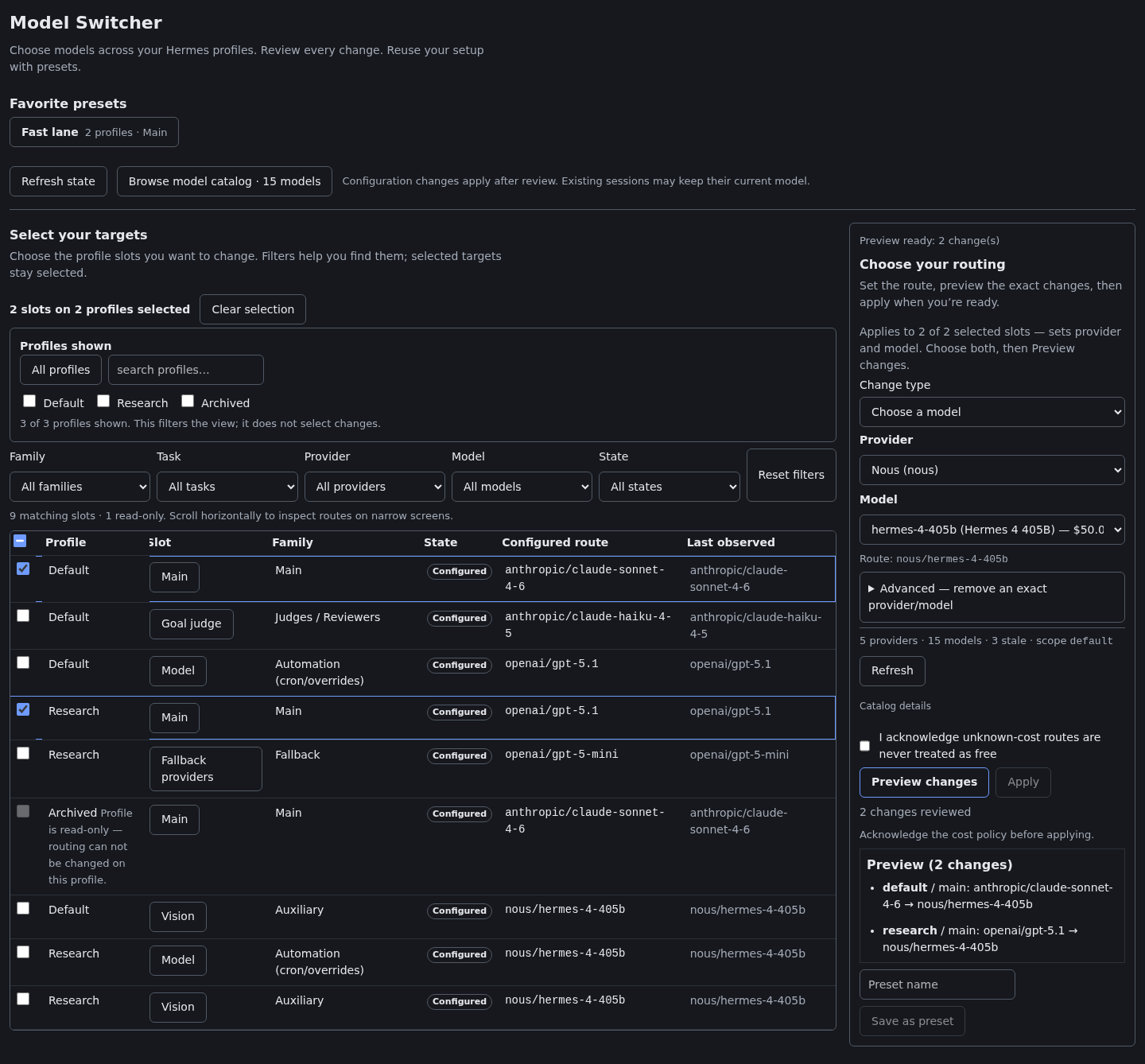
The compiled plugin in a Dashboard SDK fixture with synthetic lab profiles. This screenshot demonstrates the interface; it is not evidence of live Dashboard deployment or provider inference.
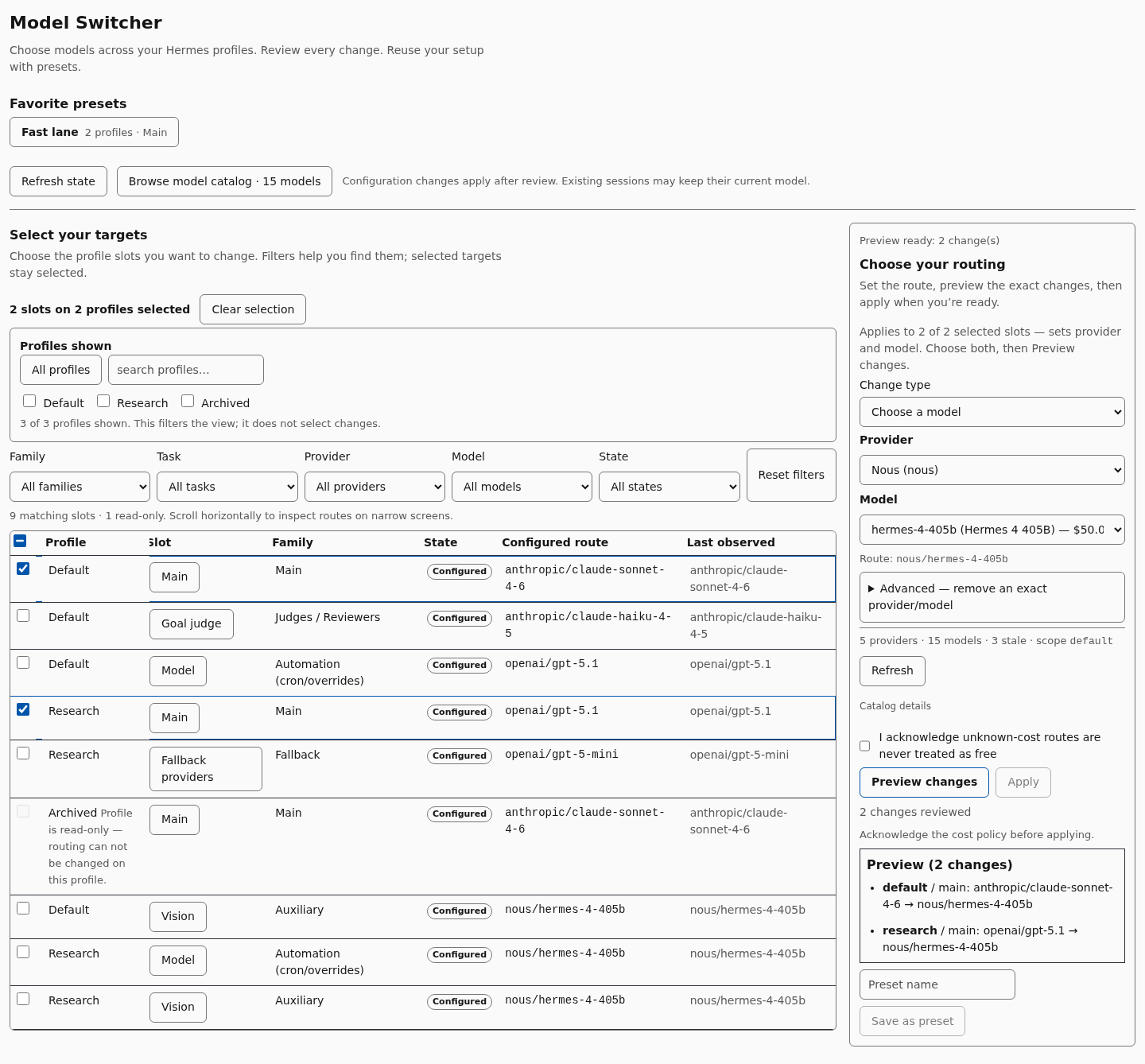
The plugin follows the host Dashboard's theme; the light theme is shown here.
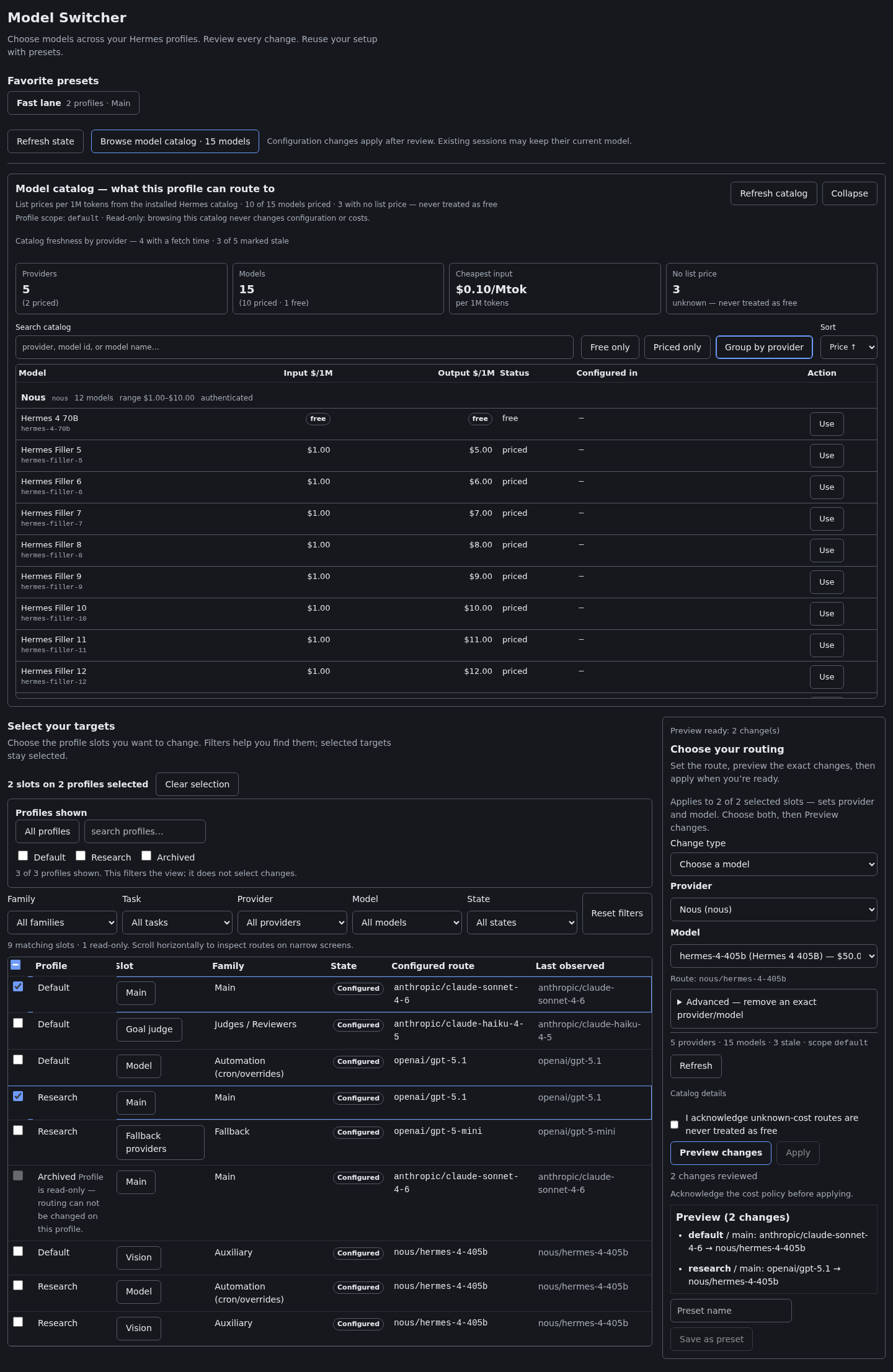
The provider-grouped catalog in the Dashboard SDK fixture with synthetic lab profiles. This is a pre-0.3.0 capture; current catalog prices come from the public host options payload, not direct plugin cache reads, inference or recorded spend.

The same catalog on a narrow screen; a fixture render of the compiled plugin, not a live Dashboard deployment or provider execution.

On a narrow screen the matrix scrolls horizontally inside its own region.
In the real Hermes Dashboard
These pre-0.3.0 captures show an isolated lab with two synthetic profiles (default and research) and synthetic routes. They are historical evidence, not verification of the refactored host-step protocol:
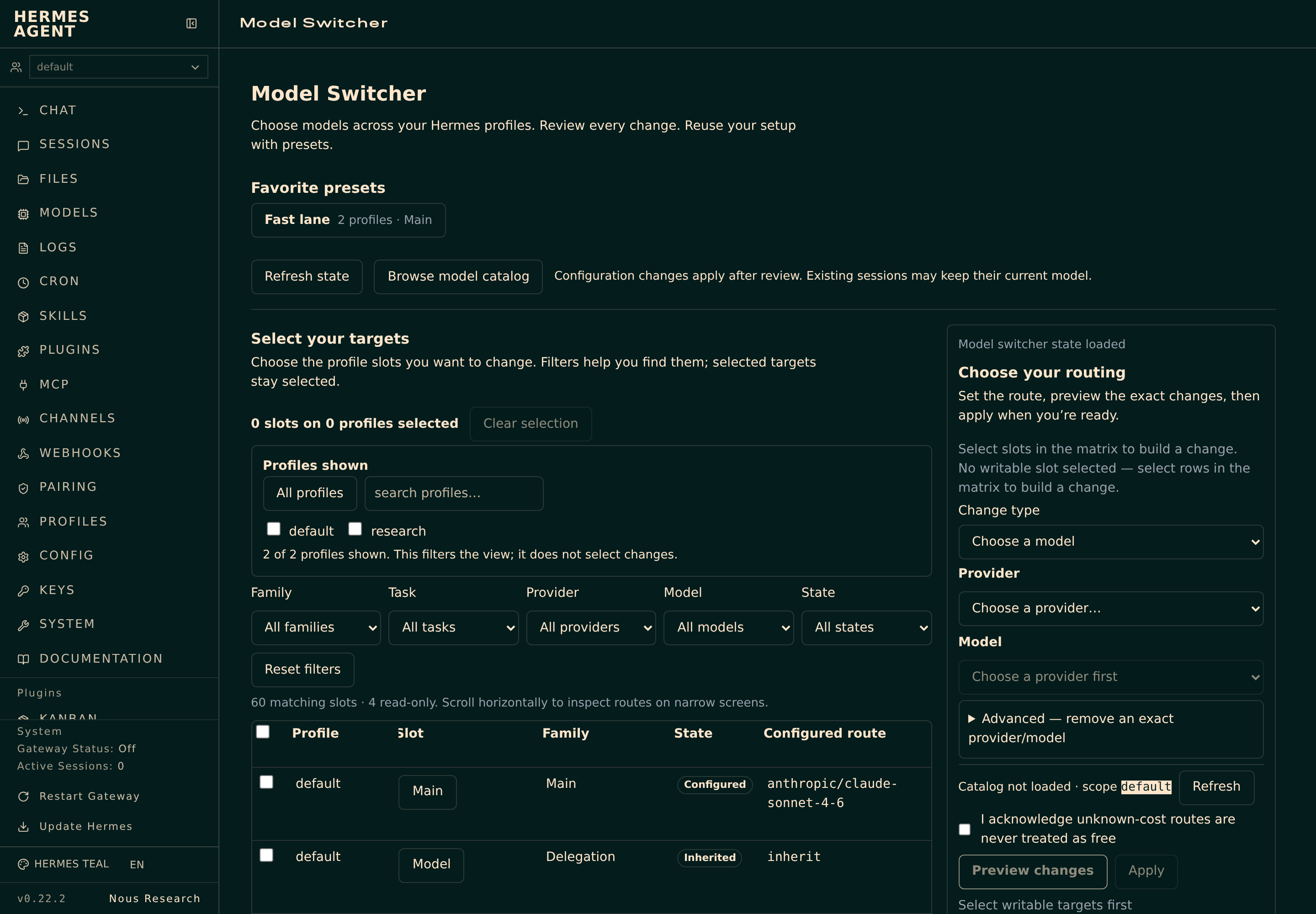
Choose the slots you want to change; filters do not select edit targets.
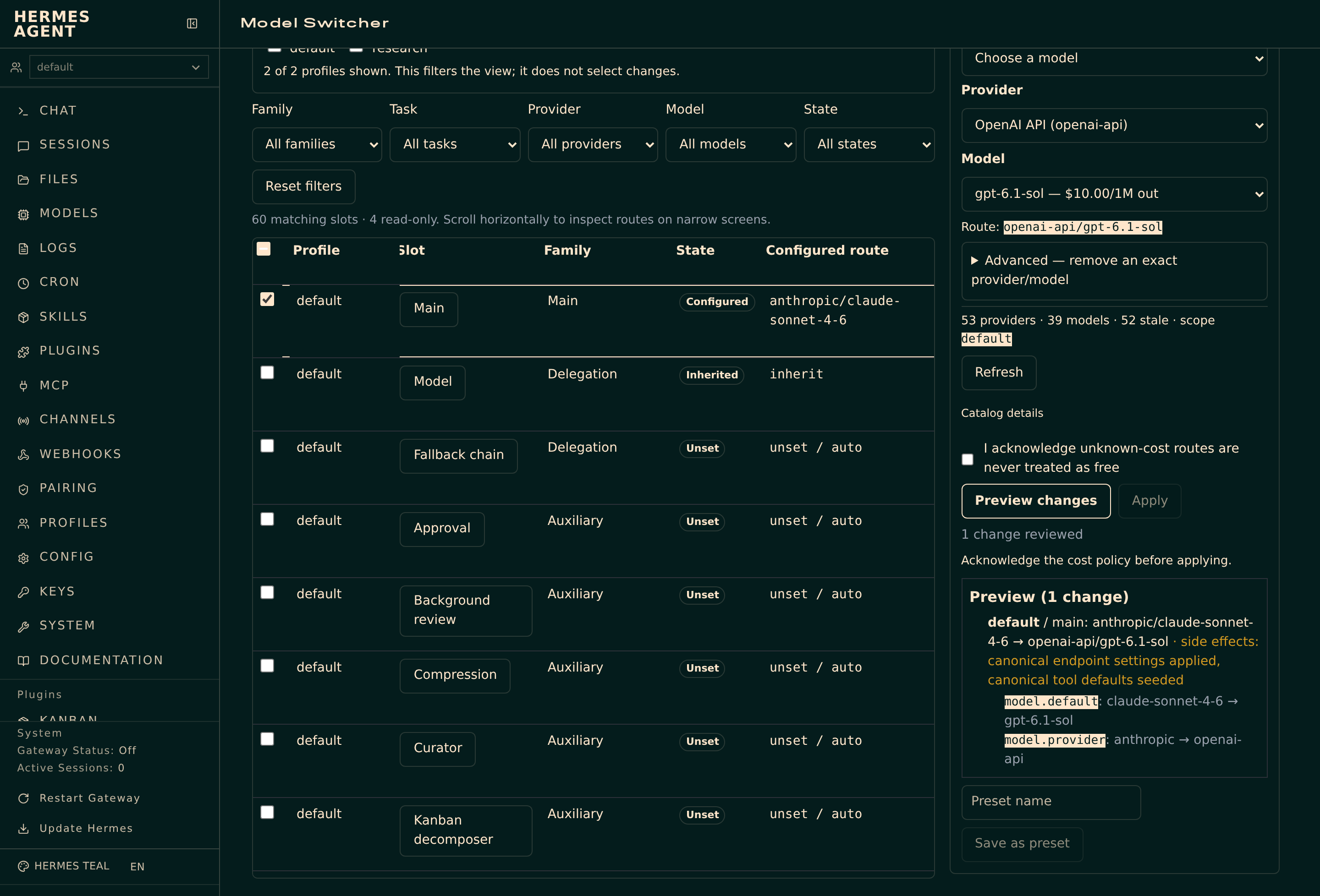
Review provider/model intent before writing. In 0.3.0, the main slot shows semantic intent; the exact persisted config diff appears only after readback.
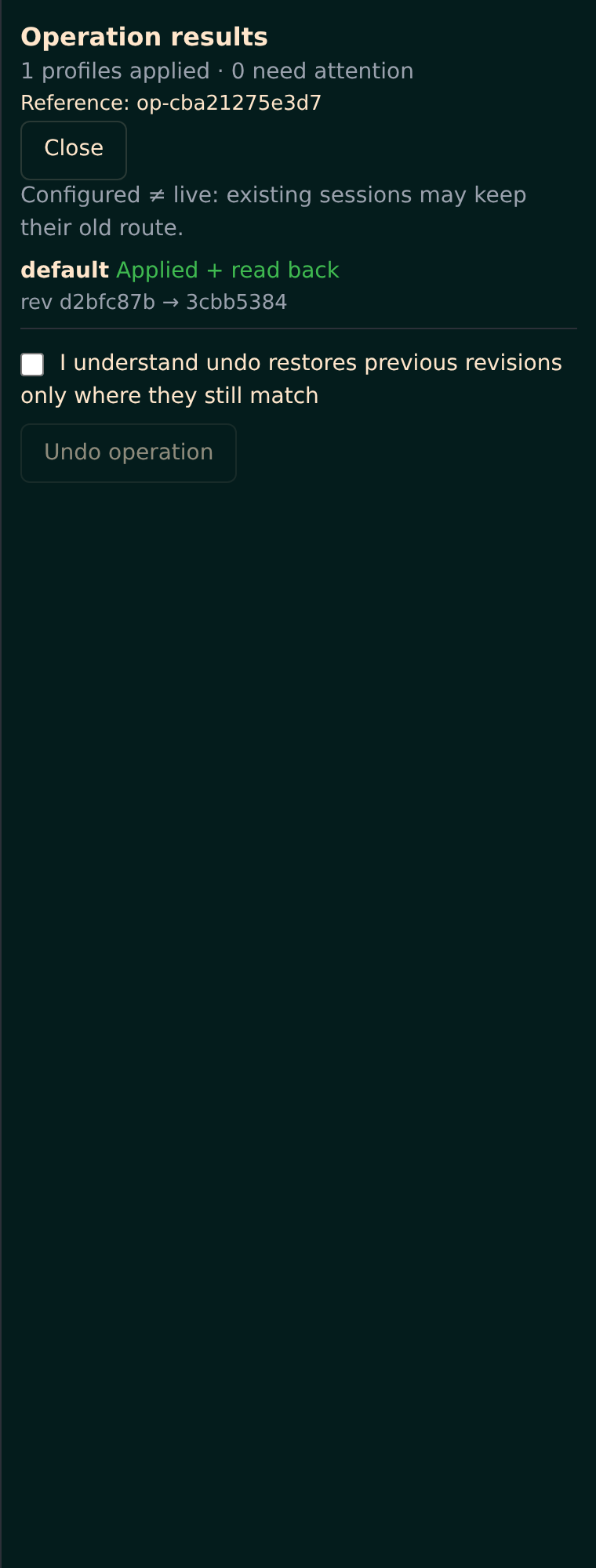
Applied and read back. The lab's subsequent Undo restored the original configuration bytes exactly. These captures show configuration changes, not provider inference.
Setup
You need a running Hermes installation with the Web Dashboard and plugin support, and
a Python version compatible with your Hermes release. This plugin declares Python
>=3.10; the Hermes runtime it integrates with requires Python >=3.11. Linux is the
verification target; macOS and native Windows are unverified.
Version 0.3.0 needs the public Dashboard /api/model/options,
/api/model/auxiliary, /api/model/moa and /api/model/set routes. The UI uses
the authenticated Dashboard SDK; no private Hermes imports or direct pricing-cache
reads are used by plugin runtime code. Missing required capabilities or host write
routes leave affected changes read-only/unavailable. Compatibility is capability-based,
not a minimum-version comparison. The tested reference is Hermes
v0.22.2+canary.20261020T065957Z, commit c5a3c0f8; see
release readiness for evidence and remaining checks.
From this repository
This plugin is not yet in the curated Hermes plugin catalog, so the bare name
hermes plugins install hermes-model-switcherdoes not resolve. Use theowner/repoform below until a catalog entry is merged.
# Install from the repository (pin an exact commit with --ref <40-char sha> if you want)
hermes plugins install nicolasestrem/hermes-model-switcher

# Enable it when you are ready
hermes plugins enable hermes-model-switcher

# Confirm what is installed
hermes plugins list

# Pull later changes (when the installed source tracks the repository)
hermes plugins update hermes-model-switcher
Run hermes plugins install --help for the full set of options (--ref,
--enable/--no-enable, --force, dependency-consent flags). These are the official
Hermes plugin commands; the plugin does not ship a self-updater.
Pinned installs do not move with update. Hermes refuses that command rather
than silently replacing your chosen revision. To move a pin, rerun hermes plugins install with the same repository, --force, and --ref followed by the new commit's
full 40-character SHA. The guarded lab check verified that same-source reinstalls
preserve untracked local state.
The Dashboard bundle is already built and committed. If the installer reports that build-time Node dependencies were skipped, you do not need to install them to use these shipped assets; Node.js is needed when rebuilding the UI from source.
From the built package
python scripts/build_package.py # assembles dist-package/ (needs a built UI)
dist-package/ contains the backend, the prebuilt Dashboard assets, and the
documentation, and can be pointed at a Hermes plugin directory. The builder refuses
an existing destination unless you pass --replace.
Manual
Clone or copy this repository into your Hermes plugins directory as
hermes-model-switcher, keeping the root plugin.yaml and __init__.py together,
then enable hermes-model-switcher in Dashboard plugin settings and reload the
Dashboard. The repository ships the built Dashboard assets, so Node.js is needed only
when you rebuild the UI yourself.
Make your first switch
- Select your targets. Narrow the matrix with the Profiles shown selector and the Family, Task, Provider, Model, and State filters, then select the slots you want to change. Filtering changes the view only; checkboxes choose edit targets. The selection summary includes selected slots hidden by filters.
- Choose your routing. Pick a provider, then a model from its dropdown (each entry shows its list price), open Browse model catalog to compare options, or choose Other to enter an exact provider/model pair for custom routes. Model IDs belong to their provider, so keep the pair together.
- Preview changes. Review the affected profiles and proposed routing. Main-slot preview shows provider/model intent, not an exact future config diff. Resolve blocked entries and acknowledge unknown-cost routes when required. Changing the selection or routing requires a fresh preview.
- Apply and inspect. Main and compatible auxiliary assignments run through the host write route. If Hermes requests expensive-model confirmation, approve or cancel its separate dialog; plugin billing approval does not bypass it. Check each profile's readback and exact persisted diff, then save the setup as a preset for next time.
Favorites open a preset preview before application. Refresh state reloads external edits. Advanced controls cover inherited/default routing, ordered fallback sequences, and exact-model removal; see advanced routing.
FAQ
- Does switching a model here start using it right away? No. Changes update saved configuration; an already-running session keeps its previous routing until a new session starts. Configured routing is not proof of inference or of recorded usage.
- Does it manage credentials? It does not copy credentials between profiles or modify authentication stores. Presence checks use public profile-scoped secret helpers and authenticated host options; it never reads another profile's environment file directly. Missing credential evidence blocks the change. Recovery snapshots do copy complete pre-change configs, which can include embedded credentials; keep them private.
- What if the model list looks stale or a provider is missing? Model catalog refresh can contact provider services; a catalog result is a listing, not an inference test. Missing providers usually mean a missing credential on that profile.
- Where do the catalog prices come from? List prices per 1M tokens come only from
GET /api/model/optionspricing fields. The plugin does not open pricing registries or provider caches. Host prices can lag behind provider pages; missing or pending prices stay unknown, never free or$0.00. They are not inference or recorded spend. - Someone edited a config while I was reviewing — what happens? Each operation
validates profiles and revisions, but the host write route has no expected-revision
check. Readback detects foreign edits and ends in
recovery_required, not silent success or blind rollback. It cannot prove every possible race was observable. Avoid concurrent CLI/editor edits during Apply or Undo and use Refresh state afterwards. - Can I undo anything? Undo is explicit, per-operation, and revision-guarded: it refuses to overwrite conflicting external edits. Disabling or uninstalling the plugin does not reverse changes already applied.
- Where does recovery data live? Only under
<hermes home>/state/hermes-model-switcher/, with a private SQLite journal (0600in a0700directory). If that location is inside the plugin tree or a Git worktree, the plugin is read-only; no alternate location is chosen. The journal keeps a copy of each complete pre-change config, including any sensitive fields, not just the model selection. - What if my saved presets get corrupted? The original preset store is quarantined
(kept, not deleted) and valid entries are salvaged with a visible
presetsCorruptwarning, so a damaged file is not silently swallowed and is not silently overwritten. - Does it work on a remote / hosted-isolation Dashboard? Writes require an in-process Dashboard. Hosted isolation stays read-only; the plugin does not change that setting.
- Why are some slots read-only? Unknown model-like keys and unsupported plugin selectors remain coverage gaps and never receive write access.
Limitations
- Configured ≠ live. Applying a change writes configuration. It is not evidence that a provider accepted it, that inference happened, or that a running session adopted it.
- Not a single global transaction. Multi-profile application uses a journal and compensation; it is not one atomic transaction across all files.
- Explicit selection only. Only supported, explicitly selected slots are writable; unknown or unsupported slots remain coverage gaps.
- Prerequisite: connected credentials. A missing connection blocks the change.
- Prices are informational. Catalog list prices can be stale or absent; they are not spend estimates, not cost approvals, and unknown cost is never treated as free.
- Scale. Large profile sets increase first-request (cold discovery) time; 50 synthetic profiles took about seven seconds in the lab. See release readiness and backlog.
- Platform scope. Linux is the verification target; macOS and native Windows are unverified. Earlier green results do not establish final 0.3.0 compatibility.
- Host capabilities required. Missing public config, home or secret capabilities make
the plugin read-only; missing host payloads show notices and unknown data. Main and
compatible auxiliary writes need
/api/model/set; other slots use public config load/save under the target home. No private-core compatibility shim is used.
Privacy
The plugin does not copy credentials between profiles or rewrite authentication stores, memories, skills, or transcripts. It uses the Dashboard's authenticated transport. Before writing, it copies each complete pre-change config into the private undo journal described above. Those snapshots can contain sensitive data even if only the model was changed; never publish journals, sidecars or backups. Public operation responses expose status, outcomes and only the current host call's allowlisted fields/token, without raw configurations, snapshots, store paths or exception strings. Read the privacy audit for scope and limits.
Recovery
There is no fleet-wide transaction and no always-undo promise. Applying across
several profiles is a journalled sequence, not one atomic transaction. When a step
fails, the engine compensates in reverse order only while each profile's revision still
matches; a conflict stops compensation and the operation reports recovery_required. A
compensated, partial, or recovery_required outcome is reported as ok=false with a
fixed failure category and the operation's final state — a success is never claimed for
a fleet that did not fully apply.
Main and compatible auxiliary steps pause at awaiting_host while the UI calls
POST /api/model/set through the Dashboard SDK and returns a one-time-token result.
The backend verifies the actual config before committing; an HTTP success alone is
not enough. Abandoned host steps are reconciled during recovery/restart. The host
route cannot perform an expected-revision check, so foreign changes detected at
readback require recovery rather than blind restoration.
Undo is explicit and per-operation. It refuses to overwrite conflicting external edits. After a crash, recovery reconciles recorded intent with the actual files. Keep recovery data until any outstanding operation is resolved; disabling or uninstalling the plugin does not reverse changes already applied.
Develop and contribute
See CONTRIBUTING.md for dependency setup, the portable vs real-runtime test split, and the CI workflow. In short:
python -m pip install -e '.[test]'
npm ci && npm run build
python -m pytest tests/
npm test
python scripts/privacy_guard.py
Read the design contract, usability notes, technical reference, verification scope, and release findings. Changes should preserve preview, apply, readback, and guarded Undo.
License
MIT. This is a community project and does not claim official Hermes endorsement or catalog listing.