abundantbeing/hermes-browser-extension
Browser-native side panel for Hermes Agent — connect web context to your local Hermes runtime.
Hermes Browser Extension is a side panel for Chromium-based browsers that connects the active web context to a local, remote, or Hermes Cloud agent runtime. It enables users to interact with Hermes Agent tools, models, and multi-agent threads while maintaining control over browser tab scoping and context inclusion.
- Connects to local gateways, Hermes Cloud, or self-hosted remote APIs.
- Includes tools for multi-agent switching, tab triage, and page commenting.
- Provides site-aware drafting assistance across 31 recognized writing environments.
full readme from github
Hermes Browser Extension
Browser-native side panel for Hermes Agent — connect active web context through a local gateway, Hermes Cloud, or a self-hosted remote gateway.
Created by Jon Komet (
@abundantbeing). Community extension for Hermes Agent by Nous Research.

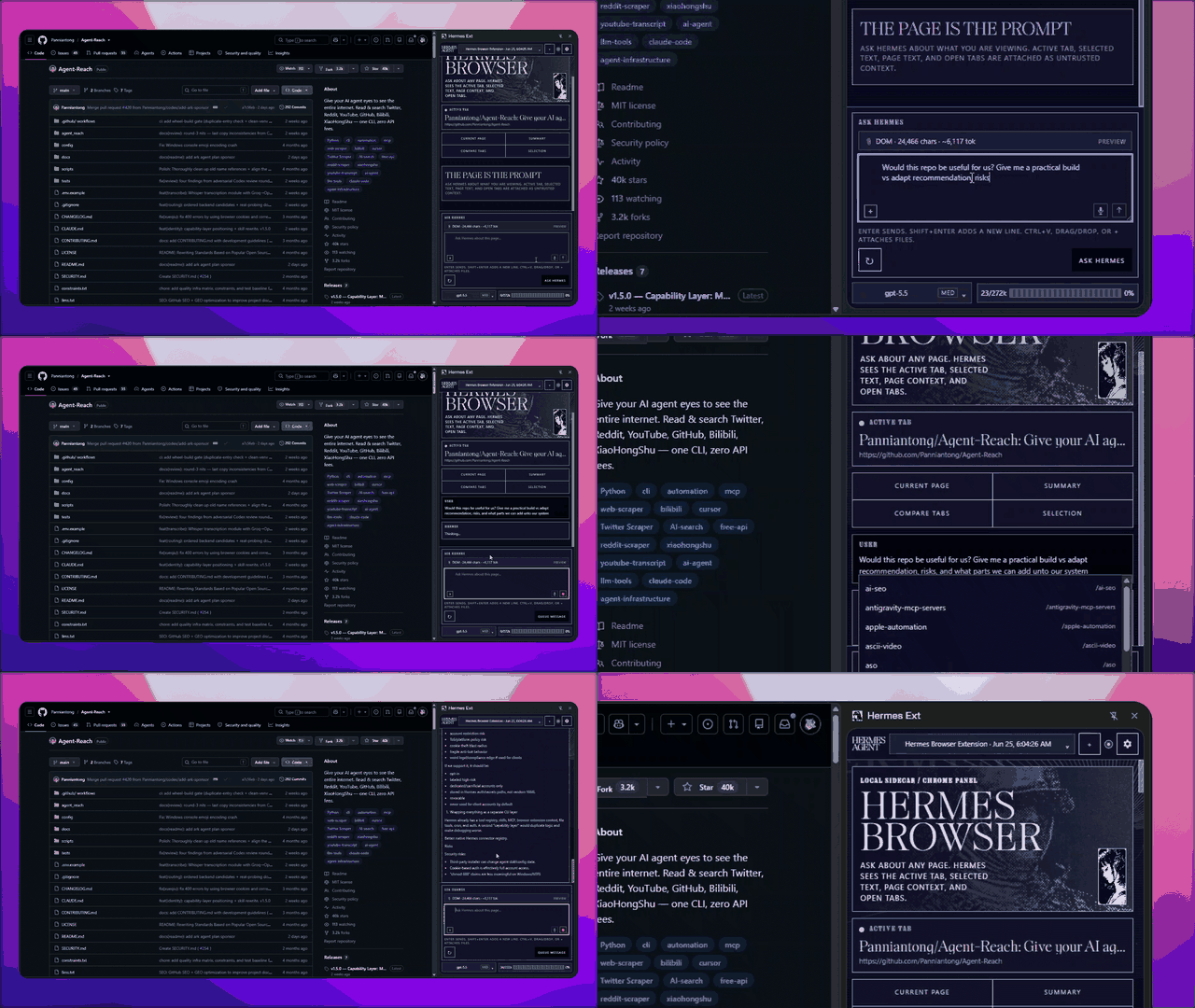
Public v0.3.3 · Load unpacked · Local / Hermes Cloud / Remote · Full Hermes runtime tools
Not on the Chrome Web Store yet.
What it is
Hermes Browser Extension is not a browser chatbot. It is a Chrome/Edge/Chromium side panel for the real Hermes Agent runtime. Choose a local gateway, attach to a signed-in Hermes Cloud agent tab, or connect to a self-hosted remote API/dashboard. Local and remote API connections can use the models, tools, skills, sessions, memory, and MCP servers already configured in Hermes; Cloud and dashboard-ticket connections are intentionally Chat-only.
This repo is specifically for the Hermes Browser Extension: the Chrome/Edge/Chromium side-panel integration for Hermes Agent.
New in v0.3.3
- Pet avatars: the agent avatar picker loads the pet gallery through your own gateway, with search, paging, and thumbnails that paint as you scroll.
- Shape colours: classic faces take one of twelve profile colours, six per row, or follow the name you type with Match the name.
- A guard before a model switch costs you context: switching the model while the transcript holds context asks first, in the same dialog style the Bot Mode exits use.
- Pinned switcher: the profile switcher keeps Browser chat and Bot chat fixed while the agent list scrolls.
New in v0.3.2: Hermes Bot Mode, Multi-Agent Threads and Intelligent Tab Scoping
v0.3.2 introduces Hermes Bot Mode, bringing your full Hermes multi-agent roster directly into the browser side panel:
- Instant Multi-Agent Switching: Seamlessly toggle between default and named agent profiles. Switching an agent reloads that profile's model catalog and starts on its live default model (
/api/model/options?profile=), and Desktop dashboard discovery uses known candidates, cached URLs, and open dashboard tabs. - Desktop Names, Avatars, and Last Activity: Bot Mode uses authenticated Desktop
profiles.listmetadata for display names, avatars, last-activity stamps, and existing Bot Chat identity instead of internal profile ids or public health-name lists. - Avatar choices: a new or edited agent can take a pet avatar from the pet gallery (searchable, paged, served through your own gateway), a classic face shape with twelve profile colours plus Match the name, or an uploaded image. The profile switcher keeps Browser chat and Bot chat pinned while the agent list scrolls.
- Existing Bot Chat Resume: Opening a bot resumes that profile's existing hidden Bot Chat. Lookup failures stay fail-closed so the extension does not mint a duplicate chat.
- Group Chats & Collaborative Threads: Synced multi-agent room projections, room-level thread tracking, and synchronized conversation histories without blank chat states.
- Truthful Page-Only Scoping & Zero Token Bloat: By default, only the active browser tab is included (
1/Ntabs in prompt) and sent in the prompt envelope. All other open tabs remain strictly excluded, preventing context bloat and token waste. - Interactive Multi-Tab In/Out Controls: Click any tab to toggle it
INorOUTon demand, with a full-width Page only reset action and side-by-side Include all tabs and AI Triage Tabs controls. - Multi-Keyword Tab Search: Fast whitespace-token search filtering across tab titles and URLs with an active match count badge and keyboard navigation (
Enterto toggle,Escapeto clear). - AI Tab Triage (
/sort-tabs): Automated tab clustering by topic or project, duplicate domain/URL detection, and an actionable checklist of tabs recommended for closure.
Live browser control
v0.3.0 added an opt-in MV3 controller for leased browser tabs, explicit approval gates for consequential or privileged actions, local HTML/PDF/localhost document access after approval, scoped artifact transfer, and reviewed workflow-to-skill drafts. Control remains bound to the exact controller, tab lease, frame, and document generation, and a Browser-bound request never falls back to an isolated browser backend.
The release also keeps Hermes Assist, session-scoped model routing, and the Browser Context Protocol introduced in v0.2.0.
Page comments
Comment on page in the attach menu uses the existing red element picker. Click a target, write a note, and queue pins without filling the composer. Queued comments sit beside Ask Hermes until you send; the chat shows a compact summary while Hermes still receives the annotated targets, notes, and crops. Closing the side panel or pressing Esc cancels pick and comment chrome. The on-page comment card follows the active extension theme and can be dragged.
Chat transcript
Hermes-managed session images (cache/@image:/MEDIA: paths) hydrate when you reopen a chat. Unsent composer text and attachments come back after you close and reopen the side panel in the same browser session. If Hermes spawns subagents, a live SUBAGENTS stack appears above the composer so you can watch, steer, or stop them. If the Browser socket goes quiet while Hermes is still working, the panel reconnects to the live turn instead of showing a dashboard timeout.
Hermes Assist
Hermes Assist adds a compact, site-aware drafting panel beside supported text composers. It recognizes 31 writing environments and adapts its primary action to the surface—such as Draft a reply, Draft a post, or Draft a message—while preserving useful site-specific actions.
Every model-backed action runs through the connected Hermes Agent. When the gateway advertises per-session model locking, Hermes Assist sends the exact selected provider/model and fails closed if Hermes does not acknowledge it. Released gateways without that contract use the active model configured in Hermes Agent and receive no unsupported override fields. Results are reviewed before use. Safe plain-text composers can apply a draft only after an explicit user action; framework-owned structured editors default to preview/copy. Hermes Assist never clicks Send/Post/Submit, navigates, purchases, or operates the page autonomously.
Private surfaces use per-site context controls and conservative defaults. Browser context remains bounded, redacted, labeled as untrusted, and visible to the user before it is sent.
Visual tour
| Side panel | Theme settings | Local agents |
|---|---|---|
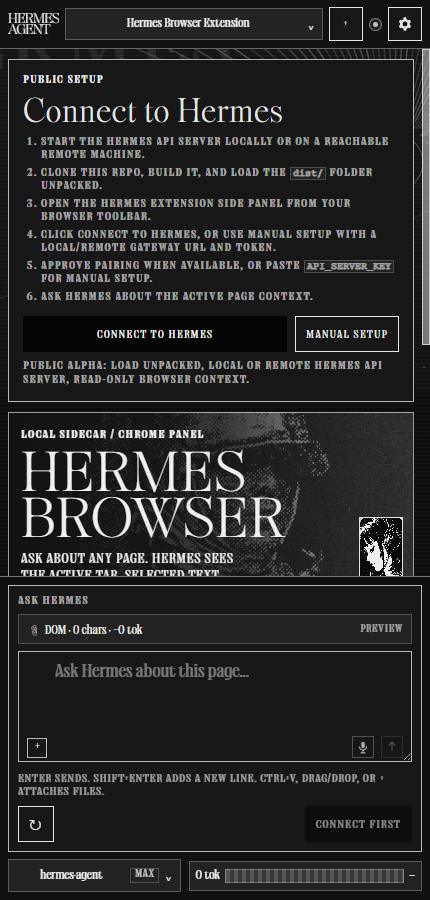 |
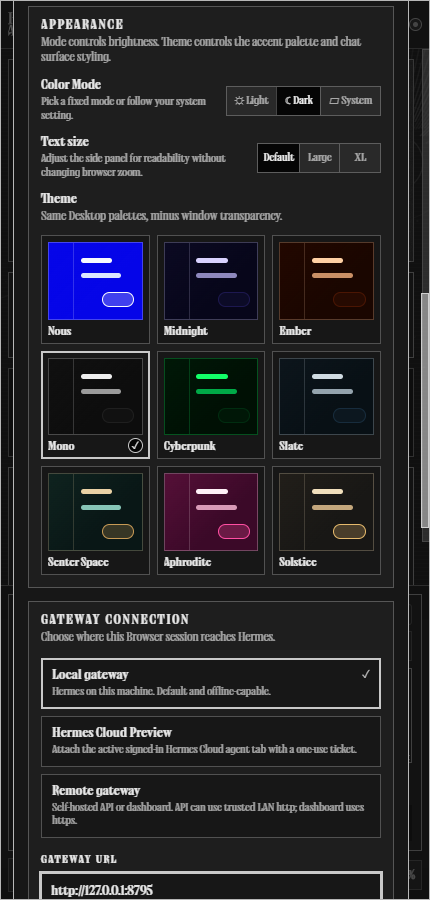 |
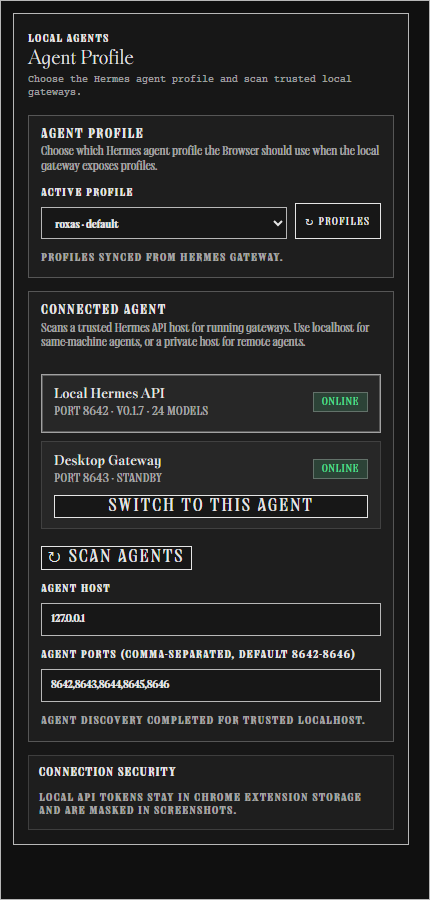 |
| Browser behavior | Page-only context | Hermes compatibility |
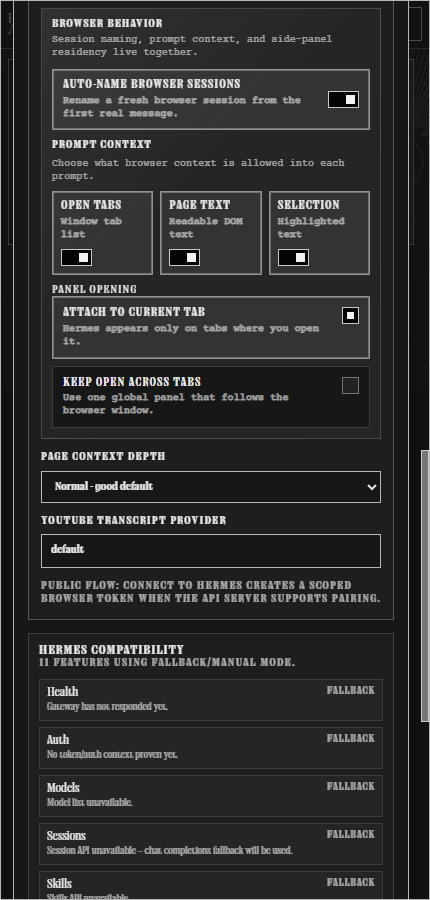 |
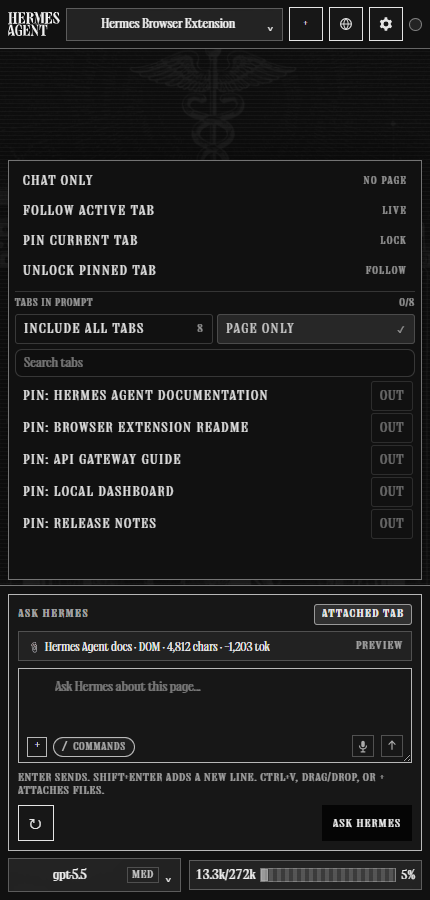 |
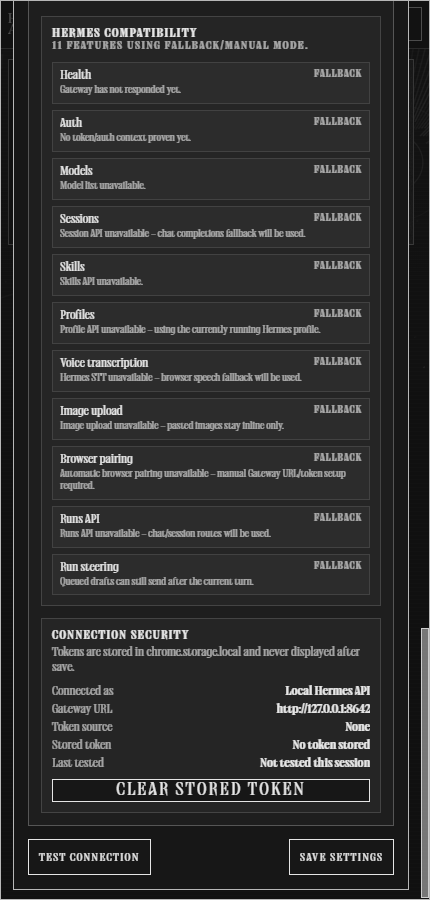 |
Full-page view
The old full-page Hermes Web workspace is retired. The side panel is the supported browser surface, and the old full-view button no longer opens that workspace.
Highlights
- Chrome/Edge/Chromium MV3 side panel powered by the Side Panel API.
- Matches Hermes Desktop's three connection choices: Local gateway, Hermes Cloud, and Remote gateway.
- Connects to a configurable local or self-hosted remote Hermes API server. Default:
http://127.0.0.1:8642. - Uses Trusted Dashboard Attach for Hermes Cloud: an explicitly selected, signed-in HTTPS agent tab mints a short-lived, single-use WebSocket ticket. Tickets stay memory-only and Cloud remains Chat-only.
- Supports the same ticketed WebSocket path for a self-hosted remote dashboard when Remote gateway is selected with no API key.
- Auto-syncs connected Hermes providers/models, skills, sessions, and capabilities over the API connection.
- Profile switching and Bot Mode use the authenticated Hermes Dashboard
profiles.listroster. A Remote API-only connection remains usable but cannot provide that roster; profile readiness is shown as degraded instead of implying the registry is empty. A successful empty roster response remains a valid0 profilesresult. Dashboard-backed group rooms also require the Dashboard transport; preserved browser-local draft rooms cannot be opened until a Dashboard connection is available. - Keeps runtime plugins available in the same Hermes session. For example, a connected social or messaging plugin can add account, post, and trend context while the extension supplies browser-page context.
- Shows a Hermes compatibility panel so older gateways degrade into explicit fallback/manual modes instead of broken route errors.
- Adds Copy Diagnostics for v0.3.0 support reports: browser family, version/build, extension origin, gateway origin, capability flags, context mode, selected model/provider, and last visible error with tokens/page content stripped.
- Adds an optional Hermes Browser Companion Plugin that passively caches sanitized Browser Context Protocol metadata for Hermes tools/hooks without browser control, network calls, or API-server routes.
- Adds
/meta//metadata//headfor truthful captured-page metadata analysis: it reports only what the Browser context actually contains and explicitly calls out metadata classes that were not captured. - Adds session controls for Browser work: create/switch sessions, copy session IDs, rename sessions, smart first-message titles, and compact on-brand session actions.
- Adds Browser-scoped model control: Browser model choices and per-session bindings stay inside the extension and do not mutate Hermes global defaults.
- Sends active tab/browser context into a persisted Hermes session, or switches to Chat only when you do not want browser context attached.
- Adds a composer-header context menu for Chat only, following the active tab, pinning a specific tab, and choosing which open tabs appear in the prompt.
- Opens as a tab-attached side panel by default, with a setting to keep the panel global across tabs.
- Opens with a keyboard shortcut (
Alt+Hby default, customizable atchrome://extensions/shortcuts). - Keeps pinned-tab conversations isolated with per-tab local history and Hermes session bindings.
- Adds quick commands for common browser-context work, including
/summarize,/explain,/rewrite,/tabs, and/action-items. - Adds a collapsible “What Hermes saw” receipt after each sent turn for transparent context/debugging.
- Shows a live Tool Activity Strip while Hermes streams, so tool calls appear as structured runtime activity instead of raw
[tool]markdown appended into answers. - Classifies upstream Hermes runtime/tool exceptions as connected-with-warning diagnostics when the gateway is reachable, including the known Python
NoneType/int()traceback class. - Adds Comment on page: pick an element, write a note, and queue pins beside Ask Hermes without dumping annotation text into the composer. Chat shows a compact summary; Hermes still receives the full annotated targets.
- Named agent profiles load their own skill catalog instead of inheriting the default profile's slash commands.
- Captures active tab title/URL, open tabs, selected text, readable page text, metadata, headings, forms, links, and buttons where available.
- Supports voice dictation through Hermes audio transcription when available: the side panel shows Dictating with a timer and live meter, then transcribes on stop. Browser speech fallback is used when the connected runtime does not expose STT.
- Reopens session images from Hermes-managed cache/image paths, including Telegram sessions that stored
image_urlcache files. Hermes-sentMEDIA:videos play when the dashboard can stream them. - Turns returned files into one-click cards: a produced PDF, HTML page, spreadsheet, document, archive, CSV, or image shows its name and type with Open (viewable kinds render in a new tab), Open on computer (downloads the file and launches the OS default app), and Save. A file the dashboard cannot read stays honest — the buttons are disabled and the reason is printed on the card.
- Wraps webpage text as untrusted context before sending it to Hermes.
- Streams Hermes responses and falls back to non-streaming chat when needed.
- Includes appearance settings with Light/Dark/System mode, nine themes, text zoom, and a font list. Headlines use the selected display face. Labels, settings controls, Hermes Control, and Bot Mode buttons use that font's readable UI face.
- The model menu shows the context window Hermes Agent uses for that model. A model Hermes has not named yet still gets Hermes Agent's own default window. The menu does not print "requestable".
- The start screen's local sidecar card shows a different illustration on every panel open, drawn from the bundled art set, and button hovers keep a visible outline in Light and Dark modes alike.
- The update card watches its own build: when a rebuilt
dist/is sitting on disk, the panel says A newer build is on disk (built …). Reload to run it. with a Reload now button instead of leaving you on stale code, checks the public repository once a day on its own, and states plainly that the in-place update needs a local checkout of this repository — with a Download the latest release link for anyone without one. - Adds generated-image reveal animation plus a lightbox with zoom, reset, open, and explicit download controls.
- Omits credential-bearing tab URLs from prompt-facing context, including decoded/nested query or hash parameters and common signed-URL credentials/signatures.
- Includes a localhost agent picker for switching between trusted local Hermes API gateway ports.
- Live control is opt-in and limited to leased tabs. The extension still requests no
nativeMessaging, cookies, history, bookmarks, or password-manager permissions. Thedownloadspermission is used only when the user explicitly saves generated images or artifacts. Hermes Assist can place a reviewed draft into a supported focused composer only after an explicit user action and never submits it.
Requirements
- Hermes Agent installed and working.
- For Local or Remote API mode: Hermes Gateway/API server enabled locally or on a reachable remote machine. Hermes Cloud instead requires a signed-in HTTPS agent tab.
- Node.js 20+.
- Chrome, Edge, Brave, Comet, or another Chromium browser with Side Panel API support (Chrome 116+ baseline). Firefox 142+ is supported via AMO, the Mozilla Add-ons listing.
npm run build:firefoxis for local/dev Firefox builds only.
Compatibility matrix
| Surface | Supported in v0.3.3 | Fallback / note |
|---|---|---|
| Chrome / Edge / Chromium 114+ side panel | Yes | Primary public support target. |
| Brave / Comet / Chromium forks | Best-effort | Must expose the Chromium Side Panel API and extension clipboard permissions for Copy Diagnostics. |
| Firefox | Install from AMO (Firefox 142+) | Mozilla signs it and Firefox auto-updates from AMO. npm run build:firefox / npm run sign:firefox are maintainer/local signing, not the public install path. Chrome/Edge/Chromium remain the primary public support target. |
| Safari | Not shipped | Browser-family diagnostics exist, but no Safari package is included. |
| Local Hermes API server | Yes | Default path: http://127.0.0.1:8642. |
| Hermes Cloud | Yes, Trusted Dashboard Attach | Requires an active signed-in HTTPS Hermes Cloud agent tab. Uses a single-use WebSocket ticket and enforces Chat-only context. This is not a general cookie import or background account-discovery flow. |
| Remote API server | Yes, explicit URL/token only | Use trusted LAN/Tailscale/VPN or HTTPS reverse proxy; do not expose Hermes naked to the internet. |
| Self-hosted remote dashboard WebSocket | Best-effort | Select Remote gateway with an HTTPS dashboard URL and no API key. Chat/session/model path only; REST-only profile/skills/image-upload surfaces remain unavailable. |
| Full-page Hermes Web view | Retired | The side panel is the supported browser surface. The old full-view button no longer opens that workspace. |
| Browser Context Protocol | Yes | Extension emits typed hermes.browser.turn.v2 envelopes while retaining the v1 payload compatibility path. |
| Hermes Assist | Yes, site-aware preview/review | 31 writing environments are recognized. Safe plain-text composers may apply after explicit review; structured/private surfaces can fall back to copy-only. Hermes Assist never submits. |
| Page comments | Yes | Attach menu. Uses the red element picker. Queues beside Ask Hermes; chat shows a compact summary. |
| Companion plugin | Optional functional context cache | companion-plugin/ provides read-only tools/hooks for sanitized Browser context; not required for normal extension use. |
| Browser control / Runs UI / debugger | Yes (Experimental) | Bounded, opt-in MV3 controller with per-tab leases, explicit user approval gates, and sensitive action classification. Requires compatible Hermes Agent controller support. |
| Local HTML / PDF / localhost context and control | Yes, after approval | file:// access also requires the browser's Allow access to file URLs switch. macOS and Windows file URLs share the same approval and lease model. |
nativeMessaging |
No | Not requested or required. |
Firefox scope: chat and context only
Hermes Browser Extension on Firefox is a chat-and-context client: pairing, the side panel, streaming replies, attachments, and page-context capture all work, but real-tab attach ("Hermes Control") is Chromium-only. Firefox WebExtensions have no equivalent to Chromium's debugger API, which live tab control requires — the Firefox package omits that permission entirely rather than shipping control that cannot run. On Firefox the panel's control card reports Control unavailable with an explanation instead of failing silently.
If you need Hermes to click, type, scroll, or operate tabs on your behalf, load the extension in Chrome, Edge, Brave, or another Chromium browser.
Quick start
1. Clone and build
git clone https://github.com/abundantbeing/hermes-browser-extension.git
cd hermes-browser-extension
npm install
npm run build
The loadable extension is generated at:
dist/
2. Load unpacked in Chrome/Edge
- Open
chrome://extensionsoredge://extensions. - Enable Developer mode.
- Click Load unpacked.
- Select this repo's
dist/folder — not the repo root and notextension/. - Pin/click the Hermes extension icon to open the side panel.
After code updates, run npm run build again and click Reload on the Hermes Browser Extension card in the browser extensions page.
3. Install in Firefox
- Open AMO in Firefox.
- Click Add to Firefox and confirm the permission prompt.
- The extension opens in the Firefox sidebar (Ctrl+Shift+H).
Because this package is Mozilla-hosted on AMO, Firefox receives future signed updates through AMO automatically. No separate update manifest or manual reinstall is required.
Do not sideload the GitHub source zip/tar.gz. Those are source archives, not a Firefox add-on.
Connect to Hermes
Settings exposes the same three product-level choices as Hermes Desktop:
| Connection mode | Use it for | Transport and boundary |
|---|---|---|
| Local gateway | Hermes running on this machine | Local API server, default http://127.0.0.1:8642, with a scoped browser token or API_SERVER_KEY. |
| Hermes Cloud | A signed-in Hermes Cloud agent open in a normal browser tab | Trusted Dashboard Attach mints a short-lived, single-use WebSocket ticket from the active HTTPS agent tab. Chat-only; no page text, selected text, open-tab context, or attachments are sent. |
| Remote gateway | A self-hosted Hermes backend on another machine or behind a trusted proxy | With a key: remote API server. Without a key: signed-in HTTPS dashboard ticket/WebSocket. |
Existing installations migrate automatically: prior local-api settings become Local gateway, while prior remote-api and remote-dashboard settings remain Remote gateway. A legacy remote dashboard is never silently relabeled as Hermes Cloud.
Local API server
Local-only is the safest default. Put this in your Hermes .env on the machine running Hermes: %LOCALAPPDATA%\hermes\.env on native Windows, ~/.hermes/.env on Linux/macOS/WSL, or $HERMES_HOME/.env if you relocated the data dir or use a named profile:
API_SERVER_ENABLED=true
API_SERVER_HOST=127.0.0.1
API_SERVER_PORT=8642
API_SERVER_KEY=<your-api-server-key>
API_SERVER_CORS_ORIGINS=chrome-extension://<your-extension-id>
Start or restart the gateway:
hermes gateway run
Verify the API server:
HERMES_GATEWAY_URL=http://127.0.0.1:8642
HERMES_API_TOKEN='<your-api-server-key-or-browser-token>'
curl "$HERMES_GATEWAY_URL/health"
curl -H "Authorization: Bearer $HERMES_API_TOKEN" "$HERMES_GATEWAY_URL/v1/models"
Then in the extension side panel:
- Click Connect to Hermes and approve locally if your Hermes Desktop/gateway supports the approval flow.
- If approval is not available yet, click Manual setup.
- Choose Local gateway.
- Use Gateway URL
http://127.0.0.1:8642. - Paste your scoped browser token or
API_SERVER_KEY. - Click Test connection, then Save settings.
- Open a normal
https://page and ask:Summarize this page in one sentence.
Remote API server
For a remote Hermes machine, bind the API server to a reachable trusted interface and keep CORS narrow:
API_SERVER_ENABLED=true
API_SERVER_HOST=0.0.0.0
API_SERVER_PORT=8642
API_SERVER_KEY=<your-api-server-key>
API_SERVER_CORS_ORIGINS=chrome-extension://<your-extension-id>
Use a private same-LAN/Tailscale/VPN host with HTTP, or put the API server behind a trusted HTTPS reverse proxy for public/proxied access. Do not expose the Hermes API server naked to the public internet. The Hermes API server can access the real Hermes runtime and tools.
Examples:
http://192.168.1.50:8642
http://hermes-desktop.local:8642
https://hermes.example.com
In the extension side panel:
- Choose Remote gateway.
- Paste the remote API URL, including
http://orhttps://. - Paste the API key/browser token.
- Click Test connection.
With a key present, Remote means Remote API server and does not force HTTPS. With the key blank, Remote means Remote dashboard WebSocket and requires an https:// dashboard URL.
Hermes Cloud Preview
Hermes Cloud Preview uses Trusted Dashboard Attach:
- Open your Hermes Cloud agent in a normal browser tab and sign in.
- Keep that fully loaded HTTPS agent tab active.
- Open extension Settings and choose Hermes Cloud Preview.
- Click Connect to Hermes or Test connection.
The extension binds trust to that exact active tab and HTTPS origin, verifies the tab again before minting, mints a short-lived single-use WebSocket ticket in the page, and verifies the WebSocket handshake before reporting success. The ticket is kept in memory only and is never persisted or logged. Cloud never falls back to localhost or a stored Local API token.
Hermes Cloud is Chat-only in this release. Browser page text, selected text, open-tab context, and attachments are disabled for this mode. The extension does not read dashboard cookies, store a Cloud password, or add cookies or nativeMessaging permissions.
If the connected Cloud agent does not expose /api/auth/ws-ticket, /api/ws, or the required session/model RPC methods, the extension reports the missing capability and leaves Local/Remote settings untouched. Update that agent's Hermes runtime using the official Hermes Agent installation and update docs. It never redirects Cloud to 127.0.0.1 as a fallback.
Self-hosted remote dashboard mode, no API server
If you run Hermes elsewhere and only expose the OAuth-gated dashboard, select Remote gateway, enter the dashboard's https:// URL, and leave the API key blank. With no key, the extension connects over the dashboard's /api/ws socket instead of the REST API server. This remains a Remote gateway connection; it is not automatically relabeled as Hermes Cloud.
Auth uses a single-use WebSocket ticket minted from a signed-in dashboard tab:
- Open the dashboard URL in a normal browser tab and sign in, and keep that tab around.
- The extension mints the ticket first-party from that tab, then opens the socket.
- Test connection opens the socket and loads models, which confirms the whole path.
Limitations in this mode: image attachments are inline-only, and the skills/profiles lists are unavailable because those are REST-only and the dashboard's REST surface is not reachable cross-origin.
What syncs after connection
After a Local or Remote API connection, the side panel loads from the connected Hermes gateway:
/v1/models— all providers/models Hermes can enumerate, including provider-qualified IDs./api/sessions— recent Hermes sessions grouped by source./v1/skills— slash-command skill suggestions in the composer. If that route is empty or unavailable, Local connections recover the catalog from the dashboard profile snapshot (profiles.describe). Named profiles never inherit the default catalog; switching profiles refreshes that profile's own skills./api/model/options— provider/model catalog, including the live default for the active profile. Switching profiles in Settings or Bot Mode reloads this catalog and pins that profile's default model./v1/profiles— profile picker when the gateway exposes profile metadata./v1/capabilities— feature flags such as audio transcription and Browser upload support.
The DOM/context chip should show a non-zero page-context count on normal readable pages. Browser internal pages such as chrome://extensions are intentionally restricted.
Context window and compaction
Context compression remains owned by Hermes Agent, using each runtime's effective context window and configured compression threshold.
The side panel shows the numbers the runtime actually reports rather than a guess: it requests the session context breakdown over the dashboard socket (session.context_breakdown) and follows the live session.usage stream, rendering the runtime's used/limit figures plus its per-category breakdown (system prompt, tool definitions, subagent definitions, memory, conversation). session.usage reports its own provenance (provider_usage, provider_usage_plus_estimate, or local_estimate), and the panel labels which one it is showing. Gateway-reported compression counts are displayed as reported.
When a gateway exposes only the classic session-row fields (last_prompt_tokens, threshold_tokens, context_length, usage_percent, compression_count), those are used instead, and gateways older still fall back to a clearly labelled local next-request estimate.
- The extension does not hardcode an 85% threshold; it honors the connected user's/runtime's value.
- Reaching the threshold is shown as Compaction due on the next Hermes turn. Hermes performs its normal pre-model-call compression and the client refreshes telemetry afterward.
- Legacy sessions already beyond a model limit are labeled honestly and allowed to recover through Hermes' pre-turn compressor.
- Older gateways without runtime telemetry use a clearly labeled local estimate. The client never treats cumulative lifetime token spend as live prompt context and never truncates/summarizes canonical history itself.
Install with Hermes / Computer Use
You can ask Hermes to help install it:
Install Hermes Browser Extension from https://github.com/abundantbeing/hermes-browser-extension. Clone it, run npm install, run npm run build, then use computer use to open chrome://extensions, enable Developer mode, and load the dist folder unpacked. Help me choose Local gateway, Hermes Cloud through my active signed-in agent tab, or a self-hosted Remote gateway. Do not reveal, print, screenshot, or commit any API key or WebSocket ticket.
Security model
Hermes Browser Extension is intentionally conservative in v0.3.0:
- Local gateway by default; remote API server support requires an explicit URL, token, and CORS allowlist.
- Hermes Cloud and self-hosted dashboard attach require an explicit HTTPS origin, the exact active signed-in tab, and a short-lived single-use WebSocket ticket kept only in memory.
- Cloud/dashboard-ticket connections are Chat-only and cannot send browser page text, selected text, open-tab context, or attachments.
- Strong bearer/API key required for API access.
- Page content is wrapped as untrusted context before it reaches Hermes.
- Credential-bearing URLs are omitted from active, selected, open-tab, pinned-scope, prompt, receipt, and payload-hash surfaces.
- Read-only browser context capture and no autonomous page control. Hermes Assist may insert a reviewed draft into a supported focused composer only after an explicit user action; it never clicks Send/Post/Submit, navigates, checks out, or performs browser-control workflows.
- No
debugger,nativeMessaging,cookies,history, orbookmarkspermissions.downloadsis limited to explicit user-requested generated-image/artifact saves. - Restricted pages include browser internals, extension pages, and obvious banking/crypto/password/payment/health/government-tax categories.
See SECURITY.md, PERMISSIONS.md, DATA-FLOW.md, and PRIVACY.md for details.
Troubleshooting
I loaded the extension but nothing works
Make sure you loaded dist/, not the repo root. The selected folder must contain manifest.json directly.
Chrome still shows an older version after updating
The browser is still using an old unpacked folder or an unpacked extension card that was not reloaded. For v0.3.3, the source manifest, built dist/ manifest, and release archive should all contain manifest.json version 0.3.3.
Fix:
- Extract/download the v0.3.3 release or run
npm run buildlocally. - Open
chrome://extensionsoredge://extensions. - On the Hermes Browser Extension card, click Reload.
- If it still shows an older version, click Remove, then Load unpacked again and select the fresh v0.3.3
dist/folder. - Click service worker / Inspect views only for debugging; it is not the version source.
Filing a support issue
Open Settings → Support diagnostics → Copy Diagnostics and paste the report into the GitHub issue or support thread.
The copied block includes version/build, browser family, gateway origin, connection state, runtime capability flags, selected model/provider, context mode, extractor mode, last visible error, and a bounded gateway failure classification when available. It intentionally excludes API keys, bearer tokens, cookies, page text, selected text, tab titles, raw tracebacks, local paths, and full tab URLs.
The side panel says it cannot connect
Check that Hermes Gateway/API server is running and reachable from the browser:
curl http://127.0.0.1:8642/health
# or, for remote mode:
curl http://<trusted-remote-host>:8642/health
If /v1/models fails, check API_SERVER_KEY, the extension's stored API key/browser token, and API_SERVER_CORS_ORIGINS. For remote mode, the browser extension origin (chrome-extension://<id>) must be allowlisted on the Hermes machine.
If the browser only reports a failed fetch, it cannot prove whether the gateway refused the connection, blocked the request, or received a turn before the response was lost. The side panel keeps the draft and offers Check connection. It never resends automatically. Check the session history before manually sending again, since a dropped response can leave delivery unconfirmed and a second send could duplicate the turn. An answered /health probe confirms reachability at probe time, not that the earlier turn failed because of CORS.
The side panel shows a runtime warning but still says connected
v0.3.0 introduced separate connection and runtime warnings. When a gateway answers a request with a runtime error, the Browser stays connected and shows a warning instead of labeling the gateway unreachable. Check the Hermes Agent logs for the failing dependency or component.
For tracebacks like int() argument must be a string, a bytes-like object or a real number, not 'NoneType', check the Hermes Agent logs on the machine running the gateway. If the traceback mentions computer_use or cua-driver, run:
hermes computer-use doctor
That diagnostic belongs to the Hermes runtime/tool layer, not to Browser extension packaging or Chrome permissions.
Native Hermes computer use is not working
Hermes Browser Extension does not request browser-control permissions and does not drive pages itself. Native desktop control comes from Hermes Agent's computer_use toolset via cua-driver.
On the machine running Hermes, verify computer use directly:
hermes tools list
hermes computer-use status
hermes computer-use doctor
If doctor says the driver is missing:
hermes computer-use install
Then start a fresh Hermes session with the toolset enabled:
hermes -t computer_use chat
Common blockers from the Hermes docs:
- Windows over SSH runs in Session 0 and cannot see the interactive desktop; use the console/RDP session or the cua-driver Windows autostart pattern.
- Elevated/admin windows cannot be driven by a normal-integrity Hermes process on Windows.
- macOS needs Accessibility + Screen Recording permissions.
- Linux needs a reachable X11/Wayland display and AT-SPI.
The DOM chip says 0 chars
Open a normal https:// page and refresh context. Browser internal pages (chrome://, edge://, extension pages, devtools, etc.) are restricted by design.
Microphone says blocked or voice dictation does not start
Chromium side panels can suppress microphone permission prompts. Hermes Browser Extension handles this with capability-gated voice modes:
- Hermes STT when the connected Hermes runtime advertises audio transcription.
- Browser speech fallback when Hermes STT is unavailable and Chromium exposes Web Speech.
- A visible Hermes Voice Dictation tab when the side panel cannot capture the mic directly.
Suggested flow:
- Click the mic button in the side panel.
- If the side panel cannot capture the mic, a Hermes Voice Dictation tab opens.
- In that tab, click Start dictation. This click is the permission gesture Chromium expects.
- Speak, then click Stop + transcribe or Stop speech depending on the active mode.
- The transcript is sent back to the side panel composer automatically.
If Chromium still says the mic is blocked, click Open microphone settings in the voice tab and set Microphone to Allow for chrome-extension://<the Hermes extension id>/, then return to the voice tab and try again.
The first-run Connect flow is unavailable
Use Manual setup and choose Local gateway, Hermes Cloud, or Remote gateway. Local/Remote API connections use a Gateway URL and API key; Cloud and dashboard-ticket connections require the signed-in HTTPS dashboard tab. The native Desktop approval flow is still evolving during alpha.
Development
npm test
npm run check:js
npm run check:manifest
npm run verify
npm run build
npm run package
Project layout:
extension/
  manifest.json       MV3 extension manifest
  app.html            retired full-page workspace, not opened from the side panel
  app.css             retired full-page workspace styling
  app.js              retired full-page runtime
  background.js       side panel behavior
  content.js          page context collector
  sidepanel.html      side panel UI
  sidepanel.css       side panel styling
  sidepanel.js        Hermes API client + UI state
  voice-dictation.*   visible extension voice recorder fallback for blocked side-panel mic capture
  request-permissions.* visible extension mic-permission helper page
  sidepanel-preview.html static visual QA preview
  assets/             icons, imagery, OFL font subsets, and local-only signature font files
  lib/browser-context-protocol.mjs versioned read-only browser context protocol helpers
  lib/runtime-events.mjs stable runtime/tool event names for Browser UI normalization
  lib/support-diagnostics.mjs redacted Copy Diagnostics support report helpers
  lib/connection-modes.mjs versioned Local / Cloud / Remote schema and compatibility migration
  lib/connection-controller.mjs generation-safe connection state controller
  lib/connection-dispatch.mjs maps Local / Cloud / Remote settings to the correct connect action
  lib/cloud-agent-tab.mjs trusted signed-in Cloud tab selection and validation
  lib/image-viewer.mjs generated-image lightbox state and zoom controls
  lib/common.mjs      shared prompt/context/security utilities
companion-plugin/     optional fail-soft Browser companion plugin with read-only context cache tools/hooks
scripts/
  build.mjs           copies extension/ to dist/
  build-firefox.mjs   produces the Firefox package at dist/firefox/
  check-manifest.mjs  validates required manifest assets/permissions
  package.mjs         creates artifacts/hermes-browser-extension.tar.gz
tests/
  common.test.mjs     utility behavior tests
Relationship to Hermes Agent
Hermes Agent is an open-source project by Nous Research. Hermes Browser Extension is a community extension by Jon Komet that connects through a local gateway, Hermes Cloud agent tab, or self-hosted remote gateway. It is designed to live at the edge of the ecosystem without adding core tool-schema footprint.
Useful links:
- Hermes docs: https://hermes-agent.nousresearch.com/docs
- Hermes API server docs: https://hermes-agent.nousresearch.com/docs/user-guide/features/api-server
- Hermes upstream repo: https://github.com/NousResearch/hermes-agent
Star History
Contributors
External contributions that have shipped are credited in CONTRIBUTORS.md.
Author
Built by Jon Komet (@abundantbeing).
License
MIT. See LICENSE.