Felix-Forever/hermes-agent-desktop
Multi-Agent AI Desktop Client — 20 specialists auto-collaborate on your tasks. Visual Skill Store, PM orchestrator, streaming chat. Works with Kimi K2.5/Qwen/DeepSeek/GPT-4o. Built on Hermes Agent.
Hermes Agent Desktop is a native GUI client that transforms the Hermes Agent from a single-agent CLI into a collaborative multi-agent system. It utilizes a Project Manager orchestrator to decompose complex requirements and delegate tasks across a team of 20 specialized AI agents. The application is built with pywebview and supports any OpenAI-compatible LLM provider. Users can manage agents via a CRUD dashboard and install capabilities through an integrated visual Skill Store.
- Orchestrated collaboration between 20 specialized AI agents
- Visual Skill Store with 50+ curated one-click installations
- Native desktop interface with streaming SSE responses and model switching
full readme from github

Hermes Agent Desktop
The Desktop Client That Turns Hermes Agent Into a Full AI Team
Features • What's New • Screenshots • Quick Start • Configuration • Architecture • License




Not just a GUI wrapper — this is a ground-up rebuild of the Hermes Agent experience. We added a complete visual multi-agent collaboration system and an integrated Skill Store that the original CLI version doesn't have.
Hermes Agent by Nous Research is already the most capable open-source AI agent. This desktop client takes it further — replacing the single-agent terminal with a 20-person AI team led by a Project Manager who automatically understands your requirements, decomposes complex tasks, delegates to the right specialists, and delivers integrated results. No prompt engineering required.
Built with a clean Apple-inspired design, zero Electron bloat, and works with any OpenAI-compatible LLM provider (DashScope, DeepSeek, OpenAI, Anthropic, OpenRouter, and more).
What's New vs Original Hermes Agent
| Original Hermes (CLI) | Hermes Agent Desktop | |
|---|---|---|
| Interface | Terminal TUI | Native desktop GUI with Apple-style design |
| Agent Model | Single agent, one conversation | 20 specialized AI agents collaborating in real-time |
| Task Handling | User manually prompts | PM auto-decomposes tasks, delegates to experts, synthesizes results |
| Skill Discovery | hermes skills CLI command |
Visual Skill Store with 50+ curated skills, one-click install, search & filter |
| Agent Management | Not available | Full CRUD dashboard — create, configure, monitor agents with live status |
| Workspace | cd in terminal |
Native folder picker with recent workspace history |
| Model Switching | Config file edit | One-click model switcher in the input area |
Why Multi-Agent Matters
A single AI agent can write code — but building a real product needs a team. This client gives you:
- A Project Manager who breaks "build me an e-commerce platform" into 12 actionable sub-tasks
- A Product Manager who writes the PRD before any code is touched
- A UI Designer who defines the interface before the frontend engineer starts
- 3 Engineers (frontend, backend, full-stack) who write actual code in their domains
- A QA Engineer who catches what the developers missed
- An Architect who ensures the pieces fit together at scale
All orchestrated automatically. You describe what you want; the team delivers.
Features
Multi-Agent Collaboration System
- 20 Built-in AI Agents — Project Manager, Product Manager, UI Designer, Frontend/Backend/Full-stack Engineers, QA, Architect, DevOps, Data/AI Engineer, Security Expert, Operations, Marketing, Business Analyst, Tech Writer, Translator, Legal Counsel, DBA, Creative Director
- Project Manager as Orchestrator — Automatically receives requirements, decomposes tasks, delegates to specialists, tracks progress, and synthesizes deliverables
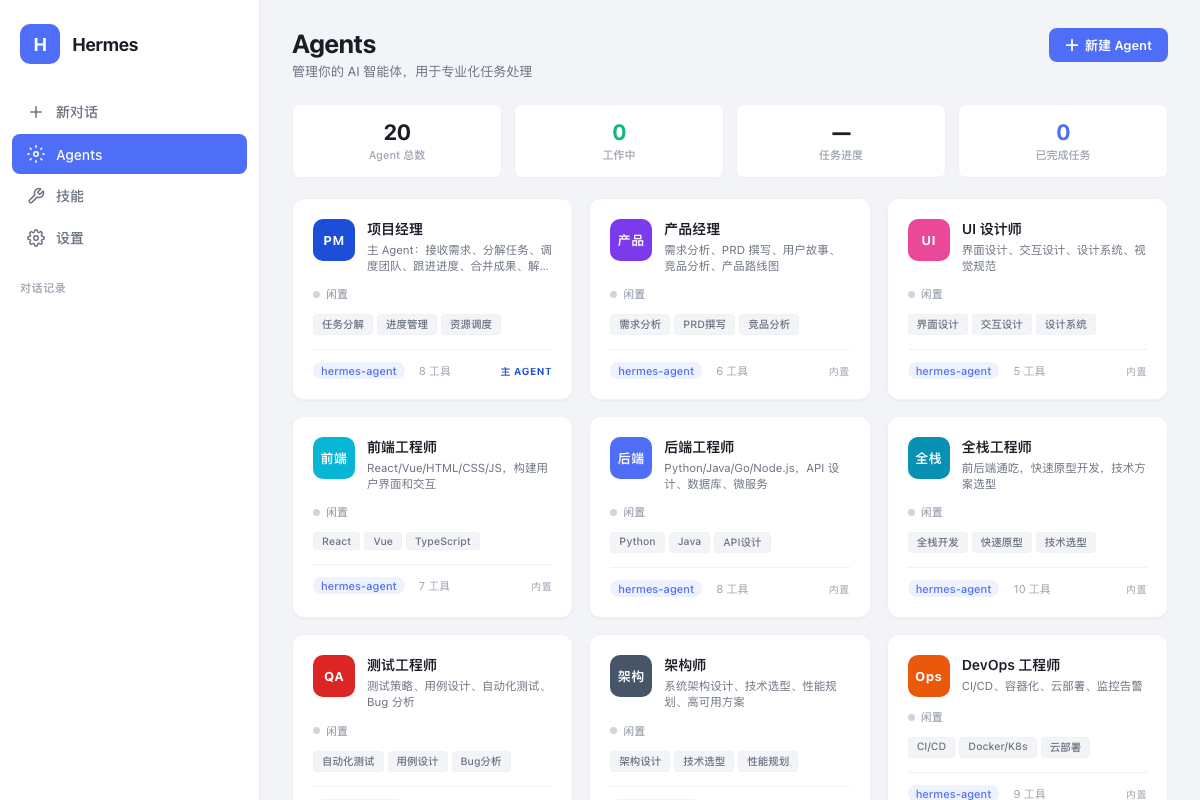
- Real-time Agent Status — Dashboard showing which agents are active, task progress, and completion stats
- Agent CRUD — Create, edit, and delete custom agents with configurable system prompts, models, and skill tags
Chat Interface
- Streaming SSE Responses — Real-time token-by-token display with typing cursor animation
- Multi-Agent Response Sections — Clearly labeled sections showing which agent contributed what
- Rich Markdown Rendering — Headings, code blocks with syntax highlighting & copy button, tables, blockquotes, lists, inline code
- Tool Call Indicators — Collapsible panels showing agent tool usage, auto-collapsed after completion
- Session Management — Multiple conversations with history, auto-save to localStorage
Integrated Skill Store (New)
The original Hermes Agent requires CLI commands to discover and install skills. We built a visual Skill Store directly into the desktop client:
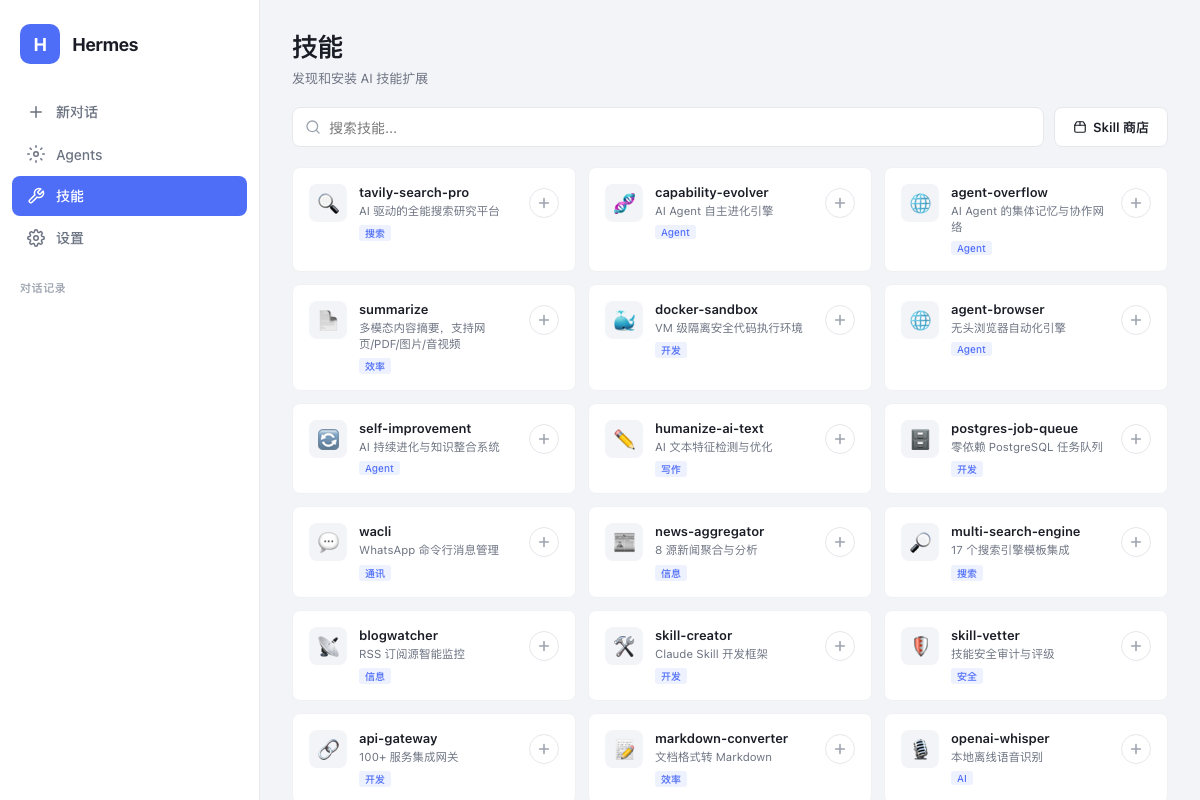
- 50+ Curated Skills — Handpicked from CocoLoop Skill Hub, covering AI search, browser automation, code execution, data processing, content creation, and more
- One-Click Install — Click "+" to install any skill instantly, with loading animation and toast confirmation
- Smart Search — Real-time fuzzy search across all skill names and descriptions
- Category Tags — Skills organized by type (Search, Agent, Development, Productivity, Security, etc.)
- Direct Store Access — Link to the full CocoLoop marketplace for browsing hundreds more
Desktop Experience
- Native macOS Window — Powered by pywebview with system-native chrome
- Workspace Selector — Native folder picker dialog for setting working directory
- Model Switcher — Quick switch between models (Kimi K2.5, Qwen Plus/Max, DeepSeek V3/R1)
- Settings Panel — Configure API endpoint, key, and model
- Apple-Inspired Design — Clean grey palette, card-based layout, smooth animations
Screenshots
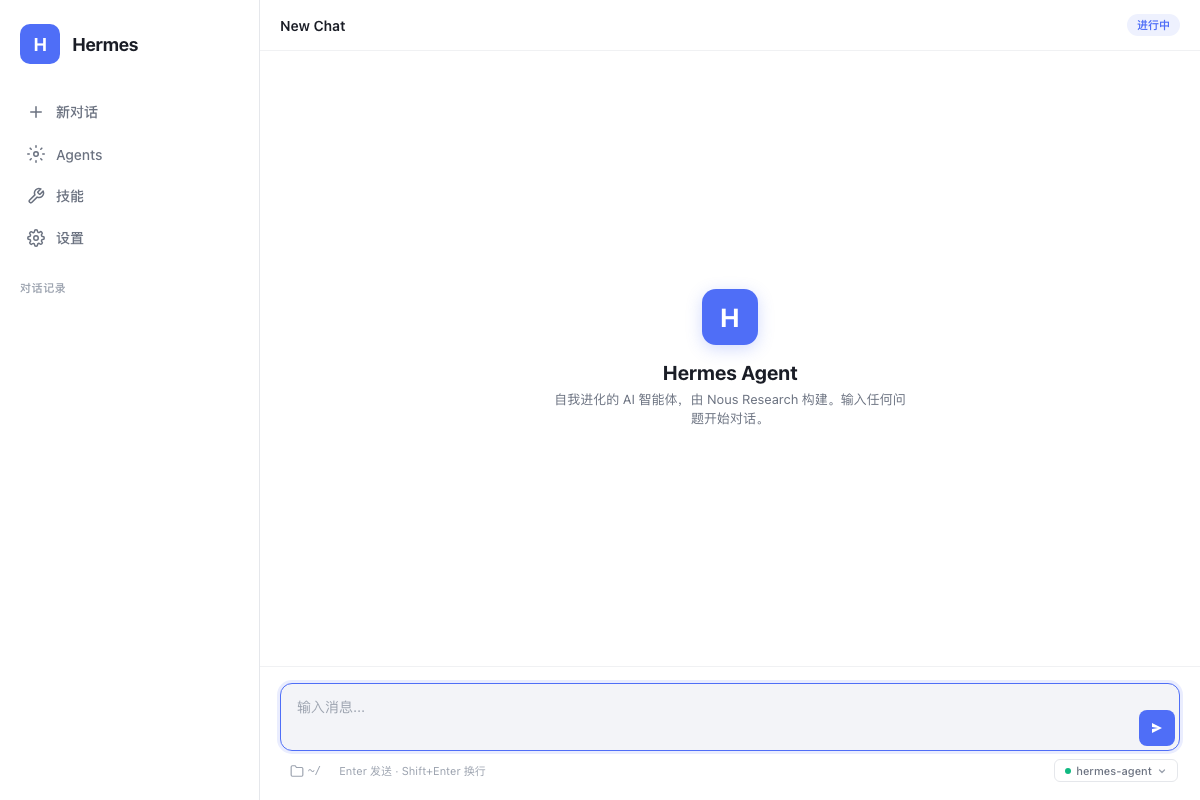
Chat Interface
Clean, distraction-free conversation view with streaming responses and multi-agent section dividers.
Agents Dashboard
Manage 20+ AI specialists with real-time status, skill tags, and tool counts.
Skill Store
Discover and install AI skills from the CocoLoop marketplace.
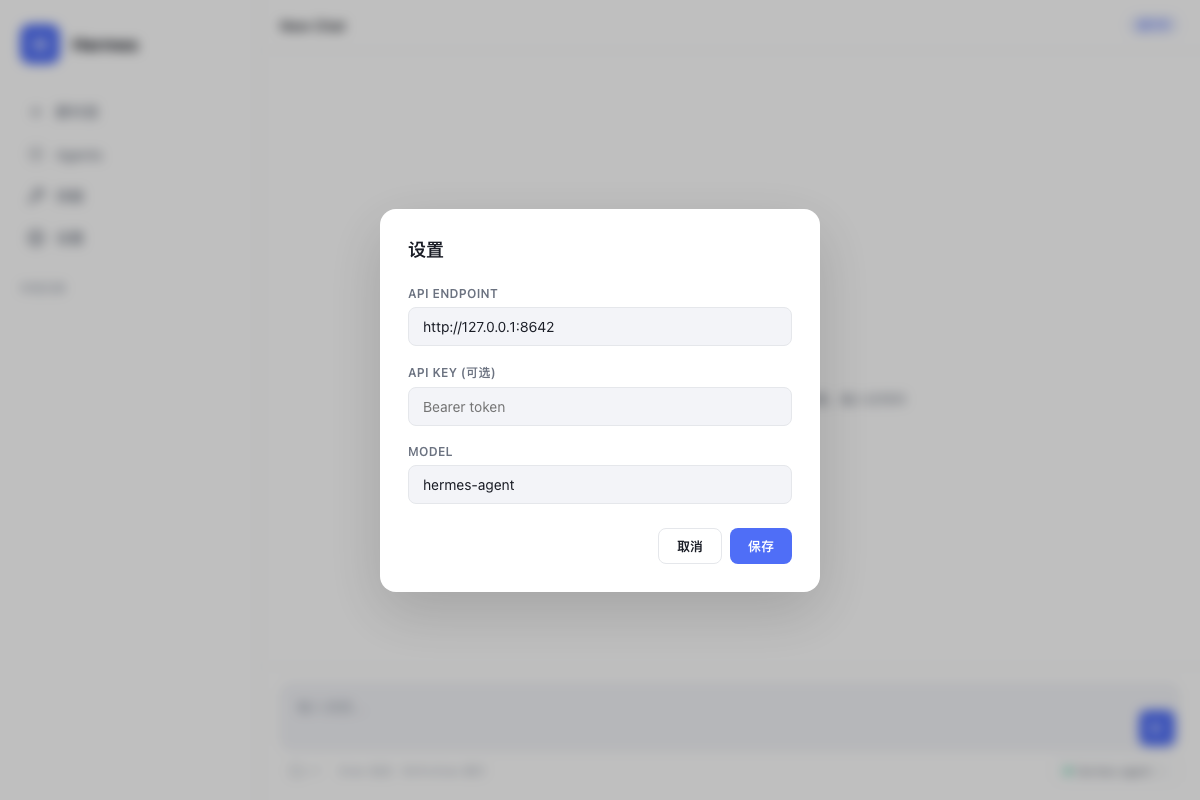
Settings
Configure your LLM provider and API credentials.
Quick Start
Prerequisites
- macOS (primary), Linux, or WSL2
- Python 3.11+
- Git
Installation
# 1. Clone the repository
git clone https://github.com/Felix-Forever/hermes-agent-desktop.git
cd hermes-agent-desktop

# 2. Clone the Hermes Agent core (dependency)
git clone --depth 1 https://github.com/NousResearch/hermes-agent.git hermes-core

# 3. Create virtual environment
python3.11 -m venv venv
source venv/bin/activate

# 4. Install dependencies
pip install -e "./hermes-core[all,dev]"
pip install pywebview

# 5. Configure your API key
cp .env.example .env
# Edit .env and add your API key

# 6. Launch
python app.py
One-Command Install (with conda)
# Using conda (recommended for macOS)
conda create -n hermes python=3.11 -y
conda activate hermes
git clone https://github.com/Felix-Forever/hermes-agent-desktop.git
cd hermes-agent-desktop
pip install -e "./hermes-core[all,dev]" pywebview
python app.py
Configuration
Environment Variables (.env)
# LLM Provider API Key (required)
DASHSCOPE_API_KEY=your-api-key-here
# Or use OpenAI-compatible keys:
# OPENAI_API_KEY=your-key

# API Base URL
BASE_URL=https://dashscope.aliyuncs.com/compatible-mode/v1

# Default Model
MODEL=kimi-k2.5
Supported LLM Providers
| Provider | Base URL | Models |
|---|---|---|
| Alibaba DashScope | https://dashscope.aliyuncs.com/compatible-mode/v1 |
kimi-k2.5, qwen-plus, qwen-max, deepseek-v3, deepseek-r1 |
| OpenAI | https://api.openai.com/v1 |
gpt-4o, gpt-4o-mini |
| OpenRouter | https://openrouter.ai/api/v1 |
200+ models |
| DeepSeek | https://api.deepseek.com/v1 |
deepseek-chat, deepseek-reasoner |
| Moonshot/Kimi | https://api.moonshot.cn/v1 |
moonshot-v1-8k |
In-App Settings
Click the Settings icon in the sidebar or the gear icon in the input footer to configure:
- API Endpoint — Your LLM provider's base URL
- API Key — Your authentication token
- Model — The model to use for conversations
Architecture
hermes-agent-desktop/
├── app.py              # Backend: aiohttp API server + pywebview launcher
├── index.html          # Frontend: single-file HTML/CSS/JS application
├── .env.example        # Environment variable template
├── README.md           # This file
└── docs/
    └── screenshots/    # App screenshots
How It Works
┌─────────────────────────────────┐
│   pywebview Desktop Window      │
│   ┌───────────────────────────┐ │
│   │   HTML/CSS/JS Frontend    │ │
│   │   • Chat UI (SSE stream)  │ │
│   │   • Agents Dashboard      │ │
│   │   • Skill Store           │ │
│   │   • Orchestrator Logic    │ │
│   └──────────┬────────────────┘ │
└──────────────┼──────────────────┘
               │ HTTP / SSE
               ▼
┌─────────────────────────────────┐
│   Python aiohttp Backend        │
│   • /v1/chat/completions (SSE)  │
│   • /v1/models                  │
│   • /api/choose-folder          │
│   • Creates AIAgent per request │
└──────────────┬──────────────────┘
               │
               ▼
┌─────────────────────────────────┐
│   Hermes AIAgent Core           │
│   • LLM API (OpenAI-compatible) │
│   • Tool Execution (60+ tools)  │
│   • Memory & Skills System      │
│   • Session Persistence (SQLite)│
└─────────────────────────────────┘
Multi-Agent Orchestration Flow
User Input
    │
    ▼
┌─────────────────┐
│  Project Manager │ ← Orchestrator system prompt with all agent definitions
│  (Main Agent)    │
└────────┬────────┘
         │ Task Decomposition
         ▼
┌────────────────────────────────────────┐
│  Sub-tasks assigned to specialists:     │
│  ┌──────┐ ┌──────┐ ┌──────┐ ┌──────┐  │
│  │ UI   │ │Front │ │Back  │ │ QA   │  │
│  │Design│ │ end  │ │ end  │ │ Test │  │
│  └──┬───┘ └──┬───┘ └──┬───┘ └──┬───┘  │
│     │        │        │        │       │
│     ▼        ▼        ▼        ▼       │
│  [Design] [Code]   [API]    [Tests]    │
└────────────────┬───────────────────────┘
                 │
                 ▼
┌─────────────────┐
│  Project Manager │ ← Synthesize all outputs
│  Final Delivery  │
└─────────────────┘
Tech Stack
- Frontend: Vanilla HTML5 + CSS3 + JavaScript (zero dependencies, single-file)
- Backend: Python 3.11 + aiohttp (lightweight async HTTP server)
- Desktop: pywebview (native OS webview, no Electron bloat)
- Agent Core: Hermes Agent by Nous Research
- LLM: Any OpenAI-compatible API provider
Development
# Run in development mode (opens in browser if pywebview not available)
python app.py

# Run frontend only (for UI development)
python -m http.server 8643 --directory .

# Run syntax check on embedded JavaScript
python -c "import re; open('/tmp/c.js','w').write(re.search(r'<script>(.*?)</script>',open('index.html').read(),re.DOTALL).group(1))" && node --check /tmp/c.js
Roadmap
- Real skill installation via Hermes CLI backend
- Agent-to-agent message passing (true parallel execution)
- Workspace file tree browser
- Voice input/output (TTS/STT)
- Plugin system for custom tools
- Dark mode theme
- Windows & Linux native builds
- Auto-update mechanism
Contributing
Contributions are welcome! Please feel free to submit a Pull Request.
- Fork the repository
- Create your feature branch (
git checkout -b feature/amazing-feature) - Commit your changes (
git commit -m 'Add amazing feature') - Push to the branch (
git push origin feature/amazing-feature) - Open a Pull Request
License
MIT License — see LICENSE for details.
Acknowledgments
- Hermes Agent by Nous Research — The powerful AI agent core
- pywebview — Lightweight native desktop webview
- CocoLoop Skill Hub — AI skill marketplace
Built with Claude Code by Anthropic