jazzyalex/agent-sessions
Local-first macOS app to browse, search, analyze, and resume supported AI coding-agent session history across Codex, Claude Code, OpenCode, Cursor Agent, Antigravity, Hermes, OpenClaw, Copilot CLI, and more.
Agent Sessions is a macOS application for searching and browsing local conversation histories from 16 different coding agents, including Codex, Claude Code, and Cursor. The tool operates locally without telemetry, allowing users to read transcripts, view tool calls, and resume supported CLI sessions in terminals like iTerm2 or Warp.
- Search local prompts, tool calls, and errors across 16 agent formats.
- Track per-session quota burn and API-equivalent costs for Codex and Claude.
- Builds search indexes locally without uploading session history.
full readme from github
Agent Sessions for macOS

Find the agent session you need
Search local conversations from Codex, Claude Code, Cursor, and 13 other coding agents in one Mac app. Read the transcript, find supported image outputs, and resume supported CLI sessions. For Codex and Claude, see which sessions are burning through your quota.
Open source. Your session history stays on your Mac. No telemetry.
Download Agent Sessions 5.5.3 · See the product page · All releases
brew install --cask jazzyalex/agent-sessions/agent-sessions

Search 16 local agent histories, resume supported sessions, and track Codex and Claude quota burn.
What it does
- Find past work. Search prompts, responses, tool calls, command output, errors, file paths, and supported image references across local agent histories.
- Pick up where you left off. Copy a resume command or open a supported CLI session in Terminal.app, iTerm2, or Warp.
- See which session is burning your quota. Track live per-session Codex and Claude burn against 5-hour and weekly windows; switch between quota, tokens, and estimated API-equivalent cost. Weekly local estimates show pace without a run-out time.
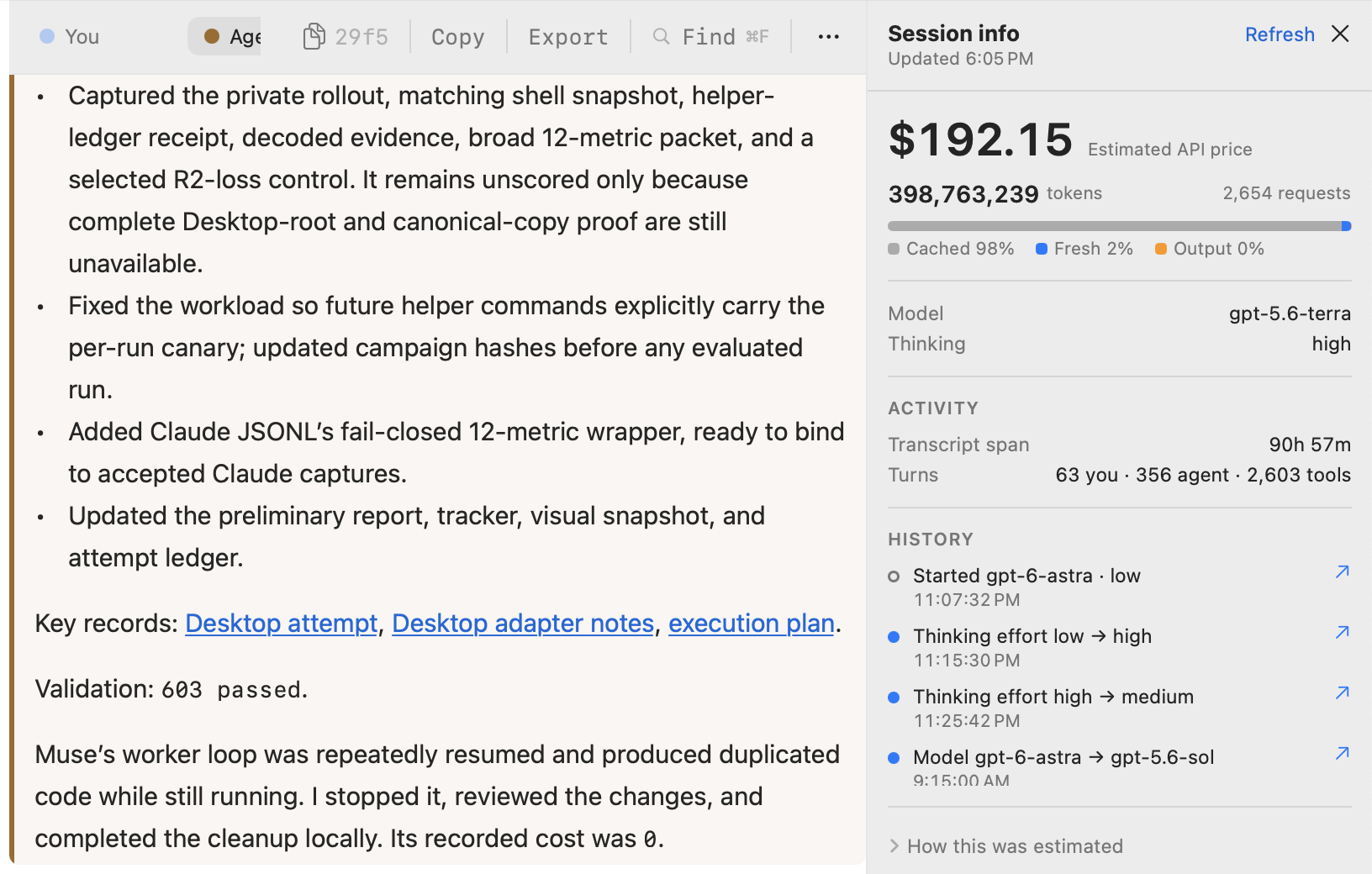
- See what a session used. For Codex and Claude, Session Info shows a session's API-equivalent price, token mix, model and thinking effort, and turn counts beside its transcript.
- Keep transcripts on your Mac. Agent Sessions builds its search index locally and does not upload session history.
What's New in 5.5.3
- Session Runway recognizes GPT-6.1 Sol. Published rates cover cached input, fast mode, and long context, so mixed Sol/Astra activity contributes to dollar estimates and shared weekly calibration.
What's New in 5.5.2
- Current agent formats stay compatible. Agent Sessions recognizes the latest observed session fields from Claude 2.1.285, Copilot 1.0.89, Kimi 2.1.1, and Codex 0.159.
- DeepSeek Harness 0.2 histories remain browseable. Native v4 sessions open alongside v0-v3 history, including developer messages and first-class tool results.
- More transcript detail survives parsing. OpenClaw shows current tool arguments and nested results, while role-less Cursor turn failures appear as visible errors.
What's New in 5.5
- DeepSeek Harness history browsing. The local, read-only integration discovers immutable session directories, selects the highest supported generation, and browses/searches supported v0-v3 plain JSONL and independently framed, checksum-validated Zstandard histories. Incomplete or corrupt artifacts stay invisible. Compatibility evidence comes from checked-in sanitized fixtures, the pinned event catalog, and a local manual UI smoke test; broad real-world coverage remains unverified.
- A clearer weekly Session Runway. The Quota Meter combines measurable active-session burn with an estimate of time left at that pace, keeps the weekly reset visible, and reports measuring, unavailable, or exhausted states instead of inventing a value.
- Codex runway follows the configured sessions root. The meter honors the Preferences override, process-inherited
CODEX_HOME, and the default path, with a GUI-launch caveat for shell-only environment settings.
What's New in 5.4
- Cline CLI and Cline Desktop support. Browse and search local prompts, responses, thinking, and tool activity from both Cline surfaces, with clear origin labels and Cline-specific Settings controls.
- More reliable session retrieval. Project filtering distinguishes same-named clones, active searches refresh cleanly, displayed titles remain searchable, and cache hydration preserves confirmed sessions when a source is temporarily unavailable.
- Clearer session titles. Claude, OpenClaw, OpenCode, and Droid keep recognizable source-aware titles after full transcript loading and search prewarming.
Supported sources
The current source registry contains 16 active agent formats plus legacy Droid sessions. Agent Sessions 5.5 adds DeepSeek Harness browsing and search; capabilities differ by source and installed CLI version.
| Source | Browse and search | Resume |
|---|---|---|
| Codex | Yes | Supported sessions |
| Claude Code | Yes | Supported sessions |
| Cursor | Yes | Supported sessions |
| GitHub Copilot CLI | Yes | Supported sessions |
| OpenCode | Yes | Supported sessions |
| Antigravity | Yes | Supported sessions |
| Pi | Yes | Supported sessions |
| Kimi Code | Yes | Supported sessions |
| Grok CLI | Yes | Supported sessions |
| Hermes | Yes | Supported sessions |
| OpenClaw | Yes | No |
| Qwen Code | Yes | Active sessions; end-to-end unverified |
| Devin CLI | Yes | Supported active sessions |
| fx | Yes | Command plan tested; interactive reopen unverified |
| Cline CLI and Desktop | Yes | No |
| DeepSeek Harness | Yes | No |
| Droid | Legacy sessions | No active monitoring |
DeepSeek Harness support is an independent integration, not an official partnership or endorsement. Its checked-in decoder vendors the selected official Zstandard 1.5.7 decompression/common sources under the upstream BSD license; provenance and the archive checksum are recorded in ThirdParty/DSHZstd/README.md.
Format-maintenance owners, verification dates, and tested versions are in STEWARDS.md. Session-Bench compares ten agents across 20 evidence-backed format gates.
Quota Meter
An account meter can tell you that 60% is used. Agent Sessions shows which active Codex or Claude session is spending it.
- Per-session burn against available 5-hour and weekly windows.
- Four views: 5-hour, weekly, tokens per hour, and estimated API-equivalent dollars per hour.
- Per-model pricing when one session uses more than one model.
- Explicit unavailable states when a provider does not expose a usable limit.
The dollar view is an API-equivalent estimate, not your subscription bill.

Session Info
Open Session Info beside any Codex or Claude transcript with ⇧⌘I or the gauge button in the toolbar. It reads the session's own records.
- Price at published API rates, total tokens, and request count.
- A cached / fresh / output bar, so a heavily cached session reads at a glance.
- Current model and thinking effort, with a history of changes that jumps to each point in the transcript.
- Transcript span and how turns divided between you, the agent, and tools.
The price is an API-equivalent estimate, not your subscription bill.
Install
Download AgentSessions-5.5.3.dmg, open it, and drag Agent Sessions.app into Applications.
Or use Homebrew:
brew install --cask jazzyalex/agent-sessions/agent-sessions
Updates are signed, notarized, and delivered through Sparkle.
Local-history guides
- Find and search old Codex CLI, Desktop, and VS Code sessions
- Find and search Claude Code JSONL history
- Search Cursor Agent transcripts
- Browse OpenCode SQLite history
- Browse GitHub Copilot CLI history
- Browse Antigravity CLI history
- Browse Hermes Agent history
- Browse OpenClaw history
See the changelog, privacy policy, and security notes.
Privacy and network access
- Transcript discovery, parsing, indexing, search, and navigation happen locally.
- Agent session folders are read rather than rewritten.
- Explicit actions can open resume commands or manage saved copies.
- Optional network access checks for signed Sparkle updates and fetches a public model-price list. Neither request contains transcript data.
Contributing
Missing your agent? Use the new source form. You can contribute a sanitized fixture without writing Swift, adopt an existing format as a steward, or follow the contribution guide.
Build locally with Xcode 16 or later:
xcodebuild -project AgentSessions.xcodeproj -scheme AgentSessions -configuration Debug -destination 'platform=macOS' build
Run the stable test wrapper:
./scripts/xcode_test_stable.sh
Found a session you thought you had lost? Star Agent Sessions to help other developers find it.
License
MIT. See LICENSE.