liftaris/herm
The Hermes TUI built with OpenTUI
Herm is a terminal user interface and dashboard for the Hermes Agent gateway. It provides an operator-focused interface for chatting, managing sessions, and overseeing Hermes home components like skills and toolsets.
- Provides a TUI for chatting and managing Hermes Agent sessions.
- Includes a kanban board for agentic work and task management.
- Supports managing profiles, skills, cron jobs, and toolsets.
full readme from github
Herm
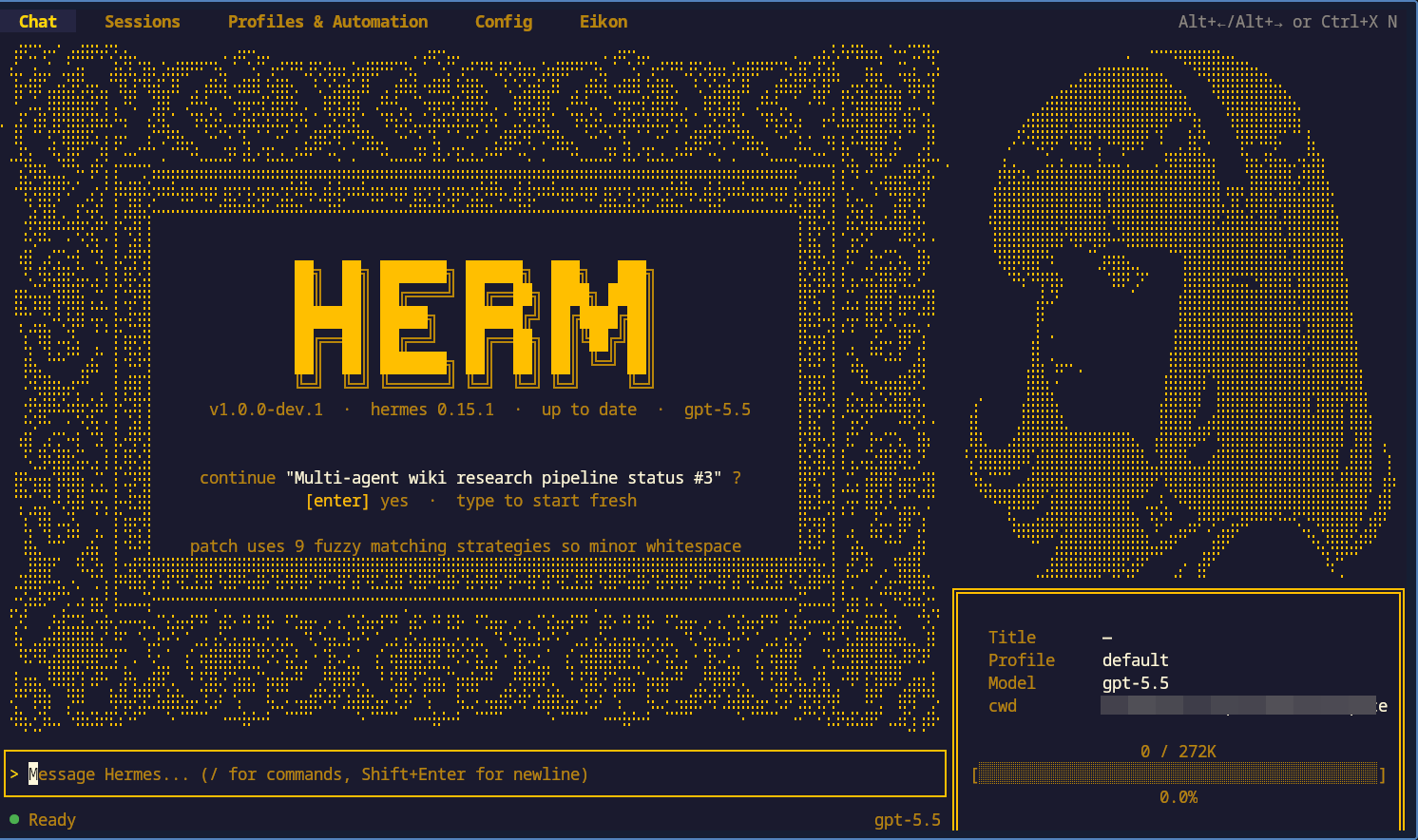
Chat stays on the left. The sidebar and tabs expose model/profile state, sessions, context, agents, analytics, skills, cron, toolsets, config, env, memory, and kanban without leaving the terminal.
herm /hɜːm/ noun : a sculptured head of Hermes on a square stone pillar, used in ancient Greece as a boundary marker at crossroads.
Why Herm
Herm gives Hermes Agent an operator-focused TUI instead of scattering work across shell commands, config files, and browser windows.
- Stay in the terminal while chatting with Hermes Agent, resuming sessions, and inspecting context.
- Operate your Hermes home through dashboard tabs for profiles, skills, cron jobs, toolsets, config, env, and memory.
- Run agentic work through kanban with boards, task detail views, diagnostics, and dispatch controls.
- Make the shell yours with rebindable keys, a command palette, slash commands, theme picker, and profile switching.
Herm is built with OpenTUI and Bun. It is a client for the Hermes Agent gateway, not a separate agent runtime.
Quickstart
Herm requires:
- a working Hermes Agent install
- Bun or a Node package runner
- a Hermes home at
~/.hermes, orHERMES_HOMEpointing somewhere else
Try Herm without installing:
bunx herm-tui
Install it globally:
bun add -g herm-tui        # stable
npm i -g herm-tui          # also fine
bun add -g herm-tui@next   # bleeding edge, every dev push
Run it:
herm       # fresh session
herm -c    # resume last session
Attach to an already-running Hermes dashboard instead of spawning a local gateway subprocess:
herm --gateway-url 'ws://127.0.0.1:9119/api/ws?token=...'
HTTP(S) dashboard URLs are normalized to WS(S) and /api/ws is appended after
any path prefix. The URL must already carry a reusable token or internal
credential. OAuth-gated dashboards use single-use tickets and require an
authenticated client that can mint a fresh ticket for every reconnect. For
persistent configuration, set HERM_GATEWAY_URL. Herm also accepts the
upstream-injected HERMES_TUI_GATEWAY_URL.
Or run from source:
git clone https://github.com/liftaris/herm.git
cd herm
bun install
bun run src/index.tsx
See .env.example for rarely-needed overrides.
What you can do
Chat with Hermes Agent
- Stream responses with markdown rendering, LaTeX-to-unicode conversion, inline
images through
chafa, diff chips, and expandable tool calls. - Add file and diff context with
@references. - Use slash commands for session control, model switching, skins, keybindings, and app actions.
- Resume, title, and manage sessions without dropping back to another command.
Operate your Hermes home
- Switch Hermes profiles from inside the TUI.
- Inspect and manage operational surfaces: sessions, context, agents, analytics, skills, cron, toolsets, config, env, and memory.
Run kanban work
- Use the kanban tab as an agent work surface rather than a detached project board.
- Open board and task detail views, inspect diagnostics, and dispatch work from the same shell you use for chat.
Share and install eikons
Eikons are 48×24 terminal avatars. The shipped lifecycle is deterministic: discover, inspect, install, use, update, and remove.
In Herm:
- Open Eikon → Catalog, or run
/catalog, to browse shared catalog entries. - Preview rows before installing. Trust is shown as
Verified,Unverified, orMismatchbeside source and compatibility state. - Install adds the eikon to your local library without activating it.
- Use selects an installed eikon as the active avatar.
- Installing over the currently active eikon name also requires confirmation or
--active-okbecause it replaces the active avatar's backing package. - Update or remove an active eikon only after confirming that the active avatar's backing package will change or be cleared.
From the shell:
herm eikon search [query] [--json]
herm eikon browse [query] [--json]
herm eikon inspect <name|url|dir> [--json]
herm eikon install <name|url|dir> [--name N] [--no-source] [--active-ok] [--json]
herm eikon list [--json]
herm eikon use <name> [--json]
herm eikon info <name> [--json]
herm eikon update <name> [--active-ok] [--json]
herm eikon remove <name> [--active-ok] [--json]
herm eikon delist <name|id> [--json]
install never activates. use is the activation action. JSON output is
available for automation with --json.
Default Catalog installs fetch built package artifacts referenced by the
catalog, not creator repositories. Direct GitHub installs are for sharing
outside the default catalog and support both single-package repos and
multi-eikon catalog repos addressed as github.com/user/repo/eikon-name.
Private GitHub repos use normal git authentication.
Creators can share Eikons through normal GitHub repositories. For official
registry listing, press u in Studio or use Library's Share to catalog action
after baking. Herm previews metadata, the prepared public bundle, and the GitHub
PR target; with local gh auth it creates the PR, otherwise it shows manual PR
steps with the prepared bundle path and compare URL. Direct-install repos can
still be prepared with upstream eikon pack, eikon index, and
eikon manifest.
eikon publish remains the lower-level GitHub PR contribution helper for the
configured/default catalog repo; it is not a hosted marketplace account, upload,
dashboard, or moderation flow.
Use eikon.liftaris.dev as a discovery gallery only; it previews catalog
entries and gives copyable Herm install instructions.
Herm owns native Catalog behavior. The eikon repo owns the registry, browser mirror, shared catalog/player exports, install resolver, and publish preflight. Herm imports public eikon package exports rather than browser mirror internals or unexported source paths.
Customize the shell
- Press
Ctrl+Kfor the command palette. - Type
/for the slash popover. - Type
/themeto browse built-in themes. - Type
/keysto view and rebind keybindings, including OpenCode-compatible bindings. - Use
Tab/Shift+Tabto move between top-level tabs. Arrow keys navigate within a tab.
If text is hard to read in tmux or a dark terminal, try a light theme such as
daylight, mercury, or github. If tmux is the issue,
set -g default-terminal "tmux-256color" in ~/.tmux.conf often fixes color
handling.
Status and compatibility
Herm does not guarantee backward compatibility with older versions of Hermes. Hermes is constantly updating, and things are bound to break. Regular Hermes parity sweeps and updates are done to keep Herm current.
Herm is the dashboard TUI for Hermes Agent. It does not replace Hermes Agent, implement model providers itself, or own Hermes runtime behavior.
For contributor review steps, see
docs/hermes_compatibility.md.
Development
bun run dev
bun run typecheck
bun test
Acknowledgments
- Hermes Agent - the agent runtime Herm operates
- OpenTUI - the TUI framework
- OpenCode - interface inspiration
License
MIT - see LICENSE.