bielcarpi/hermes-live-voice
Self-hosted realtime voice gateway for Hermes Agent. Keep talking while Hermes runs background tasks through local, Gemini Live, and OpenAI Realtime adapters.
Hermes Live Voice is a community integration that lets you talk to Hermes Agent while it runs background tasks, with results retained when you reconnect. It supports OpenAI Realtime by default, plus Gemini and local Hugging Face voice options. The Dashboard connects to a private gateway, while Hermes owns conversation history, memory, tools, and task execution.
- Talk while Hermes runs background tasks
- Providers: OpenAI, Gemini, local Hugging Face
- Task results survive voice disconnects and gateway restarts
full readme from github
Hermes Live Voice
Talk to Hermes Agent while it works. Start a background task, keep talking, and find the result when you reconnect.


Start talking
This is the 1.3 release candidate. Install from next; the stable version remains available from latest.
You need Hermes Agent 0.20.0+ for the Dashboard UI, Node.js 20+ (22 or 24 recommended), and an OpenAI API key with Realtime access.
npm install --global hermes-live-voice@next
hermes-live setup
hermes dashboard
Setup prompts for your key, installs the Live Voice plugin, and starts the gateway. It preserves your configured provider and detects an available hosted key; otherwise it uses OpenAI. Local models are installed only when you explicitly choose local voice.
Open Chat, select a saved conversation in Hermes’s own conversation list, and press Start voice. Allow microphone access and speak. Automatic turn detection is enabled by default. You can pause the microphone or interrupt a reply without stopping background work.
Try:
Inspect this repository and run the tests in the background. While that runs, help me plan the release.
Expand Tasks to see progress and retained results. Stop task stops that task; disconnecting voice lets it continue.
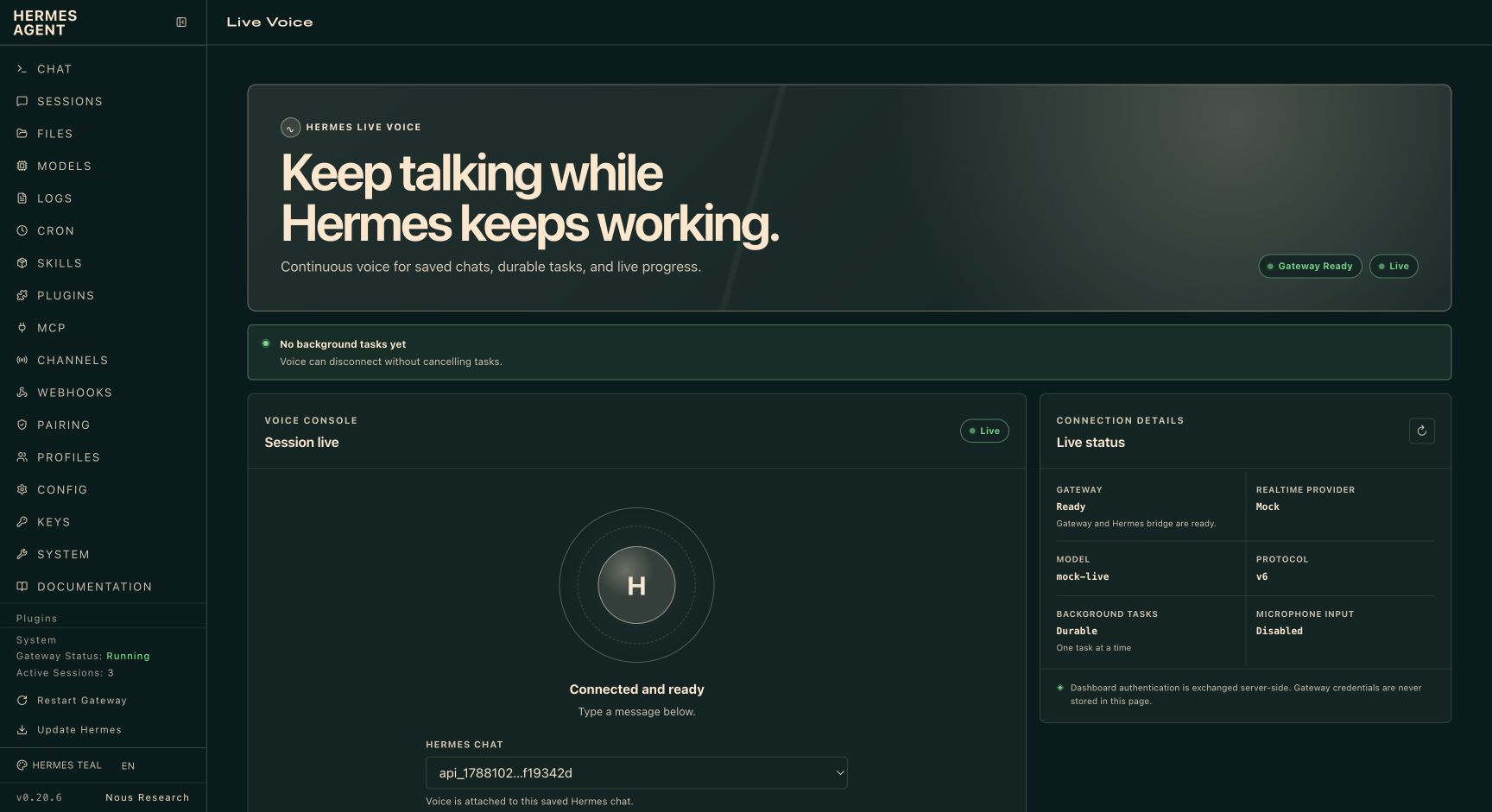
The screenshot shows the actual Hermes Dashboard with its native chat UI, the voice plugin, and fixture data. Audio uses a synthetic microphone; this is not evidence of live provider audio. See provider testing for the verification procedure and current receipts.
Providers
OpenAI is the default hosted path. Gemini and local Hugging Face voice are also available:
hermes-live setup --provider gemini
hermes-live setup --provider local
Managed local voice requires Apple Silicon, uv, and at least 12 GB memory. The first installation downloads Python and model weights. Available memory affects latency. See setup before choosing it.
Troubleshooting and updates
hermes-live doctor
hermes-live launch-check
doctor prints concrete fixes. launch-check checks the installed plugin, gateway, provider connection, and a bounded Hermes worker separately. After it passes, test a conversation in the Dashboard to verify microphone, playback, interruption, and spoken notices.
To update:
npm install --global hermes-live-voice@next
hermes-live upgrade
Restart Hermes Dashboard to load the updated plugin. upgrade keeps your provider settings. Setup and operations cover services, support bundles, remote endpoints, Docker, and advanced clients.
How it works
The Dashboard connects to a private gateway. The realtime provider handles speech and turn-taking. Hermes owns conversation history, memory, tools, and task execution. The gateway persists task receipts, progress, notifications, and results.
- Task state and results survive voice disconnects and gateway restarts. Running Hermes work cannot survive a Hermes Agent restart; ambiguous outcomes remain
unknown. - Work runs one task at a time by default. Declared read-only parallelism is an advanced operator option.
- Approval-required work is denied and stopped until Hermes provides safe targeted approval identity.
- This is a single-process, self-hosted integration. Network deployments require authentication, TLS, and an exact allowed origin.
Architecture · Task recovery · Security
The browser SDK supports host-app integrations. hermes-live terminal provides advanced text control over SSH. Both use the same client protocol.
Contribute
Report a bug, share a provider compatibility receipt, or read contributing. The roadmap prioritizes the everyday voice workflow.
MIT. This is a community integration, not an official NousResearch distribution.