briancaffey/hermes-otel
OTel Plugin for Hermes Agent
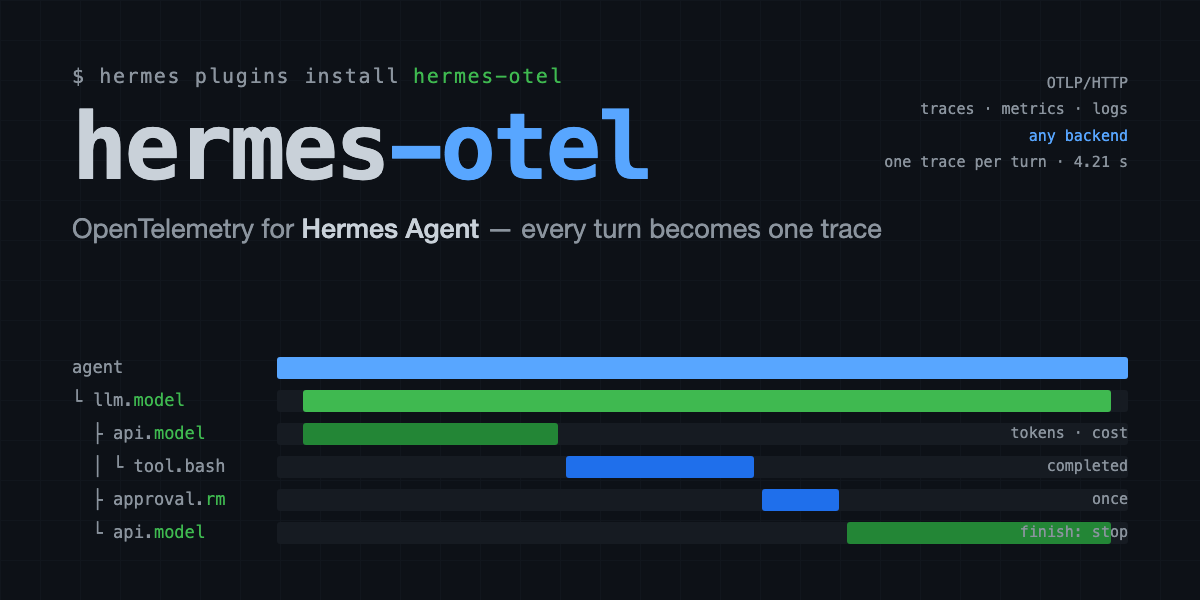
This OpenTelemetry plugin for Hermes Agent exports LLM tool calls, model invocations, and API requests as OTel spans. It supports exporting to OTLP-compatible backends, including Phoenix, Langfuse, LangSmith, SigNoz, Jaeger, Grafana Tempo, Grafana LGTM, Uptrace, OpenObserve, Honeycomb, and W&B Weave.
- Exports LLM tool calls and model invocations as OTel spans
- Supports OTLP HTTP endpoints
- Provides integration tests for multiple backends
full readme from github
hermes-otel
OpenTelemetry plugin for Hermes Agent. Automatically exports LLM tool calls, model invocations, and API requests as OTel spans to any OTLP-compatible backend.
Backends
Tested with:
- Phoenix (local or cloud) — traces + metrics
- Langfuse (cloud or self-hosted) — traces only
- LangSmith (LangChain's tracing platform) — traces only
- SigNoz (cloud or self-hosted) — traces + metrics + logs
- Jaeger (local) — traces only
- Grafana Tempo (local or Grafana Cloud) — traces only
- Grafana LGTM (local) — traces + metrics + logs
- Uptrace (self-hosted) — traces + metrics + logs
- OpenObserve (self-hosted) — traces + metrics + logs
- Honeycomb (cloud) — traces + metrics + logs — see HONEYCOMB.md
- W&B Weave (cloud / Dedicated Cloud / self-managed) — traces only
Any OTLP HTTP endpoint should work.
- For Phoenix see docker-compose/phoenix.yaml
- For Langfuse see https://langfuse.com/self-hosting/deployment/docker-compose
- For Langsmith see https://smith.langchain.com/
- For SigNoz see docker-compose/signoz/ (includes the upstream stack + port-remap notes)
- For Grafana LGTM see docker-compose/lgtm.yaml and docker-compose/lgtm/README.md
- For Uptrace see docker-compose/uptrace.yaml and docker-compose/uptrace/README.md
- For OpenObserve see docker-compose/openobserve.yaml and docker-compose/openobserve/README.md
Installation
hermes plugins install briancaffey/hermes-otel
The plugin lives in ~/.hermes/plugins/hermes_otel/ and Hermes auto-discovers it via plugin.yaml. However, the OTel dependencies must be installed into the hermes-agent virtual environment (where hermes itself runs):
# Install OTel runtime dependencies into the hermes-agent venv
~/git/hermes-agent/venv/bin/pip install \
opentelemetry-api \
opentelemetry-sdk \
opentelemetry-exporter-otlp-proto-http
# Optional: for LangSmith time-ordered run IDs
~/git/hermes-agent/venv/bin/pip install langsmith
You can also install the plugin package itself in editable mode (this pulls in the same OTel deps automatically):
~/git/hermes-agent/venv/bin/pip install -e ~/.hermes/plugins/hermes_otel
Running tests
The test suite uses its own isolated environment via uv and does not require the hermes-agent venv:
cd ~/.hermes/plugins/hermes_otel
# Unit + integration tests (no Docker needed, <1s)
uv run --extra dev pytest
# All E2E tests (requires Docker)
uv run --extra dev --extra e2e pytest -m e2e
# Phoenix E2E only (starts a single container)
uv run --extra dev --extra e2e pytest -m phoenix
# Langfuse E2E only (starts full stack via docker compose)
uv run --extra dev --extra e2e pytest -m langfuse
# Smoke tests — full pipeline: hermes API server -> plugin -> Langfuse
uv run --extra dev --extra e2e pytest -m smoke
The default pytest run excludes E2E and smoke tests and completes in under a second.
Test tiers
The test suite is organized into four tiers, from fastest/simplest to slowest/most comprehensive:
| Tier | Marker | Tests | What it tests | Requirements |
|---|---|---|---|---|
| Unit | (default) | 109 | Hook logic, tracer init, helpers, SpanTracker | None |
| Integration | (default) | 19 | Full span export pipeline with InMemorySpanExporter, parent-child hierarchy, token roll-up, metrics | None |
| E2E | -m e2e |
6 | OTLP export to real Phoenix/Langfuse, queried via GraphQL/REST API | Docker |
| Smoke | -m smoke |
6 | Send real chats to hermes via OpenAI SDK, verify traces in Langfuse | hermes gateway + Langfuse |
Unit tests (tests/unit/) cover:
_safe_str,_to_int,_detect_session_kindhelper functionsSpanTrackerclass: span lifecycle, parent stack, end_allHermesOTelPlugin.init()environment detection (Phoenix vs Langfuse vs LangSmith priority)NoopSpangraceful degradation when OTel is unavailable- All 8 hook callbacks with mocked tracer (span names, attributes, metric recording, module-state management)
Integration tests (tests/integration/) use a real OTel SDK with InMemorySpanExporter — no network needed:
- Individual hook pairs produce correctly attributed spans
- Parent-child nesting: Session > LLM > API > Tool (verified via span context)
- Full session lifecycle with token aggregation and session I/O roll-up
- Metric counters and histograms via
InMemoryMetricReader
E2E tests (tests/e2e/) invoke hooks directly against real backends and query their APIs:
- Phoenix: fires hooks, queries Phoenix GraphQL API at
/graphqlto verify spans - Langfuse: fires hooks, queries Langfuse REST API at
GET /api/public/observationsto verify observations
Smoke tests (tests/smoke/) exercise the complete production pipeline:
- test_hermes_api: verifies the hermes API server is functional (health, models, chat completion)
- test_hermes_langfuse: sends real chats via OpenAI SDK to hermes, then queries Langfuse to confirm traces arrived with correct span names, tool spans, and token data
E2E backends
Phoenix — single container, starts in seconds:
docker compose -f docker-compose/phoenix.yaml up -d
# or let the test fixture start it automatically
Langfuse — full stack (Langfuse + Postgres + Redis + ClickHouse + MinIO), starts in ~60s:
docker compose -f docker-compose/langfuse.yaml up -d
# Pre-seeded API keys: lf_pk_test_hermes_otel / lf_sk_test_hermes_otel
# UI at http://localhost:3000, OTEL endpoint at http://localhost:3000/api/public/otel
The E2E fixtures will start/stop Docker services automatically if they aren't already running. If a service is already running on the expected port, it is reused.
Smoke tests
Smoke tests exercise the full pipeline end-to-end:
OpenAI SDK --> hermes API server --> LLM --> OTEL plugin --> Langfuse
(port 8642) (hooks.py) (port 3000)
\ /
`--- pytest sends chat here pytest queries here ---`
They require:
- hermes-agent API server running with the OTEL plugin loaded. Add to
~/.hermes/.env:
Then start the gateway:API_SERVER_ENABLED=truehermes gateway - Langfuse running with credentials configured in
~/.hermes/.env(OTEL_LANGFUSE_*variables)
Tests skip automatically with a helpful message if either service is not reachable. The smoke tests poll the Langfuse observations API (up to 60-90s) to account for async trace ingestion.
Configuration
You can either pick one backend via environment variables (legacy mode,
shown below), or fan multiple backends out in parallel via
config.yaml. The two are mutually exclusive — when backends: is set in
the yaml file, env-var detection is skipped.
Multi-backend (config.yaml)
A fully annotated template lives at config.yaml.example
in the plugin root. Copy it to config.yaml and edit in place:
cp ~/.hermes/plugins/hermes_otel/config.yaml.example \
~/.hermes/plugins/hermes_otel/config.yaml
config.yaml is gitignored so local endpoints and (avoidable) secrets
never get committed. Only config.yaml.example is tracked. A minimal
multi-backend config looks like:
backends:
- type: phoenix
endpoint: http://localhost:6006/v1/traces
- type: jaeger
endpoint: http://localhost:4318/v1/traces
- type: tempo
endpoint: http://localhost:3200/v1/traces
- type: signoz
endpoint: http://localhost:4328/v1/traces
ingestion_key_env: OTEL_SIGNOZ_INGESTION_KEY # secret from env
- type: langfuse
public_key_env: LANGFUSE_PUBLIC_KEY
secret_key_env: LANGFUSE_SECRET_KEY
base_url: https://cloud.langfuse.com
- type: otlp # any other OTLP/HTTP collector
name: my-collector
endpoint: http://collector:4318/v1/traces
headers:
X-Auth: secret
Every entry gets its own BatchSpanProcessor and (where supported) its own
PeriodicExportingMetricReader. Each processor owns a background worker
thread, so a slow or unreachable collector cannot block the agent's hot
path or starve the others — span end is just a non-blocking enqueue. Both
trace and metrics export run in parallel across all configured backends.
Supported type values: phoenix, langfuse, signoz, jaeger, tempo,
otlp, lgtm, uptrace, openobserve, honeycomb, weave. Use otlp for any collector
that doesn't have a dedicated type. Backends marked
traces-only (langfuse, jaeger, tempo, weave) are auto-detected and skip
the metrics reader. Override with metrics: true|false per entry if
needed. See config.yaml.example for the full list of fields each type
accepts — Uptrace takes a dsn: for the uptrace-dsn header, OpenObserve
takes user: / password: for HTTP Basic auth, and Weave takes W&B routing
fields (entity / project) for wandb.entity / wandb.project.
Full-conversation capture
By default the llm.* span's input.value is just the latest user turn.
The underlying api.* spans don't expose per-message detail. To see the
entire message list the model actually saw, flip on
capture_conversation_history:
capture_conversation_history: true
conversation_history_max_chars: 40000 # safety cap; JSON is clipped with "..."
Or via env: HERMES_OTEL_CAPTURE_CONVERSATION_HISTORY=true. When enabled
the LLM span gets input.value = JSON-serialized history, input.mime_type = application/json, and hermes.conversation.message_count. Phoenix
pretty-prints the JSON in its Input panel; Langfuse / Jaeger / SigNoz show
it as a large string. Respects the global capture_previews kill switch.
Secrets should live in env vars (use the *_env: keys to reference them
by name) rather than inline in yaml. LangSmith remains an env-var-only
single-backend path; setting LANGSMITH_TRACING=true short-circuits the
yaml backend list.
Single backend (env vars)
Pick one backend:
Phoenix
export OTEL_PHOENIX_ENDPOINT="http://localhost:6006/v1/traces"
export OTEL_PROJECT_NAME=hermes-agent
Langfuse
# Option A (plugin-specific vars):
export OTEL_LANGFUSE_PUBLIC_API_KEY="pk-lf-..."
export OTEL_LANGFUSE_SECRET_API_KEY="sk-lf-..."
# Optional — defaults to EU cloud endpoint
export OTEL_LANGFUSE_ENDPOINT="https://cloud.langfuse.com/api/public/otel"
# For US region:
# export OTEL_LANGFUSE_ENDPOINT="https://us.cloud.langfuse.com/api/public/otel"
# Option B (Langfuse-standard vars from docs):
# export LANGFUSE_PUBLIC_KEY="pk-lf-..."
# export LANGFUSE_SECRET_KEY="sk-lf-..."
# export LANGFUSE_BASE_URL="https://cloud.langfuse.com" # or us.cloud/langfuse/self-hosted base URL
LangSmith
export LANGSMITH_TRACING=true
export LANGSMITH_API_KEY="lsv2_..."
# Optional — defaults to LangChain Cloud
export LANGSMITH_ENDPOINT="https://api.smith.langchain.com"
# Optional — project name for organizing traces
export LANGSMITH_PROJECT="hermes-langsmith-otel"
Note: Install
langsmithfor better time-ordered run IDs:pip install langsmith. The plugin useslangsmith.uuid7()for run IDs when available, otherwise falls back touuid.uuid4().
SigNoz
# Self-hosted (see docker-compose/signoz/ — OTLP HTTP is remapped to 4328
# to avoid colliding with Phoenix on 4318)
export OTEL_SIGNOZ_ENDPOINT="http://localhost:4328/v1/traces"
export OTEL_PROJECT_NAME=hermes-agent
# SigNoz Cloud — use the regional ingest URL + your ingestion key
# export OTEL_SIGNOZ_ENDPOINT="https://ingest.us.signoz.cloud:443/v1/traces"
# export OTEL_SIGNOZ_INGESTION_KEY="sz-..."
The plugin sends both traces and metrics over OTLP/HTTP. When
OTEL_SIGNOZ_INGESTION_KEY is set, the signoz-ingestion-key header is
attached to both exporters.
Jaeger
# Jaeger ≥ 1.35 accepts OTLP/HTTP natively on port 4318
export OTEL_JAEGER_ENDPOINT="http://localhost:4318/v1/traces"
export OTEL_PROJECT_NAME=hermes-otel-jaeger
Jaeger is traces-only — the plugin skips metric export when this backend is selected. If you need token/tool/cost metrics alongside Jaeger traces, pair it with a Prometheus-compatible metrics sink or use a unified backend (Phoenix, SigNoz).
Grafana Tempo
# Tempo accepts OTLP/HTTP natively on port 4318
export OTEL_TEMPO_ENDPOINT="http://localhost:4318/v1/traces"
export OTEL_PROJECT_NAME=hermes-otel-tempo
Run the upstream single-binary example (Tempo + MinIO + Grafana + Prometheus):
cd ~/git/grafana/tempo/example/docker-compose/single-binary
docker compose up -d
# UI: http://localhost:3000 (Grafana, anonymous admin)
# OTLP: http://localhost:4318 (HTTP) / localhost:4317 (gRPC)
Tempo is traces-only — the plugin skips metric export when this backend is selected. The upstream example already bundles Prometheus + Grafana, so token/tool/cost metrics can be routed there via a separate Prometheus remote-write or OTel collector if needed.
Honeycomb
export HONEYCOMB_API_KEY="hcaik_..." # x-honeycomb-team header
# Optional — defaults to the US ingest endpoint:
# export OTEL_HONEYCOMB_ENDPOINT="https://api.eu1.honeycomb.io/v1/traces" # EU
export OTEL_PROJECT_NAME=hermes-otel-honeycomb
For region selection (us/eu), a dataset, and the metrics unknown_metrics
gotcha, use the multi-backend config.yaml form instead — see HONEYCOMB.md.
W&B Weave
export WANDB_API_KEY="..." # wandb-api-key header
export WANDB_ENTITY="my-team" # Resource: wandb.entity
export WANDB_PROJECT="hermes-agent" # Resource: wandb.project
# Optional Dedicated Cloud / Self-Managed:
# export OTEL_WEAVE_BASE_URL="https://acme.wandb.io"
Weave is trace ingest only by default. The dedicated type: weave config
also supports api_key_env, entity, project, base_url, and explicit
endpoint; see config.yaml.example and the website docs for details.
Optional
export OTEL_PROJECT_NAME="hermes-agent" # Shown in Phoenix
export HERMES_OTEL_DEBUG=true # Enable debug logging (see below)
Debug logging
The plugin prints only essential startup messages (backend connected/failed, hook count) to stdout. For detailed per-span logging (span start/end, parent nesting, token counts, HTTP payloads), enable debug mode:
export HERMES_OTEL_DEBUG=true
Debug output is written to ~/.hermes/plugins/hermes_otel/debug.log and does not clutter hermes stdout.
Priority order: LangSmith (if LANGSMITH_TRACING=true) > Langfuse (if credentials set) > SigNoz (OTEL_SIGNOZ_ENDPOINT) > Uptrace (OTEL_UPTRACE_ENDPOINT + DSN) > OpenObserve (OTEL_OPENOBSERVE_ENDPOINT + creds) > Weave (WANDB_API_KEY + WANDB_ENTITY + WANDB_PROJECT) > Honeycomb (HONEYCOMB_API_KEY) > Jaeger (OTEL_JAEGER_ENDPOINT) > Tempo (OTEL_TEMPO_ENDPOINT) > Phoenix (OTEL_PHOENIX_ENDPOINT).
Shaping knobs — config.yaml and HERMES_OTEL_* env vars
Backend selection stays env-var-driven (above). For telemetry shaping — sampling, preview size, resource attributes, TTL, extra headers — you can also use a YAML file at ~/.hermes/plugins/hermes_otel/config.yaml.
Precedence (per-field): HERMES_OTEL_* env var > config.yaml value > default.
Example config.yaml:
enabled: true
sample_rate: 0.25 # ParentBased(TraceIdRatioBased) — null/omit = sample everything
root_span_ttl_ms: 600000 # orphan-sweep threshold (10 min default)
flush_interval_ms: 60000 # metrics export cadence
preview_max_chars: 1200 # global clip_preview truncation fallback
# Per-category overrides (each defaults to preview_max_chars when unset)
tool_input_preview_max_chars: 1200
tool_output_preview_max_chars: 2000
llm_input_preview_max_chars: 1200
llm_output_preview_max_chars: 1200
capture_previews: true # false = suppress all input.value / output.value
capture_sender_id: false # true = add platform-prefixed user.id to spans
project_name: hermes-prod # supersedes OTEL_PROJECT_NAME
global_tags:
team: platform
resource_attributes: # merged into Resource; overrides global_tags on key conflict
env: prod
region: us-east-1
headers: # merged onto outgoing OTLP requests
X-Scope-OrgID: tenant-a
Every field can be overridden by env var with prefix HERMES_OTEL_ (scalars only):
| Field | Env var |
|---|---|
enabled |
HERMES_OTEL_ENABLED (true/false) |
sample_rate |
HERMES_OTEL_SAMPLE_RATE (float 0..1, or 0 to disable) |
root_span_ttl_ms |
HERMES_OTEL_ROOT_SPAN_TTL_MS |
flush_interval_ms |
HERMES_OTEL_FLUSH_INTERVAL_MS |
preview_max_chars |
HERMES_OTEL_PREVIEW_MAX_CHARS |
tool_input_preview_max_chars |
HERMES_OTEL_TOOL_INPUT_PREVIEW_MAX_CHARS |
tool_output_preview_max_chars |
HERMES_OTEL_TOOL_OUTPUT_PREVIEW_MAX_CHARS |
llm_input_preview_max_chars |
HERMES_OTEL_LLM_INPUT_PREVIEW_MAX_CHARS |
llm_output_preview_max_chars |
HERMES_OTEL_LLM_OUTPUT_PREVIEW_MAX_CHARS |
capture_previews |
HERMES_OTEL_CAPTURE_PREVIEWS |
capture_sender_id |
HERMES_OTEL_CAPTURE_SENDER_ID |
project_name |
HERMES_OTEL_PROJECT_NAME |
span_batch_max_queue_size |
HERMES_OTEL_SPAN_BATCH_MAX_QUEUE_SIZE |
span_batch_schedule_delay_ms |
HERMES_OTEL_SPAN_BATCH_SCHEDULE_DELAY_MS |
span_batch_max_export_batch_size |
HERMES_OTEL_SPAN_BATCH_MAX_EXPORT_BATCH_SIZE |
span_batch_export_timeout_ms |
HERMES_OTEL_SPAN_BATCH_EXPORT_TIMEOUT_MS |
force_flush_on_session_end |
HERMES_OTEL_FORCE_FLUSH_ON_SESSION_END |
pyyaml is optional — if not installed, the YAML file is silently skipped and only env vars + defaults apply. Malformed YAML logs a single warning and falls back to defaults.
Privacy mode
Set capture_previews: false (or HERMES_OTEL_CAPTURE_PREVIEWS=false) to suppress every input.value / output.value attribute. Useful for shared deployments where message content can't leave the process. A one-line startup banner confirms the mode is active.
Set capture_sender_id: true (or HERMES_OTEL_CAPTURE_SENDER_ID=true) to attach gateway sender identity to spans. The plugin emits the raw platform ID as hermes.sender.id and the backend-neutral user key as user.id={platform}:{sender_id}. For example, Slack user U0B074344DP becomes user.id=slack:U0B074344DP. The platform is already available on LLM spans as llm.provider. This is opt-in because IDs from Discord, Telegram, Slack, email, SMS, and similar platforms can identify users. CLI sessions usually omit it.
Per-turn summary attributes
On on_session_end, the root session/agent span is enriched with a summary of what happened in the turn — so dashboards don't need to JOIN across spans.
| Attribute | Type | Meaning |
|---|---|---|
hermes.turn.tool_count |
int | distinct tool names invoked |
hermes.turn.tools |
string | sorted CSV of distinct tool names (≤500 chars) |
hermes.turn.tool_targets |
string | |-joined distinct file paths / URLs |
hermes.turn.tool_commands |
string | |-joined distinct shell commands |
hermes.turn.tool_outcomes |
string | sorted CSV of distinct outcome statuses |
hermes.turn.skill_count |
int | distinct skill names inferred |
hermes.turn.skills |
string | sorted CSV of distinct skill names |
hermes.turn.api_call_count |
int | pre_api_request hook invocations |
hermes.turn.final_status |
string | completed | interrupted | incomplete | timed_out |
Zero/empty aggregators are omitted rather than emitted as empty strings.
Tool identity, outcome, skill inference
Each tool.* span now also carries:
hermes.tool.target— first non-empty value under args.path/file_path/target/url/uri.hermes.tool.command— first non-empty value under args.command/cmd.hermes.tool.outcome— one ofcompleted·error·timeout·blocked· (explicitstatusfield from the result, lowercased). Onlyerrormaps the spanStatusCodetoERROR; timeouts/blocked stayOKso dashboards don't count them as failures.hermes.skill.name— inferred from args paths matching/skills/<name>/. Does not match/optional-skills/<name>/references/. Also increments ahermes.skill.inferred{skill_name, source}counter so ops can audit hit rates.
Orphan-span sweep
If a session never fires on_session_end (e.g. host crash mid-turn), it would otherwise leak active-span state. A TTL-based sweeper (default 10 min, configurable via root_span_ttl_ms) runs at the top of every pre_* hook; sessions older than the TTL are finalized with hermes.turn.final_status=timed_out and span status OK (not ERROR — timeouts should not pollute error rates).
Non-blocking span export
Spans are exported via OpenTelemetry's BatchSpanProcessor: span.end() enqueues the span to a bounded in-memory queue, and a background worker drains that queue in batches on a timer. This means a slow or unreachable OTLP backend no longer adds latency to every tool call / API request.
Export cadence:
- Background worker flushes every
span_batch_schedule_delay_ms(default 1s). - At the end of each session (
on_session_end), the plugin force-flushes so traces appear in the UI immediately rather than after the worker's next cycle. Disable withforce_flush_on_session_end: falseif you prefer to let the worker handle it. - On graceful process shutdown, an
atexithandler flushes the queue once so nothing is lost.
Backpressure: the queue is bounded by span_batch_max_queue_size (default 2048). If the agent outruns the exporter, the oldest enqueued spans are dropped — hermes keeps running rather than stalling.
Crash vs. graceful exit: up to schedule_delay_millis worth of spans may be lost on a hard crash (SIGKILL, OOM). This is the standard OTel trade-off and mirrors every production tracing stack. Graceful shutdown (hermes gateway stop, SIGTERM) triggers the atexit flush.
How it works
Hermes fires lifecycle hooks. This plugin maps them to OTel spans:
Turn 1:
agent / cron (root, when session hooks are available)
├── skill.{name} span (when a skill is loaded; spans load → turn end)
└── LLM span
└── API span (first call → stop or tool_calls)
└── Tool span(s) (if tools called)
├── subagent.{role} span (when delegate_task is used)
│ └── agent (child run rejoins the trace) → its own LLM/API/tool spans
└── API span (second call → final response)
Span hierarchy
| Span | Kind | Contains |
|---|---|---|
agent / cron |
AGENT | Session metadata, completion/interruption status, turn summary |
skill.{name} |
SKILL | A skill loaded during the turn — hermes.skill.name, hermes.skill.source (skill_view/path_match), hermes.skill.path, hermes.skill.result_status. Spans from load to turn end; skills overlap freely |
llm.{model} |
LLM | Model name, provider, user message (input), assistant response (output) |
api.{model} |
LLM | Token counts (prompt + completion), duration, finish reason, cache tokens. On failure: ERROR status + recorded exception + retry metadata |
tool.{name} |
TOOL | Tool name, arguments (input), result (output), error status |
approval.{pattern} |
APPROVAL | Human-in-the-loop approval prompt — the human-decision wait time, hermes.approval.choice (once/session/always/deny/timeout), correlated to the gated tool via gen_ai.tool.call.id |
subagent.{role} |
AGENT | Delegated child agent — role, goal, status, duration, summary; the child's own run nests beneath it so a multi-agent run is one connected trace |
Human-in-the-loop approvals: when a tool trips a dangerous-command approval rule, the agent blocks waiting for a human (often the dominant chunk of a turn's wall-clock, previously invisible). The plugin opens an approval.* span (via the pre_approval_request / post_approval_response hooks) capturing the wait time and the decision (approve/deny/timeout) — works on CLI and gateway surfaces (Telegram, Discord, …), and feeds hermes.approval.count / hermes.approval.duration metrics for deny/timeout-rate tracking. Observer-only: telemetry never alters an approval. See Span hierarchy → approval.*.
Sub-agent delegation: when the agent calls delegate_task, the plugin opens a subagent.{role} span in the parent trace (via the subagent_start / subagent_stop hooks) and rejoins the delegated child's own root span underneath it. Without this, child agents export as dozens of disconnected traces. See Span hierarchy → subagent.* and the hermes.subagent.count / hermes.subagent.duration metrics.
Skill execution windows: when the agent loads a skill (the skill_view tool, or a read of a /skills/<name>/ file), the plugin opens a skill.{name} span that runs until the turn ends — so a trace shows which skills were active and for how long, with overlaps. Controlled by skill_spans (default on). The plugin also ships a companion Hermes skill, hermes_otel:observability (load it with skill_view), which explains how to turn on and read this telemetry — and because skill loads are instrumented, opening it emits its own skill.observability span. See Span hierarchy → skill.*.
API errors & retries: failed provider requests (rate limits, timeouts, 5xx, network errors) close the api.{model} span as ERROR with an exception event and retry metadata (error.type, status code, hermes.retry.count, hermes.retryable), via the api_request_error hook — previously these ended OK and were invisible. Emits hermes.api.error.count{error_type,status_class,retryable} and hermes.retry.count.
Attribute conventions
The plugin emits dual-convention attributes so both backends work:
| Metric | OpenTelemetry GenAI | Phoenix (OpenInference) |
|---|---|---|
| Prompt tokens | gen_ai.usage.input_tokens |
llm.token_count.prompt |
| Completion tokens | gen_ai.usage.output_tokens |
llm.token_count.completion |
| Total tokens | gen_ai.usage.total_tokens |
llm.token_count.total |
| Cache read | gen_ai.usage.cache_read.input_tokens (gen_ai.usage.cache_read_input_tokens also kept) |
llm.token_count.prompt_details.cache_read |
| Cache write | gen_ai.usage.cache_creation.input_tokens (gen_ai.usage.cache_creation_input_tokens also kept) |
llm.token_count.prompt_details.cache_write |
| Reasoning | gen_ai.usage.reasoning.output_tokens |
llm.token_count.completion_details.reasoning |
Reasoning ("thinking") tokens are emitted only by reasoning-capable models that report them. They are a subset of the completion/output count — already included in the completion and total figures — and are surfaced separately for visibility, so they should not be added on top of the total.
LLM and API spans also expose standard GenAI request/response metadata where Hermes provides it, including gen_ai.provider.name, gen_ai.request.model, request parameters such as gen_ai.request.temperature, and response fields such as gen_ai.response.model and gen_ai.response.finish_reasons.
Phoenix uses input.value and output.value for previews. Weave and other GenAI-aware backends also receive privacy-gated gen_ai.input.messages, gen_ai.output.messages, gen_ai.tool.call.arguments, and gen_ai.tool.call.result where Hermes exposes the content. When full prompt/response capture is explicitly enabled, the plugin writes the corresponding full GenAI content attributes (gen_ai.input.messages, gen_ai.output.messages, and gen_ai.system_instructions).
Trace propagation to MCP servers
The plugin forwards the active span's W3C traceparent on outbound MCP HTTP requests so an OTel-instrumented MCP server's spans join the same trace as the agent. It registers an mcp_request_headers hook (only when the host Hermes advertises it — a silent no-op otherwise) and exposes a public helper:
from hermes_plugins.hermes_otel.hooks import get_current_traceparent
traceparent = get_current_traceparent(session_id) # "00-<trace>-<span>-01" or None
See docs: MCP trace propagation.
File structure
| File | Role |
|---|---|
plugin.yaml |
Plugin manifest — declares hooks to Hermes |
__init__.py |
Entry point — initializes tracer, registers core hooks (+ session and sub-agent hooks when supported) |
tracer.py |
OTel TracerProvider setup, span lifecycle management, parent/child tracking |
hooks.py |
Hook implementations — maps Hermes events to OTel spans with attributes |
debug_utils.py |
Optional debug logging and secret masking |
docker-compose/ |
Docker Compose files for Phoenix and Langfuse backends |
tests/unit/ |
Unit tests — helpers, SpanTracker, tracer init, hook callbacks |
tests/integration/ |
Integration tests — InMemorySpanExporter, span hierarchy, metrics |
tests/e2e/ |
E2E tests — real Phoenix/Langfuse via Docker |
tests/smoke/ |
Smoke tests — full pipeline through hermes API server to Langfuse |
Roadmap: additional backends
This plugin speaks plain OTLP/HTTP, so any OTLP-compatible backend should work today with no code changes — just point OTEL_EXPORTER_OTLP_ENDPOINT at it. The list below tracks backends I plan to formally test, add a docker-compose/ file for, and (where applicable) cover with a smoke test.
Status legend: ✅ supported & tested · 🟡 should work, not yet tested/documented · 🔲 planned
| Backend | Signals | Deployment | Account / cost | Status |
|---|---|---|---|---|
| Phoenix | traces | Local (docker) · Arize AX cloud | OSS, no account · commercial cloud | ✅ |
| Langfuse | traces | Local (docker compose) · Cloud | OSS, no account · free tier + paid | ✅ |
| LangSmith | traces | Cloud only (self-host = enterprise) | Free personal tier · paid tiers | ✅ |
| Jaeger | traces | Local (single container) | OSS, no account needed | ✅ |
| SigNoz | traces + metrics + logs | Local (docker compose) · Cloud | OSS, no account · free tier + paid cloud | ✅ |
| Grafana Tempo | traces | Local (docker compose) · Grafana Cloud | OSS, no account · free tier + paid cloud | ✅ |
| Grafana LGTM | traces + metrics + logs | Local (single container) | OSS, no account | ✅ |
| OpenObserve | traces + metrics + logs | Local (single binary / docker) · Cloud | OSS, no account · free tier + paid cloud | ✅ |
| Uptrace | traces + metrics + logs | Local (docker compose) · Cloud | OSS, no account · free tier + paid cloud | ✅ |
| Honeycomb | traces + metrics | Cloud only | Free tier + paid | 🔲 |
| W&B Weave | traces | W&B Cloud · Dedicated Cloud · Self-Managed | W&B account | ✅ |
| New Relic | traces + metrics + logs | Cloud only | Free tier (100 GB/mo) + paid | 🔲 |
| Elastic APM | traces + metrics + logs | Local (docker) · Elastic Cloud | OSS self-host · trial + paid cloud | 🔲 |
| Datadog | traces + metrics + logs | Cloud only | Trial only, paid thereafter | 🔲 |
Quick picks
- Fully offline / no account ever: Phoenix, Langfuse (self-hosted), Jaeger, SigNoz, Grafana Tempo+Mimir, OpenObserve, Uptrace, Elastic APM self-host. All runnable via
docker compose up. - Free SaaS (personal / hobby tier, no credit card): Langfuse Cloud, LangSmith, SigNoz Cloud, Grafana Cloud, Honeycomb, New Relic. Best if you don't want to run infrastructure.
- W&B agent experiment tracking: W&B Weave, using OTLP trace ingest plus GenAI agent attributes.
- Paid only (credit card required after trial): Datadog, Dynatrace, LangSmith self-hosted (enterprise plan).
Free-tier limits change frequently — check each vendor's pricing page before committing. The table reflects what's advertised as of this writing.
Signals note
Jaeger, Tempo, and Weave are traces only by default. If you want both spans and the token/tool/cost metrics this plugin emits (via PeriodicExportingMetricReader), pair them with Prometheus, or pick one of the traces+metrics backends above.
Current limitations
- No full prompt capture — Hermes hooks don't expose the fully-formed prompt (system message + conversation history + tool results) to plugins. API spans only receive metadata (token counts, model, duration). The raw user message and assistant response appear on the parent LLM span.
- Langfuse auth — Requires both public and secret keys; Basic Auth is constructed automatically. If only one key is set, Langfuse mode won't activate.
- No gRPC — Only OTLP over HTTP/JSON is used. gRPC exporters are not included.
- Single session per run — Span tracking is in-memory; if Hermes restarts mid-session, active spans are lost. A TTL-based sweeper finalizes abandoned sessions (see "Orphan-span sweep" above), but the orphaned process's buffered spans still need a graceful
atexitto flush. - Weave trace-only ingest —
type: weavedisables metrics/logs by default and routes all spans in one Hermes process to onewandb.entity/wandb.project.