unibaseio/membase
Memory layer for AI agents — SDKs, CLI and MCP server for Membase
Hosted Membase memory provider for Hermes with scoped recall, explicit saves and opt-in user-turn capture.
- Time-boxed recall with memory provenance and partial-result disclosure
- Explicit search, save and profile tools using per-profile developer keys
- Opt-in user-only capture and optional provider-owned user profile
Basic static screen: ae41a32 (November 9, 2026), not security certification. Hosted Hermes integration: automatic recall sends user queries; per-turn capture is off by default. Separate users need separate keys/profiles. No plugin delete tool; use the app for deletion. Optional local engine has separate licensing.
full readme from github

Membase
One memory. Every AI. Only yours.
Teach it once. Every AI remembers.


Website · Docs · Web app · Discord · X
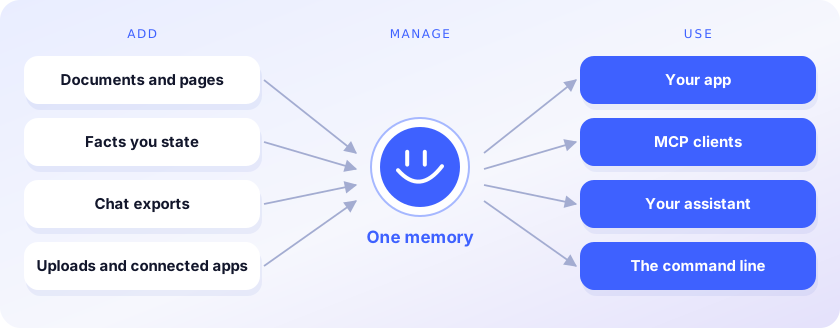
Membase is the memory layer for AI agents. It keeps one memory for everything you and your agents know, and every AI you use reads it. You stop re-explaining yourself each time you switch models or tools.
- Add. Facts, documents, web pages and chat exports from Claude or ChatGPT go into one memory.
- Manage. Memories keep projects apart; search them, ask them questions, forget what should go.
- Use. Your code, Claude Code, Cursor, Codex and ChatGPT read the same memory through the SDK or MCP.
This repository is the developer side: Python and TypeScript clients, the membase command line
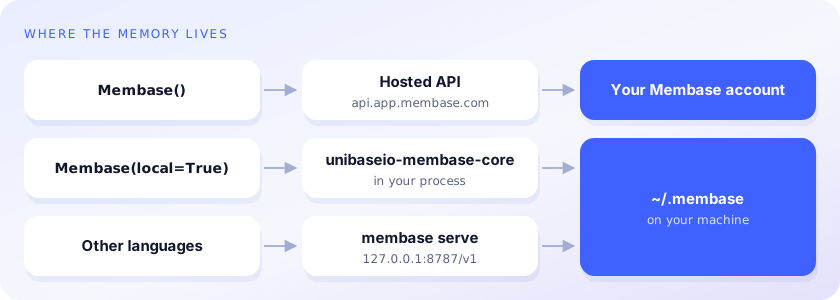
and an MCP server. The memory lives in your Membase account, which the
web app and browser extension also fill, or on your machine with
unibaseio-membase[local].
Write once, read from any AI
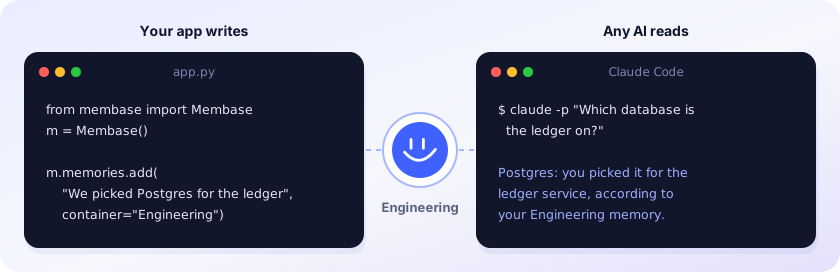
Recordings: Python SDK (57 s) · Claude Code (1 min 33 s). The answer above is illustrative.
Accuracy

93.1% on LoCoMo, 92.6% on LongMemEval_S and 92.2% on DMR, using about 3× fewer tokens than the full history on LoCoMo and 11× fewer on LongMemEval_S. Method and results: membase.com/research
Quickstart
pip install unibaseio-membase              # hosted · Python 3.10+ · needs MEMBASE_API_KEY
pip install 'unibaseio-membase[local]'     # local  · Python 3.12 or 3.13 · needs OPENAI_API_KEY
pip install 'unibaseio-membase[media]'     # local + photos, videos and audio
npm install @unibaseio/membase              # TypeScript · Node 18+
npm install -g @unibaseio/membase-cli       # the `membase` command (hosted) without Python
from membase import Membase

m = Membase()                    # hosted
# m = Membase(local=True)        # local, in ~/.membase

m.memories.add("We picked Postgres for the ledger service.")   # a fact
m.search("what database is the ledger on?")                    # {"items": [...], "partial": [...]}
m.add("Design notes …", custom_id="design-1")                   # a document
m.profile_facts.list()                                         # who the user is (Your profile ticked)
m.capabilities()                                               # what this key may do, and the rules
No call names a Memory: reads cover every Memory the key reaches, and writes land in its write
target (a key that reaches several Memories and has none is refused with WriteTargetRequiredError).
Ids are typed (mem_… a fact, doc_… a document, med_… a photo or video), lists are
{items, has_more, partial}, and a removal without confirm=True raises ConfirmationRequiredError.
Local memory answers the same routes with the same shapes.
Every method, its REST route and MCP tool, and the access it needs: SDK reference.
Upgrading from 0.3: see the changelog.
The Python package is unibaseio-membase (import membase); membase on PyPI is unrelated.
Command line
membase --local add "We picked Postgres for the ledger"
membase --local search "what did we pick for the ledger?"
membase --local memories list
membase --local ask "Which database is the ledger on?"
membase --local import ~/Downloads/claude-export.json     # Claude, ChatGPT, markdown or JSON chats
membase --local agent ingest trace.json --agent coder
membase --local agent search "fix flaky deploy" --agent coder
membase --local media add ~/Movies/trip.mp4                # shots, speech and speakers
membase --local media search "someone skiing"   # any language
Without --local (or --store DIR, both before the command) commands use the hosted API; agent,
import and serve need unibaseio-membase[local], and media add and media ask (local only)
need unibaseio-membase[media]: see Media memory. A local store
with several Memories writes where MEMBASE_WRITE_TARGET names.
MCP
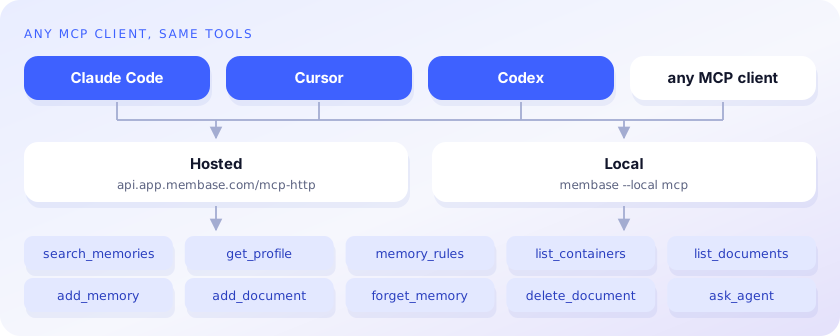
claude mcp add membase -- membase --local mcp                                   # local
claude mcp add --transport http membase https://api.app.membase.com/mcp-http \
  --header "Authorization: Bearer $MEMBASE_API_KEY"                             # hosted
Hosted without the header, the connection signs you in and is read-only. Setup for Claude, ChatGPT, Cursor, Codex and other clients: Connect your AI.
Gemini CLI, as an extension (it signs you in on first use; /mcp auth membase signs in again):
gemini extensions install https://github.com/unibaseio/membase
Cline: add the server to cline_mcp_settings.json; llms-install.md has the
entry, with and without a developer key.
Docs
- SDK reference: methods, REST routes, MCP tools, access levels
- Memory operations: Memories, facts, documents, media, profile, ask
- Authentication: keys and what each one can reach
- Connect your AI: per-client MCP setup
- Agent framework integrations: LangChain, Microsoft Agent Framework, Dify, Hermes Agent, OpenClaw and Strands Agents
- Local engine: what it stores,
membase serve, settings
License
MIT; see LICENSE. unibaseio-membase[local] also
installs unibaseio-membase-core, the compiled engine, under its own Unibase license.