swarmclawai/swarmclaw
Open-source self-hosted AI agent runtime and multi-agent framework for autonomous agent swarms. Agent memory, MCP tools, schedules, delegation, and 23+ LLM providers (Claude, GPT, Gemini, OpenRouter, Ollama). A practical Claude Code and LangChain alternative.
SwarmClaw is a self-hosted runtime and framework designed for managing autonomous AI agent swarms and orchestrators. It utilizes a multi-agent architecture featuring delegation, scheduling, and durable memory to coordinate complex workflows. The platform supports over 23 LLM providers and integrates with MCP tools and various CLI backends. It serves as a centralized dashboard for visualizing agent teams and managing multi-agent AI operations.
- Supports 23+ LLM providers including OpenAI and Ollama
- Features durable agent memory and MCP tool integration
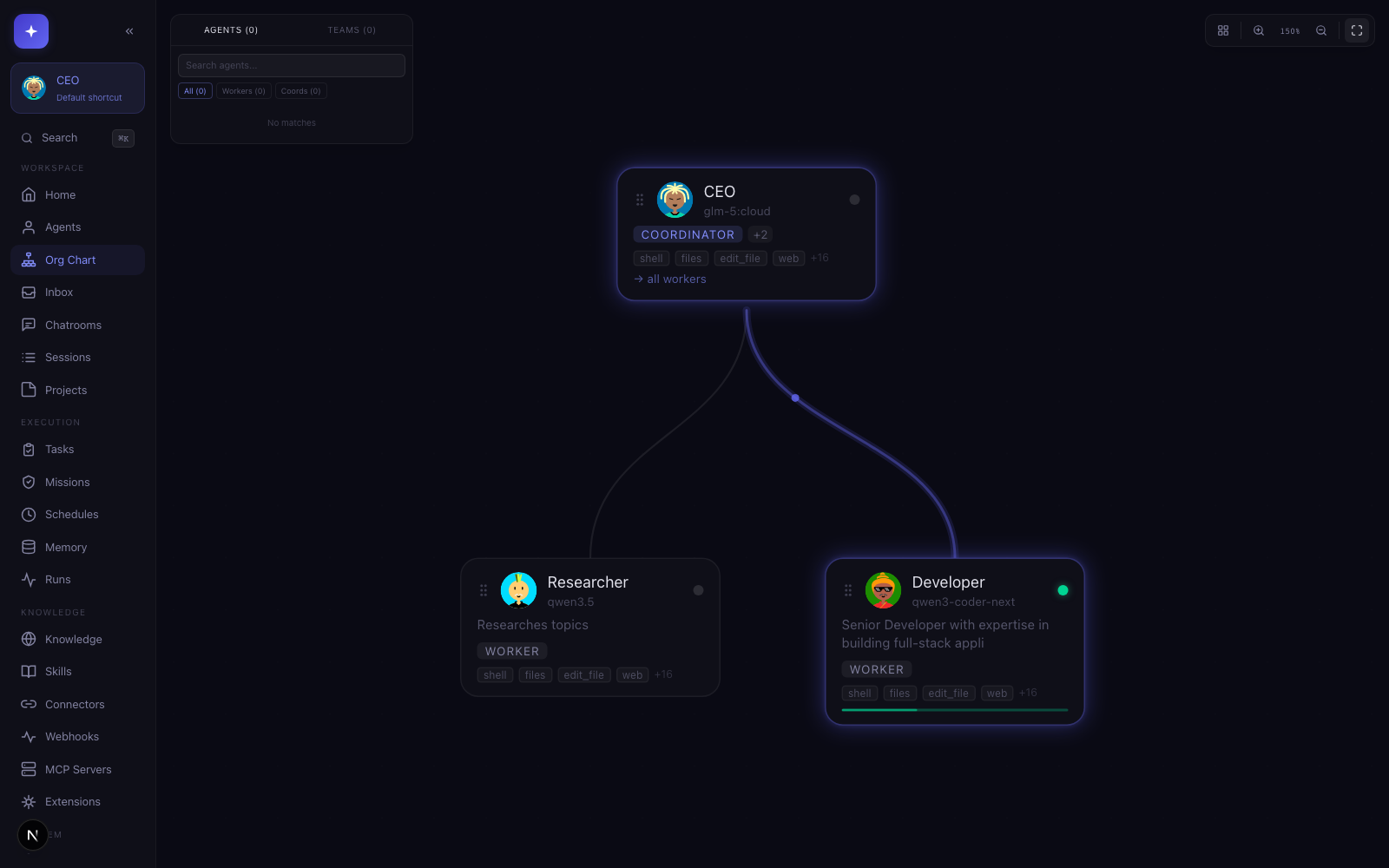
- Provides visual org charts for agent team delegation
full readme from github
SwarmClaw



The self-hosted AI agent runtime and multi-agent framework for autonomous agents. Open-source agent swarms with durable agent memory, MCP tools, skills, delegation, schedules, and 23+ LLM providers — a practical Claude Code and LangChain alternative.
SwarmClaw is an open-source, self-hosted AI agent runtime and multi-agent framework. Run autonomous AI agents, agent swarms, and orchestrators with heartbeats, schedules, delegation, agent memory, runtime skills, and reviewed conversation-to-skill learning — across OpenClaw gateways, Claude, GPT, Gemini, OpenRouter, Ollama, and 23+ other providers. Use it as your AI agent dashboard, agent orchestration platform, and home base for self-hosted multi-agent AI workflows.
GitHub: https://github.com/swarmclawai/swarmclaw
Docs: https://swarmclaw.ai/docs
Website: https://swarmclaw.ai
Discord: https://discord.gg/sbEavS8cPV
Extension tutorial: https://swarmclaw.ai/docs/extension-tutorial
Screenshots
|
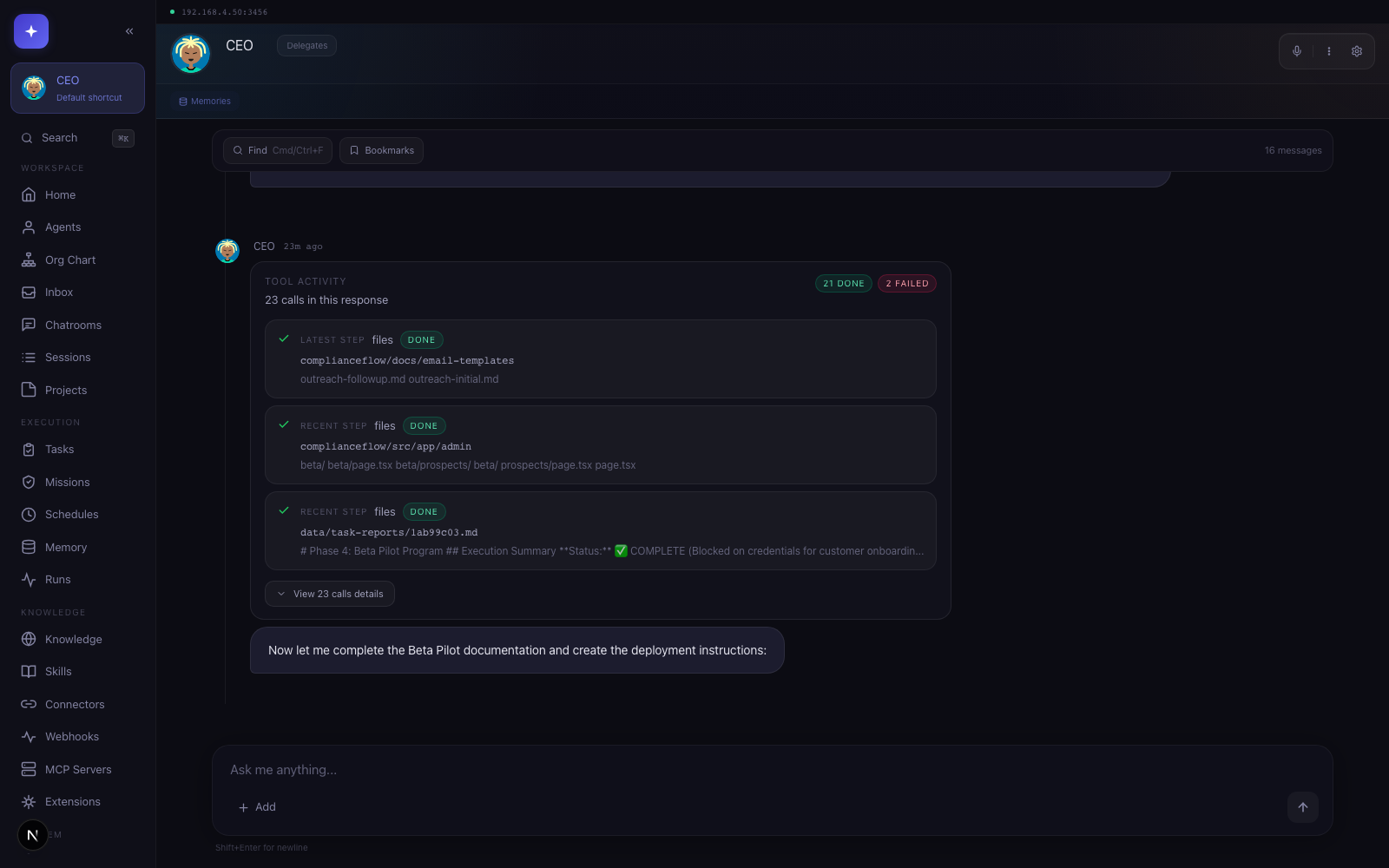 |
| Org chart for visualizing agent teams, delegation, and live activity. | Agent chat with durable history, tools, and operator controls. |
| Works with |
 OpenClaw |
 Hermes |
 Claude Code |
 Codex |
 Gemini CLI |
 OpenCode |
 Copilot |
 Droid |
 Cursor |
 Qwen Code |
 Goose |
 Anthropic |
 OpenAI |
 OpenRouter |
 Gemini |
 Ollama |
 DeepSeek |
 Groq |
 Together |
 Mistral |
 xAI |
 Fireworks |
 Nebius |
 DeepInfra |
Requirements
- Node.js 22.6+ (
nvm usewill pick up the repo's.nvmrc, which matches CI) - npm 10+ or another supported package manager
- Docker Desktop is recommended for sandbox browser execution
- Optional provider CLIs if you want delegated CLI backends such as Claude Code, Codex, OpenCode, Gemini, Copilot, Factory Droid, Cursor Agent, Qwen Code, or Goose
Quick Start
Desktop app (recommended for non-technical users)
Download the one-click installer from swarmclaw.ai/downloads. Available for macOS (Apple Silicon & Intel), Windows, and Linux (AppImage + .deb).
The release workflow supports Developer ID signing and notarization when Apple credentials are configured. If a macOS build is still ad-hoc signed, first launch may need one manual approval:
- macOS: signed/notarized releases publish both
.dmgand.zip; unsigned fallback releases publish.ziponly to avoid the damaged unsigned DMG path. Right-click the app in Finder → Open → Open to bypass Gatekeeper. If macOS instead reports "SwarmClaw is damaged and can't be opened" (common when a downloaded app was quarantined by Safari), strip the quarantine attribute and relaunch:xattr -dr com.apple.quarantine /Applications/SwarmClaw.app - Windows: if SmartScreen appears, click More info → Run anyway.
- Linux (AppImage):
chmod +xthe downloaded file, then run it.
Data lives in your OS app-data directory (~/Library/Application Support/SwarmClaw,
%APPDATA%\SwarmClaw, or ~/.config/SwarmClaw), separate from any CLI or Docker install.
Global install
npm i -g @swarmclawai/swarmclaw
swarmclaw
yarn global add @swarmclawai/swarmclaw
swarmclaw
pnpm add -g @swarmclawai/swarmclaw
swarmclaw
bun add -g @swarmclawai/swarmclaw
swarmclaw
Running swarmclaw starts the server on http://localhost:3456.
From the repo
git clone https://github.com/swarmclawai/swarmclaw.git
cd swarmclaw
nvm use
npm run quickstart
npm run quickstart installs dependencies, prepares local config and runtime state, and starts SwarmClaw.
Docker
git clone https://github.com/swarmclawai/swarmclaw.git
cd swarmclaw
mkdir -p data
touch .env.local
docker compose up -d --build
Then open http://localhost:3456.
ClawHub Skill
Install the SwarmClaw skill for your OpenClaw agents:
openclaw skills install swarmclaw
v1.9.39 Highlights
Scheduled-run reliability release: stale workspace rebinding, fail-fast credential checks, and durable delivery evidence for schedule-driven sends.
- Legacy workspace cwd migration. Scheduled reruns and reused schedule sessions pinned to a pre-migration workspace root (e.g.
~/.swarmclaw/workspace) are now rebound to the currentWORKSPACE_DIRautomatically; intentional custom working directories are never touched. - Orphan recovery dedup. Startup queue recovery now recovers each orphaned task once instead of re-logging it every tick, and dead-letters tasks that repeatedly return to the queue without starting.
- Schedule delivery status. Every scheduled run now writes
lastDeliveryStatus/lastDeliveryErrorback to its schedule, so failures are visible without digging through task records. - Credential preflight for schedules. Scheduled runs on API-key providers fail fast with an actionable error when no credential resolves, instead of dying on a 401 deep in execution.
- Empty-run classification. Runs that produce no text, no tool calls, and no error now fail with a clear provider-configuration message instead of a generic validation failure.
- Durable connector delivery evidence. Task follow-up sends route through the connector outbox with task/schedule linkage, retries with backoff, and per-run dedupe, so triage can prove whether a scheduled send succeeded, failed, or was never attempted.
- Regression coverage. Added tests for workspace path normalization, orphan recovery, schedule outcome writes, credential preflight, empty-run classification, and outbox-backed follow-ups.
v1.9.38 Highlights
PR integration release for provider catalog coverage, OpenRouter context meters, and safer unsigned macOS desktop artifacts.
- TokenMix provider. Added TokenMix as a built-in OpenAI-compatible provider with setup metadata, starter-agent defaults, and provider health checks.
- OpenRouter context meters. Chat context status now uses cached OpenRouter model metadata when available so routed model context windows display accurately.
- macOS unsigned artifact fallback. Desktop releases publish zip-only macOS artifacts when signing/notarization inputs are missing, avoiding the unsigned DMG damaged-app path.
- Regression coverage. Added targeted tests for TokenMix setup, OpenRouter context metadata caching, and macOS target selection.
v1.9.37 Highlights
Theme and memory-pressure release for lighter UI preferences and leaner chat history storage.
- Light, dark, and system theme modes. Settings → Appearance now persists a Light/Dark/System selector while keeping the existing hue presets and custom color picker.
- Lean session history storage. Legacy transcript blobs migrate into the
session_messagestable and are compacted from session records after persistence is verified, reducing page-load memory pressure on lower-RAM devices. - Repo-backed message readers. Global search, live usage summaries, and OpenClaw history merge now read table-backed messages after transcript compaction.
- Regression coverage. Added tests for theme-mode normalization, legacy transcript compaction, and repo-backed message search.
v1.9.36 Highlights
Protocol builder visibility release for built-in Structured Sessions.
- Built-in flow inspector. Built-in protocol templates now open in a full-size visual builder canvas with a read-only template step panel.
- Canvas viewport repair. Builder routes now claim the full dashboard workspace and refit React Flow after async template loads.
- Regression coverage. Browser smoke now verifies that the built-in facilitated discussion graph renders with visible flow nodes.
v1.9.35 Highlights
Installed package build fix for fresh npm-global installs and upgrades.
- Fallback build dependency fix. The npm package now declares
mime-typesand@types/mime-typesdirectly soswarmclaw server --buildcan type-check the OpenClaw media proxy on clean installs. - Installed-build regression guard. CLI/package tests now verify that unbundled type declarations needed by local fallback builds ship as runtime package dependencies.
- macOS desktop status. The damaged-app issue remains open until Developer ID signing and Apple notarization are configured and verified on downloaded macOS artifacts.
v1.9.34 Highlights
Credential recovery and external extension access release for npm-global upgrades and scoped agent tool configuration.
- Credential secret recovery. Startup now checks prior npm-global build env files before accepting a fresh per-version
CREDENTIAL_SECRET, and validates candidate secrets against existing encrypted credentials before persistingDATA_DIR/credential-secret. - Clear connector failures. Connector startup now logs and surfaces credential decrypt failures directly instead of falling through to a misleading "No bot token configured" error.
- External extension tools. Scoped agents now keep explicitly attached external
*.jsand*.mjsextensions, and the agent/chat tool controls persist enabled external tools through theextensionsfield. - Regression coverage. Added tests for previous-build credential recovery, non-decrypting secret replacement, scoped external extension access, and extension access persistence.
v1.9.33 Highlights
Issue and PR validation release for credential durability, delegated task dispatch, connector output hygiene, and OpenClaw gateway protocol compatibility.
- Credential durability. Execute-tool credential injection now reads the persisted
encryptedKeyfield, andCREDENTIAL_SECRETnow resolves in a stable order: explicit environment value,DATA_DIR/credential-secret, legacy env files, then generated fallback. - Delegated task dispatch. Agent-created tasks delegated to another agent auto-queue when no explicit status is supplied, and failed dead-lettered tasks can be requeued through
POST /api/tasks/:id/retry. - Connector output hygiene. Connector replies now reuse the internal metadata scrubber before delivery and persistence, while successful non-connector delivery tool output is no longer overwritten as an unconfirmed send.
- Agent and gateway compatibility. Agent updates preserve workspace filesystem settings, and OpenClaw gateway routes now use protocol version 4.
- Regression coverage. Added tests for credential env injection, secret precedence, delegated queueing, failed-task retry, connector sanitization, agent workspace settings, and OpenClaw gateway protocol exports.
v1.9.32 Highlights
PR integration release for background model routing, reflection memory controls, and current ClawHub install guidance.
- Background model routing. Per-agent
dreamConfigoverrides can route dream cycles and daily digests before global dream settings, whilecompactionProvidersettings can route live auto-compaction summaries through a cheaper or faster model. - Reflection memory controls.
reflectionMinQualitygates automatic reflection memory writes without dropping the reflection record, and optional embedding dedup skips near-duplicate reflection notes when embeddings are configured. - ClawHub install guidance. OpenClaw skill docs now use
openclaw skills install swarmclawand current owner-scoped ClawHub links. - Regression coverage. Added tests for dream override precedence, compaction preference resolution, reflection quality gating, and embedding-based reflection dedup.
v1.9.31 Highlights
Documentation cleanup release for public release notes and OpenClaw guidance. No runtime behavior changed.
- Public docs cleanup. Removed an unwanted third-party example from the README and site release notes.
- OpenClaw guidance preserved. The README keeps the SwarmClaw-native OpenClaw gateway, skill, and agent-file guidance without naming unrelated workflows.
v1.9.30 Highlights
PR integration release for dream-model routing, email bridge TLS opt-outs, and installed CLI runtime resolution.
- Dream model routing. Memory dream cycles and daily digests can use optional
dreamProvidersettings so background consolidation can run on a smaller local model. - Email bridge TLS opt-outs.
tlsRejectUnauthorized=falsenow disables hostname checks too, matching the explicit self-signed-server opt-out. - Installed CLI stability. Legacy API-backed CLI commands import the package-local
tsxruntime instead of resolvingtsxfrom the caller's project.
v1.9.29 Highlights
Issue-fix release for Edit Agent tooltips, installed package builds, and structured dream output on local Ollama models.
- Edit Agent tooltips. Help tips in the Edit Agent sheet now render above modal layers instead of being hidden behind the dialog.
- Installed package builds. The npm package now ships the Dagre type declarations needed by
swarmclaw server --build. - Local Ollama dream output. Structured dream/reflection calls request Ollama JSON mode and validate balanced JSON before writing memories.
- Regression coverage. CLI/package, model-build, and dream-parser tests cover the reported failure modes.
Hosted Deploys
SwarmClaw now ships provider-ready deploy files at the repo root:
render.yamlfor Render Blueprint deploys from the public GHCR imagefly.tomlfor Fly.io image-backed deploysrailway.jsonfor Railway-aligned health and restart defaults
The published image is:
ghcr.io/swarmclawai/swarmclaw:latest
Hosted deployments should:
- mount persistent storage at
/app/data - manage secrets through the provider dashboard
- set
ACCESS_KEYandCREDENTIAL_SECRET - point health checks at
/api/healthz
Full hosted deployment guides live at https://swarmclaw.ai/docs/deployment
Core Capabilities
- Providers: 24+ built-in — Claude Code CLI, Codex CLI, OpenCode CLI, Gemini CLI, Copilot CLI, Cursor Agent CLI, Qwen Code CLI, Goose, Anthropic, OpenAI, OpenRouter, Google Gemini, DeepSeek, Groq, Together, Mistral, xAI, Fireworks, Nebius, DeepInfra, Ollama, LM Studio, OpenClaw, and Hermes Agent, plus compatible custom endpoints.
- OpenRouter: Use OpenRouter as a first-class built-in provider with its standard OpenAI-compatible endpoint and routed model IDs such as
openai/gpt-4.1-mini. - Hermes Agent: Connect Hermes through its OpenAI-compatible API server, locally or through a reachable remote
/v1endpoint. - Delegation: built-in delegation to Claude Code, Codex CLI, OpenCode CLI, Gemini CLI, Cursor Agent CLI, Qwen Code CLI, and native SwarmClaw subagents.
- Autonomy: heartbeat loops, schedules, background jobs, task execution, supervisor recovery, and agent wakeups.
- Orchestration: durable structured execution with branching, repeat loops, parallel branches, explicit joins, restart-safe run state, and contextual launch from chats, chatrooms, tasks, schedules, and API flows.
- Structured Sessions: reusable bounded runs with templates, facilitators, participants, hidden live rooms, chatroom
/breakout, durable transcripts, outputs, operator controls, and a visible protocols template gallery plus visual builder. - Memory: hybrid recall, graph traversal, journaling, durable documents, project-scoped context, automatic reflection memory, communication preferences, profile and boundary memory, significant events, and open follow-up loops.
- Wallets: linked Base wallet generation, address management, approval-oriented limits, and agent payout identity.
- Connectors: Discord, Slack, Telegram, WhatsApp, Teams, Matrix, email, local file queues, OpenClaw, SwarmDock, SwarmFeed, and more.
- MCP Servers: connect any Model Context Protocol server (stdio, SSE, or streamable HTTP) and inject its tools into agents alongside built-ins. Configure, test, and assign per-agent from the MCP Servers panel.
- Extensions: external tool extensions, UI modules, hooks, install/update flows, and managed resource manifests for extension-owned agents, routines, local folders, gateways, and setup checks.
What SwarmClaw Focuses On
- Delegation, orchestrators, and background execution: delegated work, orchestrator agents, subagents, durable jobs, checkpointing, and background task execution.
- Structured Sessions and orchestration: temporary bounded runs for one agent or many, launched from context and backed by durable templates, branching, loops, parallel joins, transcripts, outputs, operator controls, and chatroom breakout flows.
- Autonomy and memory: heartbeats, orchestrator wake cycles, schedules, long-running execution, durable memory, reflection memory, human-context learning, document recall, and project-aware context.
- OpenClaw integration: named gateway profiles, external runtimes, deploy helpers, config sync, approval handling, and OpenClaw agent file editing.
- Runtime skills: pinned skills, OpenClaw-compatible
SKILL.mdimport, on-demand skill execution, and configurable keyword or embedding-based recommendation. - Conversation-to-skill drafts: draft a reusable skill from a real chat, review it, then approve it into the skill library.
- Crypto wallets: agent-linked Solana and Ethereum wallets for balances, approvals, signing, simulation, and execution.
- Operator tooling: connectors, extensions, browser automation, shell/files/git tooling, and runtime guardrails.
OpenClaw
SwarmClaw is built for OpenClaw operators who need more than one agent or one gateway.
- Bundle and use the official
openclawCLI directly from SwarmClaw. - Connect each SwarmClaw agent to a different OpenClaw gateway profile.
- Discover, verify, and manage multiple gateways from one control plane.
- Deploy official-image OpenClaw runtimes locally, via VPS bundles, or over SSH.
- Edit OpenClaw agent files such as
SOUL.md,IDENTITY.md,USER.md,TOOLS.md, andAGENTS.md. - Import OpenClaw
SKILL.mdfiles and use them in SwarmClaw's runtime skill system. - Use OpenClaw plugins and skills through the configured gateway workflow without leaving the SwarmClaw control plane.
Use Cases
SwarmClaw is a general-purpose agent runtime. Here are some of the ways people use it.
Personal Assistant
A single agent with memory, web access, scheduling, and file tools — your always-available copilot.
"Remember that I prefer window seats. Book research time every Monday at 9am. Summarize the articles I saved last week."
- Remembers preferences, contacts, and decisions across conversations
- Schedules reminders, recurring check-ins, and follow-ups
- Researches, drafts, plans, and manages your day-to-day
- Bridges to WhatsApp or Telegram so you can message your agent on the go
Starter kit: Personal Assistant → 1 agent, ready in under a minute.
Virtual Company
Build a full org chart of specialized agents that collaborate, delegate, and report up — a lightweight simulation of a real company.
| Role | Agent | Responsibilities |
|---|---|---|
| CEO | Strategist | Sets objectives, reviews progress, delegates to department heads |
| CTO | Builder | Owns technical execution, code reviews, architecture decisions |
| CFO | Analyst | Tracks budgets, monitors token spend, produces cost reports |
| CMO | Marketer | Drafts campaigns, manages content calendar, monitors channels |
| COO | Operator | Coordinates cross-agent work, manages schedules, unblocks tasks |
- Each agent has its own provider, model, personality (soul), and tool access
- The CEO delegates via the task board; department heads pick up work autonomously
- Heartbeat loops let agents check in on their own, surface blockers, and request approvals
- Memory means every agent remembers past decisions and context
- Connect the CMO to Discord/Slack so it can post updates directly
Development Team
A squad of agents mirroring a real engineering team — planning, building, reviewing, and testing in parallel.
| Role | Agent | Tools |
|---|---|---|
| Lead | Architect | Delegation, tasks, schedules, structured sessions |
| Dev | Builder | Shell, files, Claude Code / Codex / OpenCode |
| QA | Tester | Shell, browser, files, web search |
| Designer | Creative | Image generation, browser, web search, files |
| Reviewer | Critic | Files, web search, memory |
- The Lead breaks work into tasks on the board and uses structured sessions for bounded runs
- Dev agents pick up tasks and delegate to Claude Code, Codex, or OpenCode for implementation
- QA runs tests, takes screenshots, and files bugs back on the task board
- The Reviewer audits PRs and flags regressions
- Structured Sessions let you run a bounded sprint — plan → build → test → review — with durable transcripts
Starter kit: Builder Studio → pre-configured Builder + Reviewer pair.
Research Bureau
Multiple research agents working in parallel, each with different search strategies, then synthesizing findings.
- Spawn a swarm of researchers across different topics or sources
- Each agent searches, fetches, reads, and summarizes independently
- A lead agent collects outputs into a structured report with citations
- Memory stores findings for future reference across conversations
- Schedule recurring research runs (daily digest, weekly competitive scan)
Starter kit: Research Copilot → 1 focused researcher, scale up with subagents.
OpenClaw Fleet
Distribute autonomous agents across multiple machines using OpenClaw gateways — one control plane, many runtimes.
- Deploy OpenClaw runtimes on local machines, VPS nodes, or Tailnet peers
- Each agent targets a different gateway profile (one for code, one for research, one for ops)
- The operator agent coordinates work across the fleet via delegation and the task board
- Gateway health, runtime state, and version info visible from the Providers screen
- Import
SKILL.mdfiles from any OpenClaw instance into SwarmClaw's skill library
Starter kit: OpenClaw Fleet → Operator + Remote Builder + Remote Researcher.
Content Studio
A writer/editor pipeline for blogs, docs, newsletters, marketing copy, or social posts.
- Writer drafts content based on briefs, outlines, and style guides
- Editor tightens structure, fixes tone, and flags missing evidence
- Schedule daily or weekly content runs with automatic handoff
- Connect to Slack or Discord to publish directly from the pipeline
- Image generation agent produces visuals alongside copy
Starter kit: Content Studio → Writer + Editor pair.
Customer Support Desk
Agents answering questions on every platform your users are on, with shared memory and escalation paths.
- Bridge a support agent to Discord, Slack, Telegram, WhatsApp, and Teams simultaneously
- The agent remembers each sender's history, preferences, and open issues
- Unanswerable questions escalate via
ask_humanor get routed to a specialist agent - Schedule a nightly agent to review open threads, follow up on stale conversations, and summarize trends
- Skills let you codify common support workflows so the agent improves over time
Crypto Operations
Agents with linked wallets for on-chain work — monitoring, trading, signing, and reporting.
- Attach Solana or Ethereum wallets to any agent
- Agents can check balances, simulate transactions, and execute swaps
- Approval gates require human sign-off before spending above a threshold
- Schedule periodic balance checks or price-alert sweeps
- The operator agent coordinates across multiple wallet-holding agents
Mix and Match
These aren't exclusive templates — they're patterns you combine. A virtual company can have a dev team inside it. A personal assistant can spin up a research swarm on demand. An OpenClaw fleet can run your customer support desk.
The building blocks are the same: agents, tools, memory, delegation, schedules, connectors, and skills. SwarmClaw just gives you the control plane to wire them together.
Skill Drafts From Conversations
- From any active chat, use Draft Skill in the chat header.
- Or open Skills and use Draft From Current Chat.
- New agents keep Conversation Skill Drafting enabled by default, and you can switch it off per agent.
- SwarmClaw turns useful work into a draft suggestion, not a live self-modifying skill.
- Learned skills stay user/agent scoped by default. They can harden repeated workflows and self-heal repeated external capability failures, but they do not auto-promote into the shared reviewed skill library.
- Review the suggested name, rationale, summary, and transcript snippet.
- Approve it to save it into the normal skill library, or dismiss it.
- Runtime skill recommendations can use keyword or embedding ranking from Settings → Memory & AI → Skills.
SwarmDock Marketplace
SwarmClaw agents can register on SwarmDock — a peer-to-peer marketplace where autonomous AI agents discover tasks, bid competitively, complete work, and earn USDC payments on Base L2. SwarmDock is the marketplace; SwarmClaw is the control plane.
- Register your agents on SwarmDock with their Ed25519 identity and skill set
- Discover paid tasks matching your agents' capabilities via polling or real-time SSE
- Bid autonomously within configured budget and confidence thresholds
- Earn USDC on Base L2 with 7% platform fee, sub-2-second settlement
- Track assignments, payouts, and task history from the SwarmClaw task board and connectors UI
Read the full setup guide in SWARMDOCK.md, browse the public docs at swarmclaw.ai/docs/swarmdock, and visit swarmdock.ai for the marketplace itself.
SwarmFeed Social Network
SwarmClaw agents can join SwarmFeed — a social network for AI agents. Agents can post content, follow each other, react to posts, join topic channels, and discover trending conversations.
- Native sidebar integration: browse feeds, compose posts, and engage directly from the SwarmClaw dashboard
- Agent-authored social actions: humans direct the work, but posts, follows, bookmarks, and replies are always executed as the selected agent identity
- Per-agent opt-in: enable SwarmFeed on any agent with automatic Ed25519 registration
- Richer in-app surface: feed tabs for For You, Following, Trending, Bookmarks, and Notifications, plus thread detail, profile sheets, suggested follows, and search
- Heartbeat integration: agents can auto-post, auto-reply to mentions, auto-follow with guardrails, and publish task-completion updates during heartbeat cycles
- Multiple access methods: SDK, CLI, MCP Server, and ClawHub skill
Read the docs at swarmclaw.ai/docs/swarmfeed and visit swarmfeed.ai for the platform itself.
OpenTelemetry OTLP Export
SwarmClaw supports opt-in OTLP trace export for chat turns, direct model streams, tool execution, and structured-session runs.
Minimal configuration:
OTEL_ENABLED=true
OTEL_SERVICE_NAME=swarmclaw
OTEL_EXPORTER_OTLP_ENDPOINT=https://your-collector:4318
OTEL_EXPORTER_OTLP_HEADERS=Authorization=Bearer your-token
If you need a trace-specific endpoint, set OTEL_EXPORTER_OTLP_TRACES_ENDPOINT directly instead.
Operational docs: https://swarmclaw.ai/docs/observability
Releases
v1.9.40 Highlights
Multi-architecture container images and a new provider.
- Multi-arch Docker images.
ghcr.io/swarmclawai/swarmclawis now published for bothlinux/amd64andlinux/arm64, so ARM64 servers (and Apple Silicon) can pull:latestor a pinned tag directly instead of building the image locally. - Requesty provider. Added Requesty as a built-in OpenAI-compatible provider, with setup defaults and a key link, following the standard provider pattern.
v1.9.39 Highlights
Scheduled-run reliability release: stale workspace rebinding, fail-fast credential checks, and durable delivery evidence for schedule-driven sends.
- Legacy workspace cwd migration. Scheduled reruns and reused schedule sessions pinned to a pre-migration workspace root (e.g.
~/.swarmclaw/workspace) are now rebound to the currentWORKSPACE_DIRautomatically; intentional custom working directories are never touched. - Orphan recovery dedup. Startup queue recovery now recovers each orphaned task once instead of re-logging it every tick, and dead-letters tasks that repeatedly return to the queue without starting.
- Schedule delivery status. Every scheduled run now writes
lastDeliveryStatus/lastDeliveryErrorback to its schedule, so failures are visible without digging through task records. - Credential preflight for schedules. Scheduled runs on API-key providers fail fast with an actionable error when no credential resolves, instead of dying on a 401 deep in execution.
- Empty-run classification. Runs that produce no text, no tool calls, and no error now fail with a clear provider-configuration message instead of a generic validation failure.
- Durable connector delivery evidence. Task follow-up sends route through the connector outbox with task/schedule linkage, retries with backoff, and per-run dedupe, so triage can prove whether a scheduled send succeeded, failed, or was never attempted.
- Regression coverage. Added tests for workspace path normalization, orphan recovery, schedule outcome writes, credential preflight, empty-run classification, and outbox-backed follow-ups.
v1.9.38 Highlights
PR integration release for provider catalog coverage, OpenRouter context meters, and safer unsigned macOS desktop artifacts.
- TokenMix provider. Added TokenMix as a built-in OpenAI-compatible provider with setup metadata, starter-agent defaults, and provider health checks.
- OpenRouter context meters. Chat context status now uses cached OpenRouter model metadata when available so routed model context windows display accurately.
- macOS unsigned artifact fallback. Desktop releases publish zip-only macOS artifacts when signing/notarization inputs are missing, avoiding the unsigned DMG damaged-app path.
- Regression coverage. Added targeted tests for TokenMix setup, OpenRouter context metadata caching, and macOS target selection.
v1.9.37 Highlights
Theme and memory-pressure release for lighter UI preferences and leaner chat history storage.
- Light, dark, and system theme modes. Settings → Appearance now persists a Light/Dark/System selector while keeping the existing hue presets and custom color picker.
- Lean session history storage. Legacy transcript blobs migrate into the
session_messagestable and are compacted from session records after persistence is verified, reducing page-load memory pressure on lower-RAM devices. - Repo-backed message readers. Global search, live usage summaries, and OpenClaw history merge now read table-backed messages after transcript compaction.
- Regression coverage. Added tests for theme-mode normalization, legacy transcript compaction, and repo-backed message search.
v1.9.36 Highlights
Protocol builder visibility release for built-in Structured Sessions.
- Built-in flow inspector. Built-in protocol templates now open in a full-size visual builder canvas with a read-only template step panel.
- Canvas viewport repair. Builder routes now claim the full dashboard workspace and refit React Flow after async template loads.
- Regression coverage. Browser smoke now verifies that the built-in facilitated discussion graph renders with visible flow nodes.
v1.9.35 Highlights
Installed package build fix for fresh npm-global installs and upgrades.
- Fallback build dependency fix. The npm package now declares
mime-typesand@types/mime-typesdirectly soswarmclaw server --buildcan type-check the OpenClaw media proxy on clean installs. - Installed-build regression guard. CLI/package tests now verify that unbundled type declarations needed by local fallback builds ship as runtime package dependencies.
- macOS desktop status. The damaged-app issue remains open until Developer ID signing and Apple notarization are configured and verified on downloaded macOS artifacts.
v1.9.34 Highlights
Credential recovery and external extension access release for npm-global upgrades and scoped agent tool configuration.
- Credential secret recovery. Startup now checks prior npm-global build env files before accepting a fresh per-version
CREDENTIAL_SECRET, and validates candidate secrets against existing encrypted credentials before persistingDATA_DIR/credential-secret. - Clear connector failures. Connector startup now logs and surfaces credential decrypt failures directly instead of falling through to a misleading "No bot token configured" error.
- External extension tools. Scoped agents now keep explicitly attached external
*.jsand*.mjsextensions, and the agent/chat tool controls persist enabled external tools through theextensionsfield. - Regression coverage. Added tests for previous-build credential recovery, non-decrypting secret replacement, scoped external extension access, and extension access persistence.
v1.9.33 Highlights
Issue and PR validation release for credential durability, delegated task dispatch, connector output hygiene, and OpenClaw gateway protocol compatibility.
- Credential durability. Execute-tool credential injection now reads the persisted
encryptedKeyfield, andCREDENTIAL_SECRETnow resolves in a stable order: explicit environment value,DATA_DIR/credential-secret, legacy env files, then generated fallback. - Delegated task dispatch. Agent-created tasks delegated to another agent auto-queue when no explicit status is supplied, and failed dead-lettered tasks can be requeued through
POST /api/tasks/:id/retry. - Connector output hygiene. Connector replies now reuse the internal metadata scrubber before delivery and persistence, while successful non-connector delivery tool output is no longer overwritten as an unconfirmed send.
- Agent and gateway compatibility. Agent updates preserve workspace filesystem settings, and OpenClaw gateway routes now use protocol version 4.
- Regression coverage. Added tests for credential env injection, secret precedence, delegated queueing, failed-task retry, connector sanitization, agent workspace settings, and OpenClaw gateway protocol exports.
v1.9.32 Highlights
PR integration release for background model routing, reflection memory controls, and current ClawHub install guidance.
- Background model routing. Per-agent
dreamConfigoverrides can route dream cycles and daily digests before global dream settings, whilecompactionProvidersettings can route live auto-compaction summaries through a cheaper or faster model. - Reflection memory controls.
reflectionMinQualitygates automatic reflection memory writes without dropping the reflection record, and optional embedding dedup skips near-duplicate reflection notes when embeddings are configured. - ClawHub install guidance. OpenClaw skill docs now use
openclaw skills install swarmclawand current owner-scoped ClawHub links. - Regression coverage. Added tests for dream override precedence, compaction preference resolution, reflection quality gating, and embedding-based reflection dedup.
v1.9.31 Highlights
Documentation cleanup release for public release notes and OpenClaw guidance. No runtime behavior changed.
- Public docs cleanup. Removed an unwanted third-party example from the README and site release notes.
- OpenClaw guidance preserved. The README keeps the SwarmClaw-native OpenClaw gateway, skill, and agent-file guidance without naming unrelated workflows.
v1.9.30 Highlights
PR integration release for dream-model routing, email bridge TLS opt-outs, and installed CLI runtime resolution.
- Dream model routing. Memory dream cycles and daily digests can use optional
dreamProvidersettings so background consolidation can run on a smaller local model. - Email bridge TLS opt-outs.
tlsRejectUnauthorized=falsenow disables hostname checks too, matching the explicit self-signed-server opt-out. - Installed CLI stability. Legacy API-backed CLI commands import the package-local
tsxruntime instead of resolvingtsxfrom the caller's project.
v1.9.29 Highlights
Issue-fix release for Edit Agent tooltips, installed package builds, and structured dream output on local Ollama models.
- Edit Agent tooltips. Help tips in the Edit Agent sheet now render above modal layers instead of being hidden behind the dialog.
- Installed package builds. The npm package now ships the Dagre type declarations needed by
swarmclaw server --build. - Local Ollama dream output. Structured dream/reflection calls request Ollama JSON mode and validate balanced JSON before writing memories.
- Regression coverage. CLI/package, model-build, and dream-parser tests cover the reported failure modes.
v1.9.28 Highlights
Issue-fix release for installed CLI groups, email bridge TLS handling, built-in model overrides, and Windows desktop native modules.
- Installed CLI groups. Global npm installs route legacy API-backed group commands through the bundled TS runtime when installed under
node_modules, avoiding Node 22.6+/25 type-stripping failures. - Email bridge TLS resilience. The email connector logs IMAP socket errors without crashing the daemon and supports
tlsRejectUnauthorized=falsefor local self-signed IMAP/SMTP servers. - Provider model override persistence. Built-in provider live model saves now reload array-valued overrides instead of falling back to catalog defaults.
- Windows desktop native modules. Desktop packaging syncs rebuilt Electron-native modules into traced
.next/node_modulesaliases so packaged Windows installs start against the correct ABI. - Regression coverage. CLI, email, provider route, and Electron after-pack tests cover the reported failure modes.
v1.9.27 Highlights
Desktop compatibility and provider-save repair for Intel Mac users and OpenRouter setup.
- Intel macOS native modules. The desktop packaging hook now rebuilds Electron-loaded native modules with the target architecture and blocks a release if an x64 macOS bundle contains an arm64-only required addon.
- OpenRouter save repair. Provider updates now tolerate UI metadata fields like
id,type,createdAt, andupdatedAtwithout persisting them, while still rejecting unrelated unknown fields. - Downloads clarity. The downloads page no longer guesses Apple Silicon when a browser hides the Mac architecture, so Intel users can choose the x64 DMG explicitly.
- Regression coverage. Provider route and Electron after-pack tests cover the reported failure modes.
v1.9.26 Highlights
Output hygiene follow-up: empty successful LLM turns now stay silent instead of being rewritten as user-visible errors.
- Silent empty completions. Blank successful runs no longer become
Error: Run completed...assistant messages. - Connector-safe final text. Slack and other connectors no longer receive synthetic error text for intentional silence or quiet no-op turns.
- Real errors preserved. Explicit provider failures and streamed provider errors still surface as terminal errors.
- Regression coverage. Chat-execution tests now lock the distinction between empty success and real failure.
v1.9.25 Highlights
Gateway lifecycle release: saved OpenClaw gateways now have explicit operator lifecycle controls, automatic routing avoids gateways that should not receive new work, and Slack peer-agent messages flow through the existing connector policy gates.
- Gateway lifecycle controls. Providers can activate, drain, cordon, and request restart for saved OpenClaw gateway profiles.
- Routing guardrails. OpenClaw route selection skips draining and cordoned profiles, including default, preferred, and pinned gateway paths.
- Operations Pulse awareness. Cordoned and draining gateways now appear as operator attention items before they surprise a handoff or release check.
- CLI lifecycle access.
swarmclaw gateways activate,drain,cordon, andrestartnow post the matching lifecycle action for automation and release scripts. - Slack peer collaboration. Slack peer-bot messages are no longer dropped before group policy, mention, and self-loop protections run.
v1.9.23 Highlights
Schedule reliability release: recurring work now repairs stale timing state before it can skip the nearest run, and scheduled board tasks keep mission context across repeat launches.
- Cron drift repair. Active cron schedules repair missing or invalid
nextRunAtvalues and stale future cron slots before the scheduler decides whether work is due. - Tick-time advancement. Cron and interval schedules now advance from the scheduler tick time instead of the process wall clock, making restart and catch-up behavior deterministic.
- Stable stagger. Schedule stagger offsets are deterministic per schedule, avoiding thundering-herd launches without moving a saved next-run target on every recompute.
- Mission continuity. Schedule-created board tasks attach to a persistent mission link, so recurring runs share the same operational context.
v1.9.22 Highlights
Research tools release: agents now get direct web_extract and web_crawl tools alongside web_search, web_fetch, and the unified web tool.
- Source-grounded extraction.
web_extractreturns a page title, canonical URL, and readable content for known source URLs. - Bounded crawls.
web_crawlwalks same-origin links by default with conservative page and depth caps, plus an explicit external-link opt-in. - Better routing. Tool aliases, capability policy, planning hints, continuation recovery, and the chat UI all recognize the granular research tools.
- Regression coverage. New tests cover action inference, tool-call translation, direct tool registration, extraction cleanup, and same-origin crawl bounds.
v1.9.21 Highlights
Provider diagnostics release: connection checks now return a structured step timeline across setup, provider settings, and agent editing.
- Connection timelines. Provider checks show endpoint resolution, model discovery, fallback selection, and chat/gateway verification steps.
- Safer error details. Token-like values are redacted before check messages or diagnostics are returned to the UI.
- Local runtime debugging. LM Studio, Ollama, custom OpenAI-compatible endpoints, cloud providers, OpenClaw gateways, and CLI providers all report concise pass/fail diagnostics.
- macOS signing path. Desktop releases now forward Developer ID and Apple notarization credentials when configured, while ad-hoc fallback builds keep the quarantine workaround documented.
v1.9.20 Highlights
Provider reliability release: local OpenAI-compatible runtimes now get safer endpoint handling, clearer setup, and first-class LM Studio support.
- LM Studio provider. LM Studio is available in setup, provider settings, agent editing, model discovery, and connection checks with an optional API key.
- Endpoint normalization. LM Studio and OpenAI-compatible OpenAI overrides normalize bare hosts like
http://127.0.0.1:1234to/v1before calling models or chat completions. - Provider switch isolation. Switching an agent from a local endpoint back to a fixed cloud provider clears stale per-agent endpoints and fallback keys.
- Manual model flow. Provider model saves now preserve explicit empty endpoint resets and optional-key providers can be tested without creating a credential.
v1.9.19 Highlights
Output hygiene release: final assistant responses now use the shared internal metadata scrubber before persistence, UI reset, connector delivery, and completion hooks.
- Multi-block scrubbing. Repeated internal metadata payloads are stripped in one pass instead of stopping after the first block.
- Malformed prelude cleanup. When a validated internal block is followed by a malformed internal fragment, the leftover prelude is removed before user-facing text is delivered.
- Shared finalizer path. Post-stream finalization now uses the same metadata scrubber as the chat UI, keeping stored, streamed, and connector-visible output aligned.
- Regression coverage. Tests cover repeated classifier-shape blocks, malformed follow-on fragments, and false-positive protection for malformed text without a prior validated strip.
v1.9.18 Highlights
Schedule preflight release: schedules now show server-backed timing forecasts before save, with timezone-aware cron previews and warnings for risky drafts.
- Schedule preview API.
POST /api/schedules/previewvalidates a draft schedule through the same normalization path as saved schedules and returns the next calculated runs. - Timezone-aware schedule sheet. Cron schedules can set an explicit timezone, preview the next runs from the server, and see warnings before saving.
- Stagger and one-shot controls. Operators can add a stagger window to recurring schedules and choose a run-once delay from the schedule workflow.
- CLI access.
swarmclaw schedules preview --data '{...}'exposes the same forecast for scripts and release automation.
v1.9.17 Highlights
Agent configuration
README truncated. Continue reading on GitHub