MorvaniLabs/cordn8
Local-first coordination layer for multiple AI agents using an append-only markdown channel, Hermes adapter, approval modes, and audit trail
Cordn8 is a local-first coordination layer designed to manage multiple AI agents within a single repository. It functions by maintaining an append-only markdown channel that serves as a git-visible audit trail for every agent action and decision. The system supports three operational modes—Manual, Copilot, and Autopilot—to control agent autonomy and includes the Maya release gate for catching regressions. It features a universal adapter surface that integrates various models including Hermes, GPT, Claude, and local Llama instances.
- Append-only markdown channel for auditable, local-first agent coordination
- Three autonomy modes ranging from manual approval to autopilot execution
- Universal adapters for Hermes, NVIDIA NIM, OpenAI, and Anthropic models
full readme from github
Cordn8
The local-first coordination layer for AI agents. One auditable channel for every Claude, GPT, Hermes, NVIDIA NIM, or local Llama you've wired in. Append-only, grep-able, git-visible. Works without us — your data never leaves disk.





What Cordn8 actually does for you
| Outcome | How | Verify |
|---|---|---|
| Every agent action is on disk, in markdown | One append-only channel per repo (docs/agent-channel.md) |
cat docs/agent-channel.md |
| Approval routing without writing a workflow engine | 3 operational modes (MANUAL / COPILOT / AUTOPILOT) with per-criticality overrides | cordn8 mode get |
| Release gate that catches agent regressions before merge | Maya — 22 journeys + 10 gates, auto-runs against your repo | cordn8 maya |
| Mix Claude, GPT, Hermes, Ollama, Groq on the same task | Universal Adapter Surface — same dispatch, any agent | cordn8 install --list |
| Quantified ROI — see what coordination is actually saving you | Per-agent dispatch volume, approvals routed, stale entries triaged | cordn8 stats |
| You can walk away with everything | Plain markdown + JSON + ndjson export with SHA-256 manifest | cordn8 export-all |
Use Cordn8 when…
- You have 2+ AI agents working on the same repo and need them not to step on each other
- You need an audit trail of every agent decision that a compliance reviewer can actually read
- You want to swap model providers without rewriting your coordination glue
- You're shipping AI code to production and need a release gate
- Your security review won't approve a hosted vendor — local-first is non-negotiable
Don't use Cordn8 when: You have one agent in one IDE, you need a hosted SaaS with no install step, or your team won't tolerate any CLI surface. (Cursor + Claude Code's built-in /agents is a better fit there.)
Cordn8 installs into a repository and creates a shared append-only channel. Humans and agents use that channel to dispatch work, request approvals, post handoffs, report blockers, and leave a git-visible audit trail. The platform is not tied to one model provider or one agent brand: any agent can participate via a Cordn8 adapter, inbox workflow, CLI bridge, API bridge, or IDE integration.
Read the Manifesto for the product philosophy and the distinction between Cordn8 and code-first orchestration frameworks. Read PRICING.md for what's free forever vs. what's coming in Cordn8 Pro.
Install
# Global install from npm (recommended)
npm install -g cordn8

# Or try without installing
npx cordn8 start
Build from source:
git clone https://github.com/MorvaniLabs/cordn8.git
cd cordn8
npm install
npm run build
node bin/cordn8 --version
Requires Node.js 18+.
Quick Start
# 1. Initialize Cordn8 in your repo (creates the channel + config)
cordn8 init

# 2. Watch the channel for live dispatch / approvals
cordn8 watch

# 3. Open the operator landing view
cordn8 home
From there:
cordn8 start              # interactive onboarding: plan + pick agent + first dispatch
cordn8 do "build login"   # dispatch a task with auto agent selection
cordn8 show               # lanes + open tasks + recent activity + Maya gate
cordn8 fix                # doctor + Maya gate + one-line next action
cordn8 ship               # deploy walkthrough
For the full walkthrough, see the Quickstart Guide.
Web Dashboard
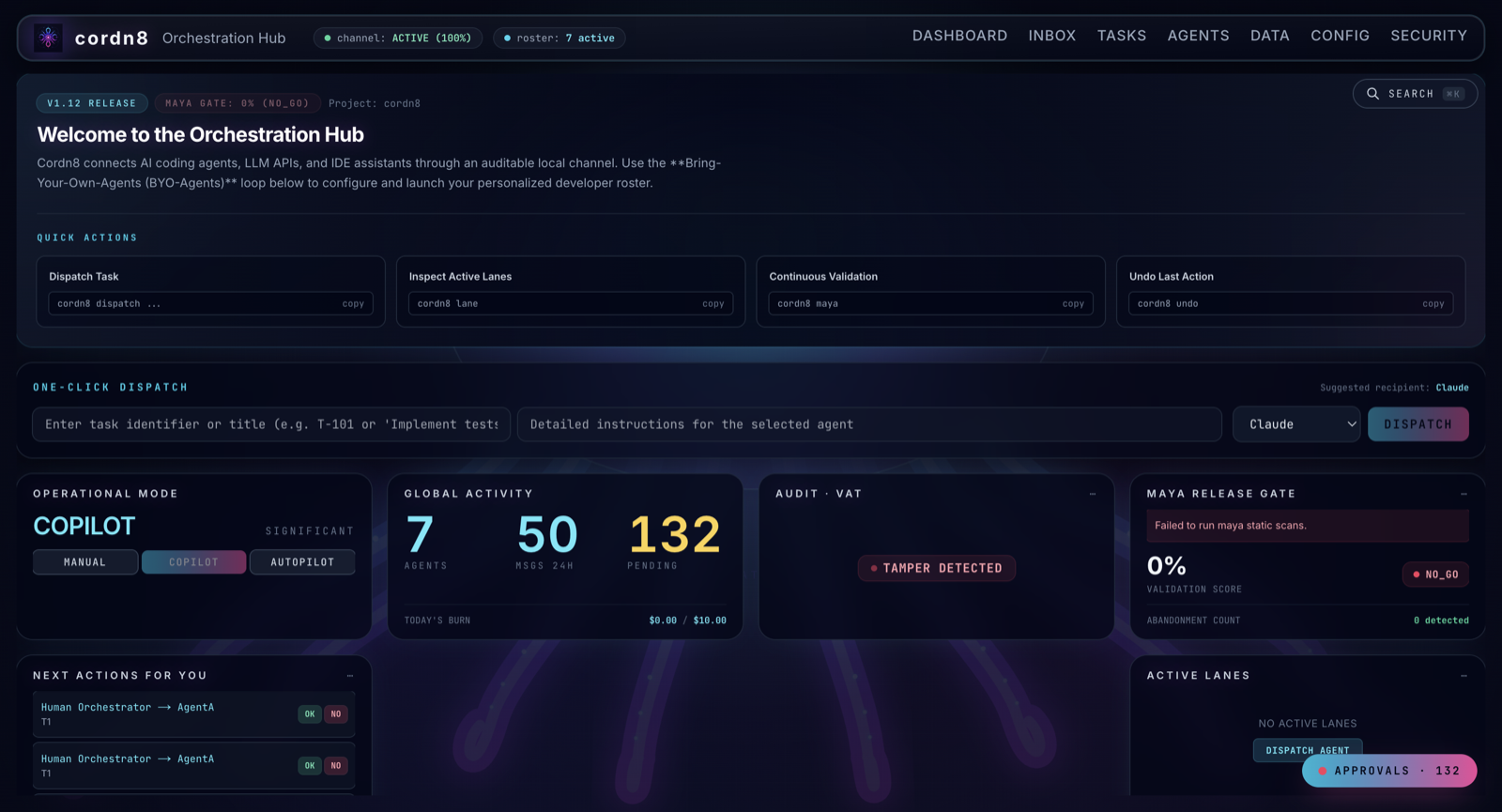
Cordn8 ships a local Next.js dashboard — the Cordn8 Mantle — for operators who prefer a GUI.
cordn8 dashboard # starts the local dashboard and opens it in your browser
The dashboard shows:
- One-click dispatch to any installed agent
- Maya release gate with per-failure remediation
- Per-agent activity with cost, latency, and trust scoring
- Channel view with grep, tail, and digest collapse
- Audit panel for approvals, denials, and handoffs
The CLI and dashboard read the same local state — switch freely between them.
Key Command Groups
The CLI surfaces ~240 commands; the groups below cover most day-to-day work. Run cordn8 --help for the full list or cordn8 help --all for the expert tree.
| Group | What it does | Examples |
|---|---|---|
| Lifecycle | Bootstrap, watch, doctor, deploy | init, watch, doctor, ship, preview |
| Dispatch | Send work, approve, deny, inspect tasks | do, send, dispatch, approve, deny, task show |
| Channel | Inspect the append-only coordination log | channel tail, channel grep, channel digest, channel restore |
| Agents | Install, configure, score, inspect | install, agent show, agent capabilities, lane, ownership |
| Adapters | Manage provider integrations | adapter list, adapters, install <provider> |
| Modes | Switch autonomy level | mode get, mode set MANUAL|COPILOT|AUTOPILOT, mode optimizations |
| MCP | Manage Model Context Protocol servers | mcp enable, mcp disable, mcp status |
| Cost & Budget | Track spend, set caps | cost, budget set, budget status |
| Memory & Insights | Operational intelligence graph | memory show, insights export, insights-config |
| Maya & QC | Release gates and continuous validation | maya, maya --fix-plan, qc, doctor --explain |
| Steward | Artifact lifecycle (score, transition, archive) | steward run |
| Diagnostics | Triage and support | why <msg_id>, error <code>, export <bundle>, friction "..." |
Agent Modes
Cordn8 gives operators three levers for how much autonomy agents have:
MANUAL— every dispatch needs an explicit human approval before the agent acts. Safest; highest friction.COPILOT— agents propose work and can act on low-risk steps; risky steps still require approval.AUTOPILOT— agents execute end-to-end within their declared sandbox and budget; the channel records everything for after-the-fact review.
Switch modes any time with cordn8 mode set <MODE>. Mode changes are written to the channel, so the audit trail always reflects what level of autonomy was in effect when a decision was made.
Adapter Model
Cordn8's core stays local-first. Network calls happen at the adapter edge after an operator configures a provider or agent.
Current built-in and documented paths include:
- Hermes — local CLI integration
- NVIDIA NIM — cloud API integration and a low-friction first real agent
- Anthropic — Claude via the Messages API (preview)
- OpenAI — chat-completions adapter
- Antigravity — IDE-assisted workflow using Cordn8 skills and inbox routing
- Mock/local stub — offline development, CI, and smoke-test paths
- Custom adapters — adapter contract, plugin guidance, and conformance testing
See Adapter Docs and Write Your Own Adapter.
How Cordn8 Differs
Cordn8 is repo-and-channel-centered, not platform-centered. It does not require teams to move work into a hosted orchestration platform or rewrite workflows around a single model provider. The coordination state lives in your project, the audit trail is visible in normal developer tools, and cloud services are optional adapter choices.
LangGraph and AutoGen are code-first orchestration frameworks. CrewAI focuses on persona-style crews. Hosted dashboards centralize workflow state outside the repository. Cordn8 is designed for operators who want multiple AI agents in the loop while keeping the coordination record local, reviewable, and portable.
See Competitive Positioning for the longer comparison.
Architecture
- Core — TypeScript CLI and local coordination layer for Node.js 18+
- Channel — append-only markdown with a safe writer, validation, snapshots, and restore
- Telemetry — local SQLite-backed event and read-model storage
- Adapters — provider, CLI, IDE, and custom integration boundary
- Dashboard — local Next.js interface launched with
cordn8 dashboard - Optional desktop shell — Tauri wrapper for native app packaging; the CLI does not require Rust
Documentation
Deeper docs live under docs/:
- Quickstart Guide
- Operator Guide
- CLI Cheatsheet
- Architecture Overview
- Adapter Docs
- FAQ · Glossary · Troubleshooting
- Manifesto · Security Policy · Contributing
- Changelog
License
Cordn8 is released under the MIT License.