marospekarik/paperclip-hermes-file-access-manager
Kernel-enforced filesystem sandboxing for Hermes Agent profiles. Docker bind mounts, not config flags. Built by Ordillect.
File Access Manager is a Paperclip plugin that sets per-path Read/Write, Read Only, or Denied permissions for Hermes profiles. It translates those rules into Docker bind mounts and uses Hermes’ Docker terminal backend to enforce access inside a container. The plugin provides a filesystem tree editor, previews generated mounts, and can apply changes by recreating the container and restarting the gateway.
- Denied paths are absent from the container by default.
- Folder permissions inherit downward; deeper rules override.
- Includes unit tests and real-Docker integration tests.
full readme from github
File Access Manager


If your AI agent shouldn't have root to your files, give this a ⭐
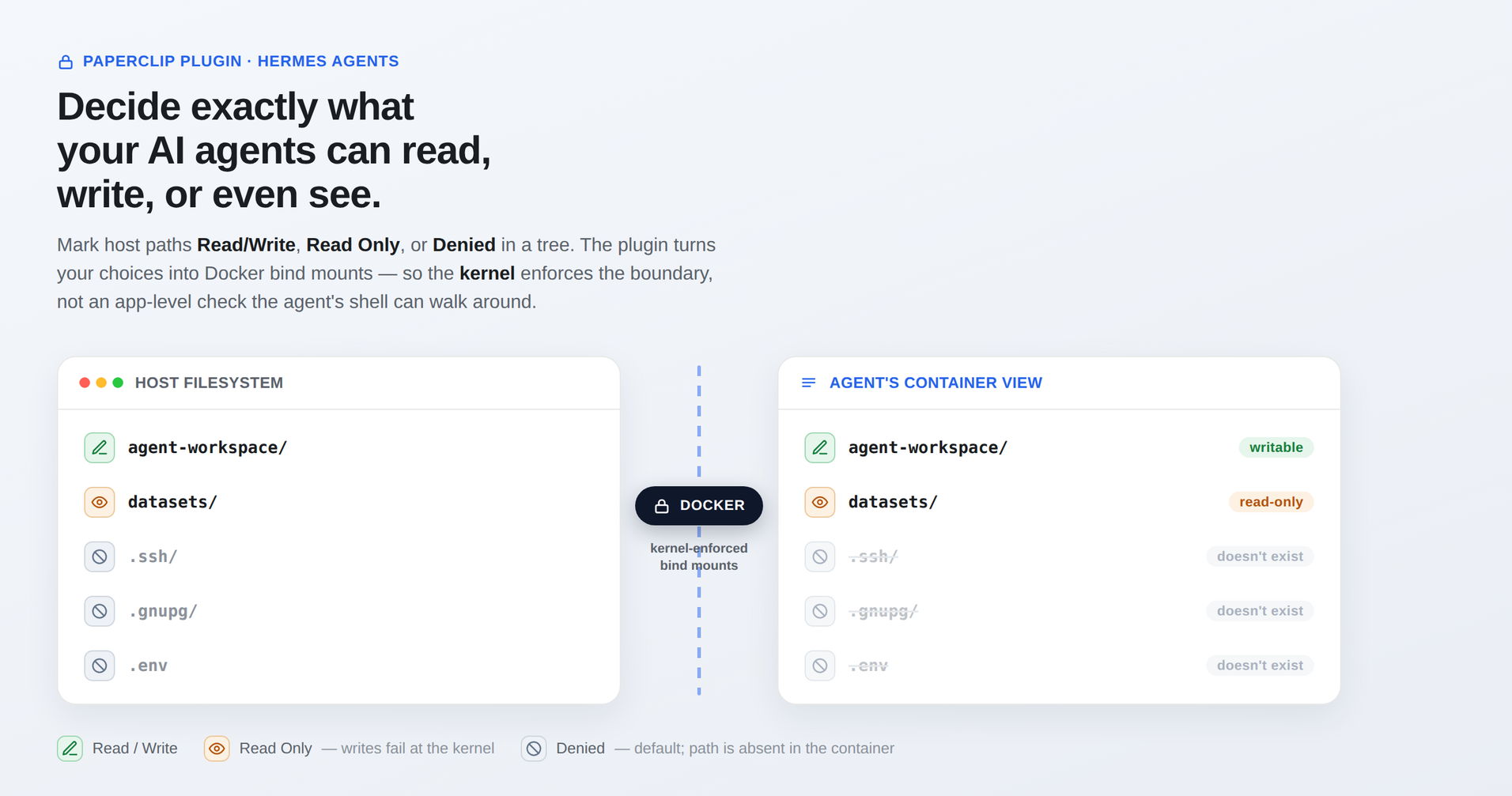
Kernel-enforced filesystem sandboxing for your AI agents. A Paperclip plugin that lets you decide — per Hermes profile, per path — exactly what an agent can read, write, or even see. Mark host paths Read/Write, Read Only, or Denied in a tree UI; the plugin turns your choices into Docker bind mounts and switches the profile to Hermes' Docker terminal backend, so the kernel enforces the boundary — not an application-level path check the agent's shell can walk around.
- Secure by default — every path is Denied until you grant it. A denied path simply doesn't exist inside the container.
- Real enforcement — Hermes' built-in path controls only guard the file
tools; the agent's shell bypasses them entirely. A
:robind mount cannot be written by any process, even the file's owner. - One-click apply — saving writes the profile config, recreates the sandbox container, and restarts the gateway. No manual steps, live progress in the UI.
- Profile-aware — discovers your Hermes profiles automatically and writes only to the ones you select; the router profile is never touched by accident.
- Battle-tested — a real-Docker integration suite proves every permission mode on Linux in CI, and on macOS via the local integration suite.
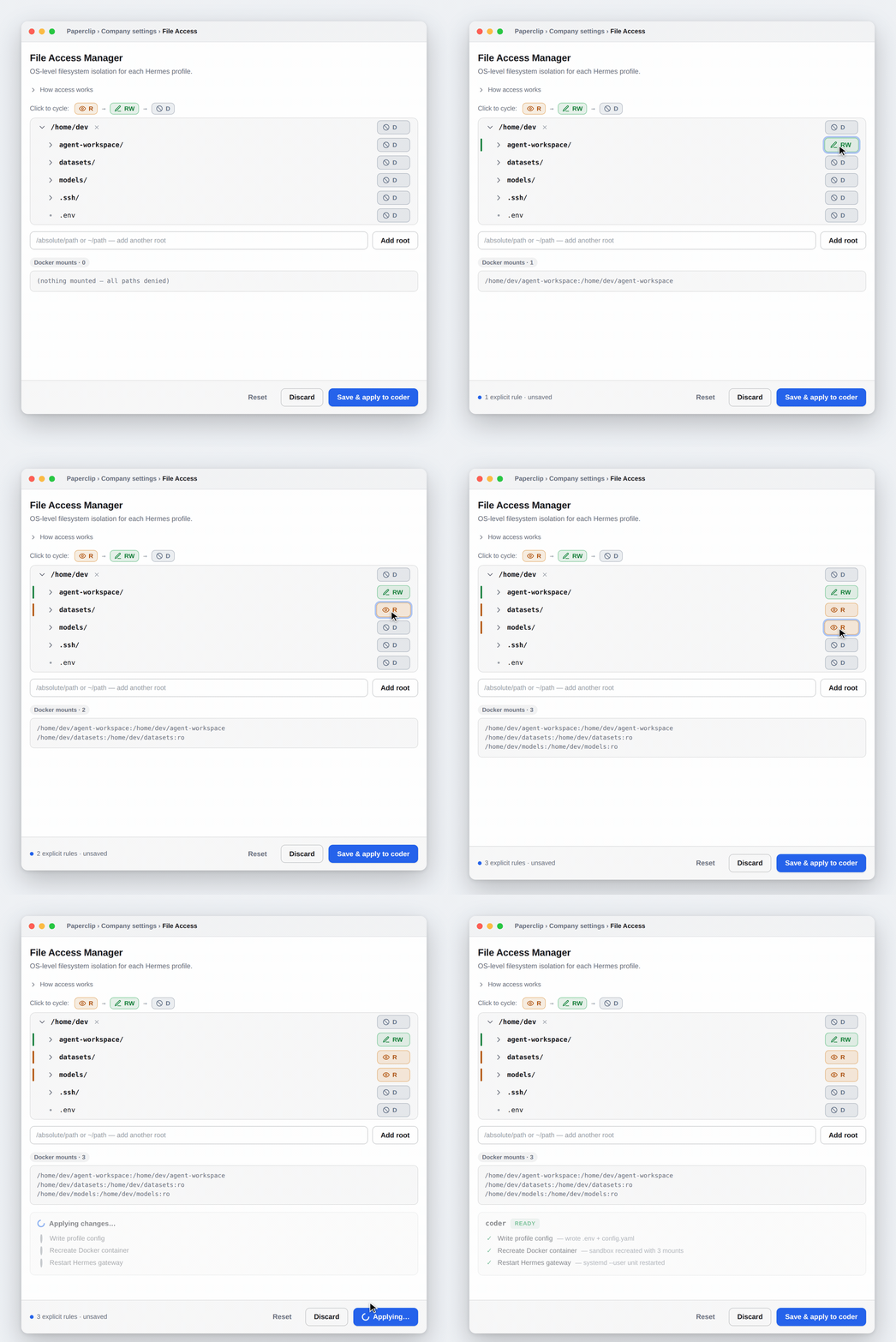
See it work
Mark paths in the tree, watch the generated Docker mounts update live, then Save & apply — the plugin writes the profile config, recreates the sandbox container, and restarts the gateway, reporting each step.
Install
Prerequisites:
- Bun — to build the plugin.
paperclipaiCLI on the Paperclip host (local installs expose it at~/.paperclip/node_modules/.bin/paperclipaiif it's not onPATH).PAPERCLIP_API_KEY— a board API key withinstance_adminrole, already exported in your shell. The CLI reads it from the environment only — never pass it on a command line or paste it into a file.- Docker or Podman — needed for enforcement at runtime, not for install. See
Docker access below: the runtime user must be able to reach
the container socket, or applying a profile will report
needs attention.
git clone https://github.com/marospekarik/paperclip-hermes-file-access-manager.git
cd paperclip-hermes-file-access-manager
bun install && bun run build
paperclipai plugin install --local "$PWD"
Docker access
Enforcement runs the Hermes gateway's terminal backend inside a container, so the
gateway process must be able to reach the Docker (or Podman) socket. On Linux
that means the account the gateway runs as is in the docker group:
sudo usermod -aG docker "$USER"
Then restart your login session — not just the gateway. Group membership is
captured when a session starts, so a gateway launched by an already-running
systemd --user manager keeps the old groups and still can't reach the socket.
Restarting the gateway unit re-forks it from the same manager, so it inherits the
same stale set. Refresh the whole user session instead:
sudo systemctl restart "user@$(id -u).service" # or simply log out and back in
Verify from the same session the gateway runs under:
docker run --rm hello-world
If a save reports needs attention with a "permission denied … Docker daemon
socket" step, this is the cause — the plugin detects it and prints these steps.
Rootless Docker or Podman need no docker group at all
and sidestep this entirely; point Hermes at Podman with
HERMES_DOCKER_BINARY=podman in the profile's .env.
Verify:
paperclipai plugin inspect ordillect.file-access-manager # status should be "ready"
If status is error, tail ~/.paperclip/instances/default/logs/server.log; the
usual cause is a stale dist/ — rerun bun run build, then
paperclipai plugin enable ordillect.file-access-manager. Remove with
paperclipai plugin uninstall ordillect.file-access-manager.
No CLI available? ./install-plugin.sh wraps the REST API instead
(PAPERCLIP_API_BASE defaults to http://localhost:3000/api).
Use
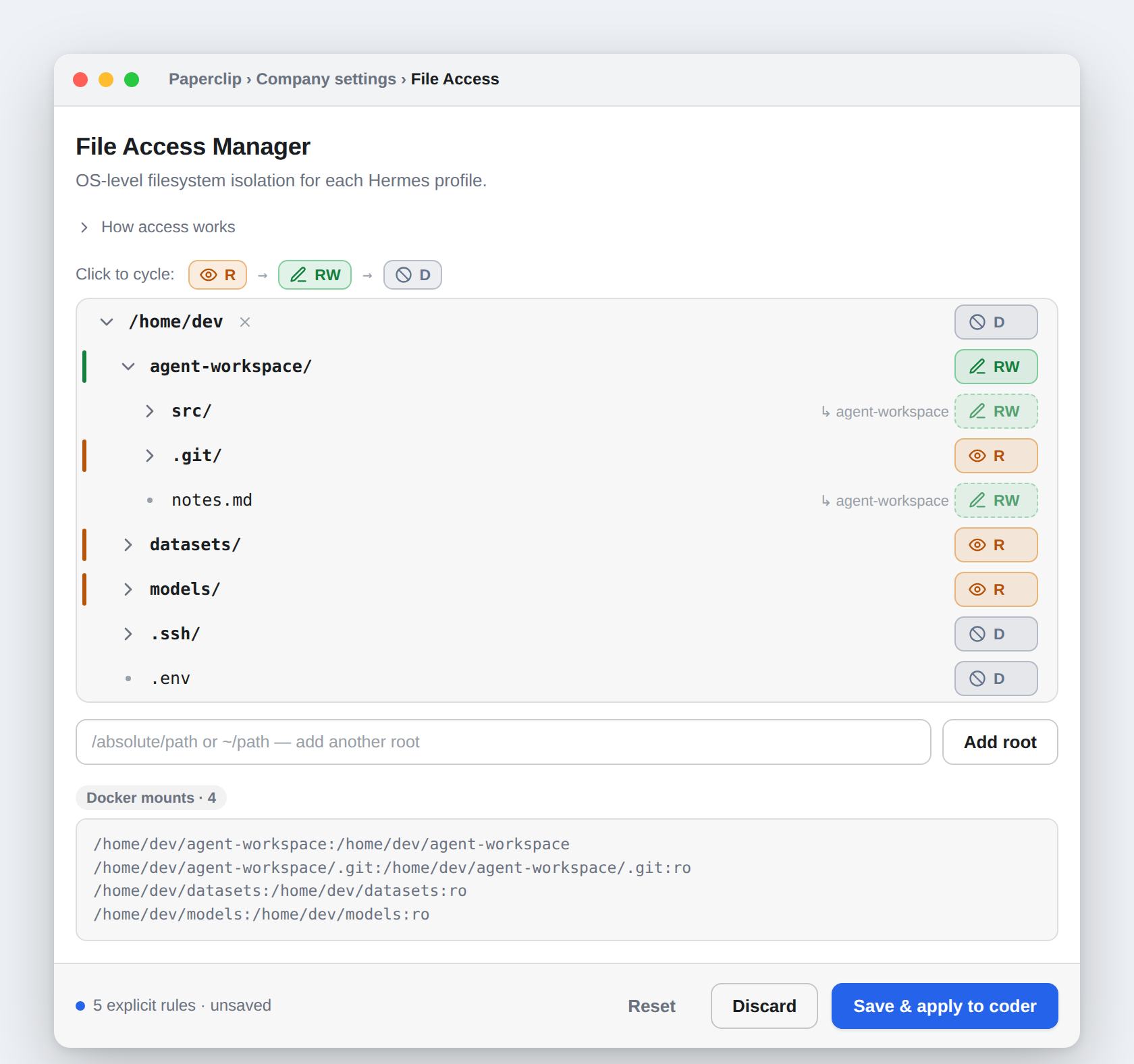
- Company settings → File Access — select one or more profiles (the router/default is clearly flagged), browse the host filesystem tree, assign permissions, preview the generated mounts, save.
- Agent detail → File Access tab — edits only the profile that agent runs on.
| Selection | Effect in the container |
|---|---|
| Read/Write | Full access; changes land on the host |
| Read Only | Readable; writes fail (Read-only file system) |
| Denied (default) | Path does not exist in the container |
Folder settings inherit downward; deeper settings override — parent rw, child
ro, grandchild denied all hold at once. Broad grants (e.g. your whole home
directory) are allowed but flagged: set .ssh, .gnupg, .env folders to
Denied to mask them.
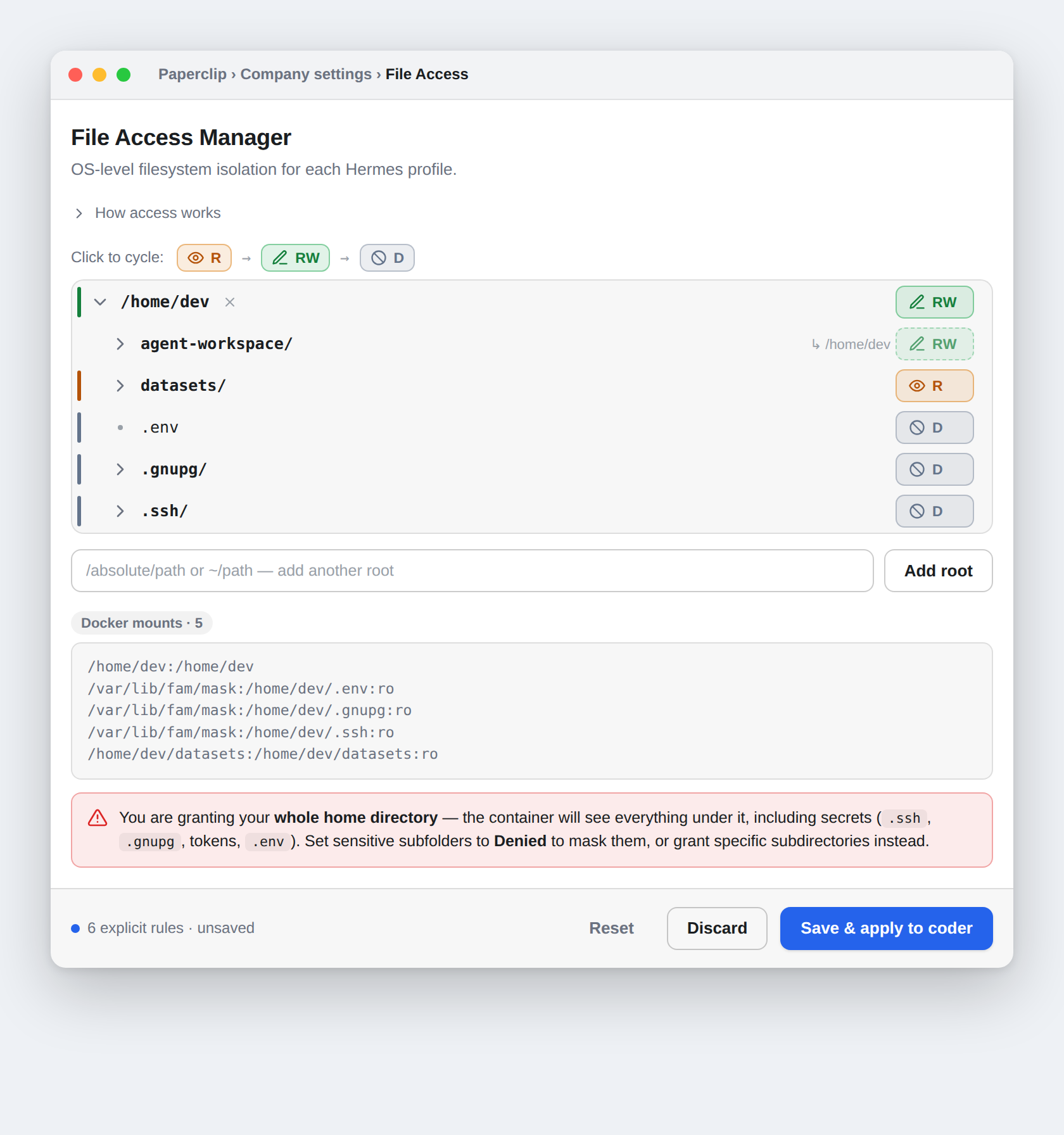
Once a profile runs the Docker backend, terminal, read_file, write_file,
and execute_code all operate inside the sandbox and see only granted paths. A
profile with nothing granted has no host access — that's the isolation working,
and the UI warns before you save one.
Develop
bun install
bun run build              # dist/worker.js, dist/manifest.js, dist/ui/index.js
bun run typecheck
bun run test               # unit: permission model, config writers, profile targeting
bun run test:integration   # real Docker containers verify every permission mode (needs Docker)
Built on @paperclipai/plugin-sdk.
The pure permission model lives in src/model.ts; its generateDockerVolumes()
is the single translation point used by the UI preview, the worker, and the
integration tests. src/worker.ts is the plugin bridge, src/apply.ts handles
the post-save container recreate + gateway restart (disable with
FAM_SKIP_RUNTIME_APPLY=1 for config-only writes — tests set this). Saving
writes both <profile>/.env and <profile>/config.yaml atomically, mirroring
hermes config set terminal.*.
Portability notes: non-standard Hermes root via FAM_HERMES_ROOT; Podman via
the profile's HERMES_DOCKER_BINARY; Windows via WSL2 only; gateway restart
recognizes systemd --user units and reports skipped elsewhere. Found a
mount bug? Add a case to tests/integration/regression.test.ts. Deeper design
analysis: Plans/docker-backend-investigation.md.
Built by Ordillect
file-access-manager is built by Ordillect — agentic infrastructure consulting.
MIT © Ordillect