junhoyeo/tokscale
🛰️ Track token usage across AI coding agents from your terminal. 🏅 Global leaderboard with trillions of tokens tracked.
Tokscale is a CLI tool and visualization dashboard for tracking token usage and costs across multiple AI coding agents. It reads usage data from the local storage locations of supported clients, including Claude Code, OpenClaw, Codex CLI, Gemini CLI, and others. Users can also run `bunx tokscale@latest submit` to submit usage data to a leaderboard and create a public profile.
- Tracks token usage and costs across AI coding agents
- Reads data from each client's local storage paths
- Offers a submit command for leaderboard and public profile
full readme from github
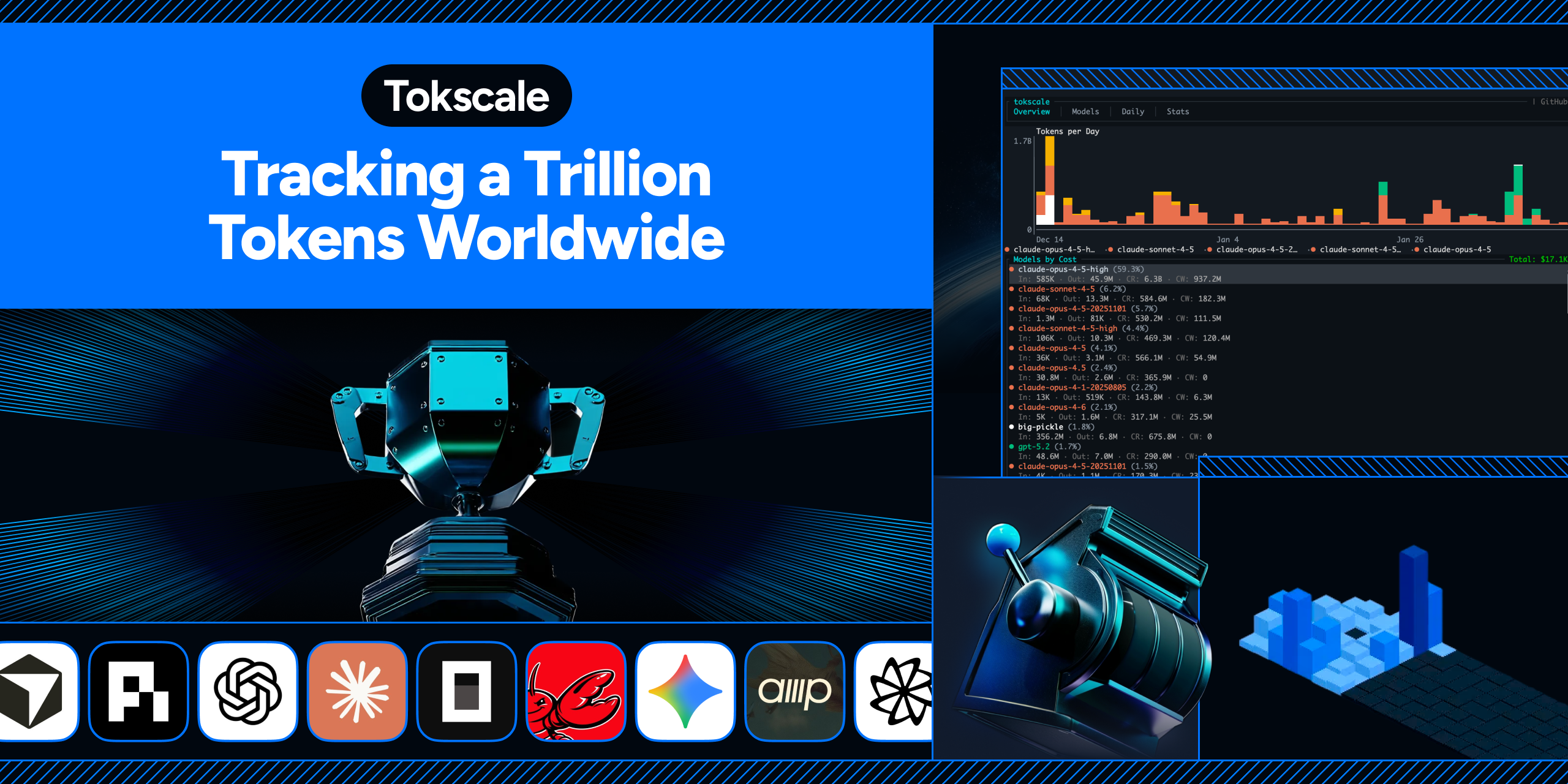
A high-performance CLI tool and visualization dashboard for tracking token usage and costs across multiple AI coding agents.
[!TIP]
I drop new open-source work every week. Don't miss the next one.
Follow @junhoyeo on GitHub for more projects. Hacking on AI, infra, and everything in between. Come hang out in our Discord — and surround yourself with the world's top-tier vibers. Support Tokscale's continued development through GitHub Sponsors.








🇺🇸 English | 🇰🇷 한국어 | 🇯🇵 日本語 | 🇨🇳 简体中文
| Overview | Models |
|---|---|
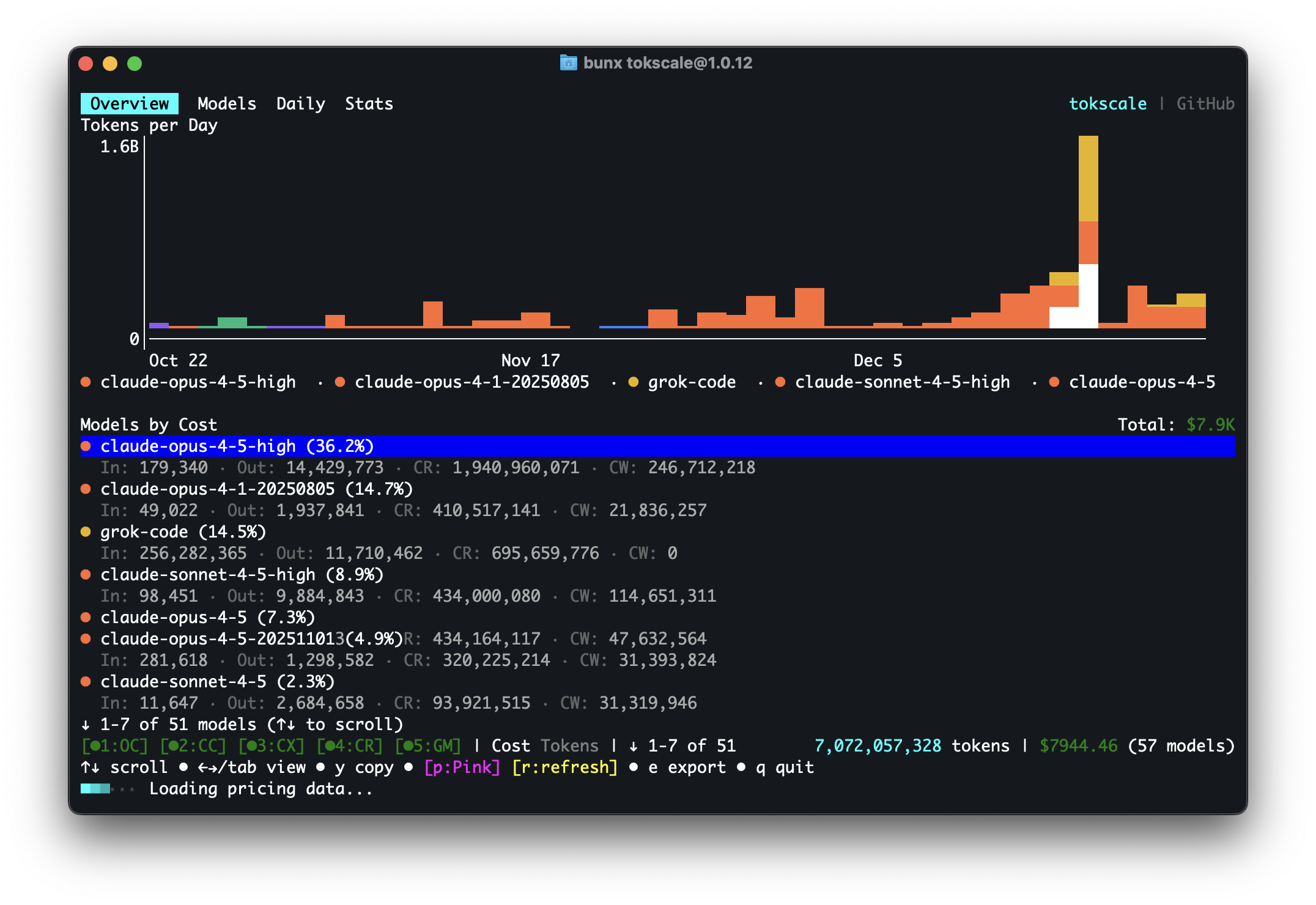 |
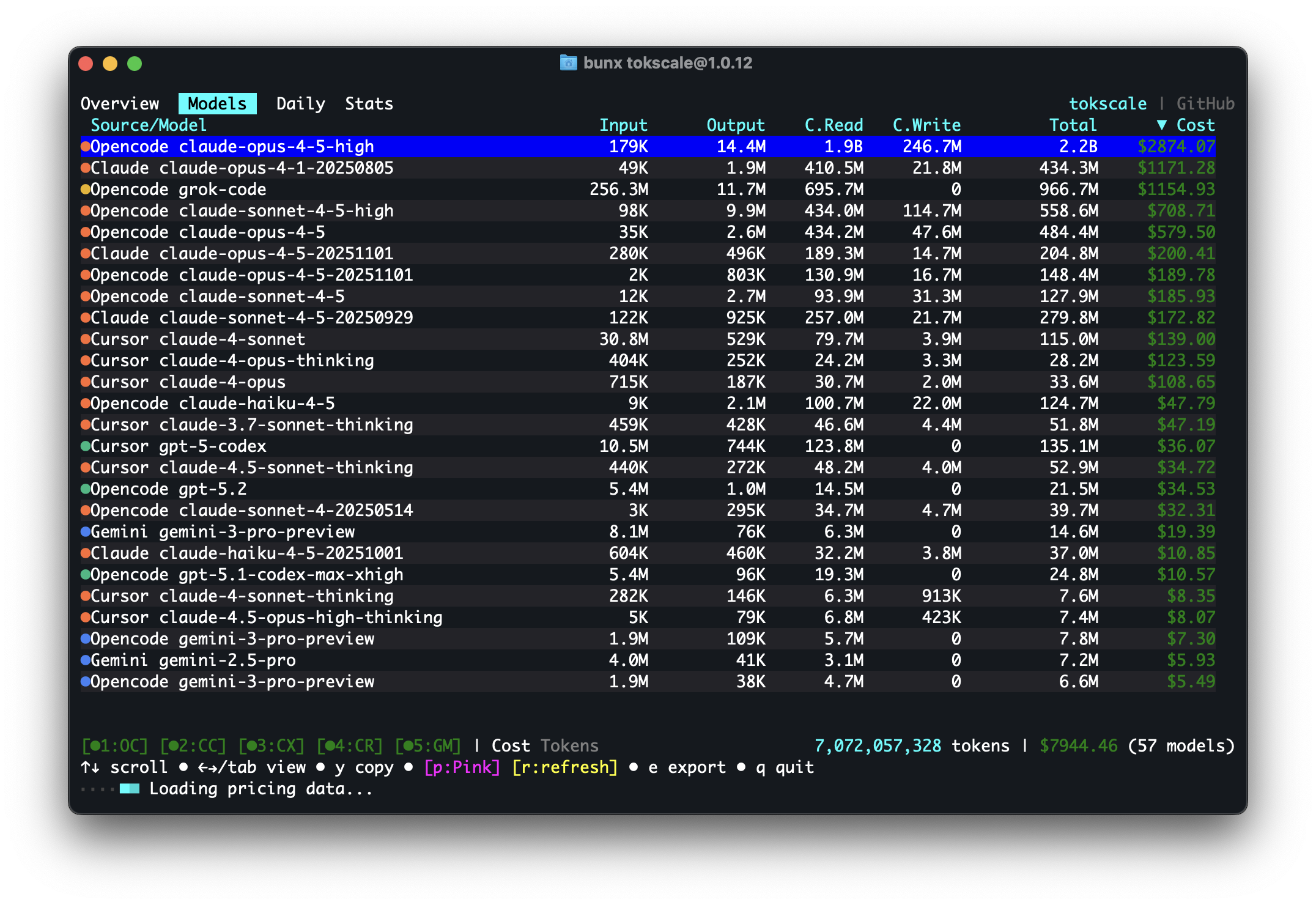 |
| Daily Summary | Stats |
|---|---|
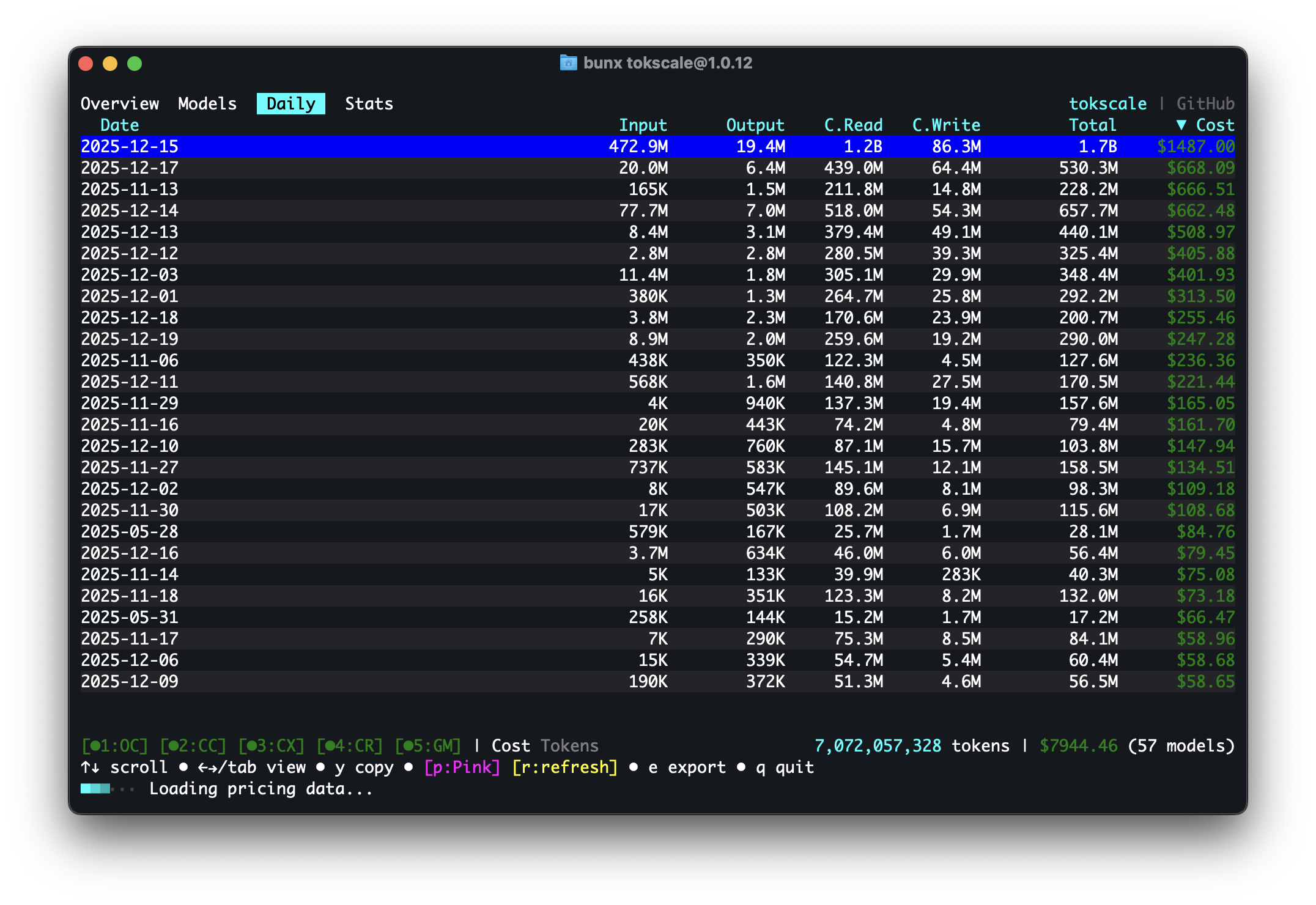 |
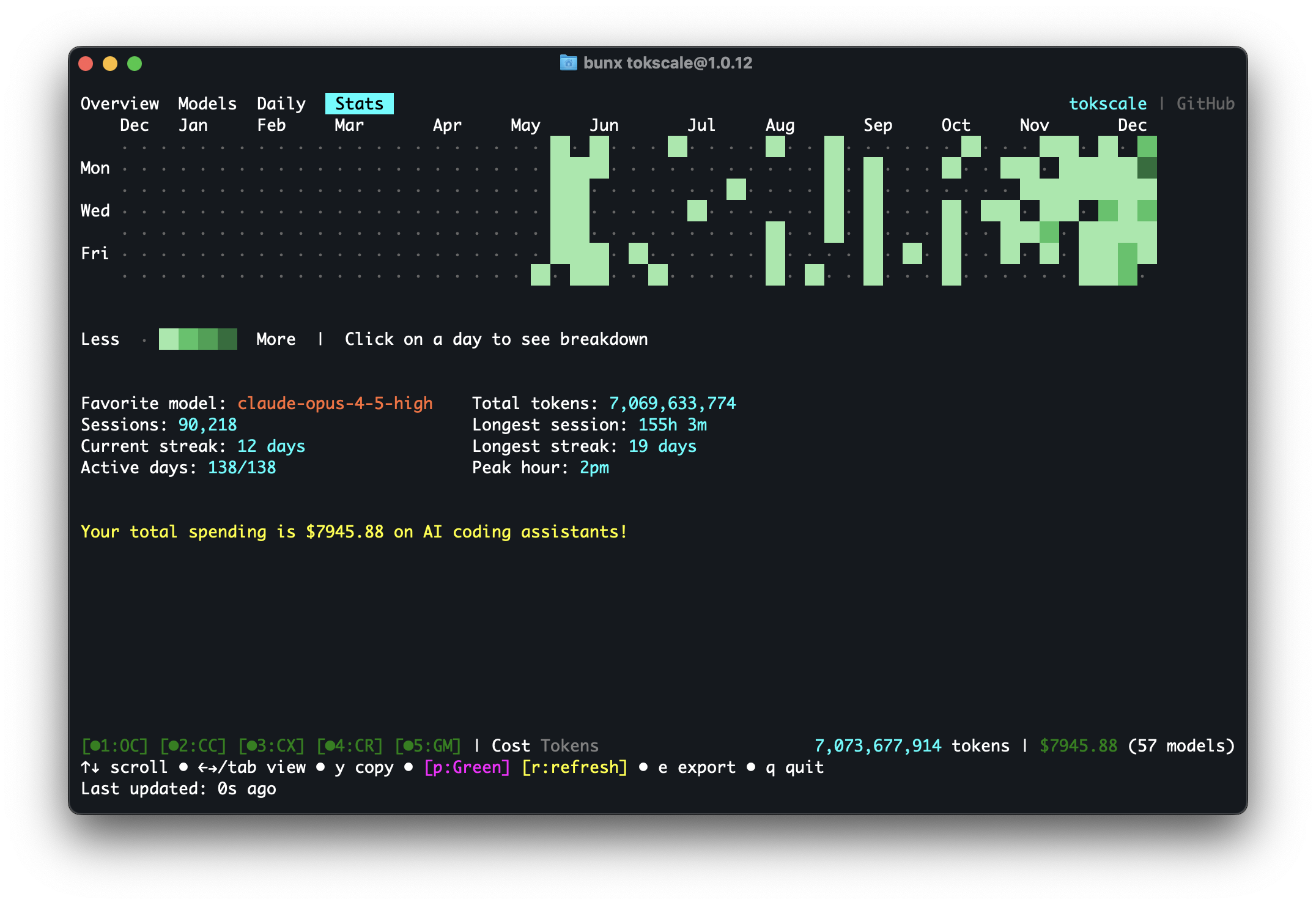 |
| Frontend (3D Contributions Graph) | Wrapped 2025 |
|---|---|
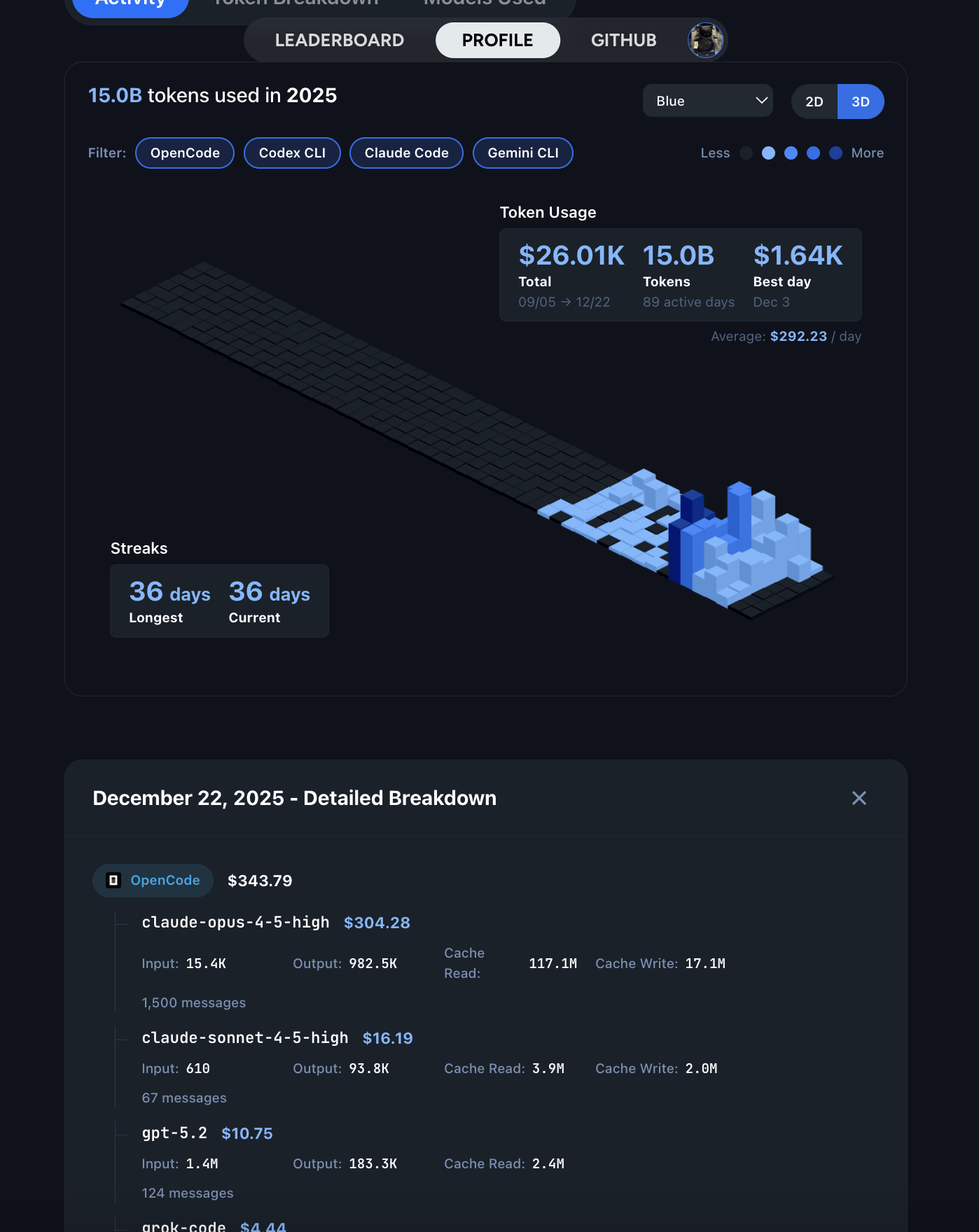 |
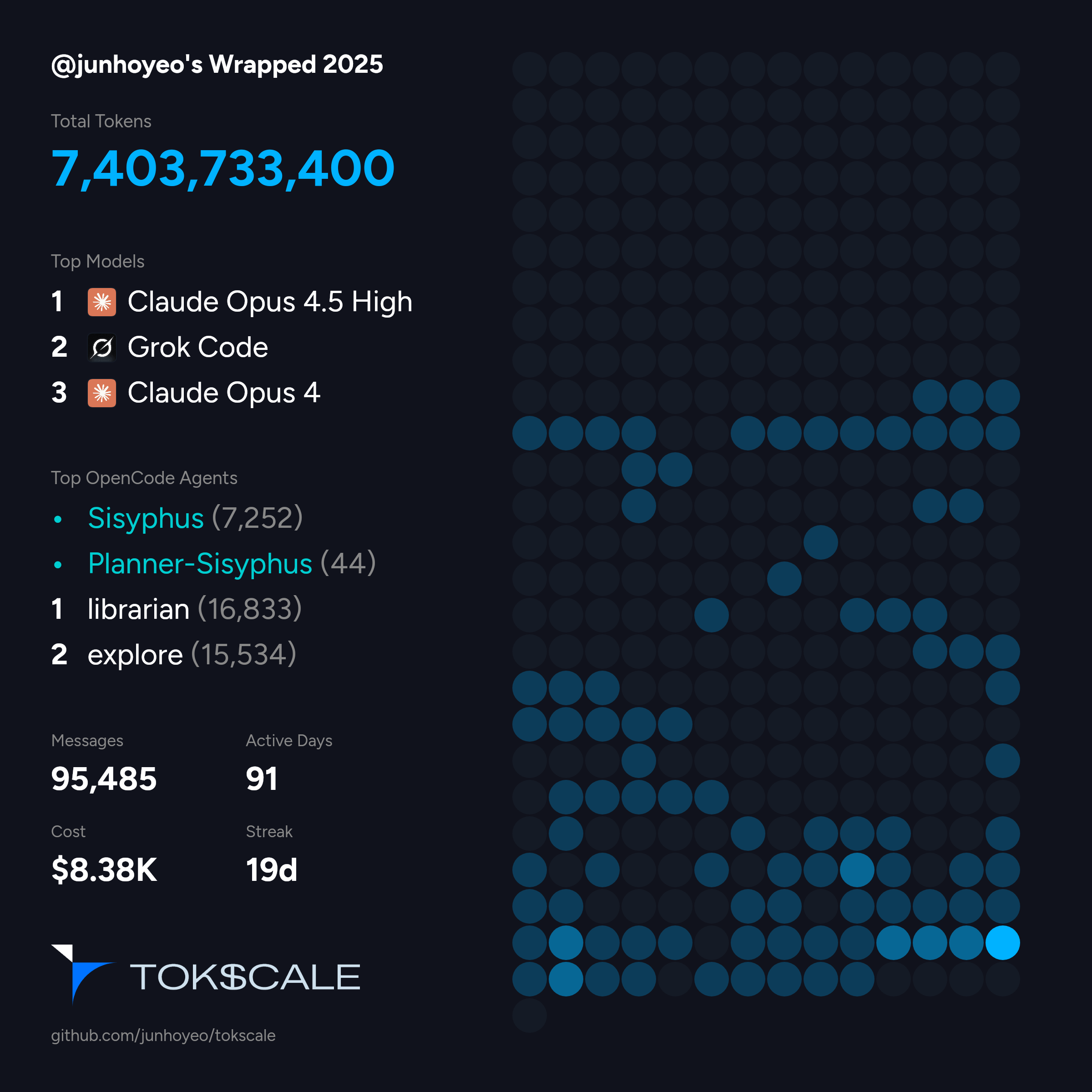 |
Run
bunx tokscale@latest submitto submit your usage data to the leaderboard and create your public profile!
Overview
Tokscale helps you monitor and analyze your token consumption from:
| Logo | Client | Data Location |
|---|---|---|
 |
OpenCode | ~/.local/share/opencode/opencode.db (1.2+, all channels including opencode-stable.db) or/and ~/.local/share/opencode/storage/message/ (legacy/unmigrated) |
 |
Claude Code | ~/.claude/projects/ and ~/.claude/transcripts/ |
 |
OpenClaw | ~/.openclaw/agents/ (*/agent/openclaw-agent.sqlite + */sessions/*.jsonl; + legacy: .clawdbot, .moltbot, .moldbot) |
 |
Codex CLI | ~/.codex/sessions/ |
 |
Prime Agent | ~/.prime/agent/sessions/ and ~/.prime/agent/session-artifacts/ (RLM child sessions) |
 |
Sakana Fugu | via Codex — ~/.codex/sessions/*.jsonl (model_provider: sakana) |
 |
GitHub Copilot CLI | ~/.copilot/session-store.db (CLI usage events; no OTEL required), ~/.copilot/otel/*.jsonl (+ COPILOT_OTEL_FILE_EXPORTER_PATH), ~/.copilot/data.db |
 |
Hermes Agent | $HERMES_HOME/state.db and $HERMES_HOME/profiles/*/state.db (fallback: ~/.hermes/...) |
 |
Gemini CLI | $GEMINI_CLI_HOME/tmp/*/chats/*.json (fallback: ~/.gemini/tmp/*/chats/*.json) |
 |
Cursor IDE | Cursor API export cached at ~/.config/tokscale/cursor-cache/usage*.csv (desktop auto-login or cookie paste; not ~/.cursor) |
 |
Amp (AmpCode) | ~/.local/share/amp/threads/ |
 |
Codebuff | ~/.config/manicode/ (+ manicode-dev, manicode-staging; override via CODEBUFF_DATA_DIR) |
 |
Freebuff | shares ~/.config/manicode/ with Codebuff (same runtime); token usage is estimated from the transcript (no local usage; override via FREEBUFF_DATA_DIR) |
 |
Droid (Factory Droid) | ~/.factory/sessions/ |
 |
Pi | ~/.pi/agent/sessions/ |
 |
omp (Oh My Pi) | ~/.omp/agent/sessions/**/*.jsonl |
 |
Senpi (OmO Native) | ~/.senpi/agent/sessions/ (override via SENPI_CODING_AGENT_DIR) |
 |
Kimchi Coding | ~/.config/kimchi/harness/sessions/ (override via KIMCHI_CODING_AGENT_DIR) |
 |
Reasonix | ~/.reasonix/stats/*.jsonl (override via REASONIX_STATE_HOME or REASONIX_HOME) |
 |
Kimi CLI / Kimi Code | kimi-cli: ~/.kimi/sessions/ kimi-code: ~/.kimi-code/sessions/ (override via KIMI_CODE_HOME) kimi-work: desktop app-data root (auto-discovered) |
 |
Qwen CLI | ~/.qwen/projects/ |
 |
Roo Code | ~/.config/Code/User/globalStorage/rooveterinaryinc.roo-cline/tasks/ (+ server: ~/.vscode-server/data/User/globalStorage/rooveterinaryinc.roo-cline/tasks/) |
 |
Kilo | ~/.config/Code/User/globalStorage/kilocode.kilo-code/tasks/ (+ server: ~/.vscode-server/data/User/globalStorage/kilocode.kilo-code/tasks/) |
|
Kilo CLI | ~/.local/share/kilo/kilo.db |
 |
Mux | ~/.mux/sessions/ |
 |
Crush | $XDG_DATA_HOME/crush/projects.json (project registry; fallback: ~/.local/share/crush/projects.json) |
 |
Goose | ~/.local/share/goose/sessions/sessions.db (+ macOS Application Support, legacy Block/goose paths; override via GOOSE_PATH_ROOT) |
 |
Google Antigravity | Cached via tokscale antigravity sync to ~/.config/tokscale/antigravity-cache/sessions/*.jsonl (live RPC against the local language server) |
|
Antigravity CLI | ~/.gemini/antigravity-cli/conversations/*.db (override the Gemini home via GEMINI_CLI_HOME; local SQLite, read directly — no antigravity sync needed) |
|
Antigravity IDE Extension | ~/.gemini/antigravity/conversations/*.db (local SQLite, read directly) |
 |
Trae IDE / Trae Solo (international) | Cached via tokscale trae sync to ~/.config/tokscale/trae-cache/sessions/*.json (account-level usage from the official API) |
 |
Warp / Oz | Cached via tokscale warp sync to ~/.config/tokscale/warp-cache/usage.json (aggregate requests and spend only; no token transcripts) |
 |
Grok Build | $GROK_HOME/sessions/*/*/updates.jsonl (fallback: ~/.grok/sessions/*/*/updates.jsonl) |
 |
Zed Agent | ~/.local/share/zed/threads/threads.db (macOS: ~/Library/Application Support/Zed/threads/threads.db; Windows: %LOCALAPPDATA%/Zed/threads/threads.db; hosted Zed models only, not external ACP agents) |
 |
Kiro | ~/.kiro/sessions/cli/*.json (+ *.jsonl), ~/.local/share/kiro-cli/data.sqlite3 (macOS: ~/Library/Application Support/kiro-cli/data.sqlite3), and Kiro IDE globalStorage snapshots (Kiro/User/globalStorage/kiro.kiroagent; macOS Application Support, Linux ~/.config/Kiro, Windows %APPDATA%\Kiro) |
 |
Cline | VS Code globalStorage tasks (Linux: ~/.config/Code/...; macOS: ~/Library/Application Support/Code/...; Windows: %APPDATA%\Code\...; server: ~/.vscode-server/data/User/globalStorage/saoudrizwan.claude-dev/tasks/) + Cline CLI sessions (first available root, in order: $CLINE_SESSION_DATA_DIR, $CLINE_DATA_DIR/sessions/, $CLINE_DIR/data/sessions/, fallback ~/.cline/data/sessions/; blank/whitespace-only environment values are ignored) |
| gajae-code (gjc) | ~/.gjc/agent/sessions/ (override via GJC_CODING_AGENT_DIR, GJC_CONFIG_DIR, PI_CONFIG_DIR; $XDG_DATA_HOME/gjc/sessions/ on Linux/macOS) |
|
 |
Cherry Studio | %APPDATA%\CherryStudio\Data\Agents\.claude\projects\*.jsonl and legacy %APPDATA%\CherryStudio\.claude\projects\*.jsonl (macOS: ~/Library/Application Support/CherryStudio/Data/Agents/.claude/projects/; Linux: $XDG_CONFIG_HOME/CherryStudio/Data/Agents/.claude/projects/; Agent / Claude Code mode transcripts; V2 root preferred, legacy keeps untransferred history) plus the chat ledger at %APPDATA%\CherryStudio\Data\cherrystudio.sqlite (macOS: ~/Library/Application Support/CherryStudio/Data/cherrystudio.sqlite; Linux: $XDG_CONFIG_HOME/CherryStudio/Data/cherrystudio.sqlite; ai_usage_record rows for the built-in chat and assistant surfaces, which write no transcript; Agent-mode rows in that table are skipped because the transcripts already report them, and both ledgers count toward the same client) |
 |
LM Studio | ~/.lmstudio/server-logs/**/*.log (LM_STUDIO_HOME supported; Chat Completions and Responses API final-response usage only; prompts and responses are not retained; local inference cost is $0) |
 |
Unsloth Studio | $UNSLOTH_STUDIO_HOME/studio.db (fallback: ~/.unsloth/studio/studio.db; exact internal-chat and authenticated API inference usage; message content is not read; training metrics are excluded; local inference cost is $0) |
 |
Hindsight | $HINDSIGHT_HOME/usage/*.jsonl (fallback: ~/.hindsight/usage/*.jsonl; populated via tokscale hindsight sync) |
 |
Jcode | ~/.jcode/sessions/session_*.json + session_*.journal.jsonl sidecars (override via JCODE_HOME) |
 |
MiMo Code | ~/.local/share/mimocode/mimocode.db (XDG data dir; SQLite) |
 |
Xiaomi MiMo AI (desktop) | Same ~/.local/share/mimocode/mimocode.db store as MiMo Code; sessions are split by session.version (desktop- prefix → micode-desktop) |
 |
Junie | ~/.junie/sessions/*/events.jsonl |
 |
Command Code | ~/.commandcode/projects/**/*.jsonl (v3 transcripts persist per-request usage and cost; estimated fallback only for legacy transcripts without a usage block) |
 |
ZCode | ~/.zcode/cli/db/db.sqlite (v2 usage database) and ~/.zcode/projects/**/*.jsonl (legacy transcripts) |
 |
OpenCodeReview | ~/.opencodereview/sessions/**/*.jsonl |
 |
CodeBuddy (CLI, IDE, VS Code plugin) | ~/.codebuddy/projects/**/*.jsonl + extension logs |
 |
WorkBuddy | ~/.workbuddy/projects/**/*.jsonl (5.5+ under ~/.workbuddy-ai/) + SQLite fallback |
 |
Devin CLI | ~/.local/share/devin/cli/sessions.db (SQLite) |
|
Devin Desktop | ACP events: macOS ~/Library/Application Support/Devin/User/acp-events/; Linux ~/.config/Devin/User/acp-events/; Windows %APPDATA%\Devin\User\acp-events\ |
 |
Augment Code (Auggie CLI) | ~/.augment/sessions/*.json |
|
Synthetic | Re-attributed from other sources via hf: model prefix or synthetic provider (+ Octofriend: ~/.local/share/octofriend/sqlite.db) |
 |
DeepSeek Harness | ~/.dsh/sessions/**/session.jsonl.zstd (or session.jsonl when written uncompressed, plus versioned session.v<N>.jsonl[.zstd] spellings; override via DSH_HOME) |
 |
MiniMax Code | ~/.config/tokscale/headless/mcode/*.jsonl (headless capture of mcode exec --output-format stream-json; override via TOKSCALE_HEADLESS_DIR) |
 |
fx | ~/.fx/sessions/<sessionId>/usage-v2.json (per-session aggregates) |
 |
Muse Code | ~/.local/share/muse/sessions/**/session.jsonl (same XDG-style path on Windows; subagent transcripts under subagent/<uuid>/ included) |
Get real-time pricing calculations using 🚅 LiteLLM's pricing data, with support for tiered pricing models and cache token discounts.
Why "Tokscale"?

This project is inspired by the Kardashev scale, a method proposed by astrophysicist Nikolai Kardashev to measure a civilization's level of technological advancement based on its energy consumption. A Type I civilization harnesses all energy available on its planet, Type II captures the entire output of its star, and Type III commands the energy of an entire galaxy.
In the age of AI-assisted development, tokens are the new energy. They power our reasoning, fuel our productivity, and drive our creative output. Just as the Kardashev scale tracks energy consumption at cosmic scales, Tokscale measures your token consumption as you scale the ranks of AI-augmented development. Whether you're a casual user or burning through millions of tokens daily, Tokscale helps you visualize your journey up the scale—from planetary developer to galactic code architect.
Contents
- Overview
- Features
- Installation
- Usage
- Frontend Visualization
- Social Platform
- Wrapped 2025
- Development
- Supported Platforms
- Session Data Retention
- Data Sources
- Pricing
- Local Usage Recovery Ledger
- Contributing
- Acknowledgments
- License
Features
- Interactive TUI Mode - Beautiful terminal UI powered by Ratatui (default mode)
- 10 interactive views: Overview, Usage, Models, Daily, Hourly, Monthly, Sessions, Projects, Stats, Agents (plus an optional Minutely view, opt-in via
minutelyTabEnabled) - Keyboard & mouse navigation
- GitHub-style contribution graph with configurable color themes
- Real-time filtering and sorting
- Zero flicker rendering
- 10 interactive views: Overview, Usage, Models, Daily, Hourly, Monthly, Sessions, Projects, Stats, Agents (plus an optional Minutely view, opt-in via
- Multi-platform support - Track usage across OpenCode, Claude Code, Codex CLI, Prime Agent, Copilot CLI, Cursor IDE, Gemini CLI, Amp, Codebuff, Droid, OpenClaw, Hermes Agent, Pi, Kimchi Coding, Reasonix, Kimi CLI, Kimi Work, Qwen CLI, Roo Code, Kilo, Mux, Kilo CLI, Crush, Goose, Antigravity, Antigravity CLI, Antigravity IDE Extension, Zed, Kiro, Trae, Warp/Oz, Cline, Gajae-Code, Grok Build, Jcode, MiMo Code, Xiaomi MiMo AI, Command Code, Junie, ZCode, OpenCodeReview, CodeBuddy, WorkBuddy, Devin CLI, Devin Desktop, Augment Code, Synthetic, Cherry Studio, LM Studio, Unsloth Studio, Hindsight, fx, Oh My Pi, and Muse Code
- Real-time pricing - Fetches current pricing from LiteLLM with 1-hour disk cache; automatic OpenRouter fallback and Cursor model pricing for newly released models
- Detailed breakdowns - Input, output, cache read/write, and reasoning token tracking
- Native Rust core - All parsing and aggregation done in Rust for 10x faster processing
- Web visualization - Interactive contribution graph with 2D and 3D views
- Flexible filtering - Filter by platform, date range, or year
- Task-attributed reports - LLM-powered session summarization and task grouping with multi-backend support (Apple FM, Claude, Codex, Gemini, Kiro, MiniMax)
- Export to JSON - Generate data for external visualization tools
- Social Platform - Share your usage, compete on leaderboards, and view public profiles
Installation
Quick Start
# Run directly with npx
npx tokscale@latest

# Or use bunx
bunx tokscale@latest

# Or use Deno without installing an alias
deno x npm:tokscale@latest

# Light mode (table rendering only)
npx tokscale@latest --light
That's it! This gives you the full interactive TUI experience with zero setup.
Package Structure:
tokscaleis an alias package (likeswc) that installs@tokscale/cli. Both install the same CLI with the native Rust core (@tokscale/core) included.
Prerequisites
Development Setup
For local development or building from source:
# Clone the repository
git clone https://github.com/junhoyeo/tokscale.git
cd tokscale

# Install Bun (if not already installed)
curl -fsSL https://bun.sh/install | bash

# Install dependencies
bun install

# Run the CLI in development mode
bun run cli
Note:
bun run cliis for local development. When installed viabunx tokscale, the command runs directly. The Usage section below shows the installed binary commands.
Building the Native Module
The native Rust module is required for CLI operation. It provides ~10x faster processing through parallel file scanning and SIMD JSON parsing:
# Build the native core (run from repository root)
bun run build:core
Note: Native binaries are pre-built and included when you install via
bunx tokscale@latest. Building from source is only needed for local development.
Usage
Basic Commands
# Launch interactive TUI (default)
tokscale

# Launch TUI with specific tab
tokscale models    # Models tab
tokscale monthly   # Daily view (shows daily breakdown)
tokscale hourly    # Hourly tab

# Use legacy CLI table output
tokscale --light
tokscale models --light

# Launch TUI explicitly
tokscale tui

# Export contribution graph data as JSON
tokscale graph --output data.json

# Output data as JSON (for scripting/automation)
tokscale --json                    # Default models view as JSON
tokscale models --json             # Models breakdown as JSON
tokscale monthly --json            # Monthly breakdown as JSON
tokscale models --json > report.json   # Save to file
TUI Features
The interactive TUI mode provides:
- 10 Views: Overview (chart + top models), Usage (subscription quotas), Models, Daily, Hourly, Monthly, Sessions, Projects (per-workspace rollups), Stats (contribution graph), Agents. In Projects, Codex Desktop's ordinary chat directories (
Documents/Codex/YYYY-MM-DD/<chat>) are combined into Codex Chat, preserving their session count, tokens, and cost; directories containing a Git repository remain separate. A per-minute view (Minutely) is hidden by default and can be enabled withminutelyTabEnabledinsettings.json— see Configuration - Keyboard Navigation:
←/→/Tab/BackTab: Switch views↑/↓orHome/End: Navigate listsEnter: Open daily detail (Daily tab) / per-day trend with ms/1K and Cost/1M (Models tab) / select graph cell (Stats tab)EscorBackspace: Close dialog or exit detail viewc/d/t: Sort by cost/date/tokensj: Jump to todays: Open source picker dialogg: Open group-by picker dialog (model, client+model, client+provider+model, workspace+model, session+model, client+session+model)h: Toggle Daily/Hourly chart granularity (Overview tab)v: Toggle Table/Profile view (Hourly tab)b: Toggle subagent session roll-up into parent sessions (Sessions tab)y: Copy selected row to clipboardp: Cycle through color themesL: Toggle light mode (white background)r: Refresh data;Shift+Rtoggles auto-refresh;+/-adjusts intervale: Export to JSONqorCtrl+C: Quit
- Mouse Support: Click tabs, buttons, and filters
- Themes: Green, Halloween, Teal, Blue, Pink, Purple, Orange, Monochrome, YlGnBu, Graphite, Lagoon, Dusk
- Settings Persistence: Preferences saved to
~/.config/tokscale/settings.json(see Configuration)
Group-By Strategies
Press g in the TUI or use --group-by in --light/--json mode to control how model rows are aggregated:
| Strategy | Flag | TUI Default | Effect |
|---|---|---|---|
| Model | --group-by model |
✅ | One row per model — merges all clients and providers |
| Client + Model | --group-by client,model |
One row per client-model pair | |
| Client + Provider + Model | --group-by client,provider,model |
Most granular — no merging | |
| Workspace + Model | --group-by workspace,model |
Group local usage by workspace key, then model — add --merge-worktrees to fold git worktrees into their repo |
|
| Session + Model | --group-by session,model |
One row per session_id and model — attribute cost to a specific agent-CLI session |
|
| Client + Session + Model | --group-by client,session,model |
One row per client, session, and model — useful for multi-agent runners that join on session_id |
--group-by model (most consolidated)
| Clients | Providers | Model | Cost |
|---|---|---|---|
| OpenCode, Claude, Amp | github-copilot, anthropic | claude-opus-4-5 | $2,424 |
| OpenCode, Claude | anthropic, github-copilot | claude-sonnet-4-5 | $1,332 |
--group-by client,model (CLI default)
| Client | Provider | Model | Cost |
|---|---|---|---|
| OpenCode | github-copilot, anthropic | claude-opus-4-5 | $1,368 |
| Claude | anthropic | claude-opus-4-5 | $970 |
--group-by client,provider,model (most granular)
| Client | Provider | Model | Cost |
|---|---|---|---|
| OpenCode | github-copilot | claude-opus-4-5 | $1,200 |
| OpenCode | anthropic | claude-opus-4-5 | $168 |
| Claude | anthropic | claude-opus-4-5 | $970 |
--group-by session,model (per-session cost attribution)
tokscale models --json --group-by session,model emits one entry per (session_id, model). Each entry includes a top-level sessionId field so downstream tools (e.g. multi-agent IDEs) can join cost data back to a specific agent-CLI session:
{
  "groupBy": "session,model",
  "entries": [
    {
      "sessionId": "019e1e27-af49-7cd1-89b7-7bad1c3f3be2",
      "client": "codex",
      "provider": "openai",
      "model": "gpt-5",
      "input": 25251,
      "output": 47,
      "cacheRead": 1920,
      "cacheWrite": 0,
      "reasoning": 40,
      "messageCount": 12,
      "cost": 0.0123
    }
  ]
}
Use --group-by client,session,model when you also need the client name on every row (one spawn across all 20+ supported CLIs at once).
Per-workspace cost
--group-by workspace,model attributes usage to the directory an agent ran in, so you can see what a given project cost:
# One row per (workspace, model)
tokscale models --light --group-by workspace,model --month

# Fold every git worktree into its parent repository — one row per repo
tokscale models --light --group-by workspace,model --merge-worktrees --month

# JSON carries workspaceKey (grouping identity) and workspaceLabel (display name)
tokscale models --json --group-by workspace,model --merge-worktrees
In the TUI, press g → Workspace + Model, then w to toggle worktree rollup (the footer shows [w:worktrees] or [w:repos]).
Workspace rows are labeled repo or repo ⑃ worktree. Clients disagree about how they record a workspace — Claude Code stores a dash-mangled directory slug (-Users-me-devpro-app) while Codex and OpenCode store real paths — so tokscale resolves slugs back to their true path against the filesystem. Four consequences worth knowing:
- Without
--merge-worktrees, each git worktree is its own row. Agent CLIs that isolate every task into a worktree will therefore spread one repository across many rows;--merge-worktreesre-unites them (and also merges a repo recorded by different clients under different key formats). --merge-worktreesfinds worktrees kept inside the repo and beside it.<repo>/.claude/worktrees/<name>(what agent CLIs create) and<repo>/.git/worktrees/<name>are recognized from the path alone; a worktree checked out elsewhere (git worktree add ../feature-x) is recognized by reading its.gitpointer file back to the repository. A repo reached through two different path spellings (a symlink and its target) still stays two rows, because a workspace identity is compared as a string. Totals are unaffected either way — usage is split across rows, never lost or double counted.- Rows that would show the same name are qualified with their parent directory. A label is the directory's own name, so
~/work/apiand~/oss/apiwould both readapi; colliding labels gain as many leading path segments as it takes to tell them apart (work/api,oss/api), and when no path segment can — the same directory recorded by two clients under different key formats — the row is qualified with its workspace key instead. Grouping is unaffected — this only changes the displayed text. - Clients that never record a workspace roll up into a single
Unknown workspacerow. Roughly half the supported clients (including gemini, cursor, amp, droid, roocode, kilocode, goose, and Copilot's OTEL path) do not write one, so their usage cannot be attributed to a directory.
Filtering by Platform
Use --client (short -c) to scope reports to one or more clients. The flag is repeatable, accepts comma-separated values, and works with every report command:
# Show only OpenCode usage
tokscale --client opencode

# Comma-separated: combine multiple clients
tokscale --client opencode,claude

# Repeated: same effect, useful with shell aliases
tokscale -c opencode -c claude

# Cursor IDE uses Tokscale's API cache; run login + sync --json first
tokscale --client cursor

# Synthetic (synthetic.new) is detected from other agent sessions
tokscale --client synthetic

# Combine with other filters
tokscale --client opencode,claude --week --json
Possible values: opencode, claude, codex, copilot, gemini, cursor, amp, codebuff, droid, openclaw, hermes, pi, prime-agent, kimchi, kimi, qwen, roocode, kilocode, kilo, mux, crush, goose, antigravity, antigravity-cli, antigravity-extension, zed, kiro, trae, warp, cline, gjc, grok, jcode, micode, micode-desktop, commandcode, junie, zcode, opencodereview, codebuddy, augment, synthetic, cherrystudio, lmstudio, unsloth, hindsight, muse.
Breaking change (v4.0.0): The per-client boolean flags (
--opencode,--claude,--codex, etc.) have been removed and now error. Use the canonical--client/-cflag instead — e.g.tokscale --client opencode,claude.
Date Filtering
Date filters work across all commands that generate reports (tokscale, tokscale models, tokscale monthly, tokscale graph):
# Quick date shortcuts
tokscale --today              # Today only
tokscale --yesterday          # Yesterday only
tokscale --week               # Last 7 days
tokscale --month              # Current calendar month

# Custom date range (inclusive, local timezone)
tokscale --since 2024-01-01 --until 2024-12-31

# Filter by year
tokscale --year 2024

# Combine with other options
tokscale models --week --client claude --json
tokscale monthly --month --benchmark
Note: Date filters use your local timezone. Both
--sinceand--untilare inclusive. v2.2.0 note: Session active-time daily buckets also use your local timezone, so users outside UTC may see active-time dates align with local token/cost report days instead of UTC day boundaries.
Pricing Lookup
Look up real-time pricing for any model:
# Look up model pricing
tokscale pricing "claude-3-5-sonnet-20241022"
tokscale pricing "gpt-4o"
tokscale pricing "grok-code"

# Force specific provider source
tokscale pricing "grok-code" --provider openrouter
tokscale pricing "claude-3-5-sonnet" --provider litellm

# Inspect custom pricing overrides
tokscale pricing list-overrides
Lookup Strategy:
The pricing lookup uses a multi-step resolution strategy:
- Custom Pricing Overrides - Exact user-defined entries from
~/.config/tokscale/custom-pricing.json - Exact Match - Direct lookup in LiteLLM/OpenRouter databases
- Alias Resolution - Resolves friendly names (e.g.,
big-pickle→glm-4.7) - Tier Suffix Stripping - Removes quality tiers (
gpt-5.2-xhigh→gpt-5.2) - Version Normalization - Handles version formats (
claude-3-5-sonnet↔claude-3.5-sonnet) - Provider Prefix Matching - Tries common prefixes (
anthropic/,openai/, etc.) - Cursor Model Pricing - Hardcoded pricing for models not yet in LiteLLM/OpenRouter (e.g.,
gpt-5.3-codex) - Fuzzy Matching - Word-boundary matching for partial model names
Custom Pricing Overrides
Create custom-pricing.json in Tokscale's config directory (~/.config/tokscale/custom-pricing.json on macOS/Linux by default; the same directory resolved by TOKSCALE_CONFIG_DIR when set) to override prices for model IDs that upstream pricing databases do not yet cover correctly.
{
  "$schema": "https://tokscale.ai/custom-pricing.schema.json",
  "models": {
    "accounts/fireworks/routers/kimi-k2p6-turbo": {
      "input_cost_per_million_tokens": 2.00,
      "output_cost_per_million_tokens": 8.00,
      "cache_read_input_token_cost_per_million_tokens": 0.30,
      "source": "https://docs.fireworks.ai/serverless/pricing",
      "notes": "Fireworks Kimi K2.6 Turbo (preview)"
    },
    "accounts/fireworks/models/kimi-k2p6": {
      "input_cost_per_million_tokens": 0.95,
      "output_cost_per_million_tokens": 4.00,
      "cache_read_input_token_cost_per_million_tokens": 0.16
    },
    "kimi-k2p6-turbo": {
      "input_cost_per_million_tokens": 2.00,
      "output_cost_per_million_tokens": 8.00
    }
  }
}
Override prices are entered in dollars per million tokens, matching how most API providers publish pricing; Tokscale converts them to per-token rates internally. At least one of input_cost_per_million_tokens or output_cost_per_million_tokens must be present, and cache-read/cache-creation fields are optional. An explicit 0 is allowed and is the way to declare a free model — it is a statement ("this costs nothing"), unlike an omitted field, which means the rate is unknown and leaves the usage unpriced. LiteLLM-style per-token field names such as input_cost_per_token, output_cost_per_token, and cache_read_input_token_cost are also accepted for copy/paste compatibility, but the per-million names are the recommended user-facing form. To omit a tier or cache price, leave the field out; negative or non-finite values are treated as invalid and the whole model entry is skipped so typos do not silently alter accounting. Optional source and notes fields are ignored by Tokscale and can be used for your own bookkeeping.
Overrides are exact-only and case-insensitive. Tokscale checks the raw model ID first, then the existing synthetic /models/ normalization, then falls through to LiteLLM, OpenRouter, Cursor pricing, and fuzzy matching if no override matches. Raw exact matches beat normalized exact matches, so accounts/fireworks/routers/kimi-k2p6-turbo can override one gateway-specific model while kimi-k2p6-turbo can cover normalized /models/ paths. Overrides are loaded once at startup; restart the command after editing the file. This is the recommended local fix for wrong-model pricing bugs while waiting on upstream LiteLLM pricing updates.
Provider Preference:
When multiple matches exist, original model creators are preferred over resellers:
| Preferred (Original) | Deprioritized (Reseller) |
|---|---|
xai/ (Grok) |
azure_ai/ |
anthropic/ (Claude) |
bedrock/ |
openai/ (GPT) |
vertex_ai/ |
google/ (Gemini) |
together_ai/ |
meta-llama/ |
fireworks_ai/ |
Example: grok-code matches xai/grok-code-fast-1 ($0.20/$1.50) instead of azure_ai/grok-code-fast-1 ($3.50/$17.50).
Social
# Login to Tokscale (opens browser for GitHub auth)
tokscale login

# Save an existing Tokscale API token without browser auth
tokscale login --token tt_xxx

# Check who you're logged in as
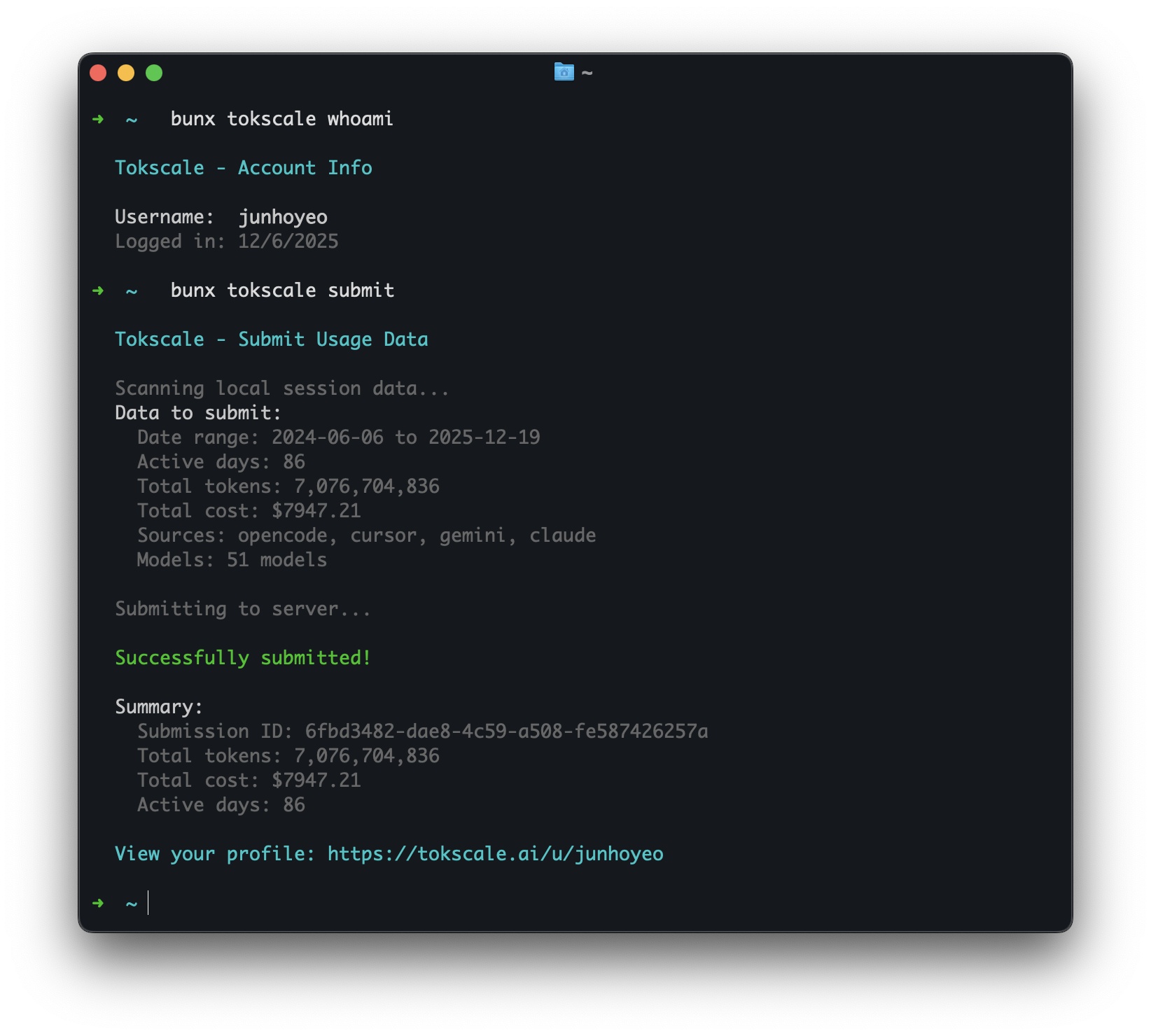
tokscale whoami

# Display your saved API token as a QR code (useful for sharing to another device)
# Encodes {"token":"tt_xxx","username":"..."} — scan with any QR reader
tokscale qr

# Submit your usage data to the leaderboard
tokscale submit

# Submit in CI/headless environments without writing credentials
# Precedence: TOKSCALE_API_TOKEN env > saved credentials file (~/.config/tokscale/credentials.json).
# When the env var is set, the saved file is ignored for that invocation.
TOKSCALE_API_TOKEN=tt_xxx tokscale submit

# Revoke a token: visit Settings > API Tokens on the leaderboard site
# (https://tokscale.ai/settings) and click "Revoke" on the token row.
# Revocation takes effect immediately — subsequent requests with that
# token will get HTTP 401 "Invalid API token".

# Submit with filters
tokscale submit --client opencode,claude --since 2024-01-01

# Preview what would be submitted (dry run)
tokscale submit --dry-run

# Logout
tokscale logout
Unpriced usage is excluded from submission
Before anything is submitted, every message must resolve to an authoritative price that covers every token bucket the message populated (input, output, cache read, cache write). Messages that cannot be priced are skipped and reported as Warning: excluded N unpriced provider/model message(s) — unknown models never submit invented or guessed spend, and all remaining priced usage still submits normally.
The exclusion reasons:
no authoritative model-to-price mapping— the model ID is absent from LiteLLM, OpenRouter, models.dev, and your custom overrides.generic routing label has no authoritative model-to-price mapping— the ID is a router label (auto,gemini-default, …) whose underlying model varies per request, so it is refused outright. An explicit entry for the label incustom-pricing.jsonis the supported way to assert a rate you know applies.pricing does not cover every populated token bucket— a price row was found, but it is missing a rate (most often cache read or cache creation) that this usage actually populates.model price match does not establish the requested provider— a price row was found only by matching the model part of the ID, or by trying a provider prefix, which does not prove your provider bills at that row's rate.model price match does not exactly name the requested model— a fuzzy or provider-scoped match was found, but nothing proves the priced key names the model you actually used.model price lookup is ambiguous across non-equivalent candidates— several candidate rows matched and they quote different prices.
To include previously excluded usage, add an exact-match entry to custom-pricing.json (see Custom Pricing Overrides) — an explicit 0 declares a genuinely free model — then re-run tokscale submit --dry-run until no warnings remain. tokscale pricing <model-id> shows which entry matched. The file is keyed by the model ID alone — the model half of the provider/model pair shown in the warning.
Autosubmit
Autosubmit schedules the normal tokscale submit flow with the operating system scheduler. It is useful for keeping your public profile current without a manual terminal run.
# Enable periodic submission. Uses launchd on macOS, systemd user timers on Linux
# when available, cron as a Linux fallback, and Windows Task Scheduler on Windows.
tokscale autosubmit enable --interval 24h

# Keep the same client and date filters you would pass to submit.
tokscale autosubmit enable --interval 2h --client opencode,claude --week

# Show saved settings and the last run/error.
tokscale autosubmit status
tokscale autosubmit status --json

# Run once now, even if the saved interval has not elapsed.
tokscale autosubmit run --force

# Disable autosubmit and remove the scheduler entry.
tokscale autosubmit disable
Scheduled runs are non-interactive: they never prompt for GitHub auth or star confirmation. Run tokscale login --token tt_xxx once, or set TOKSCALE_API_TOKEN in the scheduler environment. Tokscale records scheduler state in settings.json, writes logs under ~/.config/tokscale/autosubmit/, and uses a lock file so overlapping scheduler ticks do not submit twice.
Cursor IDE Commands
Cursor IDE support uses Cursor's web API export, cached by Tokscale at ~/.config/tokscale/cursor-cache/usage*.csv. Tokscale does not parse local Cursor Agent CLI state under ~/.cursor, and it does not treat the desktop SQLite DB as a usage ledger.
When the Cursor desktop app is installed and signed in, tokscale cursor login prefers the local cursorAuth/accessToken from Cursor's state.vscdb and builds the session cookie automatically. tokscale cursor sync also refreshes that token when available. Usage rows still come only from Cursor's usage-export API.
Setup (desktop auto-login):
- Sign in to the Cursor desktop app.
- Run
tokscale cursor login --name work(auto-detects the local desktop session when available). - Run
tokscale cursor sync --jsonto populate~/.config/tokscale/cursor-cache/usage.csv. - Run
tokscale --client cursoror any report command.
Fallback (manual browser cookie), if desktop login is unavailable:
- Open https://www.cursor.com/settings in your browser and sign in.
- Copy the
WorkosCursorSessionTokencookie value:- Network tab: make any request to
cursor.com/api/*, then copy the value afterWorkosCursorSessionToken=from theCookierequest header. - Application tab: open Cookies ->
https://www.cursor.com, then copy theWorkosCursorSessionTokenvalue.
- Network tab: make any request to
- Run
tokscale cursor login --name workand paste the token when prompted. - Continue with
tokscale cursor sync --jsonas above.
Treat the session token like a password. It is stored locally in ~/.config/tokscale/cursor-credentials.json.
# Login to Cursor (auto-detects Cursor desktop login; falls back to browser cookie paste)
# --name is optional; it just helps you identify accounts later
tokscale cursor login --name work

# Check Cursor authentication status and session validity
tokscale cursor status

# List saved Cursor accounts
tokscale cursor accounts

# Manually refresh cached Cursor usage
tokscale cursor sync --json

# Switch active account (controls which account syncs to cursor-cache/usage.csv)
tokscale cursor switch work

# Logout from a specific account (keeps history; excludes it from aggregation)
tokscale cursor logout --name work

# Logout and delete cached usage for that account
tokscale cursor logout --name work --purge-cache

# Logout from all Cursor accounts (keeps history; excludes from aggregation)
tokscale cursor logout --all

# Logout from all accounts and delete cached usage
tokscale cursor logout --all --purge-cache
By default, Tokscale aggregates usage across all saved Cursor accounts by reading cursor-cache/usage*.csv. The active account syncs to usage.csv; additional accounts sync to usage.<account>.csv.
When you log out, Tokscale moves cached usage to cursor-cache/archive/ so it is no longer aggregated. Use --purge-cache to delete cached usage instead.
Antigravity Commands
Antigravity sync currently works on macOS and Linux only. The Antigravity-enabled editor must be running and its local language server available; tokscale reads usage from that local language server and caches normalized artifacts locally.
# Check whether tokscale can see running Antigravity language servers
tokscale antigravity status

# Sync usage from local Antigravity language servers into tokscale's cache
tokscale antigravity sync

# Delete the cached Antigravity artifacts
tokscale antigravity purge-cache
Cache location: ~/.config/tokscale/antigravity-cache/
How it works: tokscale antigravity sync discovers local Antigravity session candidates, fetches confirmed usage data from the local language server RPC, and stores normalized JSONL artifacts for tokscale-core to parse later. Run sync before reports if you want the freshest Antigravity data.
Trae Commands
Trae (ByteDance's AI IDE) ships in two international product lines — Trae IDE and Trae Solo. They share the same account-level usage data (same backend, same JWT), so tokscale reports them as a single trae client. You can install either or both desktop apps; tokscale auto-discovers credentials from whichever is present.
Credentials are identified per desktop app via --variant:
--variant ide— credentials from Trae IDE (~/Library/Application Support/Trae/)--variant solo— credentials from Trae Solo (~/Library/Application Support/TRAE SOLO/)
tokscale trae sync calls the official query_user_usage_group_by_session API exactly once per run (regardless of how many desktop apps are installed) and persists the raw JSON to a local cache.
# Log in (auto-detects credentials from any installed Trae desktop client)
tokscale trae login

# Manual JWT entry (for environments where auto-detect can't find storage.json,
# e.g. Linux/Windows or a headless server). Open https://www.trae.ai/account-setting#usage
# in your browser, then F12 → Network → fi

---

*README truncated. [Continue reading on GitHub](https://github.com/junhoyeo/tokscale#readme)*