jau123/MeiGen-AI-Design-MCP
Supports GPT Image 2, Seedance & ComfyUI, with a 1,400+ prompt library, carefully crafted hooks and a multi-task orchestration system
MeiGen AI Design MCP is an open-source Model Context Protocol server for generating images and videos using remote cloud models or local ComfyUI backends. It provides tools for background removal, upscaling, and ecommerce asset creation, alongside a library of 1,446 curated prompt templates.
- Supports MeiGen Cloud, OpenAI-compatible APIs, and local ComfyUI backends.
- Includes 1,446 curated prompt templates for image and video generation.
- Offers specialized skills for background removal, upscaling, and marketing posters.
full readme from github
MeiGen AI Design MCP 

Open-source MCP server for AI image & video generation — native to every major AI coding tool
Leading models (GPT Image 2 · Nanobanana 2 · Seedream 5.0 · Midjourney V8.1 · Flux 2 Klein · Grok Imagine · Seedance 2.0 · Veo 3.1 · Grok Video · Agnes Video · local ComfyUI) · 1,446 curated prompts · parallel sub-agent orchestration · standalone CLI mode. Works in Claude Code, Cursor, Codex, Windsurf, Roo Code, OpenClaw, Hermes Agent, and any MCP-compatible host.





Quick Start • Five Skills • HTTP API • Upgrade to 2.0 • Demo • Features • Providers • Commands
English | 中文
New in 2.0.1:
generate_videoaccepts multiple reference videos and reference audio (referenceVideos/referenceAudios; local.mp4/.mov/.wav/.mp3files are uploaded automatically). Per-model limits come fromlist_models.New in 2.0.0: five guided ecommerce/image Skills, original-image enhancement, upload validation, request recovery and Codex setup. Use a Skill · Upgrade guide · HTTP API
What Is This?
An MCP server that helps your AI assistant create images, videos and ecommerce assets. Connect to the remote server (14 tools) or install the local npm server (17 tools). Works in Claude Code, Cursor, Codex, Windsurf, Roo Code, OpenClaw, Hermes Agent, and other compatible MCP hosts.
Version 2.0.0 adds five guided Skills: background removal, Product Detail Images, Marketing Poster, AI Backgrounds and Upscale. These run on MeiGen Cloud and require an authorized MeiGen account and purchased credits. Remote HTTP clients can use OAuth when enabled; the local npm/API Key compatibility path uses a private MeiGen key. The local server also supports OpenAI-compatible APIs and ComfyUI for general image generation; those providers do not run the five Skills.
- Local general image generation supports three backends: MeiGen Cloud, OpenAI-compatible APIs, or local ComfyUI. Use
list_modelsfor current capabilities. - Built-in 1,446 curated prompt templates from nanobanana-trending-prompts plus style-aware prompt enhancement
- Callable image/video steps for upstream workflows, optional creative helpers, and a standalone CLI for shell scripts and CI
See It in Action
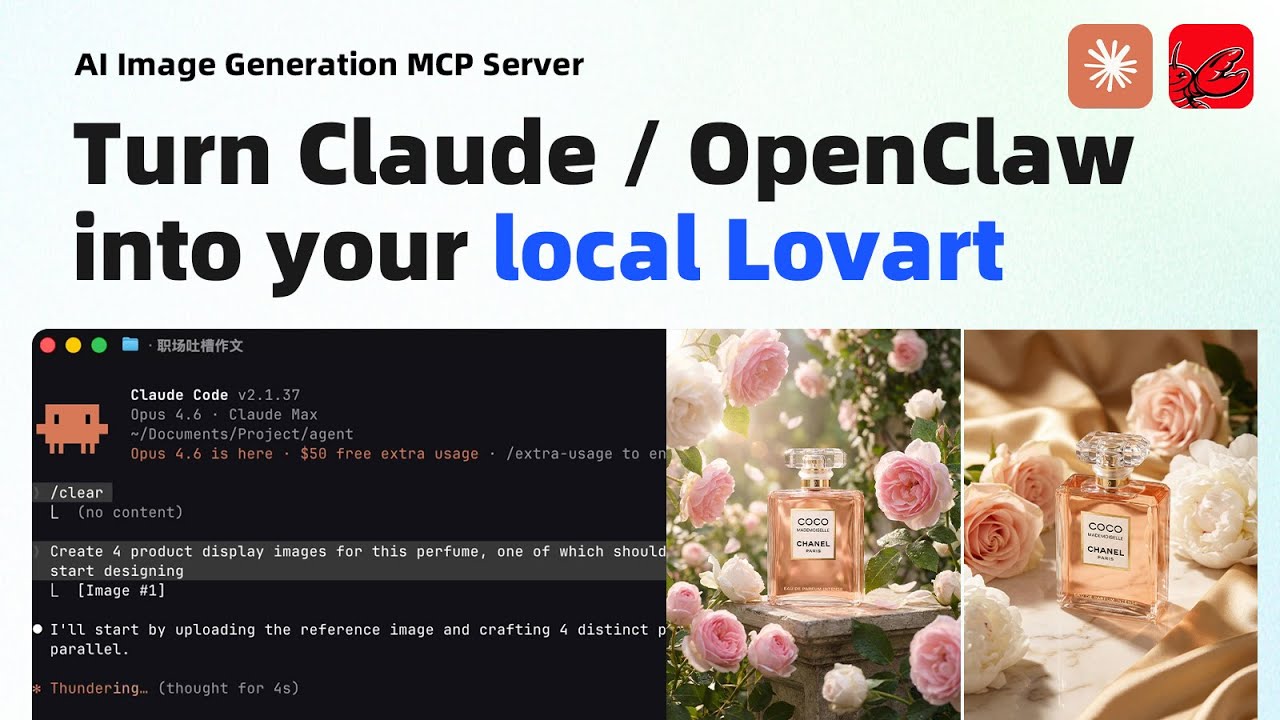
Product Photo — 4 Directions in Parallel
"Create 4 product display images for this perfume, one of which should feature a model."
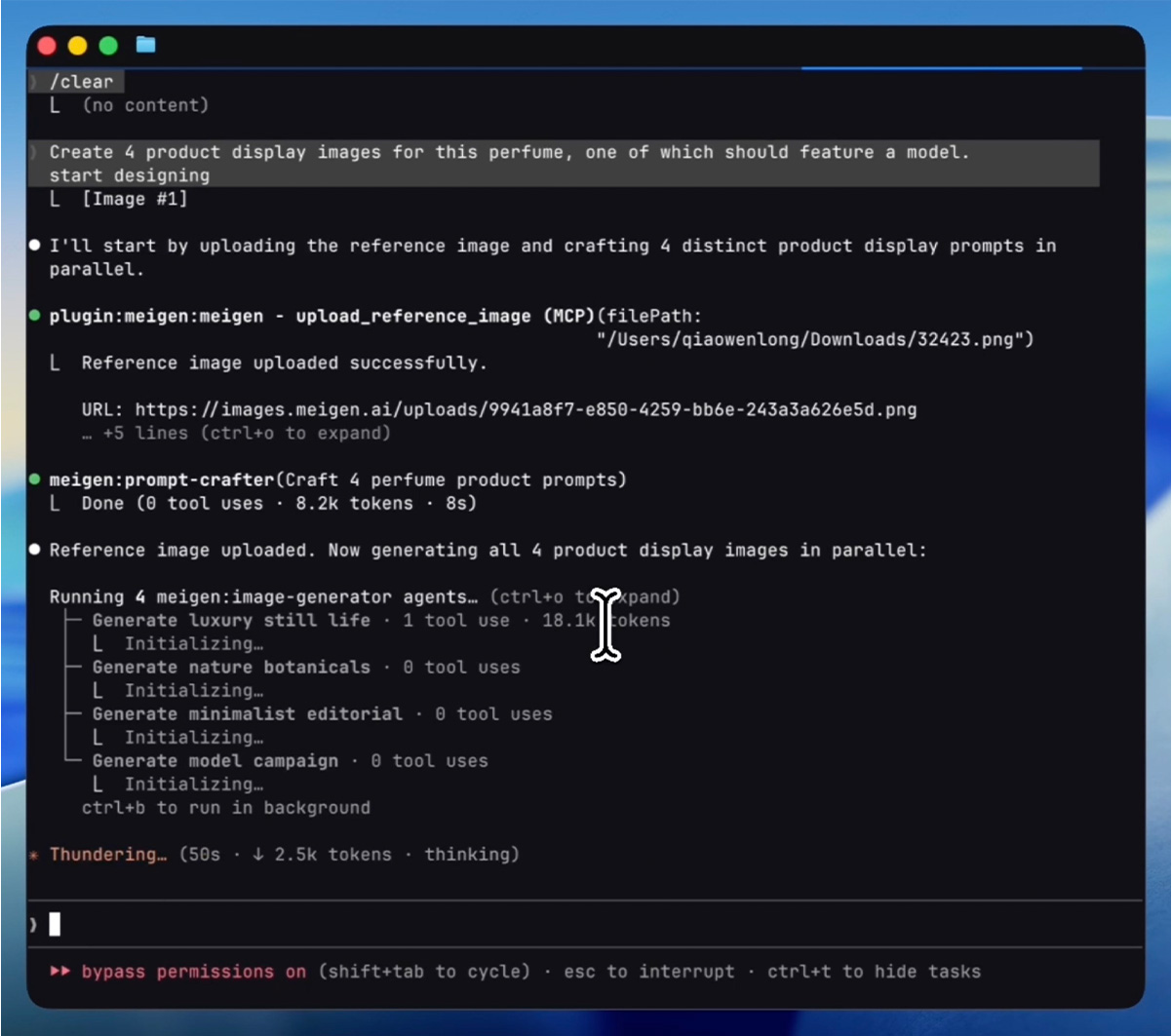
Process — AI uploads the reference image, crafts 4 distinct prompts, then generates all 4 in parallel:
Result — 4 creative directions delivered in under 2 minutes:
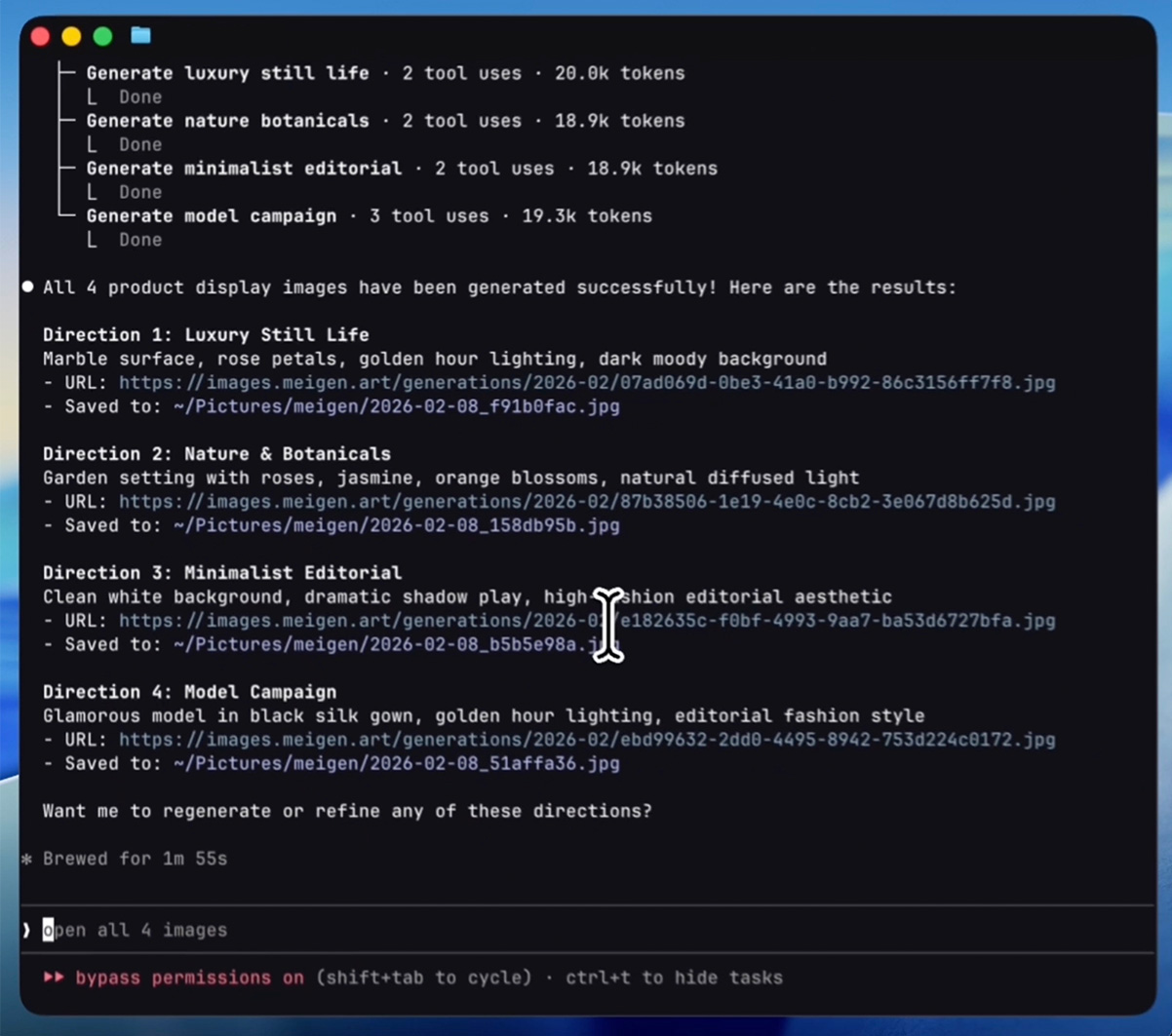
Generated images:




Quick Start
Ask your AI assistant to install
Copy this entire block into Codex, Claude Code, Cursor, or another AI assistant that can configure MCP servers. It can set up the connection and guide you through credentials. ChatGPT web uses the separate setup below.
Install MeiGen MCP for this AI client using this guide:
https://github.com/jau123/MeiGen-AI-Design-MCP#quick-start

Detect the current client and inspect its MCP configuration without printing
credentials. Preserve other servers and reuse an existing MeiGen entry.
Prefer Streamable HTTP at https://www.meigen.ai/api/mcp. For Codex, use
codex mcp add meigen --url https://www.meigen.ai/api/mcp
When the server and client support automatic OAuth, run codex mcp login meigen
or use the client authentication UI, and let me sign in and approve consent.
Otherwise use a private API key; do not combine it with OAuth.
If I need automatic local-file preparation, ComfyUI, or local-only tools, use
the stdio command npx -y meigen@2.0.2 instead. Check that this exact npm
version exists before configuring it; report an unavailable version.
If using a key, guide me to enter it in local credentials or the launch
environment, never in this chat. Public lookups can be tested without a key.
Reload/reconnect, inspect the actual tool list, and call list_skills to verify.
If you cannot configure or reconnect this client, give me the exact manual
steps and say what remains unverified. If list_skills is missing, report it.
Do not upload images, generate anything, or spend credits during installation.
For manual setup, jump to Codex desktop / CLI / IDE, ChatGPT web, or the client-specific instructions below.
1. Prepare your account
You can browse inspiration and inspect models or Skill prices without signing in. For MeiGen Cloud generation:
- In a compatible remote HTTP client, use OAuth to sign in and review permissions when automatic account login is enabled. No brand-specific client ID or shared secret is required. For local npm or clients without OAuth, create a private key at API Keys.
- Use purchased credits on the connected account. MCP generation does not use daily free credits or Web free attempts. Check live prices with
list_models/list_skills. - Approve only the connection you started. You can revoke OAuth in Connected apps. Never put API keys in chat or shared configuration.
2. Choose one connection
| Remote MCP — recommended | Local npm MCP 2.0.2 | |
|---|---|---|
| Connection | Streamable HTTP at https://www.meigen.ai/api/mcp |
Node.js process over stdio |
| Tools | 14: MeiGen generation, gallery and the five Skills | The same 14, plus prompt enhancement, preferences and ComfyUI management |
| Reference images | Public image link, an existing MeiGen URL, or actual attachment bytes readable by the host | Local files and public image links are prepared automatically |
| Local extras | Result URLs; the host handles preview/download | General generation saves files; also CLI, offline prompt library and local ComfyUI |
| Plugin extras | A bare MCP connection does not install commands, agents, output styles or hooks | The Claude Code plugin adds these; a bare npm connection also does not include them |
| Updates | Backend changes arrive after server deployment; refresh/reconnect if the host caches tools | Local tool changes require an npm release and a client update |
Choose one server entry for this host to avoid duplicate tools. The two entries use the same MeiGen account and purchased credits.
Install for your client: Remote settings · Codex · Claude Code · Cursor / VS Code / Windsurf / Roo · OpenClaw · ChatGPT web.
3. Try your first Skill
After connecting, ask: “List the available Skills and their current prices.” This does not generate an image or spend generation credits. Then provide the required material and describe the result you want:
| Skill / tool | Example request | Required | Optional | Output and cost |
|---|---|---|---|---|
Background removal — remove_background |
“Remove this background and give me a transparent PNG.” | One source image | No creative brief needed | One cutout; charged from the first request |
Product Detail Images — generate_product_detail_images |
“Use this product photo to make a main shot, a detail close-up and a lifestyle image.” | One product image; resolve the desired count/modules | Product name, selling points, copy, logo, model photo, up to two extra product photos, language and marketplace | 1–6 images; one paid image per module |
Marketing Poster — generate_marketing_poster |
“Make one poster for a weekend coffee tasting.” | A brand, event, campaign or topic | Display copy, logo, up to three product images, one style reference, language and style | One poster; images are optional |
AI Backgrounds — generate_ai_background |
“Put this product on a sunlit stone counter.” | One product image; desired setting for custom mode | White/smart/custom mode, ratio and quality | One product image with a new background; not a transparent cutout |
Upscale — upscale_image |
“Make this original product photo clearer while keeping its appearance.” | One original still PNG/JPEG/WebP image | crisp preserves structure (default); creative reconstructs details and requires acceptance of changes | One enhanced image; video enhancement is not exposed |
The assistant chooses the tool, prepares images, checks status and presents preview/download links. You do not need to write prompts, UUIDs or API parameters. It asks only for missing essential information. An explicit request for a specified count, modules or quality already confirms that scope.
Product-detail batches: choose 1–6 modules in total. The presets are main shot (hero), close-up (detail), lifestyle (scene), texture/craft (material), how-to-use (usage) and brand story (brand); custom modules are also supported. MCP requires the assistant to pass modules explicitly, preventing extra images when an argument is omitted. You can specify only the count and let the assistant choose modules. Direct HTTP API calls still default to three images (hero, detail and scene) when modules are omitted. The assistant should calculate the batch cost from the live per-image price and requested count before submitting an unresolved batch.
Copy and quality: ask to preserve your wording when exact copy matters; otherwise the service can draft copy from your brief. State the desired text language. Product details and posters default to Fast; Pro costs more. AI Backgrounds defaults to smart/Fast; white mode uses a fixed output specification and ignores ratio/quality options. Current options and prices come from list_skills.
Poster fields: with autoCopy: true, content is a brief; with autoCopy: false, it is the visible wording to preserve (the selected language may translate it). Put style/layout/design directions in extraNotes or customStyle, not in verbatim content. extraNotes may also contain verified facts or explicitly requested display copy; design instructions in it are directions, not text to print verbatim. Use a catalog preset ID for styleId, not its display label. Omit both written style fields for Auto; nonempty customStyle overrides styleId. styleImage is the primary visual reference, with written style only as a compatible supplement; do not copy its products, wording or layout. Logo and product references preserve identity.
Output and timing: current Product Detail and Poster Fast/Pro tiers both use the 2K preset; quality is not resolution. Actual pixels depend on ratio and provider output. Use current list_skills specifications/prices and do not send an unsupported resolution argument. Queueing, planning, provider execution and image count affect completion time; no fixed number of seconds is guaranteed. Polling intervals and HTTP timeouts are not ETAs.
Valid MCP call example: this illustrative request already supplies the event copy and time. Only content below is the exact visible wording; extraNotes describes layout and preservation requirements, not additional text to print. Pass it to client.callTool(...). Use list_skills({skill: "brand-poster"}) for live options and price when choosing. It creates one paid poster without image material. The caller generates and saves a UUID for each real attempt, reuses it for recovery and does not blindly rerun this example.
{
  "name": "generate_marketing_poster",
  "arguments": {
    "requestId": "8f729f7e-934e-4e2c-bae3-bf23a782f964",
    "brand": "Coffee tasting",
    "content": "Coffee tasting\nSaturday, 10:00–12:00",
    "autoCopy": false,
    "extraNotes": "Keep the supplied time. Use a clear headline and a small schedule block.",
    "styleId": "minimalist",
    "language": "en",
    "ratio": "4:5",
    "quality": "low"
  }
}
Images: for the local npm server, provide an actual file path or a public direct HTTPS image link. For remote MCP, the assistant uses upload_skill_image for external links or readable attachment bytes, then passes its imageUrl to the Skill. Existing images.meigen.ai, images.meigen.art or pbs.twimg.com HTTPS URLs can be used directly. upload_skill_image and /api/skills/upload require a positive purchased-credit balance for both local and remote MCP connections. Uploading does not start generation or spend generation credits. If your host cannot read an attachment, provide a direct image URL or use the local npm server.
Local preprocessing accepts source files up to 32 MiB and prepares references up to 4096px / 8 MiB, preserving PNG/WebP transparency. Remote uploads accept a public direct HTTPS image up to 8 MiB, or real base64 bytes up to 3 MiB decoded. Private-network URLs, redirects, authenticated links and IPv6-only sources are unsupported. These are reference image limits, not generated output specifications.
Upscale uses the original: pass an original local file or public direct HTTPS URL to upscale_image; do not resize it with a generic reference uploader. For readable attachment bytes, use upload_skill_image with purpose: "upscale". Originals may be up to 64 MiB / 64 million pixels; base64 remains limited to 3 MiB decoded. Only still JPEG/PNG/WebP is supported. Local uploads fully decode, auto-orient, remove metadata and preserve alpha and dimensions; encoding must fit below 9,500,000 bytes. If it cannot, provide a public original URL.
A source larger than 4096px on either edge or 16 million pixels returns upscale_resize_required before generation or charging. Explain that resizing can produce a result smaller than the original with limited clarity gain; after acceptance, use allowDownscale: true and a new requestId. Both MCP transports require confirmedCredits on the first call too: use the live list_skills quote within the accepted user or upstream workflow budget. This is a pre-dispatch check, not an atomic spending cap. For price_changed, obtain acceptance of the updated quote before submitting a new ID with the accepted confirmedCredits. Explain possible detail changes before choosing creative mode.
Direct HTTP API: developers without an MCP host can use the complete five-Skill API guide, including upload, run and recovery examples. GET /api/skills supplies capabilities and current prices.
Remote MCP Endpoint (zero-install, recommended)
Select Streamable HTTP, enter https://www.meigen.ai/api/mcp, then choose Connect / Authenticate and sign in to MeiGen. General OAuth uses client metadata (CIMD) or dynamic registration (DCR), with public-client authentication (none) and S256 PKCE. It is not restricted to a list of AI brands. Supporting MCP alone does not imply HTTP/OAuth support.
For Claude Code:
claude mcp add --transport http meigen https://www.meigen.ai/api/mcp
claude mcp login meigen
Automatic login depends on the server rollout and client version. If unavailable, use a private Authorization: Bearer <MeiGen API key> header; local npm continues to use MEIGEN_API_TOKEN. The remote guide covers OAuth, fallback credentials and client differences.
The remote endpoint supports stateless Streamable HTTP, including the 2026-07-28 protocol and compatible 2025 clients. Stateless means no persistent MCP session is required. Accepted generation jobs and their billing records still live on the server, so an interrupted conversation can recover them.
There is no npm install or local server process. Changes to remote tools require a backend deployment, not an npm release; the client may need to reload its tool list. Remote generation still requires an internet connection. Local npm updates remain necessary when local tools or file-handling behavior change.
Codex desktop / CLI / IDE
Use this setup for Codex CLI, the Codex IDE extension, and the desktop app when using a local Codex host. These clients share MCP configuration on the same host. ChatGPT web has a different connection flow. See the official Codex MCP guide.
Remote — recommended for MeiGen Cloud and Skills:
codex mcp add meigen --url https://www.meigen.ai/api/mcp
codex mcp login meigen
When switching an existing entry to OAuth, remove its fixed Authorization header or bearer_token_env_var; keep other servers. For longer Skills, set tool_timeout_sec = 240 in the existing entry. General OAuth requires the server rollout and a compatible client version.
API key fallback: add --bearer-token-env-var MEIGEN_API_TOKEN instead of using OAuth login, and set that variable in the environment that launches Codex. A project's .env.local is not automatically loaded. Use private header settings if your desktop client cannot inherit that environment. Keep the key out of chat and shared files.
Local — for automatic local-file preparation, ComfyUI and local-only tools: use this entry instead of the remote entry. Node.js 22 or newer is recommended.
[mcp_servers.meigen]
command = "npx"
args = ["-y", "meigen@2.0.2"]
env_vars = ["MEIGEN_API_TOKEN"]
startup_timeout_sec = 90
tool_timeout_sec = 240
This forwards your locally configured MEIGEN_API_TOKEN to the npm process. To register just the local command with the CLI, use codex mcp add meigen -- npx -y meigen@2.0.2, then add the environment forwarding and timeout settings shown above. meigen init codex is not supported; use Codex's own MCP configuration.
Restart/reconnect after setup. In Codex CLI, codex mcp list checks registration and /mcp shows connection status. Then ask “List MeiGen's available Skills and current prices” to verify an actual tool call without generating or spending credits. A saved configuration alone does not prove that the server connected. Longer video jobs may need a longer tool timeout.
ChatGPT custom remote connection
If your plan/workspace offers Developer mode and custom MCP connections, add https://www.meigen.ai/api/mcp, select OAuth, use automatic registration when offered and complete MeiGen sign-in/consent. This requires the server's generic OAuth rollout. See OpenAI's setup guide and the MeiGen remote guide.
This standard MCP connection is separate from the marketplace adapter and its custom cards. Without OAuth, No Authentication supports public lookups only. Generation, upload and private recovery require authorization. ChatGPT cannot use a MeiGen API key as an OAuth client secret; do not put keys in chat or the server URL. A chat message cannot install local npm inside ChatGPT web.
Local npm MCP (Node.js)
Node.js 22 or newer is recommended. The examples below pin meigen@2.0.2. After changing an installed version or connection settings, restart or reconnect the host. The five Skills still call MeiGen Cloud and need the account setup above.
Claude Code Plugin (npm, local tools)
# Add the plugin marketplace
/plugin marketplace add jau123/MeiGen-AI-Design-MCP

# Install
/plugin install meigen@meigen-marketplace
Restart Claude Code after installation (close and reopen, or open a new terminal tab).
Alternative marketplace — also available via wshobson/agents (30k+ stars):
/plugin marketplace add wshobson/agents
/plugin install meigen-ai-design@claude-code-workflows
This marketplace doesn't bundle MCP server config. After installing, add to your project's
.mcp.json:{ "mcpServers": { "meigen": { "command": "npx", "args": ["-y", "meigen@2.0.2"] } } }
First-Time Setup
Free features work immediately after restart — try:
"Search for some creative inspiration"
The Claude Code plugin includes a setup command:
/meigen:setup
For the five Skills, choose MeiGen Cloud and configure your MeiGen key in the connection settings. For general image generation, the wizard also offers ComfyUI and OpenAI-compatible APIs. Restart Claude Code after changing configuration. Do not paste secrets into a conversation.
Cursor / VS Code / Windsurf / Roo Code
One command to set up MeiGen for any supported AI coding tool:
npx -y meigen@2.0.2 init cursor      # Cursor
npx -y meigen@2.0.2 init vscode      # VS Code / GitHub Copilot
npx -y meigen@2.0.2 init windsurf    # Windsurf
npx -y meigen@2.0.2 init roo         # Roo Code
npx -y meigen@2.0.2 init claude      # Claude Code (project-level)
This writes the correct MCP config file with the right format and path for your tool. If a config file already exists, MeiGen is merged in without overwriting your other servers.
init writes a configuration that follows the default npm release tag; the manual examples above pin 2.0.2. To pin an initialized connection too, change its args to ["-y", "meigen@2.0.2"] and restart the host.
OpenClaw
Install the full plugin from ClawHub (includes Skills and an explicit MCP connection; other features depend on the loader):
openclaw plugins install clawhub:meigen-ai-design
Or install only the skill (no commands/agents):
npx clawhub@latest install creative-toolkit
Use as CLI (no MCP host required)
For shell scripts, CI pipelines, or anyone who wants AI image generation without an MCP host, MeiGen ships a one-shot gen command in the same npm package.
# Set your token locally (create it at https://www.meigen.ai/profile/api-keys on desktop)
export MEIGEN_API_TOKEN=meigen_sk_...

# Generate
npx -y meigen@2.0.2 gen --prompt "a calico cat in a sunlit kitchen"

# With a specific model + aspect ratio
npx -y meigen@2.0.2 gen -p "tech logo" -m midjourney-v8.1 -r 1:1

# With a reference image (local file auto-uploaded)
npx -y meigen@2.0.2 gen -p "product hero shot" --ref ~/Desktop/bottle.jpg

# Submit only — print generationId without polling (good for CI)
npx -y meigen@2.0.2 gen -p "..." --no-wait

# Machine-readable output (good for jq pipes)
npx -y meigen@2.0.2 gen -p "..." --json | jq -r '.imageUrls[0]'
CLI image output is saved to ~/Pictures/meigen/ (override with MEIGEN_OUTPUT_DIR). The five Skills return result links; your host can preview or download them.
meigen gen --help lists all flags.
Other MCP-Compatible Hosts
Add to your MCP config (e.g. .mcp.json, claude_desktop_config.json):
{
  "mcpServers": {
    "meigen": {
      "command": "npx",
      "args": ["-y", "meigen@2.0.2"],
      "env": {
        "MEIGEN_API_TOKEN": "meigen_sk_..."
      }
    }
  }
}
Free features (inspiration search, prompt enhancement, model listing) work without any API key.
Hermes Agent (NousResearch)
Hermes Agent is a first-class MCP client — add MeiGen to ~/.hermes/config.yaml:
mcp_servers:
  meigen:
    command: "npx"
    args: ["-y", "meigen@2.0.2"]
    env:
      MEIGEN_API_TOKEN: "meigen_sk_..."
    timeout: 2700         # generate_video polls until the server reports a terminal state (long videos can run 15+ min) — default 120s is not enough
    connect_timeout: 120  # first npx download can take a minute
The
timeout: 2700andconnect_timeout: 120overrides are important — Hermes defaults (120s / 60s) are tuned for short-running tools and will time out on video generation or first-run npx downloads.
Features
Compose with an existing workflow
An upstream Skill can write N scripts, call MeiGen for each first frame, then pass completed frame URLs to generate_video(firstFrame=...). Reference clips (referenceVideos, referenceAudios) can be mixed in the same call and addressed from the prompt as "Video 1" / "Audio 1". It owns prompts, models/providers, ratios, approved count/budget and presentation. Creative planning and plugin agents are optional; resolved requests do not need repeated approval at every step.
For MeiGen jobs, persist one UUID requestId and exact inputs per logical step. Use wait: false for an immediate task handle; local npm also accepts download: false. Existing local defaults remain wait: true, download: true; asynchronous calls skip download. Remote MCP returns URLs and has no download setting. Recover with check_generation using the original requestId or generationId. Request lookup requires authorization for the same MeiGen account (OAuth remotely, or a MeiGen API key); known generation-ID status remains public remotely. Read structuredContent for status, handles, URLs, errors and polling advice.
Local npm bounds concurrent API submissions at four, with polling/downloads outside those slots; ComfyUI executes one job at a time. The caller also bounds outstanding work and reserves in-flight costs within its approved budget. Actual backend rate limits and Retry-After remain authoritative. Parallel videos are allowed within authorized scope; no ten-image total or atomic batch spending guarantee applies.
Local waiting retries temporary status-query failures within its observation budget; cancellation stops waiting while IDs remain recoverable. A completed media mismatch keeps the actual result and returns requestedMediaType plus review_media_type. A missing or unrecognized recovery route returns endpoint_unavailable / check_backend, never permission to submit again. Deploy the matching backend first and preserve recovery APIs during rollback.
See persistent step IDs, frame/video calls and recovery rules.
MCP Tools
Both entries expose the following 14 cloud tools. The local npm entry adds three local tools, for 17 total. Read-only lookups do not spend generation credits; check_skill requires the original OAuth account or the API key that owns the request. Local npm uses an API key; remote HTTP also supports OAuth when enabled.
| Tool | Entry | Billing / purpose |
|---|---|---|
search_gallery |
Both | No generation charge; search inspiration with image previews, at most 3 per call. With OAuth or a MeiGen key configured the call is authenticated and counts against that account's daily search quota instead of the shared per-IP budget. Local npm also bundles 1,446 prompts. |
get_inspiration |
Both | No generation charge; full prompt, images and metadata for a gallery entry. |
list_models |
Both | No generation charge; current supported models and options. |
generate_image |
Both | Generate an image. Remote uses MeiGen purchased credits; local also supports configured BYOK/ComfyUI providers. |
generate_video |
Both | Authorized MeiGen account and purchased credits; use the current model options from list_models. Reference clips go in referenceVideos / referenceAudios (images.meigen.ai URLs — normally a clip MeiGen generated earlier — or, on the local npm server only, local .mp4/.mov/.wav/.mp3 files that are uploaded for you; remote MCP takes images.meigen.ai URLs only, and other hosts are rejected); per-model clip counts and second budgets come from list_models, and reference audio is never billed. |
check_generation |
Both | No generation charge; recover by generationId or authenticated requestId. |
list_skills |
Both | No key or generation charge; current Skill inputs, defaults and prices. |
upload_skill_image |
Both | Authorized MeiGen account; prepares a reference without spending generation credits. |
remove_background |
Both | MeiGen purchased credits; one transparent cutout. |
generate_product_detail_images |
Both | MeiGen purchased credits; 1–6 images, billed per module. |
generate_marketing_poster |
Both | MeiGen purchased credits; one poster, optional image references. |
generate_ai_background |
Both | MeiGen purchased credits; one product image with a white, smart or custom background. |
upscale_image |
Both | MeiGen purchased credits; faithful or creative enhancement from the original image. |
check_skill |
Both | Original OAuth account or owning API key; no additional generation charge. Returns completed images, failed modules and refund states. |
enhance_prompt |
Local only | Local prompt enhancement; no generation charge. |
manage_preferences |
Local only | Read/write local preferences; no generation charge. |
comfyui_workflow |
Local only | Manage local ComfyUI workflows; no MeiGen generation charge. |
Local synchronous image/video generation saves files by default; use download=false to skip, or wait=false to return a handle without downloading. Skills return preview/download links in both entries. Tools with the same name can have transport-specific input schemas; clients should read the connected server's tool list.
Slash Commands
These commands require the Claude Code plugin; connecting a bare MCP server does not install them.
| Command | Description |
|---|---|
/meigen:gen <prompt> |
Quick generate — skip conversation, go straight to image |
/meigen:find <keywords> |
Search 1,446 curated prompts for inspiration |
/meigen:models |
Browse and switch AI models for this session |
/meigen:setup |
Interactive provider configuration wizard |
Standalone CLI Mode
For shell scripts, CI pipelines, and terminal users who don't run an MCP host:
export MEIGEN_API_TOKEN=meigen_sk_...
npx -y meigen@2.0.2 gen --prompt "a calico cat in a sunlit kitchen"
npx -y meigen@2.0.2 gen -p "logo design" -m midjourney-v8.1 -r 1:1 --json
See Use as CLI (no MCP host required) for the full flag list.
Smart Agents
The Claude Code plugin includes optional helpers for general image generation; direct tool calls remain supported. The five Skills handle their own planning and do not require these agents:
| Agent | Purpose |
|---|---|
image-generator |
Optional executor; preserves caller parameters and returns task handles/results |
prompt-crafter |
Writes multiple distinct prompts for batch generation (runs on Haiku for cost efficiency) |
gallery-researcher |
Deep gallery exploration without cluttering the main conversation (runs on Haiku) |
Output Styles
Switch creative modes with /output-style:
- Creative Director — Art direction mode with visual storytelling, mood boards, and design thinking
- Minimal — Just images and file paths, no commentary. Ideal for batch workflows
Automation Hooks
Automatic Preview is off by default. Set MEIGEN_AUTO_OPEN=1 in the plugin host environment to open saved images on macOS; workflow callers otherwise control presentation. Async/no-download calls have no saved image to open.
- Config Check — Validates provider configuration on session start, guides setup if missing
- Optional preview — Set
MEIGEN_AUTO_OPEN=1to open saved images in Preview (macOS)
Providers
The local npm server supports three backends for generate_image. Configure one or multiple. The remote server and all five Skills use MeiGen Cloud; Skills do not accept a BYOK provider or run on ComfyUI.
ComfyUI — Local & Free
Run generation on your own GPU with full control over models, samplers, and workflow parameters. Import any ComfyUI API-format workflow — MeiGen auto-detects KSampler, CLIPTextEncode, EmptyLatentImage, and LoadImage nodes.
{
  "comfyuiUrl": "http://localhost:8188",
  "comfyuiDefaultWorkflow": "txt2img"
}
Useful for models you run locally. Generation can stay on your machine when you use local files and a local workflow. The MeiGen Skills still use cloud services.
MeiGen Cloud
Cloud API with multiple models: GPT Image 2.0, Nanobanana 2, Seedream 5.0, and more. No GPU required.
Get your API key and credits:
- Sign in and open API Keys in a desktop browser.
- Create a key starting with
meigen_sk_and save it in your MCP connection settings. - On the same account, open Profile → Top Up or mobile Premium to buy credits.
{ "meigenApiToken": "meigen_sk_..." }
General image resolution & quality — generate_image accepts model-dependent options. Use list_models for the current default and supported values:
resolution: e.g."1K"/"2K"/"4K"— upgrade for posters, prints, wallpapersquality: e.g."low"/"medium"/"high"— use"low"for quick drafts and thumbnails
Seedance 2.0 video now renders native 4K — but only on the pro tier (mini/fast cap at 480p/720p); pass tier: "pro" for 1080p/4K output.
Each model exposes its own supported resolutions and quality tiers — run list_models to see what's available. For up-to-date pricing across all models, see meigen.ai/model-comparison.
Bring Your Own API (OpenAI-Compatible)
Connect any image generation API that follows the OpenAI format — Together AI, Fireworks AI, DeepInfra, SiliconFlow, or your own endpoint. Just provide your key, base URL, and model name:
{
  "openaiApiKey": "sk-...",
  "openaiBaseUrl": "https://api.together.xyz/v1",
  "openaiModel": "black-forest-labs/FLUX.1-schnell"
}
All three providers support reference images. MeiGen and OpenAI-compatible APIs accept URLs directly; ComfyUI accepts both URLs and local file paths, injecting them into LoadImage nodes in your workflow.
Configuration
Claude Code Plugin Setup
/meigen:setup
This command belongs to the Claude Code plugin. Other MCP hosts should use their own connection settings. For the five Skills, configure a MeiGen key; OpenAI-compatible credentials and ComfyUI only apply to general image generation. Store credentials in connection settings or the local config file, not a chat message.
Config File
Configuration is stored at ~/.config/meigen/config.json. ComfyUI workflows are stored at ~/.config/meigen/workflows/.
Environment Variables
Environment variables take priority over the config file.
| Variable | Description |
|---|---|
MEIGEN_API_TOKEN |
MeiGen API key; required for all five Skills and MeiGen generation |
MEIGEN_BASE_URL |
Local server API origin; default https://www.meigen.ai. Use an explicit local origin for backend development. |
MEIGEN_REQUEST_STORE_DIR |
Private local receipt directory (default ~/.meigen/requests). Use an absolute path to an owned writable directory; POSIX permissions must be 0700, with no symlink. If storage is unavailable, generation uses process memory and returns receiptWarning; persist the returned request ID and exact inputs in your workflow for restart recovery. |
UPLOAD_GATEWAY_URL |
Local reference upload gateway; default https://gen.meigen.ai. Independent of MEIGEN_BASE_URL. |
OPENAI_API_KEY |
Your API key (any OpenAI-compatible provider) |
OPENAI_BASE_URL |
API base URL — change this to use Together AI, Fireworks AI, etc. |
OPENAI_MODEL |
Model ID supported by your endpoint |
COMFYUI_URL |
ComfyUI server URL (default: http://localhost:8188) |
MEIGEN_OUTPUT_DIR |
Override the local save directory for generated images (default: ~/Pictures/meigen). Useful for sandboxed hosts (e.g. OpenClaw) where the default path is unreachable. |
MEIGEN_VIDEO_OUTPUT_DIR |
Override the local save directory for generated videos (default: ~/Movies/meigen). |
XDG_PICTURES_DIR |
Linux only — when MEIGEN_OUTPUT_DIR is unset, images are saved to $XDG_PICTURES_DIR/meigen if this env var is set (e.g. by your desktop environment). Falls back to ~/Pictures/meigen. |
XDG_VIDEOS_DIR |
Linux only — same logic as XDG_PICTURES_DIR but for videos. Falls back to ~/Movies/meigen. |
Privacy
MeiGen MCP respects your privacy. Here's what happens with your data:
- ComfyUI (local) — A local workflow with local files can run without cloud generation. Gallery queries and MeiGen Skills still use external services.
- MeiGen Cloud and Skills — Prompts and reference images are processed by MeiGen and its generation providers; result images are stored on Cloudflare R2. See MeiGen Privacy Policy.
- OpenAI-compatible — Prompts and reference images are sent to the configured API endpoint. See your provider's privacy policy.
- Reference image upload — Local files use the configured upload gateway (default
gen.meigen.ai) and Cloudflare R2. Local MCP ordinary generation and standard Skill references target 4096px / 8 MiB; the standalonemeigen genCLI retains its 2 MiB target. Upscale keeps original dimensions and uses the limits above. Skill preparation removes metadata and preserves transparency; GIF references use the first frame. Remote Skill uploads require MeiGen account authorization (OAuth or API key). Reference URLs are accessible to anyone with the link. Preserve accepted URLs for retries, keep your originals and download results you need; URLs are not promised as permanent archival storage. ComfyUI can use local paths without uploading. - Gallery search — With a search query, the MeiGen API is queried (your query text is sent to
www.meigen.ai); category browsing and offline fallback use bundled local data. Prompt enhancement runs locally with no external calls.
The local npm server adds no telemetry. Requests sent to MeiGen are subject to its service and privacy policies.
Custom Storage Backend
If you prefer to use your own S3/R2 bucket for reference image uploads, set the UPLOAD_GATEWAY_URL environment variable or uploadGatewayUrl in ~/.config/meigen/config.json to point to your own presign endpoint. The endpoint must implement:
POST /upload/presign
Content-Type: application/json

Request:  { "filename": "photo.jpg", "contentType": "image/jpeg", "size": 123456 }
Response: { "success": true, "presignedUrl": "https://...", "publicUrl": "https://..." }
The presignedUrl is used for a PUT upload, and publicUrl is the publicly accessible URL returned to the user. This option applies to local uploads. For standard Skills, the local server automatically prepares a custom CDN URL through authenticated /api/skills/upload before submission. Upscale passes a public original URL to the backend for source validation and preparation. Custom gateway images must remain publicly reachable without authentication or redirects.
Troubleshooting
| Problem | Next step |
|---|---|
| New Skills do not appear | Remote: refresh/reconnect the tool list after the backend is deployed. Local: confirm the connection runs meigen@2.0.2, then restart. Installing npm alone does not deploy the APIs. |
| Invalid or missing key | Create/check the key in desktop API Keys and update the MCP connection's header or MEIGEN_API_TOKEN. Restart a local server after changing its environment. Do not paste the key into chat. |
| Insufficient credits, but the website shows a balance | API calls use purchased credits only, never daily free credits. Use Profile → Top Up on the same account; then ask the assistant to continue. A rejected call should not be polled. |
| The image cannot be uploaded | Use a real local file (local npm) or a public direct HTTPS image link. Check format/size and remove login or redirect requirements. If the host cannot read attachments, use a direct link. Upload failure has not started a generation. |
| A tool timed out or the host restarted | Recover Skills with check_skill, and ordinary image/video jobs with check_generation; do not automatically submit a new paid request. A host with a 60-second tool timeout may need a longer timeout, such as 240 seconds for Skill submission. |
| Some product-detail modules failed | Keep and display completed images; show the failed modules and their reported refund state. Do not regenerate the whole batch or add paid replacements automatically. |
| The request is rate-limited | Follow the returned waiting instruction. A daily request limit is separate from the credit balance; repeated polling or topping up does not reset it. |
| I configured OpenAI or ComfyUI, but a Skill still asks for a MeiGen key | Those backends support local general image generation. The five Skills use MeiGen Cloud and purchased credits. |
For Skill client implementers: generate requestId internally, keep it with the original inputs, and query check_skill after interruptions. Follow nextAction; processing responses normally suggest a 10-second polling interval. Reuse returned retryParameters exactly, including uploaded URLs. A new ID represents a new paid attempt; changing inputs under an existing ID is rejected. These IDs belong in the client, not in questions to the user.
Upgrading from 1.4.0
- Remote MCP: keep the endpoint and your valid MeiGen key. After backend deployment, reconnect and call
list_skills; expect five Skills and 14 tools. Updating npm alone does not deploy the APIs. - Local npm: change pinned configurations to
meigen@2.0.2and restart; global installations can runnpm install -g meigen@2.0.2. Expect 17 tools. Check that the version is available on npm first. - Plugin users: update the Claude marketplace plugin, OpenClaw native plugin or standalone ClawHub Skill separately. Updating npm alone does not replace installed instruction files. Do not add a second MCP entry when the plugin already supplies one.
- Composable calls: local
wait: true/download: trueremain defaults. New workflows should persist UUIDrequestId, usewait: falseand recover by that ID. Remote legacyattemptIdremains accepted; older receipts cannot retroactively prove every historical parameter mismatch. Update plugin instructions as well as the server to get the optional creative flow. - Existing configuration and jobs: general generation keeps its MeiGen/OpenAI/ComfyUI configuration; the five Skills need an authorized MeiGen account and purchased credits. Preserve IDs and inputs for interrupted jobs and recover them; an upgrade is not a reason to resubmit a paid request.
- Input changes: local Skill paths must be absolute,
~/orfile://; relative paths are rejected instead of being resolved against a hidden process directory. Images lose metadata, GIF references use the first frame, and Upscale needs a still original. Keep original assets and download results you need; result links are not a permanent-storage guarantee.
Releasing
The npm package version 2.0.2 is separate from the MCP protocol date and SDK version.
Maintainers: follow RELEASING.md for the 2.0.2 build, package checks and publishing process. Store NPM_TOKEN only in this repository's ignored .env.local as described there. It authorizes npm publishing and is separate from the MEIGEN_API_TOKEN used by customers. Never include either credential in commits or the published package.
License
MIT — free for personal and commercial use.