indranilbanerjee/digital-marketing-pro
An open-source AI based digital marketing operating system for strategy, SEO, AEO/GEO, paid media, content, CRM, and analytics - grounded in brand context, human approval, and verifiable outputs. Best for Brands, Agencies and one person campanies.
Digital Marketing Pro is an open-source, MIT-licensed AI marketing plugin with skills and specialist agents for brand setup, campaign planning, SEO audits, competitor analysis, and pre-publish checks. It guides brands through a 12-part engagement flow and supports multiple agent platforms, including Claude Code, Anthropic Cowork, OpenAI Codex, Cursor 2.5+, and Google Antigravity 2.0.
- Includes 164 skills and 24 specialist agents.
- Live writes require typed approval or an approved standing rule.
- Supports 9 native platforms and 35+ Agent Skills platforms.
full readme from github
Digital Marketing Pro
Your agency just signed a 50-brand client. The previous agency left no playbook. Three brands are bleeding budget, two have stale positioning, one is launching in a regulated jurisdiction next month. Where do you start?
Run /digital-marketing-pro:engagement against each brand. Same 12-Part Strategy Flow, same Four Core Documents, same 61-step structure — auditable across the entire portfolio in about an hour per brand on a top-tier model (measured in 2026; your model and plan change the time). No more inconsistent depth between brands. No more "what did the last agency do?" mysteries. No more compliance gaps in regulated jurisdictions.
Open-source AI marketing plugin — 164 skills, 24 specialist agents, EU AI Act Article 50 ready, Cowork team-persistent. Built for marketing agencies, in-house teams running 50–200 brands, and consultancies. Installs on Claude Code (CLI + IDE), Anthropic Cowork, OpenAI Codex, Cursor 2.5+, GitHub Copilot CLI, Google Antigravity 2.0, Hermes Agent, OpenClaw, and Grok + 35+ Agent Skills platforms. Created by Indranil Banerjee · LinkedIn · X.






🆕 Just shipped — v3.35.8 (October 12, 2026): the command that returns autopilot to propose-only works from any folder, and the script checks cover new folders by default. What's new · Changelog
# Install — one line
/plugin marketplace add indranilbanerjee/neels-plugins
/plugin install digital-marketing-pro@neels-plugins
If this saves you time, give it a star ⭐ — it's the single thing that helps other marketers find it.
How it works
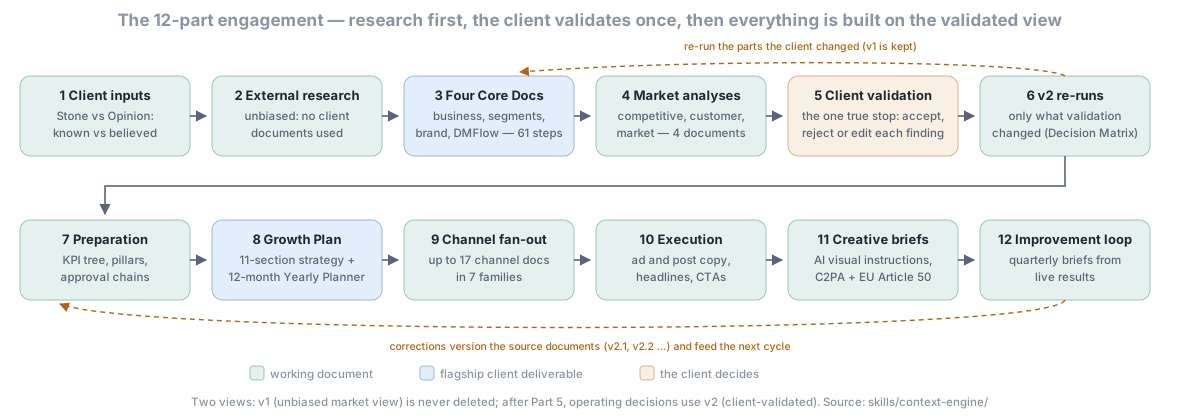
Every brand runs the same 12 parts in the same order; Part 5 is the one stop where the client validates. Details: The 12-Part Engagement Methodology.
Try this first
Install, then ask in plain words. Each of these kinds of request reached the right skill in our trigger tests.
| You type | What happens |
|---|---|
| "set up a new brand" | The brand profile every skill reads: voice, audience, compliance |
| "build the Q3 campaign plan" | A multi-channel plan: objectives, channel mix, budget, timeline, KPIs |
| "why did our traffic drop" | A site-wide SEO audit ranked into a PLAN.md: technical, content, links, local |
| "how do we stack up against X" | A one-off analysis of 2-5 competitors: positioning, content, SEO, ads, pricing |
| "check this before we publish" | The scored pre-publish gate: claims, brand voice, compliance; plus an AI-tell scan |
| "how many visitors per variant" | An A/B test plan computed by script: sample size, days to run, stopping rules |
Safety and approvals
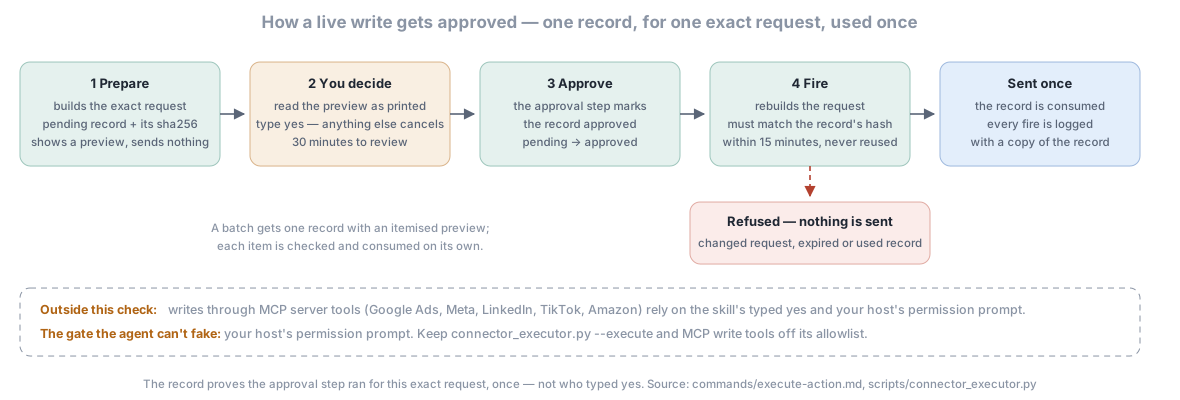
- Writes the plugin sends itself (
/digital-marketing-pro:execute-action) fire only against a single-use approval record for that exact request: the script prepares the record with a preview of the request, the skill approves it after you typeyes, and the request must match it byte for byte within 15 minutes. The record proves the approval step ran for this request, once; it cannot prove who typedyes, because the agent runs every command. - Writes through MCP server tools (Google Ads, Meta, LinkedIn, TikTok, Amazon and other connected servers) are outside that code check. They rely on the skill's typed-
yesgate and your host's permission prompt. - Keep the gate you control. Leave
connector_executor.py --executeand MCP write tools out of your host's command allowlist so it asks you every time; bypass or auto-approve modes remove that check. - Autopilot proposes by default. It applies a correction on its own only under a standing approval you approved: scoped, capped per day, at most 30 days. Details in PRIVACY.md.
What it will never do
- Install a package on its own. A missing one prints the exact pinned install command.
- Send, publish or spend without your typed
yes(or a standing rule you approved). Writes it sends itself also need the single-use approval record above. - Ask for an API key in the chat. Connectors read keys from environment variables.
- Connect a service you did not set up. No MCP server ships enabled and no hooks run.
- Remove or hide AI watermarks. AI involvement is disclosed, with C2PA provenance where the format supports it.
What it costs
- The plugin is free (MIT-licensed).
- Model usage (tokens). On a subscription (Claude Pro, Max, Team or Enterprise in Claude Code or Cowork; a ChatGPT plan in Codex; a Cursor or Copilot plan; the same goes for other hosts' plans) the tokens count against your plan's usage limits instead of being billed per token; check your plan for any optional extra-usage billing. Only pay-as-you-go API-key users pay per token. Context (the skill listing, a skill's instructions, the documents it reads) uses context window and usage allowance for everyone, and money only for API users. A full engagement is a heavy user;
/usagein Claude Code shows per-model consumption. - Services you connect with your own keys (ad, email and CRM platforms, SEO and data APIs such as Ahrefs or DataForSEO) are billed by those providers whatever plan you are on, and the money an action moves (an ad budget, a send) is spent on their side. Live writes wait for your typed
yesfirst.
Get started in 5 minutes (non-developer path)
Are you a marketer, agency owner, or content lead who doesn't live in a terminal? Here's the fastest path:
- Open Anthropic Cowork in your browser (no installation, no terminal, no command line). Sign in with your Claude account (Cowork usage counts against your plan).
- Click your profile menu → Settings → Plugins → Add Marketplace. Paste:
indranilbanerjee/neels-plugins - Find "Digital Marketing Pro" in the list → click Install.
- Type in chat: "Let's set up a brand for ACME Corp" — Claude will walk you through brand setup (voice, audience, jurisdiction, competitors).
- Then ask: "Run a full marketing engagement for ACME" — and watch ~50–60 strategy documents get produced over the next ~60 minutes.
That's it. You never touched a command line. Your team Drive will hold the outputs. Re-open Cowork tomorrow and pick up where you left off.
If you're more technical, see Quick start below for the Claude Code CLI install (one terminal command).
For team usage (agencies running 50+ brands), also run /digital-marketing-pro:cowork-setup once so brand state persists across Cowork sessions via your team's Google Drive.
Quick start
1. Install on Claude Code (canonical)
/plugin marketplace add indranilbanerjee/neels-plugins
/plugin install digital-marketing-pro@neels-plugins
/plugin commands work in Claude Code (CLI + IDE at claude.com/code) and Anthropic Cowork. In the standard Claude chat app (browser claude.ai OR the installed Claude Desktop app) plugins still install and run, but management is via the Plugins UI button at the bottom of the chat — not via /plugin slash commands. See the Updating section for the recovery procedure if you accidentally try a slash command in the chat UI.
2. Turn on auto-update (recommended)
Third-party marketplaces have auto-update OFF by default in Claude Code — no banner tells you when a new version ships. Fix it once:
Open /plugin → Marketplaces tab → find neels-plugins → toggle Enable auto-update. Done — future releases pull at session start; /reload-plugins applies mid-session without restart.
3. Set up your first brand
/digital-marketing-pro:brand-setup
Interactive brand profiling — voice, audience, channels, industry, target jurisdictions, competitors, goals. Quick mode (5 questions) or full mode (17 questions). Optional: /digital-marketing-pro:import-guidelines to bulk-load existing brand guidelines, SOPs, or templates.
4. Run a full engagement, or jump straight to a workflow
/digital-marketing-pro:engagement # full 12-Part Strategy Flow (~60 min)
Or jump straight to one workflow:
/digital-marketing-pro:campaign-plan        # multi-channel campaign with budget, timeline, KPIs
/digital-marketing-pro:seo-audit            # technical + content + E-E-A-T + AI visibility audit
/digital-marketing-pro:content-engine       # blog / ad / email / social / landing / video drafts
/digital-marketing-pro:competitor-analysis  # multi-dimensional deep-dive
/digital-marketing-pro:performance-report   # trends + anomalies + recommendations
/digital-marketing-pro:email-sequence       # subject lines, copy, timing, segmentation
/digital-marketing-pro:check                # pre-publish quality gate (hallucination + voice + claims)
/digital-marketing-pro:status               # unified brand snapshot
/digital-marketing-pro:resume               # resume an interrupted long workflow (engagement / campaign-plan / etc.)
/digital-marketing-pro:output-folder        # open the user-visible ~/Documents/DigitalMarketingPro/ folder
5. Find your output
~/.claude-marketing/brands/<brand-slug>/
├── profile.json                              ← brand voice, audience, guardrails, jurisdictions
├── insights.json                             ← cross-engagement learnings
└── engagements/
    └── <engagement-id>/
        ├── _engagement.json                  ← state: current part, completed parts, change log
        ├── living-instruction-file.md        ← Living Project Instruction File
        ├── part-01-client-inputs/            ← Part 1 Stone-vs-Opinion intake
        ├── part-02-external-research/        ← Part 2 external market research
        ├── part-03-four-core-documents/      ← Part 3 Four Core Documents (61 steps), v1/ and v2/
        ├── part-04-competitive-customer-market/  ← Part 4 analyses, v1/ and v2/
        ├── part-05-client-validation/        ← Part 5 Client Validation Document
        ├── part-06-v2-reruns/                ← Part 6 selective v2 re-runs
        ├── part-07-preparation/              ← Part 7 internal operating layer
        ├── part-08-growth-plan/              ← Part 8 Growth Plan + Yearly Planner
        ├── part-09-channel-strategy/         ← Part 9 channel-strategy fan-out
        ├── part-10-execution-artefacts/      ← Part 10 ad copy / post copy / headlines / CTAs
        ├── part-11-ai-creative-instructions/ ← Part 11 AI creative instructions
        └── part-12-continuous-improvement/   ← Part 12 continuous improvement loop
The workspace is ~/.claude-marketing/ unless CLAUDE_MARKETING_HOME or your host's plugin data folder says otherwise; user-facing deliverables are also copied to ~/Documents/DigitalMarketingPro/ (/digital-marketing-pro:output-folder opens it).
See the Multi-Brand & Agency Guide for the multi-client switching workflow.
Who this is for
| If you're a... | Run this | What you get |
|---|---|---|
| 🏢 Marketing agency managing 50–200 brands | /digital-marketing-pro:engagement per brand, then /digital-marketing-pro:cowork-setup for team Drive persistence |
Same 12-Part Strategy Flow audited across every brand. Portfolio health and budget pacing per brand via :agency-dashboard (it adds an AI-cost line only from a /usage output you paste; it cannot read usage itself). |
| 👔 In-house marketing team (B2B SaaS · e-commerce · fintech · healthtech) | /digital-marketing-pro:engagement once to anchor strategy, then :content-engine + :campaign-plan for ongoing work |
A single canonical strategy doc, monthly stakeholder reports via :performance-report, content + campaigns that tie back to the strategy instead of drifting. |
| 🚀 Marketing automation builder (n8n · Zapier · Make · Pipedream · custom) | /digital-marketing-pro:doctor to see what's wired, :execute-action to fire real API calls |
8 verified HTTP connectors executing end-to-end (Slack · HubSpot · Klaviyo · SendGrid · Brevo · Customer.io · Mailchimp · Ahrefs); 28 OAuth connectors via MCP manifest. Stdlib only, no third-party deps. |
| 💼 Solo consultant or freelance marketer | /digital-marketing-pro:engagement per client |
Same depth on every project. Installs on Codex / Cursor / Copilot CLI / Antigravity if you don't live in Claude. |
| 📈 Growth team / product marketer | :funnel-architect → :analytics-insights → :attribution-model → :churn-risk → :cohort-analysis |
Journey design + measurement + retention + churn — all aligned to the strategy document, not isolated outputs. MMM + incrementality testing baked in. |
| 🛡 Compliance-led marketer (EU · UK · India · Brazil · California) | /digital-marketing-pro:check before publishing anything |
C2PA content provenance, EU AI Act Article 50 disclosure, GDPR + CCPA + DPDPA + LGPD across 16 jurisdictions, deepfake disclosure clauses on every AI creative brief. |
How does this compare?
Other marketing plugins exist, including Anthropic's own marketing plugin and community SEO skill sets, and each is good at what it covers. What sets Digital Marketing Pro apart:
| Digital Marketing Pro | |
|---|---|
| Scope | 164 skills and 24 specialist agents across strategy, SEO/AEO/GEO, paid media, email, CRM and analytics |
| A methodology | 12-Part Strategy Flow (61 explicit steps) producing the Four Core Documents |
| Agencies | Per-brand state, brand switching and an agency dashboard |
| Compliance | EU AI Act Article 50 (C2PA + AI disclosure) and 16 privacy jurisdictions |
| Teams on Cowork | Persistence through a Drive MCP |
| Real API execution | 8 connectors live, 28 manifest-ready for the MCP path |
| AEO / GEO | A 6-platform audit, including Google AI Mode |
| Where it runs | 9 native hosts: Claude Code, Cowork, Codex, Cursor, Copilot CLI, Antigravity, Hermes, OpenClaw, Grok |
| Live-write safety | Single-use approval record for writes it sends itself; MCP writes: typed yes + host prompt |
| Tests | 700 stdlib unittest tests |
| License | MIT: no telemetry, no seats |
Why Digital Marketing Pro
Most AI marketing tools generate isolated outputs — a campaign brief here, an email there. No canonical sequence, no shared state, no enforced structure. Result: inconsistent depth, missed dependencies, outputs that don't compound.
DM Pro runs every brand through the same 12 parts, producing the same files in the same order, with explicit dependency rules between them. That's the whole product. Everything else — the 164 skills, 24 agents, 2026 compliance updates, Cowork persistence — exists to make that 12-Part Flow ship cleanly across real marketing operations.
| What this gives you that ad-hoc prompts don't | Why it matters |
|---|---|
| Canonical 12-Part Strategy Flow producing the Four Core Documents (61 explicit steps) | Every engagement looks the same, so handoffs work and quality is auditable |
| Two-Views Model (v1 unbiased + v2 client-validated) | You never lose the original market view when the client pushes back |
| Decision Matrix — maps validation responses to re-runs | Stops over-running (wasted hours) and under-running (broken strategy) |
| Living Project Instruction File — single source of truth per engagement | All skills read it first; corrections propagate automatically |
| EU AI Act Article 50 readiness built in | C2PA provenance signing, deepfake disclosure, final Article 50 Guidelines + Code of Practice (10 June 2026) in compliance |
| 6-platform AEO/GEO audit (incl. Google AI Mode) | Treats AI Mode as a distinct surface from AI Overviews |
What you get in 60 minutes
Run /digital-marketing-pro:engagement and the plugin produces a full brand-strategy engagement in roughly 60 minutes on a top-tier model (measured on Opus 4.8) — ~50–60 canonical files organized by part:
- Part 1 — Stone-vs-Opinion intake (what the client knows for certain vs what they believe)
- Part 2 — External market research (unbiased, no client docs)
- Part 3 — Four Core Documents — 61 explicit steps across Business & SBU Analysis, Segmentation Framework, Brand Positioning & Communications, DMFlow
- Part 4 — Competitive + Customer + Market analysis (4 unbiased docs)
- Part 5 — Client Validation Document — the one true stop
- Part 6 — Selective v2 re-runs per Decision Matrix
- Part 7 — Preparation documents (campaign architecture, KPI tree, content pillars, approval chains)
- Part 8 — Growth Plan + 12-month Yearly Planner (the flagship deliverable)
- Part 9 — Channel-strategy fan-out (up to 17 channel docs in 7 families)
- Part 10 — Execution artefacts (ad copy, post copy, headlines, CTAs)
- Part 11 — AI creative briefs (with current image- and video-model guidance and C2PA + deepfake-disclosure clauses)
- Part 12 — Continuous improvement loop
Cost: the plugin is MIT-licensed and free. A full 12-part engagement writes about 50–60 documents, so it uses a lot of model tokens: on a subscription that counts against your plan's usage limits, and only pay-as-you-go API-key users are billed per token (What it costs).
Real workflows you'd actually run
🆕 New-client onboarding (agency, week 1)
/digital-marketing-pro:brand-setup "ACME Corp"        # interactive: voice, audience, channels, jurisdiction
/digital-marketing-pro:competitor-analysis            # multi-dimensional deep-dive on top 5 competitors
/digital-marketing-pro:engagement                     # full 12-Part Strategy Flow (~60 min on Opus-class)
/digital-marketing-pro:check  engagements/<id>/part-03-four-core-documents/v1/*.md   # pre-publish gate before client review
Output: ~50–60 canonical files. Time saved: ~3 weeks of senior-strategist labor.
📊 Quarterly business review (in-house, last week of quarter)
/digital-marketing-pro:performance-report   --period=Q2-2026
/digital-marketing-pro:attribution-report   --period=Q2-2026 --model=data-driven
/digital-marketing-pro:competitor-monitor   --since=2026-04-01
/digital-marketing-pro:continuous-improvement-loop --quarter=Q2-2026
Output: stakeholder-ready Q2 review with anomalies, attribution shift, competitor moves, and next-quarter recommendations.
🎯 SEO sprint (any audience, 1 week)
/digital-marketing-pro:seo-plan                       # 4-pillar scorecard; weakest pillar drives the theme
/digital-marketing-pro:keyword-cluster  seeds.csv     # SERP-overlap clustering into pillar+spokes
/digital-marketing-pro:backlink-gap  acme.com competitor1.com competitor2.com
/digital-marketing-pro:content-engine                 # draft the top 3 pillar pages
/digital-marketing-pro:check  drafts/*.md             # hallucination + brand voice + claims gate
/digital-marketing-pro:seo-drift  baseline.csv current.csv     # 30 days later, what moved
🤖 Marketing automation flow (builders)
/digital-marketing-pro:doctor                         # which actions are live vs need connector setup
/digital-marketing-pro:execute-action --action diagnostic --brand acme --execute         # GA4 + GSC tag/consent check (MCP path: returns the manifest)
/digital-marketing-pro:execute-action --action audit-current --brand acme --execute      # current SEO state (Ahrefs over HTTP; GSC via MCP)
/digital-marketing-pro:execute-action --action enable-automation --brand acme --execute  # email automation flow: prepares a preview + approval record
# after you type yes: approval-manager.py --brand acme --action approve --id <id>, then re-run with --approval-id <id>
Output: HTTP calls for the 8 executable connectors (Slack, HubSpot, Klaviyo, SendGrid, Brevo, Customer.io, Mailchimp, Ahrefs), MCP manifests for the rest; each write fires against a single-use approval record for that exact request and is logged at ~/.claude-marketing/brands/{brand}/executions/. See Safety and approvals.
🛡 Pre-publish compliance gate (every campaign)
/digital-marketing-pro:check  campaign.md --full      # hallucination + voice + claims + jurisdictions
/digital-marketing-pro:c2pa-metadata  hero.png        # sign image with provenance for EU Article 50
🎨 AI creative brief with EU disclosure (every AI-generated asset)
/digital-marketing-pro:ad-creative                # ad concepts + copy with EU/FTC disclosure clauses
/digital-marketing-pro:influencer-creator         # FTC + EU deepfake clauses baked in
Supported surfaces (v3.35.8)
| Platform | Install command | Manifest path | Status |
|---|---|---|---|
| Claude Code CLI + IDE extensions | /plugin install digital-marketing-pro@neels-plugins |
.claude-plugin/plugin.json |
Full support (canonical) |
| Anthropic Cowork | Plugins UI → Add marketplace → indranilbanerjee/neels-plugins → Install |
same .claude-plugin/ files |
Full support — no /plugin slash commands in Cowork (UI-only) |
| OpenAI Codex CLI + IDE + App | codex plugin marketplace add indranilbanerjee/neels-plugins then codex plugin add digital-marketing-pro@neels-plugins |
.codex-plugin/plugin.json (published OpenAI schema) |
Full skills + MCP support |
| Cursor 2.5+ | In any Cursor Agent chat: /add-plugin digital-marketing-pro@https://github.com/indranilbanerjee/digital-marketing-pro |
.cursor-plugin/plugin.json (published Cursor JSON Schema) |
Full skills + agents + commands support |
| GitHub Copilot CLI | copilot plugin marketplace add indranilbanerjee/neels-plugins then copilot plugin install digital-marketing-pro@neels-plugins |
.github/plugin/plugin.json (Copilot CLI also recognizes .claude-plugin/plugin.json as fallback) |
Full skills + MCP support; subagents need .agent.md extension (open issue); skills run as /skill-name or by natural language |
| Google Antigravity 2.0 CLI + IDE | agy plugin install https://github.com/indranilbanerjee/digital-marketing-pro |
gemini-extension.json (at repo root, per Google's reference pattern) |
Full skills + hooks support; subagents need /agent CLI spawning; slash commands fold into skills via agy plugin import gemini |
| Hermes Agent (Nous Research) — Desktop + CLI on macOS / Windows / Linux | hermes plugins install indranilbanerjee/digital-marketing-pro |
plugin.yaml + __init__.py at repo root (Hermes native spec) |
Native plugin — adapter walks skills/ at register time and exposes all 164 skills via ctx.register_skill(). Targets Hermes Desktop v0.15.2+ (public preview June 2 2026). |
| OpenClaw (formerly Clawdbot / Moltbot) | openclaw plugins install git:github.com/indranilbanerjee/digital-marketing-pro |
openclaw.plugin.json at repo root (also auto-detects .claude-plugin/plugin.json as Claude-compatible bundle) |
Native plugin via openclaw.plugin.json; skills field points at ./skills. Also installable via ClawHub marketplace (submission pending). |
| Grok (xAI Build CLI) | grok plugin install indranilbanerjee/digital-marketing-pro — or grok plugin marketplace add indranilbanerjee/neels-plugins then grok plugin install digital-marketing-pro (append --trust to skip the install confirmation) |
.grok-plugin/plugin.json + .grok-plugin/marketplace.json (Grok Build also reads the Claude Code manifests for compatibility; the native pair is the first-class lane) |
Full skills support |
Why this works: Agent Skills became an open standard in December 2025 (donated to the Agentic AI Foundation; adopted by 41+ agent products by June 2026 — see "Works on 40+ agent harnesses" below). All 164 SKILL.md files in DM Pro are platform-portable as written. The sibling manifests are thin platform-specific wrappers around the same skills/ directory — no skill duplication, no maintenance fork. The pattern is borrowed from Google's reference repo gemini-cli-extensions/data-agent-kit-starter-pack.
Recommended Claude Code version: current. Claude Code has no plugin-level minimum-version field — requiredMinimumVersion is a managed setting that pins the host version for everyone, so a plugin cannot enforce it (DMP declared it in plugin.json from v3.12.0 to v3.31.1, where Claude Code silently stripped it; corrected in v3.32.0). Teams that want a floor set it in their own settings.json — see settings.json.example.
Works on 40+ agent harnesses (via the Agent Skills open standard)
Beyond the 9 surfaces above where we ship a native manifest, DMP's 164 SKILL.md files work out-of-the-box on any agent that adopted the Agent Skills open standard (Anthropic-published Dec 2025, 41+ adopters as of June 2026). On each platform below, copy our skill folders (the folders inside skills/) into the folder it reads and all 164 marketing skills are discoverable. No platform-specific manifest needed.
Platforms that have adopted the Agent Skills standard. Where a row gives an install hint, it was checked against that tool's own documentation in October 2026; most of these tools read skills from a folder, so the hint names the folder to copy the skill folders into:
| Platform | Vendor | Install hint |
|---|---|---|
| Goose | Block (Square) | Copy the skill folders into ~/.agents/skills/ (all projects) or .agents/skills/ (one project) · docs |
| OpenHands | Open Hands (cloud agents) | Copy the skill folders into the project's .agents/skills/ · docs |
| OpenCode | sst | Copy the skill folders into .opencode/skills/ (project) or ~/.config/opencode/skills/ (global); .agents/skills/ and .claude/skills/ are read too · docs |
| Junie | JetBrains | Copy the skill folders into .junie/skills/ (project) or ~/.junie/skills/; Junie CLI also reads .agents/skills/ in a trusted project, and /skills re-scans · docs |
| Gemini CLI | Copy the skill folders into ~/.gemini/skills/ (or ~/.agents/skills/) for all projects, or .gemini/skills/ for one · docs |
|
| Roo Code | Roo Code Inc. | Copy the skill folders into .roo/skills/ (project) or ~/.roo/skills/ (global); .agents/skills/ works too · docs |
| Cline / Windsurf | open-source VS Code agents | Cline: copy into .cline/skills/ or ~/.cline/skills/ (docs). Windsurf: copy into .devin/skills/ (the legacy .windsurf/skills/ is still read) (docs) |
| Kiro | Kiro | Spec-driven dev with Agent Skills support |
| Amp | Sourcegraph | Copy the skill folders into .agents/skills/ (project) or ~/.config/agents/skills/ (this machine) · docs |
| Letta | Letta | Copy the skill folders into .agents/skills/ (project) or ~/.letta/skills/ (all agents on this machine) · docs |
| Mux | Coder | Browser-based parallel cloud agents |
| Factory | Factory | "Droid" agents read Agent Skills bundles |
| Workshop | Workshop | Multi-LLM cross-platform agent |
| Tabnine | Tabnine | Enterprise context-aware AI agent |
| Emdash | General Action | Parallel git-worktree agents |
| Superconductor | Superconductor | Multiplayer cloud agents |
| Ona | Ona | Background cloud-agent fleet |
| Mistral Vibe | Mistral AI | Copy the skill folders into .vibe/skills/ (project) or ~/.vibe/skills/; .agents/skills/ is read too · docs |
| VT Code | open-source | LLM-native code agent |
| Qodo | Qodo | Code integrity agent |
| Piebald | Piebald | Desktop agentic dev |
| Autohand Code CLI | Autohand | ReAct terminal agent |
| pi | open-source | Minimal terminal harness |
| Command Code | Command Code | Coding-taste-learning agent |
| TRAE | ByteDance | Adaptive AI IDE |
| Firebender | Firebender | Android-native agent |
| bub | Bub | Channel-native agent framework |
| fast-agent | evalstate | ACPX + Skills development |
| nanobot | HKUDS | Ultra-light personal agent (Slack / Discord / Telegram / WeChat) |
| Vita | Vita | Virtual-desktop autonomous workers |
| Snowflake Cortex Code | Snowflake | Data-platform agent |
| Databricks Genie Code | Databricks | Data-engineering agent |
| Laravel Boost | Laravel | Laravel-specific agent skills layer |
| Spring AI | Spring | Java/Spring AI applications |
| Agentman | Agentman | Healthcare revenue-cycle agents |
| Google AI Edge Gallery | On-device mobile LLM agent |
Quick test on any of these platforms:
# 1. Clone the repository
git clone --depth=1 https://github.com/indranilbanerjee/digital-marketing-pro.git
# 2. Copy the folders inside ./digital-marketing-pro/skills/ into your tool's skills folder (see the table above)
# 3. Try: "Run a competitor analysis on stripe.com"
# Your agent should pick the competitor-analysis skill.
Why we don't ship per-platform manifests for these: the Agent Skills standard says agents discover by walking a directory tree for SKILL.md files — no manifest required. Shipping 35 extra wrapper manifests would create maintenance overhead with zero added value.
If you run into a platform-specific install snag, file a GitHub issue — we'll add platform-specific docs as users report patterns.
The 12-Part Engagement Methodology
| Part | Name | Output |
|---|---|---|
| 1 | Client Inputs | Stone vs Opinion intake (what client knows for certain vs what they believe) |
| 2 | External Research | Unbiased market research (no client docs used) |
| 3 | Four Core Documents | 61 explicit steps — Business & SBU (18), Segmentation (15), Brand Positioning (19), DMFlow (9) |
| 4 | Competitive + Customer + Market | 4 unbiased analysis documents (4.1–4.4) |
| 5 | Client Validation Document | The one true stop — client accepts/rejects/edits each finding |
| 6 | Selective v2 Re-runs | Subset of Part 3 + Part 4 docs re-run per the Decision Matrix |
| 7 | Preparation Documents | Internal operating layer (campaign architecture, KPI tree, content pillars, asset inventory, approval chains) |
| 8 | Growth Plan + Yearly Planner | The flagship 11-section client-facing strategy + 12-month operational calendar |
| 9 | Channel Strategy Fan-out | Up to 17 channel docs grouped into 7 families |
| 10 | Execution Artefacts | Ad copy, post copy, headlines, CTAs |
| 11 | AI Creative Instructions | Visual asset briefs with C2PA + EU Article 50 clauses |
| 12 | Continuous Improvement Loop | Quarterly briefs feeding signals back into product/offering decisions |
Key architectural concepts:
- Two-Views Model — Every engagement carries v1 (unbiased market view) and v2 (client-validated view) after Part 5. Operating decisions reference v2; ideation references both. v1 is never deleted.
- Stone vs Opinion — Every fact captured at intake is tagged with confidence. Stone = client knows for certain. Opinion = client believes (becomes a research question, not ground truth).
- Decision Matrix — Maps client validation responses to which v1 documents need v2 re-runs. Prevents over- and under-re-running.
- Update-Back Rule — Live operations surface corrections → source documents get versioned (v2.1, v2.2 …) → Living Project Instruction File propagates the change to all downstream skills.
- Living Project Instruction File — Single source of truth per engagement. All skills read it first.
15+ strategic-framework reference documents in skills/context-engine/ support the methodology (Five Digital Markets, Channel Families, In-Market vs Out-Market, Multi-Dimensional Decision Framework, Unit Economics, Actionable Persona Format, B2B Decision-Making Unit, Three-Scenario Forecasting, 30/60/90-Day Framework, Reporting Cadence, Fixed vs Variable Budget, Competitor 3-Question Output, India Market Context, and more).
What's new
v3.35.8 — the propose-only command works from any folder (October 12, 2026)
From the fresh-install smoke test's recheck. PRIVACY.md's command for returning autopilot to propose-only used a relative scripts/ path that fails from your own project; it now uses the plugin's folder. The check that every script-running file says where the scripts are now covers every document by default instead of a list of folders. Printed commands carry no text after them, so a PowerShell note never swallows it, and a test confirms no script waits for input on Claude Code's open stdin pipe. 700 tests.
v3.35.7 — errors exit non-zero; commands paste into Git Bash (October 12, 2026)
From the fresh-install smoke test's recheck. Fifteen scripts printed an error and exited 0, so a caller checking $? read a failure as success: utm-generator (a missing CSV, or a CSV where every row failed), the SEO and local-SEO auditors, the budget, ROI and lifetime-value calculators, the scorers and others. A bad argument now exits 2 and a failure 1; utm-generator exits 3 for a partly failed batch, as its --help says. Printed commands use forward slashes, so they run in Git Bash (Claude Code's Bash tool on Windows) as well as PowerShell. 694 tests.
v3.35.6 — quoted paths, BOM-safe inputs, hints that run anywhere (October 12, 2026)
From the fresh-install smoke test's final pass. Five skill commands ran an unquoted ${CLAUDE_PLUGIN_ROOT} path, which breaks in a folder with a space; every such path is now quoted and a test checks them all. utm-generator.py --csv turned Excel's "CSV UTF-8" export into rows of missing URLs (still exiting 0), and --prepare-batch refused a plan saved by PowerShell; every script now reads files with or without a BOM and never writes one. Printed hints run a script by the interpreter and its absolute path. 680 tests.
Older releases are in CHANGELOG.md.
How the SEO skills chain together
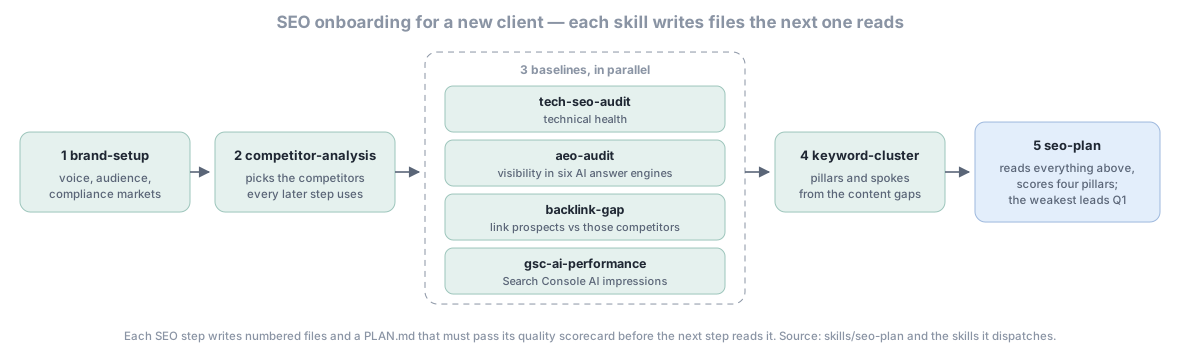
Most SEO work uses 3-5 skills in sequence rather than one mega-skill. The plugin is designed so that each skill produces numbered intermediate files (01-...md, 02-...md, …, PLAN.md) under ${CLAUDE_PLUGIN_DATA}/{brand}/seo/{workflow}/{date}/ — downstream skills read those numbered files, not the endpoint, so you can re-run any single step without redoing the whole chain.
Agency onboarding workflow (week 1 of a new client engagement):
1. /digital-marketing-pro:brand-setup
2. /digital-marketing-pro:competitor-analysis        ← picks the right competitors for everything downstream
3. Run all in parallel:
   /digital-marketing-pro:tech-seo-audit             ← baseline technical health
   /digital-marketing-pro:aeo-audit                  ← baseline AI visibility
   /digital-marketing-pro:backlink-gap               ← link prospects (needs competitors from step 2)
   /digital-marketing-pro:gsc-ai-performance         ← GSC AI Performance Report (3 Jun 2026)
4. /digital-marketing-pro:keyword-cluster            ← pillar+spokes architecture from aeo-audit content gaps
5. /digital-marketing-pro:seo-plan                   ← DISPATCHER — reads all of the above, scores 4 pillars,
                                                       the weakest pillar drives the lead theme of Q1's roadmap
Quarterly review workflow:
1. /digital-marketing-pro:gsc-ai-performance         ← fresh GSC AI export
2. /digital-marketing-pro:seo-drift                  ← compare this quarter vs last (auto-classifies gainers,
                                                       losers, reshuffles, new keys, lost keys)
3. Branch by finding:
   - High decline → /digital-marketing-pro:seo-audit + /digital-marketing-pro:content-decay-scan
   - High reshuffle → /digital-marketing-pro:aeo-geo (intent realignment)
   - High growth → /digital-marketing-pro:content-engine (amplification briefs)
4. /digital-marketing-pro:seo-plan                   ← re-run dispatcher with fresh inputs;
                                                       lead theme may shift to a different pillar
Content production workflow:
1. /digital-marketing-pro:keyword-cluster            ← from your seed list
2. /digital-marketing-pro:content-brief              ← per pillar from the cluster plan
3. /digital-marketing-pro:content-engine             ← drafts with brand voice + fact-check + humanize + SEO checklist
4. /digital-marketing-pro:check                      ← pre-publish gate (hallucination + brand voice + structure)
5. /digital-marketing-pro:publish-blog               ← push to CMS
6. /digital-marketing-pro:c2pa-metadata              ← if EU markets are targeted and AI images accompany
Backlink campaign workflow:
1. /digital-marketing-pro:competitor-analysis
2. /digital-marketing-pro:backlink-gap               ← gap-vs-competitors with link-prospect priority scoring
3. /digital-marketing-pro:digital-pr                 ← consumes the prospect shortlist + outreach templates
4. /digital-marketing-pro:pr-pitch                   ← drafts individual pitches per prospect
Each skill has a quality scorecard that must pass before its PLAN.md is declared ready, and every heavy skill carries a Tips & caveats section with the common pitfalls. The seo-plan dispatcher uses Confirm-Then-Dispatch — it never silently re-runs expensive specialists, always asking explicitly with cost estimate before fanning out.
Architecture — what's actually in the box
24 specialist agents
Marketing Strategist · Brand Guardian · Content Creator · Email Specialist · Social Media Manager · PR Outreach · SEO Specialist · CRO Specialist · Analytics Analyst · Marketing Scientist · Market Intelligence · Influencer Manager · CRM Manager · Growth Engineer · Journey Orchestrator · Agency Operations · Performance Monitor · Quality Assurance · Memory Manager · Execution Coordinator · Intelligence Curator · Localization Specialist · Media Buyer · Competitive Intel
Each agent has scoped responsibilities, explicit input/output contracts, and reads the Living Project Instruction File before acting.
164 skills
Skills are invoked by description match through the Skill tool, addressable as /digital-marketing-pro:<skill-name> from chat. Coverage: brand setup, content production (blog / ad / email / social / landing / video / PR / case study), SEO / AEO / GEO audits (6 platforms incl. Google AI Mode), competitor monitoring, campaign planning, channel-specific strategies, attribution, churn risk, lifecycle journeys, intelligence reports, eval framework, knowledge management, multi-brand operations, regional configuration, C2PA content provenance, Cowork+Drive team persistence.
Slash commands
Every skill answers to /digital-marketing-pro:<skill-name>. Five more are standalone commands with no same-named skill: engagement, resume, output-folder, doctor and execute-action. v3.33.0 folded every command that duplicated a same-named skill into that skill, so those slash names work exactly as before and each now loads once instead of twice. The most-used:
| Slash name | What it does |
|---|---|
/digital-marketing-pro:brand-setup |
Set up a new brand profile (voice, audience, competitors, compliance) |
/digital-marketing-pro:engagement |
Run the full 12-Part Strategy Flow |
/digital-marketing-pro:campaign-plan |
Generate a multi-channel campaign plan with budget, timeline, KPIs |
/digital-marketing-pro:seo-audit |
Comprehensive SEO audit — technical, on-page, content, E-E-A-T, AI visibility |
/digital-marketing-pro:content-engine |
Draft blog, ad copy, emails, social, landing pages, video scripts |
/digital-marketing-pro:performance-report |
Performance report with trends, anomaly detection, recommendations |
/digital-marketing-pro:competitor-analysis |
Multi-dimensional competitive analysis (content, SEO, ads, social, pricing) |
/digital-marketing-pro:email-sequence |
Complete email sequences (subject lines, copy, timing, segmentation) |
/digital-marketing-pro:check |
Pre-publish quality gate (hallucination + brand voice + structure + claims) |
/digital-marketing-pro:status |
Unified brand snapshot (profile, engagements, insights, compliance) |
/digital-marketing-pro:resume |
Resume an interrupted long workflow from the last checkpoint |
/digital-marketing-pro:output-folder |
Print + open the visible output folder for a brand |
/digital-marketing-pro:doctor |
Per-action readiness diagnostic (which campaign-audit / launch-campaign actions are live vs need connector setup) |
/digital-marketing-pro:execute-action |
Actually fire an action against its real API (stdlib urllib, no third-party deps). 8 verified connectors execute end-to-end; 28 OAuth-only or MCP-only connectors fall back to the MCP path with the manifest still returned. |
/digital-marketing-pro:cowork-setup |
(v3.12.0) One-shot Cowork team setup — wires DMP through a Drive MCP so brand state survives across Cowork sessions |
/digital-marketing-pro:keyword-cluster |
Pillar + spokes content cluster from seed keywords with SERP-overlap clustering and 4-gate quality scorecard |
/digital-marketing-pro:backlink-gap |
Competitor backlink gap audit with priority scoring (DR + overlap + traffic + topical) |
/digital-marketing-pro:seo-drift |
Snapshot-vs-snapshot drift with auto-classification (growth/decline/reshuffle/stable/new/lost) |
Every other skill works the same way — :competitor-monitor, :churn-risk, :autopilot-status, :agency-dashboard, :aeo-audit, :geo-monitor, :c2pa-metadata, :client-onboarding, :journey-design … see /digital-marketing-pro:help after install for the full list, or browse skills/ in the repo.
95 Python scripts (optional)
Plugin works fully without Python — all marketing knowledge, frameworks, agent capabilities, and skills work out of the box via the 177 reference knowledge files.
| Mode | Size | Adds |
|---|---|---|
| Knowledge-only (default) | 0 MB | All 164 skills + 24 agents + 177 reference files |
Lite (python scripts/setup.py --install lite) |
~15 MB | Brand-voice scoring, content quality scoring, readability analysis |
Full (python -m pip install -r scripts/requirements.txt, exact pins) |
~50 MB | Competitor scraping, QR generation, AI visibility API checking, GEO tracking, C2PA signing |
14 HTTP MCP connectors
Notion · Slack · Canva · Figma · HubSpot · Amplitude · Ahrefs · SimilarWeb · Klaviyo · Google Calendar · Gmail · Stripe · Asana · Webflow
These are an opt-in catalog — no .mcp.json ships (it is gitignored), so nothing auto-connects; enable only the ones you need. All HTTP, all Cowork-compatible. For services without first-party HTTP MCPs (Google Sheets, Drive, Salesforce, etc.), see .mcp.json.connectors-reference for Pipedream / Composio / Zapier / Make.com aggregator paths.
For the extended stdio catalog (Google Ads, Meta Ads, GA4, GSC, Brevo, etc. via npx, Claude Code only — not Cowork-compatible; verify each npm package exists before use, npx runs remote code): cp .mcp.json.example .mcp.json. See CONNECTORS.md and Integrations Guide.
Resumable workflows and a visible output folder
Two user-team complaints from the v3.7.5 cycle drove this release: "dm pro is taking too long to process" (the 60-minute engagement that breaks midway loses 30+ minutes of work on restart) and the general "where did my 50 deliverable files save?" confusion (everything was landing under the Windows-hidden ~/.claude-marketing/ dotfolder).
Fix 1 — Resumable workflows. Every long-running DMP workflow now writes per-part checkpoints to disk so an interrupted session can resume from the next un-checkpointed part instead of restarting from Part 1. Covered workflows: engagement (12-Part Strategy Flow), campaign-plan, content-engine, seo-audit, competitor-analysis, campaign-audit (v3.7.5), launch-campaign (v3.7.5), plus a custom slot for any other long flow. Resume with:
/digital-marketing-pro:resume                              # auto-pick latest in-progress run
/digital-marketing-pro:resume engagement                   # filter to a workflow
/digital-marketing-pro:resume engagement <run-id>          # pick a specific run
Fix 2 — Visible output folder. Every artifact a workflow produces is now copied to TWO locations: the internal tracking copy under ~/.claude-marketing/brands/{brand}/output/{workflow}/... (system-of-record), and a user-visible published copy under ~/Documents/DigitalMarketingPro/{brand}/{workflow}/{YYYY-MM}/{filename} (visible in Windows Explorer / macOS Finder by default). Override the visible root with DIGITAL_MARKETING_PRO_PUBLISH_DIR=/path (e.g. a Dropbox share for the team). Reveal the folder any time with:
/digital-marketing-pro:output-folder                       # opens ~/Documents/DigitalMarketingPro/{brand}/
/digital-marketing-pro:output-folder <brand> <workflow>    # drill down
Implementation: scripts/checkpoint-manager.py (per-step storage + atomic writes, stdlib only) + scripts/output-publisher.py (dual-copy publish + where + open subcommands: internal tracking copy + user-visible published copy). The engagement/checkpoint state machine ships tests in tests/test_engagement_state.py + tests/test_checkpoint_roundtrip.py; a fuller 5-scenario end-to-end simulation (clean 12-part run / interrupt-resume / parallel workflows / quality-gate fail / all-workflows-accepted) was used during development but is a dev tool, not shipped in the repo.
Connector-aware action resolver
The campaign-audit and launch-campaign skills depend on 14 actions that map to real marketing APIs (Google Ads, Meta Marketing, LinkedIn, TikTok, HubSpot, Salesforce, Klaviyo, Mailchimp, Customer.io, Gmail, Cision, Muckrack, Slack, Google Calendar, Ahrefs, Similarweb, SEMrush, Google Search Console). v3.7.5–v3.7.7 shipped these actions as honest stubs that always returned status: stub_implementation regardless of which connector
README truncated. Continue reading on GitHub