chillerno1/hermes-yt-plugin
A floating YouTube player plugin for Hermes Desktop
This plugin provides a compact YouTube player for the Hermes Desktop client that functions in floating or docked modes. It uses an isolated Electron webview to play watch pages, playlists, Shorts, Live, and embed links without requiring an API key.
- Supports floating or docked pane modes
- Saves favourites and up to 50 recent videos
- Uses an isolated webview session
full readme from github
hermes-yt-plugin
A compact, floating or docked YouTube player for the Hermes Desktop client.




Search YouTube or paste a link, keep playback running while you work, and save
favourites for later. The plugin uses YouTube's normal watch page in an isolated
Electron <webview>, so it requires no API key and does not access media streams
directly.
Screenshots
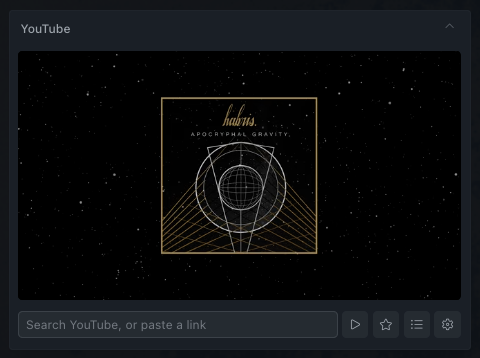 |
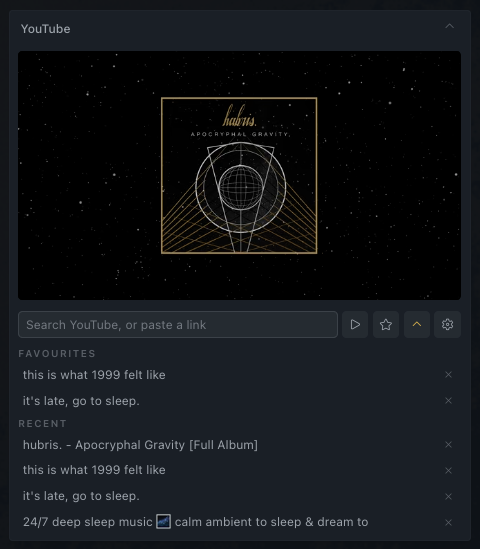 |
| Compact player | Expandable library |
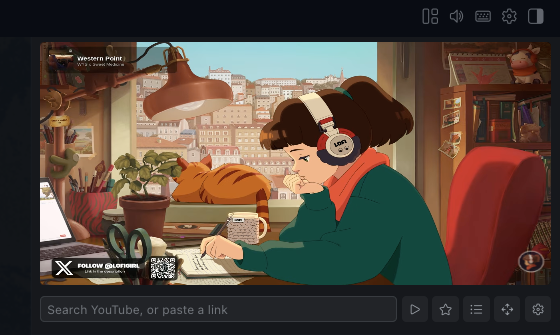 |
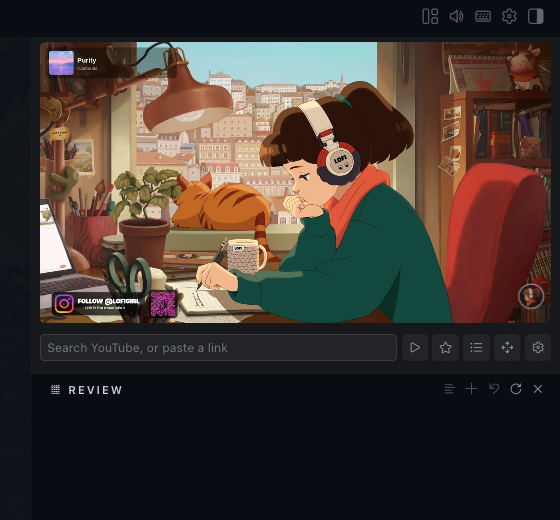 |
| Docked player | Native layout integration |
Features
- Search YouTube without configuring an API key.
- Play watch, playlist, Shorts, Live, embed, and
youtu.belinks. - Keep playback mounted while searching or browsing the library.
- Save favourites and retain up to 50 recent videos.
- Configure how many favourites and recent videos each list displays.
- Float, resize, and reposition the player independently of the workspace.
- Dock into the native Hermes layout grid, then move, split, tab, or resize the pane.
- Grow a docked library row smoothly while keeping the neighbouring pane visible.
- Hide recent history without deleting it.
- Expand and collapse with smooth pane transitions.
- Run in a webview session isolated from other Hermes webviews.
- Check for and install published plugin updates without leaving Hermes.
- Open, hide, browse favourites, or clear playback from the command palette.
Install
Clone the repository and run the installer:
git clone git@github.com:chillerno1/hermes-yt-plugin.git
cd hermes-yt-plugin
./install.sh
The default destination is ~/.hermes/desktop-plugins/hermes-yt-plugin. Set
HERMES_HOME before running the installer to target another Hermes profile:
HERMES_HOME=/path/to/profile ./install.sh
This is a UI-only runtime plugin. It has no backend, build step, or
plugin.yaml. Hermes watches the desktop plugin directory and reloads installed
changes automatically.
Updates
Open the settings cog and select Check for updates. The plugin checks the
latest published GitHub Release and, when a newer version exists, can replace
its installed plugin.js directly. The downloaded file must come from the
exact release tag and declare the expected plugin ID and version before Hermes
will write it.
Hermes hot-reloads the updated file. Favourites, recent history, pane geometry, and the isolated YouTube session remain under the same storage keys. Builds without the required desktop filesystem bridge open the release page for a manual update instead.
Troubleshooting
Installed, but Settings → Plugins shows "0 installed"
If Settings → Plugins reports No desktop plugins installed yet and clicking
Open plugins folder raises:
Could not open the plugins folder
ENOENT: no such file or directory, mkdir 'undefined'
then the plugin is installed correctly and Hermes cannot see it. This is a Hermes Desktop bug, not a fault in this plugin — nothing on disk can load while it applies.
Cause. Affected builds ask the connected backend where HERMES_HOME is.
Point the desktop client at a remote gateway and the backend answers with a path
on the remote machine — or with nothing — so the client resolves its plugin root
to the literal string undefined and never looks in your local profile. Upstream
issue NousResearch/hermes-agent#66899. From apps/desktop/electron/main.ts
on main:
A remote backend reports its own
hermes_homeover the gateway, which is a path on the REMOTE box; deriving the plugin dir from it yieldsundefined/desktop-plugins(or a non-existent remote path) and the on-disk plugin door silently breaks (#66899).
Who is affected. Only sessions connected to a remote backend — check for a
Remote: <host>:<port> indicator in the status bar. Purely local sessions
resolve the path correctly and are unaffected.
Affected versions. Every release up to and including v2026.7.20
(2026-07-20, Hermes Desktop 0.17.0). Verified by inspecting
apps/desktop/electron/main.ts at each tag: no release yet contains the
hermes:fs:desktopPluginsRoot handler that fixes it.
Fixed in. Unreleased as of 2026-07-30. The fix is on hermes-agent main,
landing after v2026.7.20; it moves the resolution into the Electron main
process so the plugin root always comes from the local HERMES_HOME,
whatever the connection mode.
Workarounds.
- Run Hermes locally instead of against a remote backend.
- Update Hermes Desktop to a build that includes the fix.
- Install into the remote machine's profile instead —
HERMES_HOME=/path/on/remote ./install.sh, run there.
Controls
| Control | Action |
|---|---|
| Search field | Search YouTube or paste a supported link |
| Enter / play button | Play a pasted link or the top search result |
| Star | Add or remove the current video from favourites |
| List / chevron | Show or hide favourites and recent history |
| Move | Enter the Hermes layout editor for the docked pane |
| Settings cog | Choose floating or docked mode, set list length, configure recents, and check for updates |
| Floating pane | Drag the header or resize from the southeast corner |
| Docked pane | Move, split, tab, or resize through the Hermes layout controls |
| Status bar chip | Hide or restore the player |
| Command palette | Show, hide, open favourites, or clear the player |
Pane Modes
| Mode | Behaviour |
|---|---|
| Floating | Draggable overlay with a southeast resize handle and persisted geometry |
| Docked | Native Hermes grid pane with persisted placement and Layout Editor support |
The library expands the floating pane to fit its content up to the available viewport height. In a vertical docked split it grows its layout row and pushes the neighbouring pane down, while preserving enough room for that pane. Longer lists then scroll inside the expanded row.
Changing pane location remounts the webview, so active playback is briefly interrupted. Hermes remembers floating geometry and docked grid placement independently, letting each mode return to its previous position.
Supported Links
Accepted targets include YouTube watch pages, youtu.be, playlists, Shorts,
Live, and embed URLs, plus bare 11-character video IDs. Start timestamps in
t= or start= are honoured, including values such as 1h2m3s.
The current URL, favourites, recent-visibility setting, list length, pane mode,
and recent history are stored in Hermes plugin storage. The
persist:hermes-yt-plugin partition gives the player its own cookie jar,
isolated from other Hermes webviews and persisted across restarts.
Known Limitations
There is no sign-in flow. The player is always signed out, so you get the
logged-out YouTube experience: ads, no subscriptions feed, no watch history, no
playlists. The partition would persist a session, but nothing can establish one
— the masthead (and its sign-in button) is hidden by the pane's CSS, the webview
is created without allowpopups, and accounts.google.com rejects Electron's
user agent as an insecure embedded browser regardless.
Signing in would not remove ads on a free account — only YouTube Premium does that. This plugin plays YouTube's own player untouched and does not block ads or access media streams.
Playback Lifecycle
Searching and opening the library leave the player mounted, so playback continues through those interactions. Hiding or collapsing the floating pane, disabling a docked pane, or changing pane mode unmounts its body and interrupts playback. This follows the Hermes pane lifecycle.
How It Works
The packaged Hermes renderer runs over file://, which does not provide a
suitable referrer for YouTube iframe verification and can cause Error 153. This
plugin loads a normal YouTube watch page as a top-level HTTPS document inside a
webview instead.
Search also runs inside a hidden webview on the YouTube origin. It fetches the
results page same-origin and extracts video entries from ytInitialData. Search
failures are isolated from playback and return an empty result list.
Development
desktop-plugins/hermes-yt-plugin/plugin.js # Complete runtime plugin
docs/screenshots/                         # README media
install.sh                                # Hermes profile installer
The runtime plugin is uncompiled ESM and uses react/jsx-runtime rather than
JSX. Imports are deliberately limited to @hermes/plugin-sdk, react, and
react/jsx-runtime; Hermes validates this list using a raw-source import scan.
Styles remain inline because Tailwind does not scan runtime plugin directories.
The plugin ID, install directory, command namespace, and webview partition all
use hermes-yt-plugin. This release intentionally starts with fresh pane
geometry, plugin storage, history, favourites, and YouTube session state.
Basic local validation:
node --check desktop-plugins/hermes-yt-plugin/plugin.js
bash -n install.sh
Possible Future Work
Nothing here is promised or in progress.
- Sign-in. Would need the masthead unhidden, a stock browser user agent on the webview, and the auth popup allowed through. Google actively blocks sign-in from embedded webviews, so this may simply not be workable — and it would not remove ads on a free account either. See Known Limitations.