apelabs-dev/hermes-finance
Self-hosted personal-finance dashboard
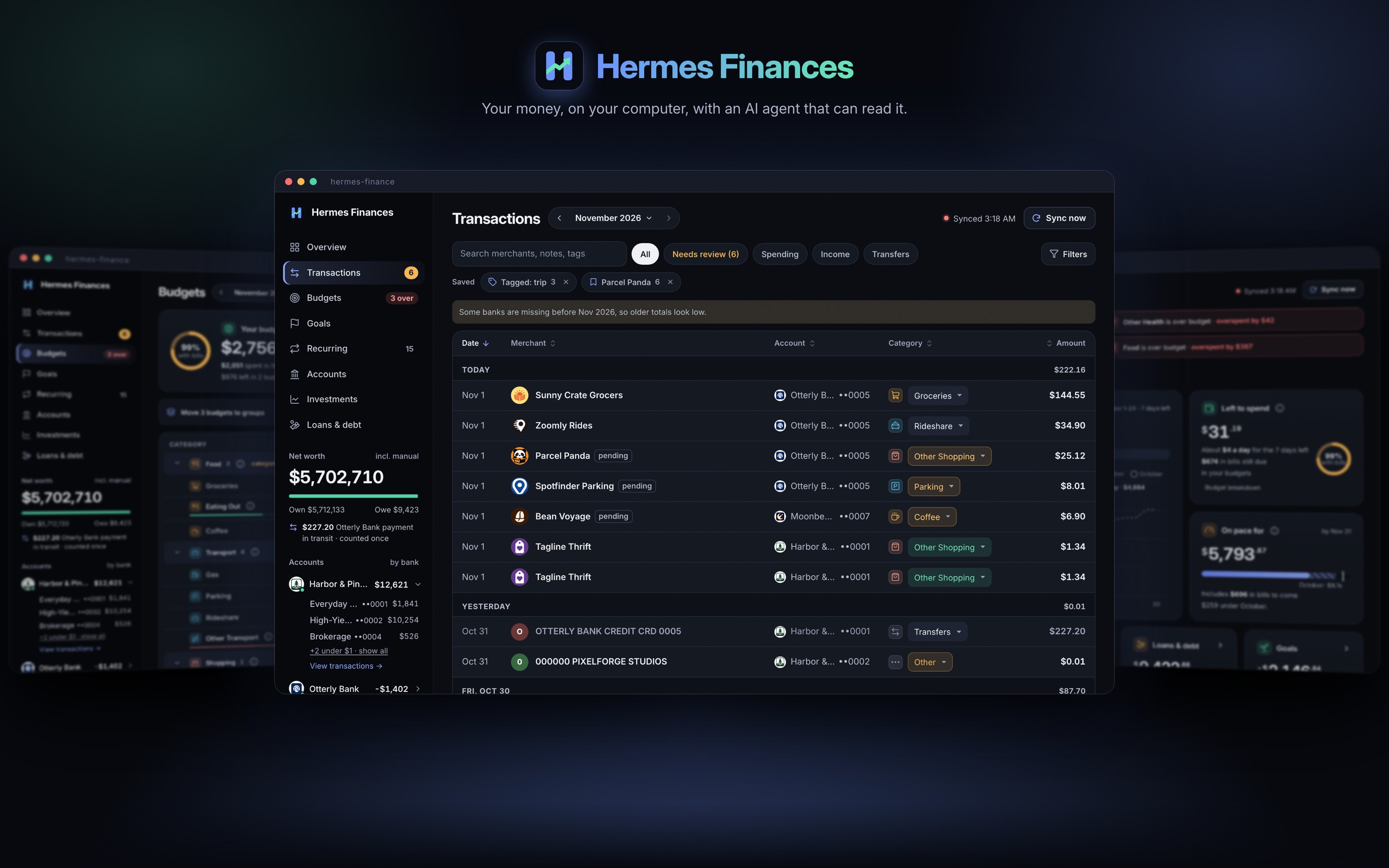
hermes-finance is a self-hosted personal-finance dashboard that stores account, balance, and transaction data in a local SQLite file. It supports Plaid connections and manual accounts or CSV, OFX, and QFX imports, and tracks spending categories, budgets, bills, goals, loans, investments, and net worth. An AI agent can access the same financial data through native tools, MCP, or the dashboard’s Ask panel.
- Stores financial data in a local SQLite file
- Imports CSV, OFX, and QFX files
- Provides agent access through native tools and MCP
full readme from github
hermes-finance
Your money, on your computer, with an AI agent that can read it.





Plugs into



Built with



A self-hosted personal-finance dashboard for people who already run Hermes. It pulls your accounts, balances and transactions from Plaid into a SQLite file on your own computer. It files spending into categories and tracks budgets, recurring bills, goals, loans, investments and net worth. For what Plaid can't see (a car, a home, a loan from a lender that isn't connected) you add an account by hand or import a CSV, OFX or QFX file. Your agent gets the same numbers as native tools, over MCP, or through the dashboard's own Ask panel.
Full documentation: docs/, a MkDocs site (uvx --python 3.12 --with "mkdocs-material>=9.5,<10" --from "mkdocs>=1.6,<2" mkdocs build --strict).
Try the live read-only demo with synthetic data, or build it yourself; it needs no account or API key.
Quickstart
You need Python 3.12 and uv.
Look around without any account
A synthetic database and a throwaway credentials file (nothing is sent to Plaid unless you click Continue to Plaid):
git clone https://github.com/<owner>/hermes-finance.git   # <owner>: wherever you found this repository
cd hermes-finance
uv sync                                           # .venv on Python 3.12
T=$(mktemp -d); mkdir "$T/data"
printf 'PLAID_CLIENT_ID=fake0000000000000000001\nPLAID_SECRET=fake000000000000000000000000\n' > "$T/env"
uv run python tests/demo_data.py "$T/data"       # add a number (e.g. 30) for that many days of holding snapshots
HERMES_ENV_FILE="$T/env" FINANCE_DATA_DIR="$T/data" uv run finance serve --port 8799
Open http://127.0.0.1:8799/.
Plaid Sandbox in five minutes
You need a Plaid account's client ID and Sandbox secret.
uv run finance serve # http://127.0.0.1:8765/
Open http://127.0.0.1:8765/. The first-run wizard opens: setup happens in the browser.
- Paste the client ID and the Sandbox secret. They're saved to
~/.config/hermes-finance/secrets.env(0600). For AI, pick No AI for now to just look around. - Who can open this app? Keep This computer only.
- Pick Try demo (Plaid Sandbox, fake data).
- Connect a bank: Plaid Link opens. Pick any bank and sign in as
user_good, passwordpass_good. The app stores the connection and runs the first sync.
Then, from another terminal in the checkout:
uv run finance status                # banks, accounts, balances, slots used
uv run finance doctor                # every integration and what it is missing
uv run finance sync                  # pull what's new
uv run finance spend --by category   # this month's spending, compared with last month
uv run finance bills --next 14d      # recurring bills coming up
finance networth [--history] [--custom] [--json] prints net worth grouped as on the Accounts page. Its
All · Custom switch, and finance networth-custom, choose which accounts Custom counts. That's one saved setting
(networth_excluded), so the page and the CLI always agree.
Every command is in the CLI reference, generated from finance --help; the
user guide covers each one in detail. More: Getting started and
Plaid setup.
The 10-connection rule. A Plaid Trial account allows at most 10 Items (bank logins) for the life of the account, and removing one does not give the slot back. The app counts every connection ever made (
slots used: N / 10), refuses to connect the same bank twice, and offers Reconnect (Link's update mode, no new Item) for a broken one. Never connect a bank a second time. Details: Plaid setup.
Install as a Hermes plugin
Version 0.2.0 is a beta. No bank or API key is required to install the plugin or read a local database. Plaid, market data and AI providers are optional; manual accounts, imports and synthetic data work without them.
The plugin is an adapter, so first prepare a trusted app checkout with Python 3.12
and uv. Do not install the app into Hermes's Python 3.11 environment. Replace <owner>
with the repository owner supplied by your distributor; this release's public identity
and catalog listing remain gated on the privacy-reviewed public export.
git clone https://github.com/<owner>/hermes-finance.git
cd hermes-finance
uv sync
export HERMES_FINANCE_APP_DIR="$PWD"
uv run finance doctor
finance doctor runs offline. It exits 1 when an integration is missing or unusable,
and 0 otherwise. An integration switched off on purpose (e.g. HERMES_ALPACA=off)
reports off: it is not counted as missing and does not fail the run. Doctor explains
how to configure what is missing; missing provider keys do not prevent plugin loading.
Keep this checkout available: the installed plugin loads src/hermes_finance/tooldefs.py
from it, and report jobs use its app environment. It does not download the app for you.
Install the adapter from the same trusted repository (the #hermes_plugin fragment
selects its subdirectory), then validate it:
hermes plugins install 'https://github.com/<owner>/hermes-finance.git#hermes_plugin' --no-enable
hermes plugins validate hermes_plugin
hermes plugins doctor --ci hermes_plugin
hermes plugins enable hermes-finance
hermes plugins list
For a reproducible install, add --ref <full-40-character-commit-sha> to the install
command, using a reviewed commit from that repository. A private repository needs
existing Git access. Review any scanner warnings; a dangerous verdict blocks installation.
Persist the checkout path for future Hermes processes in your active profile's
config.yaml (merge into existing plugins settings), or export it whenever you start Hermes:
plugins:
  entries:
    hermes-finance:
      settings:
        HERMES_FINANCE_APP_DIR: /path/to/hermes-finance
        HERMES_FINANCE_DATA_DIR: /path/to/finance-data
The data directory holds finance.db; without that setting the app uses
FINANCE_DATA_DIR, then its checkout's data/. To try local reads without a bank,
run uv run python tests/demo_data.py /tmp/finance-plugin-demo and set
HERMES_FINANCE_DATA_DIR in the profile settings to /tmp/finance-plugin-demo.
The plugin opens reads read-only and never creates a missing database.
Each category change, rule, budget cap and tracked bill requires approval. Scheduled
and unattended runs block those writes. Sync contacts Plaid; a billed bank refresh
also requires approval. Optional report jobs run subprocesses only after explicit
hermes finance crons apply. The Ask completion bridge delegates to Hermes's
configured model and authentication.
Keys are optional and set through Hermes, or in the Desktop's plugin settings:
hermes config set PLAID_CLIENT_ID <client id>
hermes config set PLAID_SECRET <secret>
hermes config set PLAID_ENV production        # or sandbox; empty means production
hermes config set APCA_API_KEY_ID <key id>     # Alpaca, live account only
hermes config set APCA_API_SECRET_KEY <secret>
hermes config set APCA_ENV live
Under the plugin (its tools and its report jobs) the app reads keys only from Hermes.
It never opens secrets.env, the Hermes .env file or the Alpaca key file. A missing
key gives "Plaid not configured in Hermes (...)". Report jobs set up before this
change pick it up after hermes finance crons apply. The standalone app is unchanged.
The three AI modes
All three use the same 16 finance_* tools (src/hermes_finance/tooldefs.py). A read tool returns exactly what the
matching finance <command> --json prints. Details: AI modes.
Hermes plugin. Follow Install as a Hermes plugin. Hermes then gets native tools,
a usage skill, and optional daily and weekly report jobs (hermes finance crons). The Ask panel can also use Hermes's
own model, so the app never sees a model key. Writes show Hermes's approval prompt with the change in plain words.
Trade-off: approvals need a person there. In scheduled jobs and on unattended platforms the plugin refuses writes
instead of asking.
MCP server. finance mcp (stdio), or /mcp on finance serve, for any MCP client. Trade-off: it is read-only
by default and has no approval prompt of its own. After finance mcp allow-writes on, a write is only saved as a
pending action, which you approve in Settings → Connect other agents. On This computer only, any local program can
reach /mcp without a token.
API key. Settings → AI provider → API key points the Ask panel at any OpenAI-compatible endpoint (OpenRouter, OpenAI, a local Ollama or LM Studio, or your own). Trade-off: the app is its own agent harness, running at most 6 tool rounds per question within a deadline, under a monthly spend cap. Your key lives in the app's secrets file. Your questions and the data the tools read go to that provider. Writes are approval cards in the panel.
Configuration
Every key, file and setting the app reads, and in what order, is in docs/configuration.md.
In short: keys go in the secrets file ~/.config/hermes-finance/secrets.env (the app writes it when you paste keys
into first-run setup or Settings; FINANCE_SECRETS_FILE moves it), whose values win over the env file
~/.hermes/.env (HERMES_ENV_FILE); the data directory is data/ (FINANCE_DATA_DIR); everything else is a
setting on the Settings page, kept in the database.
finance doctor lists every integration below with what it's missing, offline and without writing anything, and
exits 1 when something is missing (--json for scripts). Each line ends with the section here that fixes it:
missing plaid: PLAID_CLIENT_ID and PLAID_SECRET not set (...) -> README.md#integration-plaid-banks
ok login
Integration: Data directory and database
The SQLite database, finance.db, in the data directory (data/ in the checkout, or FINANCE_DATA_DIR), 0600 in a
0700 directory. finance status (or finance serve) creates it; every start upgrades an older schema (see
Known limitations). finance doctor reports it missing until it exists, and an error when it
can't be read or written or its schema is newer than the code. Back it up with finance backup (see
Backup and restore).
Integration: Plaid (banks)
Bank and card accounts, synced through Plaid. Keys: PLAID_CLIENT_ID, PLAID_SECRET, and PLAID_ENV
(production, the default, or sandbox for demo data). Get them from the Plaid dashboard (Developers → Keys), then
paste them into first-run setup or Settings → Connections → Replace keys, or put them in the secrets file. Read
the 10-connection rule above first. Without them the app still runs on manual accounts and imported files. Check:
finance doctor shows ok plaid.
Integration: AI provider (Ask and classification)
The Ask panel and the daily AI classification. Settings → AI provider picks the mode (ai.mode): Hermes (the
default: Hermes's own model through the hermes-finance plugin; the app needs the Hermes executable,
$HERMES_HOME/hermes-agent/venv/bin/hermes or FINANCE_HERMES_BIN), API (an OpenAI-compatible endpoint:
ai.base_url and ai.model on the page, and the key AI_API_KEY, pasted there or put in the secrets file; the
local preset needs no key), or Off. Check: finance doctor shows ok ai (or off ai when it's off).
Integration: Access and login
Who may open the dashboard: see Security model. "This computer only" needs nothing. "Behind your
proxy login" needs at least one allowed identity (finance access allow <login>, --allow-user or
FINANCE_ALLOWED_USERS). "Built-in login" needs its set-up finished on the Settings page. Check: finance doctor
shows ok login.
Integration: Alpaca (investments)
An Alpaca live brokerage account, read-only (optional). Create a read-only live API key in Alpaca's dashboard and
paste it into Settings → Connections → Alpaca (or Add account → Alpaca); the app checks it once and writes its own key
file, ~/.config/hermes-finance/alpaca-live.env (HERMES_ALPACA_KEY_FILE), with APCA_API_KEY_ID,
APCA_API_SECRET_KEY and APCA_ENV=live. Paper keys are refused. Check: finance doctor shows ok alpaca.
Integration: MCP server
finance mcp and /mcp, for other agents (optional). Needs the optional mcp package: uv sync --extra mcp. Switch
it off in Settings → Connect other agents. Check: finance doctor shows ok mcp (or off mcp).
Integration: Carfax (car values)
Monthly trade-in estimates of manual vehicles (optional, no key). Switch it on in Settings → Valuations (or
CARFAX_ENABLED=1 in the env file). It runs through a local Chrome with remote debugging on 127.0.0.1:9222
(HERMES_CHROME_DEVTOOLS=host:port, or off); see Car and property values.
Check: finance doctor shows ok carfax (or off carfax while it's switched off).
Integration: Redfin (home values)
Monthly Redfin Estimates of manual properties (optional, no key). Switch it on in Settings → Valuations (or
REDFIN_ENABLED=1 in the env file). Check: finance doctor shows ok redfin (or off redfin).
Integration: Photos (car and home pictures)
Pictures of cars (Wikimedia Commons) and homes (Redfin's listing photo, else an OpenStreetMap tile), on by default
(optional, no key). Switch them off in Settings → Valuations (or PHOTOS_ENABLED=0 in the env file). Set
FINANCE_CONTACT (an email or URL) to put a contact in the User-Agent, as Wikimedia asks. Check: finance doctor
shows ok photos.
Security model
- Your data stays local. The database is a file,
data/finance.db(directory 0700, file 0600). Bank access tokens never leave the server: no page or API response includes one,finance queryreads them asNULL, and the redactor scrubs them, and every key, from output and logs. Download backup strips every credential. - Keys you paste go to
~/.config/hermes-finance/secrets.env(0600) and are never shown again. - Agents can't change things on their own. MCP is read-only by default, and its writes wait for your approval. The plugin asks before every write. The Ask panel shows approval cards.
- Who can open the dashboard is one of three modes (Settings → Access & security, or
finance access):- This computer only (the default): binds 127.0.0.1, no login, and refuses anything that arrives through a proxy.
- Behind your proxy login: Tailscale Serve, Cloudflare Access, Authelia or oauth2-proxy signs you in on this machine and passes your identity in a header. Only identities on your list get in.
- Built-in login: a password (argon2id), a required authenticator app (TOTP) and recovery codes. Sessions are
HttpOnly,SameSite=Strictcookies, every write needs a CSRF token, and 5 wrong tries lock you out for 15 minutes.
- Fail-closed.
finance serverefuses to start when it would be reachable from other devices with nothing protecting it.
Everything that leaves the computer, and when: Security model. The access modes in detail: user guide.
Known limitations
- Single household, single login. One database is one household's money, and the app has one owner: there's no multi-user or multi-account (several people with their own data and permissions) support, and no concurrent-session story (two people editing at once are not coordinated beyond SQLite's own locking). These are out of scope.
- 10 Plaid connections per database, ever. The cap is fixed in the code at the Trial plan's limit
(
config.SLOT_LIMIT). Every connection ever made counts. Use Reconnect for a broken one, never a second connection. - US banks only in Plaid Link. The currency setting only changes how amounts are written.
- Nothing runs on a schedule by itself. Run
finance syncfrom the Hermes jobs, cron or launchd, or tap Sync now. - Car and home values scrape free public pages (Carfax through your own Chrome with remote debugging, and Redfin). They can break or block lookups. Both are off on a new install and capped per month.
- Upgrades migrate the schema automatically. Every command and
finance serveopen the database throughdb.connect(), which runs the migrations when the file's schema version (PRAGMA user_version) is older than the code's (db.SCHEMA_VERSION). Each step is idempotent and the version is stamped last, so an interrupted upgrade is finished by the next start. Back up before upgrading (finance backup --out PATH);finance doctorsays when an upgrade is pending and tries it in memory first. - Downgrades are not supported. An older version of the code doesn't know a newer schema;
finance restorerefuses a backup newer than the code, andfinance doctorreports such a database as an error. To go back, restore a backup taken before the upgrade. - Python 3.12 (
requires-python = ">=3.12"). The Hermes plugin runs on Hermes's own Python and loads the app from your checkout.
Tests
uv run python scripts/check.py ci        # what CI runs: every test without a browser, plus the privacy scans
uv run python scripts/check.py full      # everything: the browser tests and the layout / numbers / controls gates
uv run pytest tests/test_reads.py        # one file
Tests use synthetic data only: Plaid's HTTP is mocked, real network is blocked, every provider is off
(HERMES_PLAID=off, HERMES_ALPACA=off, HERMES_CHROME_DEVTOOLS=off) and scripts/check.py strips anything named
like a credential from the environment. The browser tests and the gates drive headless Chrome (HF_CHROME names the
binary when it isn't found) and are skipped without one. How the suite and the gates are organized:
Contributing.
The privacy scanner, scripts/dehardcode.py, keeps personal data out of the code, the fixtures and every shipped
file; install its pre-commit hook with scripts/install-hooks.sh (docs/dehardcode.md).
Built with
Python 3.12's standard library, plus argon2-cffi (the built-in login's password hashes) and ofxtools (OFX and QFX
import). Optional extras: mcp (the MCP server) and photos (background removal for car photos). The one front-end
library, Chart.js v4.5.1, is vendored at src/hermes_finance/static/vendor/chart.umd.min.js, MIT license alongside
(sha256 48444a82d4edcb5bec0f1965faacdde18d9c17db3063d042abada2f705c9f54a). The only script loaded from elsewhere is Plaid Link.
Contributing
See Contributing. The working rules for people and coding agents are in CLAUDE.md and AGENTS.md.
License
AGPL-3.0-or-later. hermes-finance is a personal project, shared as is, with best-effort support.