TheAiSingularity/hermesclaw
Hermes Agent (NousResearch) sandboxed by NVIDIA OpenShell — hardware-enforced network/filesystem/syscall policy, full memory + gateway stack
HermesClaw is a community implementation that runs the Hermes Agent inside an NVIDIA OpenShell sandbox to provide hardware-level security enforcement. It utilizes kernel-level mechanisms like Landlock LSM and Seccomp BPF to restrict network egress, filesystem access, and dangerous system calls. This architecture allows the agent to maintain its full capability stack while ensuring that rogue skills are stopped by the operating system. Users can manage security postures through policy presets ranging from strict inference-only to permissive web and messaging access.
- Hardware-enforced sandboxing via NVIDIA OpenShell
- Kernel-level restriction of network and filesystem access
- Configurable security policies for messaging and web search
full readme from github





Hermes Agent (NousResearch) running inside NVIDIA OpenShell.
NVIDIA built OpenShell to hardware-enforce AI agent behavior — blocking network egress, filesystem writes, and dangerous syscalls at the kernel level. HermesClaw is a community implementation that puts Hermes Agent inside the same sandbox. The agent gets its full capability stack while the OS enforces hard limits. If a skill goes rogue, the kernel stops it.
Table of Contents
- Architecture
- Quick Start
- What OpenShell Enforces
- Policy Presets
- Hermes Features
- Skills Library
- Use Cases
- HermesClaw vs NemoClaw
- CLI Reference
- Personalise Hermes
- Project Structure
- Diagnostics & Testing
- Contributing
- Related Projects
Architecture
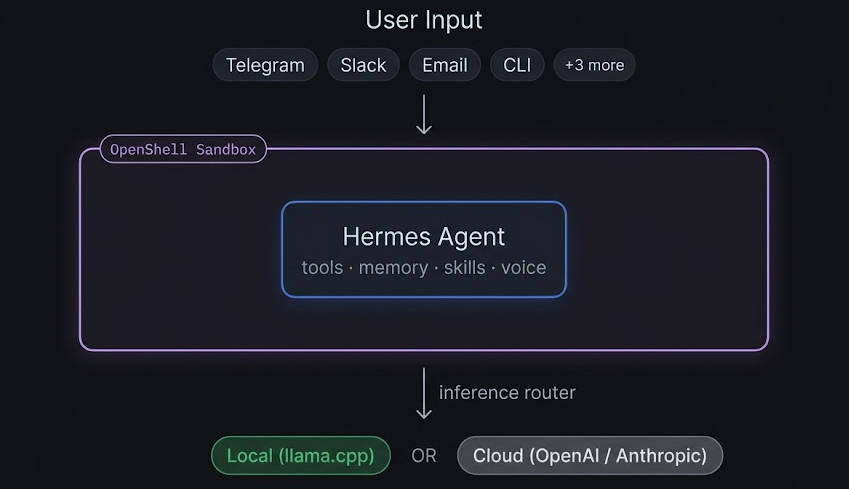
OpenShell intercepts every call to inference.local inside the sandbox and routes it to the configured backend. Hermes never knows it's sandboxed.
Quick Start
Recommended — one-command install
Installs the prebuilt image (multi-arch, linux/amd64 + linux/arm64) from GitHub Container Registry, clones the repo to ~/.hermesclaw, symlinks the hermesclaw CLI to /usr/local/bin, and prints your next steps:
curl -fsSL https://raw.githubusercontent.com/TheAiSingularity/hermesclaw/main/scripts/install.sh | bash
Prerequisites: docker, git, curl. Docker Desktop (macOS / Windows) or dockerd (Linux) must be running.
After install.sh completes, three manual steps remain (model weights, llama-server, start the container):
# 1. Download a GGUF model (example: Qwen3 4B, ~2.5 GB)
curl -L -o ~/.hermesclaw/models/Qwen3-4B-Q4_K_M.gguf \
  https://huggingface.co/bartowski/Qwen3-4B-GGUF/resolve/main/Qwen3-4B-Q4_K_M.gguf

# 2. Start llama-server on the host  (macOS shown; Linux: build llama.cpp from source)
brew install llama.cpp
llama-server -m ~/.hermesclaw/models/Qwen3-4B-Q4_K_M.gguf --port 8080 --ctx-size 32768 -ngl 99

# 3. Start HermesClaw
cd ~/.hermesclaw && docker compose up -d
hermesclaw chat "hello"
Why
--ctx-size 32768? Hermes's system prompt alone is ~11k tokens; lower context windows cause overflow on every query.
Build from source (if you want to modify HermesClaw itself)
git clone https://github.com/TheAiSingularity/hermesclaw
cd hermesclaw
cp .env.example .env                 # edit MODEL_FILE and any messaging tokens
./scripts/setup.sh                   # builds hermesclaw:latest locally
# ... then steps 2 and 3 above
OpenShell sandbox (full hardware enforcement)
Requires Linux + NVIDIA GPU + OpenShell installed.
# Install OpenShell (requires NVIDIA account)
curl -fsSL https://www.nvidia.com/openshell.sh | bash

# Install HermesClaw via the one-liner above, then:
cd ~/.hermesclaw
llama-server -m models/your-model.gguf --port 8080 --ctx-size 32768 -ngl 99 &
hermesclaw start                     # default: strict policy
hermesclaw start --gpu --policy gateway  # GPU + messaging enabled
hermesclaw chat "hello"
Full CLI reference: hermesclaw CLI. Diagnostics: hermesclaw doctor.
What OpenShell Enforces
| Layer | Mechanism | Rule |
|---|---|---|
| Network | OPA + HTTP CONNECT proxy | Egress to approved hosts only — all else blocked |
| Filesystem | Landlock LSM | ~/.hermes/ + /sandbox/ + /tmp/ only |
| Process | Seccomp BPF | ptrace, mount, kexec_load, perf_event_open, process_vm_* blocked |
| Inference | Privacy router | Credentials stripped from agent; backend credentials injected by OpenShell |
All four layers are enforced out-of-process — even a fully compromised Hermes instance cannot override them.
Policy Presets
Switch security posture without restarting the sandbox:
./scripts/hermesclaw policy-set strict      # inference only (default)
./scripts/hermesclaw policy-set gateway     # + Telegram + Discord
./scripts/hermesclaw policy-set permissive  # + web search + GitHub skills
| Preset | Inference | Telegram / Discord | Web Search | GitHub Skills |
|---|---|---|---|---|
strict |
✅ | ❌ | ❌ | ❌ |
gateway |
✅ | ✅ | ❌ | ❌ |
permissive |
✅ | ✅ | ✅ | ✅ |
Hermes Features Inside the Sandbox
| Feature | Status | Notes |
|---|---|---|
hermes chat |
✅ | Routes via inference.local → llama.cpp |
| Persistent memory (MEMORY.md + USER.md) | ✅ | Volume-mounted on host, survives sandbox recreation |
| Self-improving skills | ✅ | DSPy + GEPA optimisation, stored in ~/.hermes/skills/ |
| 40+ built-in tools | ✅ | Terminal, file, vision, voice, browser, RL, image gen, etc. |
| Cron / scheduled tasks | ✅ | hermes cron create |
| Multi-agent delegation | ✅ | hermes delegate_task |
| MCP server integration | ✅ | hermes mcp |
| IDE integration (ACP) | ✅ | VS Code, JetBrains, Zed |
| Python SDK | ✅ | from run_agent import AIAgent |
| Telegram / Discord gateway | ✅ | Requires gateway or permissive policy |
| Signal / Slack / WhatsApp / Email | ✅ | Requires permissive policy |
| Voice notes (all platforms) | ✅ | Auto-transcribed before passing to model |
| Web search | ✅ | Requires permissive policy (DuckDuckGo) |
Skills Library
Pre-built skills that encode recurring workflows. Install with one command, invoke via chat:
./skills/install.sh research-digest     # weekly arXiv digest → Telegram
./skills/install.sh code-review         # local code review (CLI or VS Code ACP)
./skills/install.sh anomaly-detection   # daily DB anomaly detection → Slack/Telegram
./skills/install.sh market-alerts       # watchlist price alerts → Telegram
./skills/install.sh slack-support       # Slack support bot with knowledge base
./skills/install.sh home-assistant      # natural language smart home control
./skills/install.sh --all               # install everything
After installing, invoke from chat or any connected messaging platform:
docker exec -it hermesclaw hermes chat -q "run research-digest"
# or in Telegram: "run the anomaly-detection skill"
Full index: skills/README.md
Use Cases
Seven end-to-end guides covering real deployment scenarios — each with prerequisites, setup steps, automated tests, and a NemoClaw comparison:
| Who | Setup | Guide |
|---|---|---|
| Researcher / writer | Docker + Telegram + weekly arXiv digest | 01-researcher |
| Developer | Docker + VS Code ACP | 02-developer |
| Home automation | Docker + Home Assistant MCP + Telegram | 03-home-automation |
| Data analyst | Docker + Postgres MCP + anomaly alerts | 04-data-analyst |
| Small business | Docker + Slack support bot + knowledge base | 05-small-business |
| Privacy-regulated | OpenShell sandbox + strict policy (HIPAA/legal) | 06-privacy-regulated |
| Trader / quant | Docker + local model + Telegram price alerts | 07-trader |
Full index and NemoClaw compatibility table: docs/use-cases/
HermesClaw vs NemoClaw
Full comparison and test results: docs/test-results.md · docs/test-results-uc.md
| HermesClaw | NemoClaw | |
|---|---|---|
| Agent | Hermes (NousResearch) | OpenClaw (wrapped by NemoClaw) |
| Sandbox | OpenShell (optional) | OpenShell |
| Tools | 40+ (web, browser, vision, voice, RL, …) | 25+ via OpenClaw |
| Memory | Persistent MEMORY.md + USER.md | Session only — no cross-session persistence |
| Self-improving skills | Yes (DSPy + GEPA) | No |
| Messaging | Telegram, Discord, Signal, Slack, WhatsApp, Email | Telegram, Discord, Slack, WhatsApp, Signal, Teams (via OpenClaw) |
| MCP servers | Yes | Unconfirmed |
| IDE integration | VS Code, JetBrains, Zed (ACP) | OpenClaw-native (not ACP) |
| Inference providers | llama.cpp, NVIDIA NIM, OpenAI, Anthropic, Ollama, vLLM | OpenAI, Anthropic, Gemini, NVIDIA NIM, local (Linux only) |
| macOS local inference | ✅ Works | ❌ Broken (DNS bug, issue #260) |
| Without NVIDIA GPU | ✅ CPU Docker mode | ✅ Cloud inference |
| Status | Community implementation | NVIDIA official (alpha) |
hermesclaw CLI
hermesclaw onboard                    First-time setup and prerequisite check
hermesclaw start [--gpu] [--policy]   Start sandbox (OpenShell) or docker compose
hermesclaw stop                       Stop sandbox (memories + skills preserved)
hermesclaw status                     Show inference config + memory/skill counts
hermesclaw connect                    Open interactive shell inside sandbox
hermesclaw logs [--follow]            Stream sandbox logs
hermesclaw policy-list                List available policy presets
hermesclaw policy-set PRESET          Hot-swap policy without restart
hermesclaw doctor                     End-to-end diagnostic
hermesclaw chat "prompt"              One-shot message to Hermes
hermesclaw version                    Print version
hermesclaw uninstall                  Remove Docker image (data preserved)
Personalise Hermes
cp configs/persona.yaml.example configs/persona.yaml
Edit configs/persona.yaml — set your name, role, expertise, ticker watchlist, and response style. Hermes loads this into every session. For deeper personalisation, edit ~/.hermes/SOUL.md — this goes directly into the system prompt.
Project Structure
hermesclaw/
├── Dockerfile                          # Hermes Agent on debian:bookworm-slim
├── docker-compose.yml                  # Hermes container (llama-server runs on host)
├── .env.example                        # MODEL_FILE, CTX_SIZE, bot tokens
├── openshell/
│   ├── hermesclaw-policy.yaml          # Default policy
│   ├── hermesclaw-profile.yaml         # Sandbox profile
│   ├── policy-strict.yaml             # Inference only
│   ├── policy-gateway.yaml            # Inference + Telegram + Discord
│   └── policy-permissive.yaml         # Everything
├── configs/
│   ├── hermes.yaml.example            # Full Hermes config
│   └── persona.yaml.example           # User persona
├── skills/
│   ├── install.sh                     # Skill installer
│   ├── anomaly-detection/             # DB anomaly detection (detect.py)
│   ├── market-alerts/                 # Price threshold alerts (monitor.py)
│   ├── code-review/                   # Code review prompts
│   ├── slack-support/                 # FAQ + escalation bot
│   ├── home-assistant/                # HA MCP control
│   └── research-digest/               # Weekly arXiv digest
├── scripts/
│   ├── hermesclaw                     # Main CLI
│   ├── setup.sh                       # One-time setup
│   ├── start.sh / stop.sh / status.sh
│   ├── doctor.sh                      # End-to-end diagnostic
│   ├── test.sh                        # Feature comparison test suite
│   ├── test-setup.sh                  # Use-case test environment setup
│   └── test-uc-01.sh … test-uc-07.sh  # Per-use-case automated tests
├── docs/
│   ├── use-cases/                     # 7 end-to-end use-case guides
│   ├── features.md                    # Full feature reference
│   ├── test-results.md                # Feature comparison table
│   └── test-results-uc.md             # Use-case test results (2026-03-31)
├── knowledge/                         # Drop documents here (RAG context, read-only mount)
└── models/                            # Drop .gguf model weights here
Diagnostics & Testing
# Check your environment
./scripts/doctor.sh           # full diagnostic
./scripts/doctor.sh --quick   # skip slow checks

# Run the feature test suite
./scripts/test.sh             # generates docs/test-results.md
./scripts/test.sh --quick     # skip live inference tests

# Run use-case tests
bash scripts/test-setup.sh          # verify environment
bash scripts/test-uc-01.sh          # researcher
bash scripts/test-uc-04.sh          # data analyst (Postgres + anomaly detection)
bash scripts/test-uc-07.sh          # trader (latency measurement)
Contributing
HermesClaw welcomes contributions — especially:
- OpenShell policy corrections — if you have access to a real OpenShell environment, correctness fixes are the highest-value contribution
- New policy presets — homeassistant, coding, research, etc.
- New skills — follow the
SKILL.mdformat in any existing skill as a template - Real-world test reports — if you've run HermesClaw on NVIDIA hardware, share your
./scripts/doctor.shoutput
Quick contributor setup:
git clone https://github.com/TheAiSingularity/hermesclaw
cd hermesclaw
./scripts/doctor.sh --quick    # verify your environment
./scripts/test.sh --quick      # run the feature test suite
shellcheck scripts/hermesclaw  # lint before submitting
Full guide: CONTRIBUTING.md · Code of Conduct · Changelog
Related
- hermes-agent-nemoclaw-openclaw — The parent repo: Hermes + NemoClaw + lightweight bots in one stack
- Hermes Agent — NousResearch's agent (18k ⭐)
- NemoClaw — NVIDIA's OpenClaw + OpenShell reference implementation
- OpenShell — NVIDIA's hardware-enforced AI sandbox