TechFlipsi/FlipsiBridge
FlipsiBridge - remote Android device control for AI agents (MIT). Voice, camera, screen & device actions for the Hermes Agent: self-hosted relay, E2E-encrypted chat, works behind NAT.
FlipsiBridge connects an Android device to a Hermes Agent through a self-hosted server relay. It provides end-to-end encrypted chat and opt-in tools for device actions, including camera, screen, files, notifications, and microphone streaming.
- Android app connects to the server over WebSocket.
- Includes a Python toolset and WebSocket relay.
- Device permissions are opt-in and default to denied.
full readme from github
FlipsiBridge
Remote Android device control for AI agents. Self-hosted, MIT-licensed: give your AI agent hands on your phone - voice, camera, screen, files, notifications, health and 40+ device actions, end-to-end encrypted. Built for the Hermes Agent ecosystem.





Screenshots
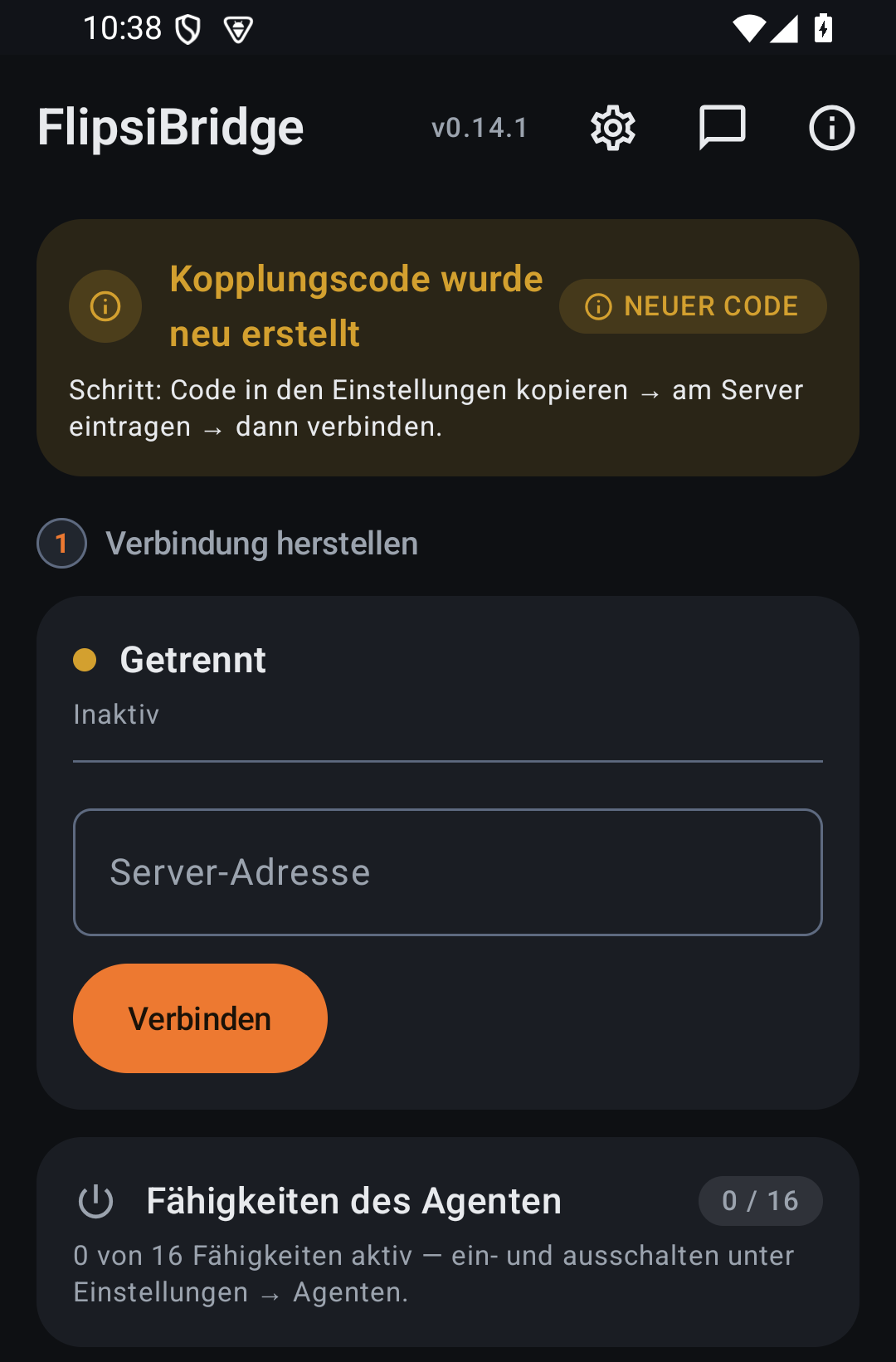
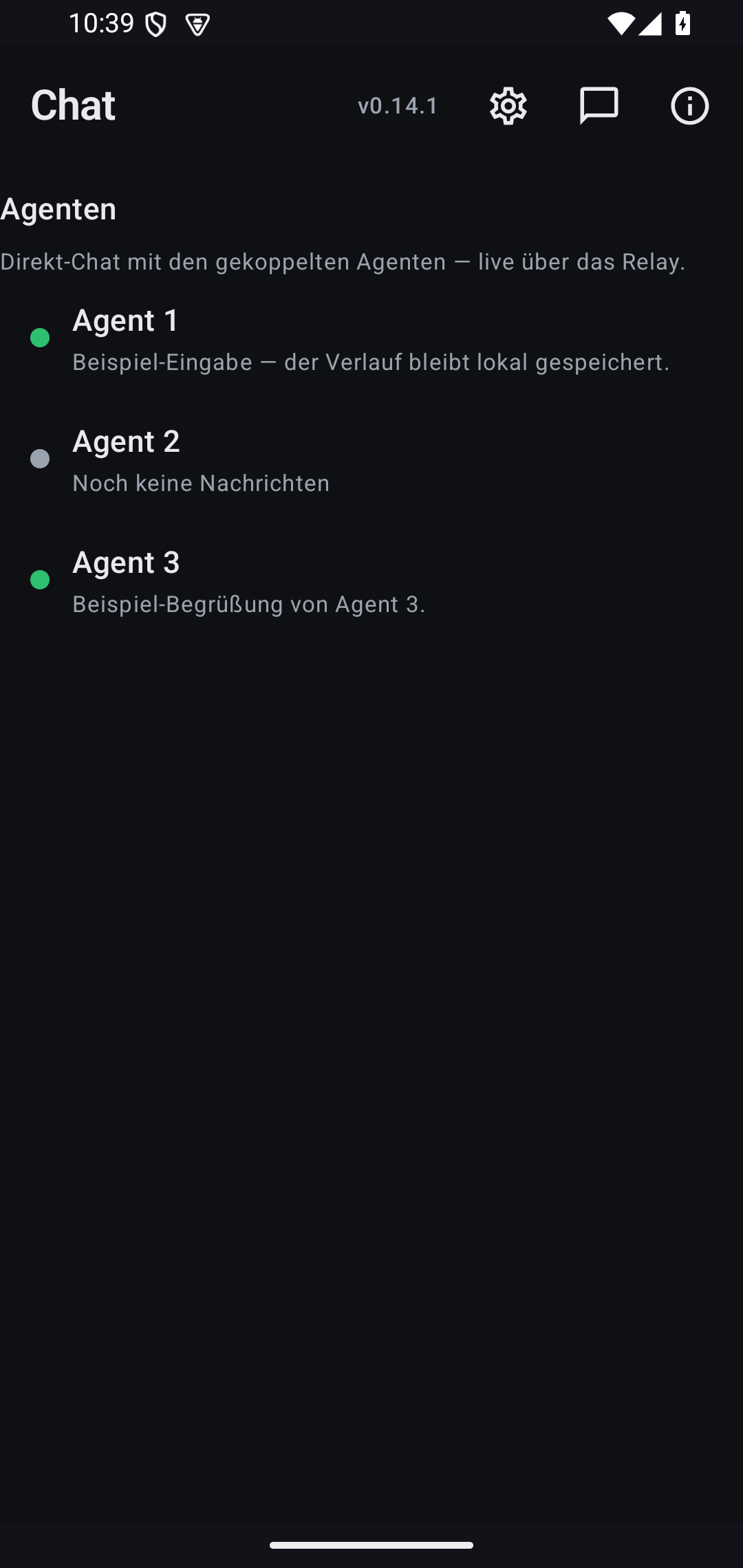
Features
- End-to-end encrypted chat - Double Ratchet (X25519 + X3DH + AES-256-GCM) phone <-> agent; the relay sees only ciphertext
- Multi-agent chat - multiple agents in one app: status chips (sent/delivered/read), presence, offline spool (24 h)
- 40+ device tools - camera, screen, screen recording, files, notifications, microphone streaming, media, clipboard, SMS, calls, apps
- Health Connect integration - read-only aggregates (steps, heart rate, sleep), default OFF per capability
- OEM compatibility profiles - Xiaomi/HyperOS, Samsung/One UI, OPPO/realme/OnePlus, VIVO/iQOO, Huawei/Honor, Motorola, Nothing + generic AOSP fallback
- Two editions, one codebase - GitHub edition (full features) and Play edition (Google-compliant, per flavor)
- Capability gating - every device permission is an explicit opt-in switch, default denied
- Connects out, works behind NAT - no port forwarding, no VPN; the phone opens the WebSocket to your own server
How it works
Phone (home WiFi)  ──WebSocket──>  Hermes Server (cloud)  <──HTTP──  AI Agent
                                   relay on port 8766
The phone connects out to your Hermes server — works behind any NAT, no port forwarding, no VPN, no USB. Just a 6-character pairing code.
Backend installieren (Server) — Einzeiler
curl -fsSL https://raw.githubusercontent.com/TechFlipsi/FlipsiBridge/main/install-relay.sh | ANDROID_BRIDGE_TOKEN=<CODE> bash
Der Code steht in der App (Setup-Screen). Danach die Handy-App verbinden (URL http://dein-server:8766 oder https://deine-domain.tld via Reverse-Proxy + TLS).
Repository Structure
This repo contains two components:
| Component | Path | Language | Purpose |
|---|---|---|---|
| Android bridge app | hermes-android-bridge/ |
Kotlin | Runs on the phone. Connects to server via WebSocket, executes commands via AccessibilityService |
| Python toolset | tools/, tests/ |
Python | Runs on the server. 42 android_* tools + WebSocket relay. |
Note: The Python code exists here for standalone development and testing (
pip install -e .,pytest). The Android app does not use or depend on the Python files.
Install as hermes-agent plugin (hermes-agent v0.3.0+)
Sicherheitsmodell (nur
wss://+ mTLS, Capability-Gating) siehe SECURITY.md. Komplettes Setup durch einen Hermes-Agenten inklusive Copy-Paste-Auftrag: docs/AGENT_SETUP.md.
curl -sSL https://raw.githubusercontent.com/TechFlipsi/FlipsiBridge/main/install.sh | bash
Or manually:
mkdir -p ~/.hermes/plugins
cp -r hermes-android-plugin ~/.hermes/plugins/hermes-android
Restart hermes — run /plugins to verify. Should show: ✓ hermes-android v0.5.0 (42 tools)
Quick Start
1. Install the bridge app on your phone
Option A — Download the prebuilt APK (easiest). Every push to main automatically
publishes a fresh debug APK to the Latest Build
release. Download the flipsibridge-<version>-github.apk asset from there and install it — either
by opening the file on the device (enable "Install unknown apps" for your browser/file
manager when prompted) or via adb install flipsibridge-*-github.apk.
Option B — Build from source:
cd hermes-android-bridge
./gradlew assembleGithubDebug
adb install app/build/outputs/apk/github/debug/flipsibridge-*-github.apk
The APK is an unsigned debug build, which is why Android/Play Protect may warn on install — it is not yet published on the Play Store or F-Droid.
2. Grant permissions on the phone
- Open Hermes Bridge app
- Tap Enable Accessibility Service → find Hermes Bridge → toggle ON
- Tap Enable Status Overlay → grant permission
- Tap Grant Screen Recording → approve the system dialog (needed for
android_screen_record) - Grant additional runtime permissions in Settings > Apps > Hermes Bridge > Permissions:
- Microphone — for
android_mic_record - Location — for
android_location - Contacts — for
android_search_contacts - SMS — for
android_send_sms - Phone — for
android_call(direct dialing)
- Microphone — for
- Enable Notification Listener in Settings > Apps > Special app access > Notification access → enable Hermes Bridge (for
android_notifications/android_events)
3. Connect to your Hermes server
Tell hermes (via Telegram, Discord, etc):
Connect to my phone, code is <CODE>
Where <CODE> is the 6-character pairing code shown in the app.
Hermes will reply with the server address. Enter it in the app and tap Connect.
Full install detail (permission → tool mapping, AAOS, persistent systemd relay) lives in docs/install.md.
4. Done
The agent can now control your phone. Try: "open Instagram", "take a screenshot", "what apps do I have?"
Android Automotive OS (Car Head Units)
The bridge app can run on Android Automotive OS (AAOS) car head units. Phone-specific features (SMS, calls, contacts) gracefully return errors when the hardware is unavailable.
Installation
- Get the APK: download
flipsibridge-<version>-github.apkfrom the Latest Build release, or build it withcd hermes-android-bridge && ./gradlew assembleGithubDebug - Sideload via ADB:
adb install flipsibridge-*-github.apk- USB: connect directly to the head unit's USB port
- WiFi:
adb connect <head-unit-ip>:5555then install
- Grant Accessibility Service: Settings > Accessibility > Hermes Bridge > Enable
- Grant overlay permission: Settings > Apps > Special access > Draw over apps > Hermes Bridge
- Skip phone-specific permissions (SMS, calls, contacts) — not applicable
Connection
The car head unit needs network access to reach the relay server:
- USB tethering (recommended):
adb forward tcp:8766 tcp:8766, then enterhttp://localhost:8766in the app - WiFi: enter the relay server's
http://<ip>:8766in the app (both devices on same network)
Limitations
| Tool | Status on AAOS |
|---|---|
android_send_sms |
Not available — returns error |
android_call |
Not available — returns error |
android_search_contacts |
Not available — returns error |
android_location |
Depends on car unit GPS configuration |
android_screen_record |
May behave differently (restricted MediaProjection on some OEMs) |
All other tools (tap, swipe, type, screenshot, read screen, open apps, etc.) work normally.
Tools (42)
| Tool | Description |
|---|---|
android_setup |
Start relay and configure pairing code |
android_ping |
Check if phone is connected |
android_read_screen |
Get accessibility tree of current screen (System UI excluded by default; include_system_ui=true to include) |
android_screenshot |
Capture screenshot and send to user |
android_tap |
Tap by coordinates or node ID |
android_tap_text |
Tap element by visible text |
android_type |
Type into focused input field |
android_swipe |
Swipe up/down/left/right |
android_scroll |
Scroll screen or element |
android_open_app |
Launch app by package name |
android_press_key |
Press back, home, recents, etc. |
android_wait |
Wait for element to appear |
android_get_apps |
List installed apps |
android_current_app |
Get foreground app info |
android_long_press |
Long press by coordinates or node ID |
android_drag |
Drag from one point to another |
android_pinch |
Pinch zoom in/out at coordinates |
android_find_nodes |
Search accessibility nodes by text/class/clickable |
android_describe_node |
Get detailed info about a specific node |
android_screen_hash |
Get hash of current screen for change detection |
android_diff_screen |
Compare current screen against a previous hash |
android_location |
Get phone GPS location |
android_search_contacts |
Search contacts by name |
android_send_sms |
Send SMS to a phone number |
android_call |
Make a phone call or open dialer |
android_media |
Control media playback (play, pause, next, previous) |
android_macro |
Execute a sequence of android tool calls as ordered steps in one request |
android_send_intent |
Send an Android intent |
android_broadcast |
Send a broadcast intent |
android_clipboard_read |
Read clipboard contents |
android_clipboard_write |
Write text to clipboard |
android_notifications |
Read current notifications |
android_events |
Read recent accessibility events |
android_event_stream |
Stream accessibility events in real-time |
android_screen_record |
Record screen video for a duration |
android_mic_record |
Start a 16 kHz mono WAV recording (30-minute safety cap) |
android_mic_stop |
Stop and finalize the active recording |
android_mic_status |
Read recorder state and latest-file metadata |
android_mic_fetch |
Stream a completed WAV to a local MEDIA: file |
android_read_widgets |
Read home screen widgets |
android_speak |
Text-to-speech output |
android_speak_stop |
Stop text-to-speech |
Microphone recordings use the speech-oriented Android audio source with bounded PCM gain. The bridge retains the 10 newest completed WAV files and removes older ones after successful finalization.
Permissions
| Permission | How to Grant | Required For |
|---|---|---|
| Accessibility Service | App button → Settings > Accessibility | All tools (core requirement) |
| System Alert Window (Overlay) | App button → Settings > Draw over apps | Status overlay display |
| Screen Recording (MediaProjection) | App button → approve system dialog | android_screen_record |
| Microphone | Settings > Apps > Permissions > Microphone | android_mic_record |
| Location | Settings > Apps > Permissions > Location | android_location |
| Read Contacts | Settings > Apps > Permissions > Contacts | android_search_contacts |
| Send SMS | Settings > Apps > Permissions > SMS | android_send_sms |
| Call Phone | Settings > Apps > Permissions > Phone | android_call (auto-dial) |
| Notification Listener | Settings > Special app access > Notification access | android_notifications, android_events |
Architecture
Android app (Kotlin):
- AccessibilityService reads the UI tree and performs taps/types/swipes
- WebSocket client (OkHttp) connects out to the Hermes server
- Ktor HTTP server for local/USB development
- Pairing code authentication
- Screenshot capture via AccessibilityService API
- Terminal-themed UI
Server (Python):
- WebSocket + HTTP relay (aiohttp) on port 8766
- Tools register into hermes-agent's tool registry
- Rate-limited authentication (5 attempts / 60s, then 5min block)
- Auto-detects server public IP for setup instructions
Security
See SECURITY.md for details. Key points:
- Pairing code authentication with rate limiting
- Phone connects out (never directly exposed)
- Transport encryption: native TLS (
ANDROID_RELAY_TLS=1+ cert/key,wss://) or via TLS reverse proxy — the relay refuses plaintext binds off-localhost by default - Full device access once paired — only connect to trusted servers
Development
# Python tests
pip install -e ".[dev]"
python -m pytest tests/

# Android build
cd hermes-android-bridge
./gradlew assembleGithubDebug
Roadmap
This is a working prototype. The vision: give Hermes its own phone — a fully autonomous mobile presence.
Shipped milestones live in the CHANGELOG — notifications, clipboard, direct SMS/calls, location, microphone recording, screen-wake key, text-to-speech, and a persistent systemd relay are all in. What's still ahead:
Upcoming
- Certificate pinning in the app (with backup pins for CA rotation)
- Server-side call counter to prevent tool call loops
- Better error reporting (screenshot + annotated explanation on failure)
- File transfer — send files/photos between phone and server
- Multiple phones — connect more than one device to the same relay
- Scheduled automations — "every morning, check my commute price on Bolt"
- Event triggers — "when a notification arrives from this app, do X"
- Macro recording — watch a workflow once, replay it on demand
- Phone call capability — answer and speak in calls using TTS/STT
- Voice assistant mode — always-listening on the phone, responds via speaker
- Call handling — answer, take a message, relay a callback
- Local model execution — run small models (Qwen 0.5B, Gemma 2B) on-device
- Offline fallback — basic commands work without server using an on-device model
- Hybrid routing — simple tasks locally, complex tasks to the server
- On-device app adapters — fast structured parsing without server round-trips
- iOS support via Shortcuts/accessibility bridge
- Web dashboard for monitoring phone activity
- Cross-app workflows — "find a restaurant on Maps, share on WhatsApp, book an Uber there"
- Agent-framework adapters — OpenClaw & co. (community adapters onto the framework-agnostic wire protocol)
- Dedicated "Hermes Phone" — a phone that boots straight into agent mode
Other agent frameworks (OpenClaw & co.)
FlipsiBridge's agent-facing side is deliberately thin: the wire protocol between your phone and the relay is agent-framework-agnostic — the E2E-encrypted channel (Double Ratchet) terminates at your relay, and only a small adapter layer connects that relay to your agent runtime's tool system. Today a first-class adapter ships for Hermes Agent (Python toolset + plugin, above). The same pattern is architecturally portable to other runtimes — e.g. OpenClaw's plugin/skill system (Node/TypeScript) could speak the relay protocol (WebSocket + JSON, Web Crypto for the ratchet) and expose the 40+ device tools as native OpenClaw tools.
No OpenClaw adapter ships yet — so FlipsiBridge currently runs on Hermes only. If you're building one, we want to hear from you: open an issue in this repo and we'll help with protocol details and cross-language crypto vectors (reference implementations exist in Kotlin and Python and are pinned by tests on both sides).
Links
- hermes-agent: github.com/NousResearch/hermes-agent
Star History
Contributing
Bugs, Ideen und PRs willkommen — siehe CONTRIBUTING.md. Feature-Wünsche laufen über die Discussions.