Fruxano/fruvisi
Visual organization dashboard plugin for Hermes Agent — org chart with areas & groups, one-click team lineups (functional presets), per-agent OpenRouter fallback, kanban integration and chat control.
FruVisi is a dashboard plugin for Hermes Agent that provides an interactive 2D organizational chart for managing agent structures. It enables functional presets for team lineups, per-agent OpenRouter fallbacks, and kanban task integration via the native Hermes API.
- Interactive 2D org chart using React Flow
- One-click functional presets for team lineups
- Per-agent OpenRouter fallback configuration
full readme from github
FruVisi
Visual organization dashboard for Hermes Agent — structure your agents like an org chart, switch whole team lineups with one click, distribute kanban tasks by drag & drop, and control it all from chat.
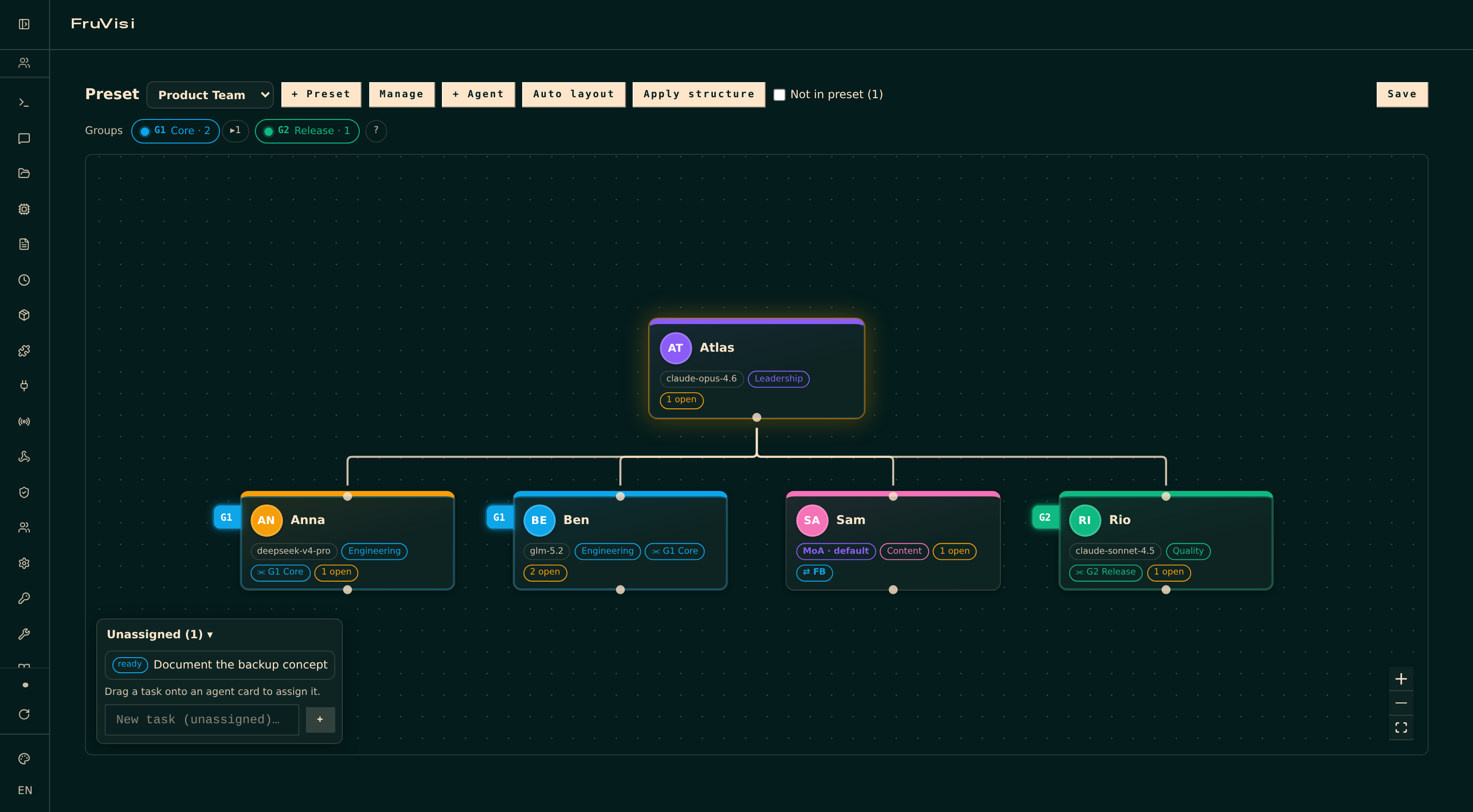
FruVisi adds an interactive 2D org chart to the Hermes dashboard. Agents are native Hermes profiles (single source of truth) — FruVisi only adds the organizational layer on top: reporting lines, areas, groups, presets per project, an OpenRouter fallback per agent, and a delegation export that feeds your drawn structure into Hermes' native kanban routing.
Features
- Org chart built on React Flow: freely placeable cards (avatar, display name, model/MoA-preset badge, area color), reporting lines drawn between handles with cycle protection, auto layout (dagre), position swap, pins, a board that grows with your org
- Native profiles as single source of truth — FruVisi never duplicates agent data; MoA agents show their selected MoA preset on the card
- Agent wizard: create real Hermes profiles from the chart (name with free capitalization, title, area, parent, group, fixed model or MoA preset, optional lean profile without default skills, optional OpenRouter fallback)
- Areas & groups: free-form colored labels; groups get stable numbers (main groups G1, G2 …, subgroups G2.1 with shaded family colors) and render as tabs on the card edge — plus a group bar above the board with search and a spotlight that highlights members on hover. Both renamable without losing any assignments
- Functional presets: multiple named lineups per use case, switchable and fully isolated. Switching a preset writes active/INACTIVE markers into the profile descriptions — the exact routing signal Hermes' kanban decomposer reads — so only the active preset's cast receives work. Agents outside the preset live in a "not in preset" bar and rejoin by drag & drop
- OpenRouter fallback per agent: one checkbox in the wizard and the detail panel, with a configurable default model (OpenRouter presets like
@preset/…work too, both as fallback and as main model). Cards show a "⇄ FB" badge when a fallback is set; agents that already run on OpenRouter hide the option automatically. Kicks in on rate limits, overload and connection errors - Top agent: explicitly designated (golden aura instead of guesswork) — cutting lines never promotes anyone by accident; replace only via swap or by releasing the role
- Kanban integration: task badges per agent, an unassigned-task dock with drag-to-assign, quick task creation, per-agent task list — all through the native Hermes kanban API (no separate task store)
- Delegation export ("Apply structure"): writes hierarchy, area and group notation into the profile descriptions; your own description text is preserved
- Chat control: a deliberately lean set of six operational agent tools for all Hermes gateways (Telegram, Discord, …) — overview, list/switch presets, add/remove preset members (with immediate sync), apply structure. Speak naturally ("switch the FruVisi preset to project X"); the model picks the tool
- Single-language English UI, light/dark theme aware (follows the dashboard theme)
Requirements
- Hermes Agent v0.15+ with dashboard plugin support (tested against v0.18.2)
- Works with the official Docker image (
/opt/datamount) and native~/.hermesinstalls - For the fallback feature:
OPENROUTER_API_KEYin the instance's env
Installation
Via the Hermes CLI (recommended)
Hermes ships a Git-based plugin installer — one command, no clone needed:
hermes plugins install Fruxano/fruvisi/plugin --enable
Then restart the dashboard (API routes and agent tools mount at startup). Update later with hermes plugins update fruvisi.
Docker (official image): run the same command inside the container as the Hermes user, then restart:
docker exec -u 10000 -e HOME=/opt/data <container> \
  hermes plugins install Fruxano/fruvisi/plugin --enable
docker restart <container>
10000 is the Hermes UID in the official image — verify with docker exec <container> stat -c %u /opt/data.
Installer script (alternative, with backup)
Prefer a guided install that backs up your config, profiles and plugins first? Clone or download this repo onto your server and run:
sudo bash release/install.sh
The script auto-detects Docker vs. native installs, creates the backup, copies the plugin, sets ownership container-side, enables it (hermes plugins enable fruvisi) and restarts the dashboard. Docker note: the restart briefly takes the whole Hermes container offline.
Manual
- Copy
plugin/to<HERMES_HOME>/plugins/fruvisi/(Docker: the host path of the/opt/datamount) and chown to the Hermes user. hermes plugins enable fruvisi- Restart the dashboard (API routes and agent tools mount at startup).
Usage
Open the dashboard → sidebar → Plugins → FruVisi.
- Structure: drag an edge from a card's bottom handle onto another card to set "reports to"; click a line to remove it; the detail panel offers the same as dropdowns.
- Presets: create, duplicate, rename and delete lineups under Manage; switching writes the active/INACTIVE markers into the profile descriptions (can be disabled there too). "Create empty" starts without members — drag agents in from the "not in preset" bar.
- Fallback: set a default fallback model under Manage (e.g. an OpenRouter preset), then enabling a fallback per agent is a single checkbox.
- Top agent: select a card → "👑 Set as top agent". The role only changes via swap or by releasing it — never by cutting lines.
- Groups/areas: create, rename (✎) and remove them under Manage, assign via the detail panel; hover a group chip for the spotlight.
- Tasks: drag tasks from the dock onto cards to assign; create tasks per agent in the detail panel or unassigned in the dock.
- Apply structure: writes the chart into the profile descriptions (marked block, your own text preserved). From then on, prompting your orchestrator distributes kanban tasks along your drawn structure.
- Chat: "show me my FruVisi organization", "switch the preset to project X", "remove dev-anna from the preset" — works on every connected gateway. Mentioning "FruVisi" or "org chart" helps tool selection for ambiguous words like "group".
How it works
| Layer | What FruVisi does |
|---|---|
| Dashboard plugin | React IIFE bundle (React from the Hermes plugin SDK, React Flow + dagre bundled), FastAPI backend for the topology store |
| Agent tools | Registered via the plugin register(ctx) entry point — deliberately only six operational tools (every registered tool costs system-prompt tokens on each turn). They follow the same rules as the UI: pinned agents are protected, and removing an agent from the preset releases its subordinates and the top-agent role. Structural edits (lines, groups, top agent) are UI-only by design |
| Data | Everything FruVisi owns lives in <HERMES_HOME>/fruvisi/topology.json (atomic writes). Agents, kanban and models stay native |
| Native writes | Only through official Hermes functions, only on user action: profile creation (wizard), profile descriptions (apply structure / preset sync), kanban assignments — and, as the single documented config exception, the fallback_providers key in a profile's config.yaml for the fallback feature (written via Hermes' own load/save path, same as the native model endpoint) |
Security & transparency
- No shell calls, no eval, no reading of keys/secrets, no external network requests, no telemetry
- Frontend is fully bundled (no CDN loading); API calls use the dashboard's own session auth
- FruVisi's only own write surface is
topology.json; native writes are listed above, uninstalling leaves the Hermes core untouched - Like every Hermes plugin with a backend, the code runs inside the dashboard/agent process — install plugins you trust and keep
allow_tool_override: false(FruVisi never asks for it)
Development
npm install
npm run build          # src/ → plugin/dashboard/dist/ (esbuild, IIFE, React external)
cd docker && docker compose up -d   # local Hermes 0.18.2 with the plugin mounted
Set your own basic-auth credentials in the fresh docker/hermes-data/config.yaml (see docs/api-findings.md). UI changes: authenticated GET /api/dashboard/plugins/rescan. Backend/tool changes: restart the container. See docs/api-findings.md for verified Hermes API notes and pitfalls.
Uninstall / rollback
hermes plugins remove fruvisi     # or: hermes plugins disable fruvisi (keeps the files)
rm -rf <HERMES_HOME>/fruvisi      # optional: chart data
# restart the dashboard
Roadmap
- Live activity on cards (lifecycle hooks: which agent is working right now)
- Role presets: skill set + working directory per role, so a new agent is one click and lean by default
- Long term: spatial view (2.5D/3D)
Acknowledgments
Built on Hermes Agent by Nous Research, React Flow and dagre.
License
MIT