100yenadmin/hermes-plan-mode
Plan mode for Hermes Agent: it explores read-only and writes a plan, and its edit tools stay blocked until you approve.
Hermes Plan Mode is a plugin for Hermes Agent that lets the agent explore with read-only tools, write a Markdown plan, and request approval before implementation. After approval, it can implement the plan in the same turn and track progress in a todo list.
- Blocks write and other tools while planning.
- Supports plan commands across Hermes interactive surfaces.
- Offers approval and plan-revision options.
full readme from github
Hermes Plan Mode

Plan mode for Hermes Agent: it explores read-only and writes a plan, and its edit tools stay blocked until you approve. Hermes'
Codex app-server runtime and TUI /background and btw side agents are outside the block (why).
https://github.com/user-attachments/assets/a900f39d-417c-4517-be9e-58bad3cf3538




hermes plugins install 100yenadmin/hermes-plan-mode --enable
No API keys and no extra dependencies. It needs Hermes 0.21.3 or newer on the classic CLI, and 0.21.5 (v2026.9.24) or
newer on the gateway, TUI and Desktop; 0.21.6 or newer is recommended (Compatibility). Restart any
running Hermes session (and hermes gateway restart if you use the messaging gateway), then try it.
Install covers pinning a release.
Try it
- In a project, start a Hermes session and type
/plan add a --dry-run flag to the import command. - The agent reads the code, may ask you one question with its recommended answer first, writes a plan and shows it with an approval card: "Approve, auto-accept edits", "Approve, review each file edit" (when Hermes approvals are on) or keep planning, where Other sends feedback.
- Approve it. The agent builds the plan in the same turn, tracks the steps in a todo list and ends with a line such as
✅ Plan rev 1 done: 4 of 4 steps, 2 files changed (importer.py, test_importer.py).
/planmode status shows where you are, /planmode list shows your plans, and /planmode off leaves plan mode without
approving anything.
Why it exists
/plan in core Hermes is a prompt, which the model can ignore. Plan Mode turns it into a lock. The lock covers the
tools Hermes dispatches through its pre_tool_call hook; Hermes' Codex app-server runtime and TUI /background and
btw side agents run outside that hook, so plan mode does not block them (Known limitations).
It works on every interactive Hermes surface (CLI, TUI, Desktop and the messaging platforms) with no core changes.
- A real lock. While it plans, Plan Mode lets through only a short read-only list of tools and blocks the rest
at Hermes'
pre_tool_callhook, including file writes and patches, the terminal, code execution, sub-agents and MCP tools. The only file it can write is its own plan, and the reply ends with a line naming any call it blocked. - Questions before guesses. It asks about choices only you can make, usually one question with its recommended
choice first. Say "grill me", or set Questions to
thorough, and it interviews you, one decision at a time, before every plan. - One approval for the whole plan. A card offers: approve and auto-accept edits, approve and review each file
edit (each
write_fileandpatch; shell commands keep Hermes' own approvals), or keep planning (Other sends feedback). Approval belongs to the exact plan you saw: if the plan changes, it asks again. The classic profile and surfaces without a card use Hermes' own approval prompt. - It builds in the same turn and tracks progress in a todo list. With Allow commits off (the default), terminal
git commitandgit pushstay blocked while the plan runs, unless you ask for a commit. When the plan is done, the reply says so in one line. - A live progress card on Telegram, Discord, Slack, Desktop and the TUI: one message lists the plan's steps and updates as each one finishes (✓ done, ▶ now, ○ next), ending with "✅ Plan rev N done". The classic CLI keeps Hermes' own todo list.
- Wherever you use Hermes: the same card on the CLI, TUI and Desktop, and as buttons on Telegram, Slack and Discord.
Contents: How it works · What you see on each channel · Install · Commands · The agent tool · What is allowed in plan mode · Configuration · Compared with other plan modes · Security model · Known limitations · Compatibility · How to test · Disclosure · Troubleshooting and reporting a bug
How it works
- Start planning with
/plan <task>or/planmode on [task]. The agent can also enter on its own with theplan_modetool. - The agent explores with read-only tools. For a choice only you can make, it asks with
clarifybefore it writes the plan. With the defaultleanprofile it prefers one question and asks at most three, each with 2–3 choices, recommended first. Say "grill me" in your request for more, or set Questions tothoroughfor an interview before every plan: one decision per question, until no open choice is left. - It writes the plan as Markdown under
<cwd>/.hermes/plans. - It shows the complete plan in its reply, then calls
plan_mode(action="submit"). - With the default
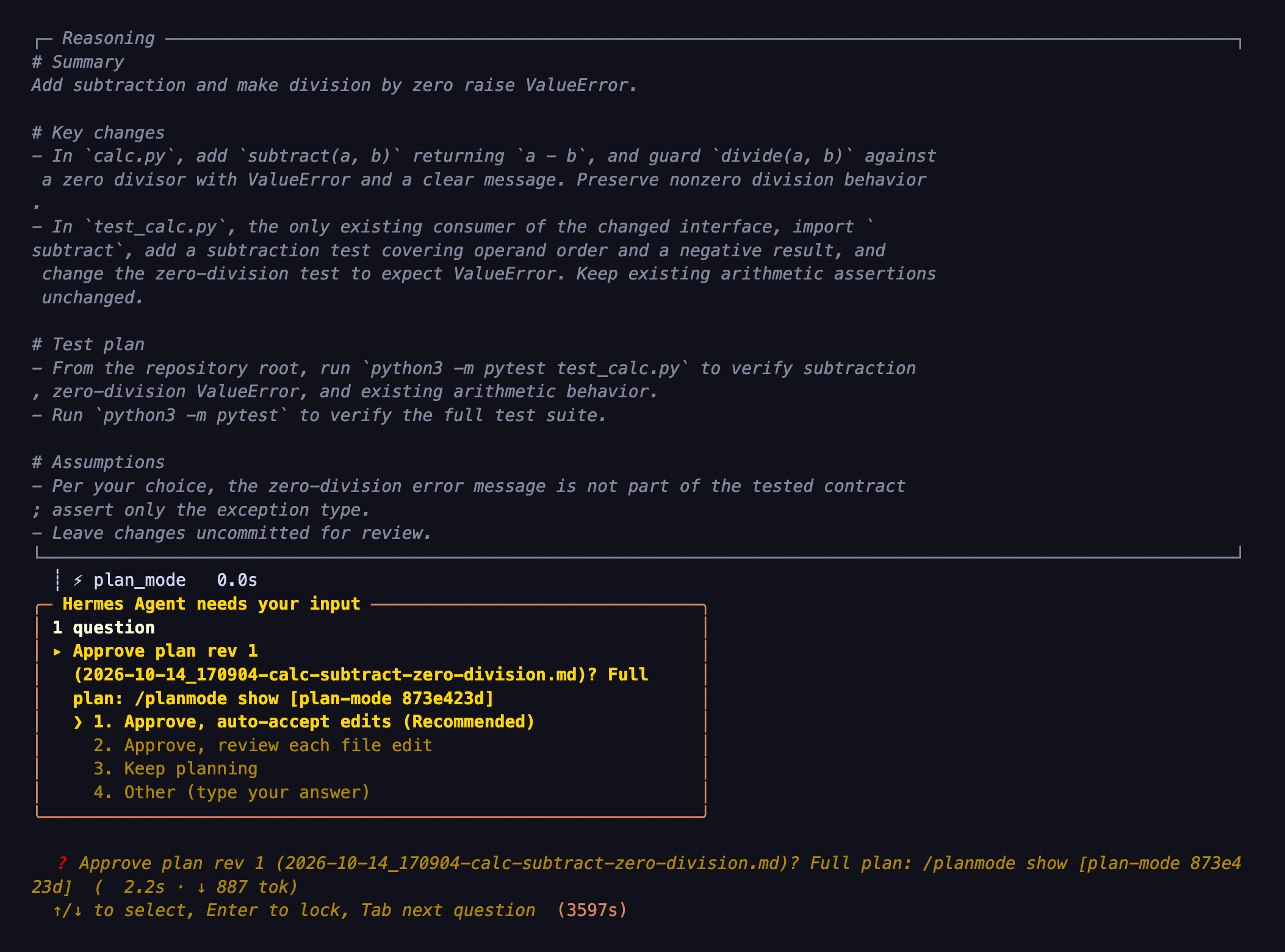
leanprofile, plan mode asks oneclarifycard for plan revision N: "Approve, auto-accept edits" (recommended), "Approve, review each file edit" (only when Hermes approvals are on) or "Keep planning"./planmode showprints the plan (up to 64 KB, then a truncation notice). The classic profile, a customleverslist withoutapproval_card, and ACP, API server, cron and webhooks keep Hermes' own approval prompt: buttons, a card, the CLI panel or/approve. If a turn ends while the plan still awaits approval and no card was answered, the reply ends with a line saying how to approve (unlessfooteris off). - Approve: plan mode turns off and the agent implements the plan in the same turn. It mirrors the steps into
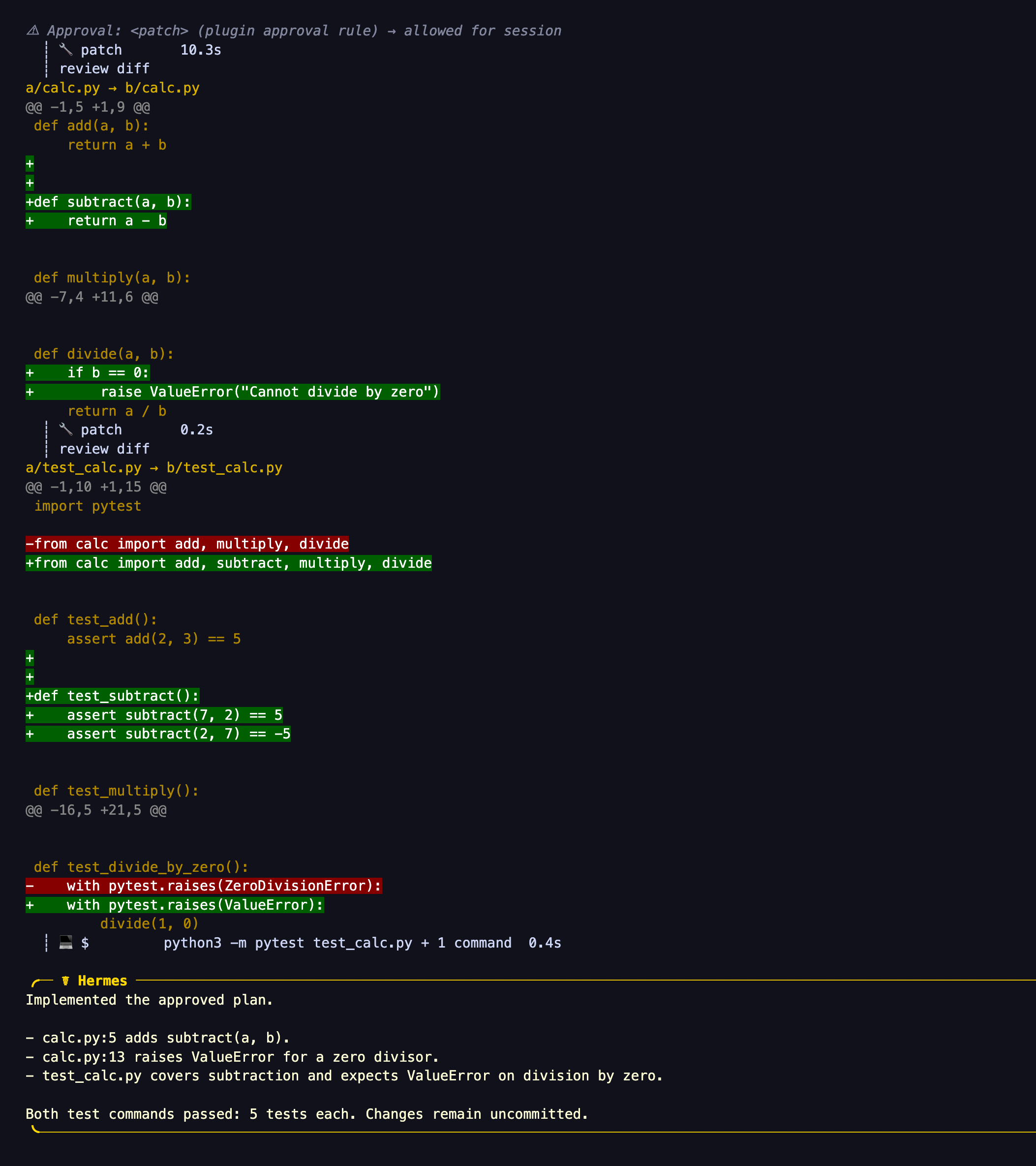
todo_list(with the defaultleanprofile, for plans of 4 or more steps). With "review each file edit", everywrite_file/patchgets Hermes' approval prompt first. When the last todo is marked done, the plan ends at the end of that turn, so fixes made in that turn after a failed final test still get the review and the no-commit block. That reply ends with one line, for example✅ Plan rev 2 done: 5 of 5 steps, 3 files changed (cli.py, test_cli.py, README.md)(chat platforms give counts only; API server, webhook and cron replies stay unchanged;footer: offturns it off). With the default lean profile, a short plan without todos gets the line when it changed files. Typed/planmode approvealso works while the card is open and selects auto-accept edits. - Keep planning, or Other with feedback: plan mode stays on. The agent asks what to change (when no feedback came with it), revises the plan and submits a complete new revision. Its card says what changed since the last one ("Changed since rev 1: +6/−5 lines in Summary, Key changes, Test plan").
  /plan <task>  ─┐
  /planmode on  ─┼─► PLANNING ── read-only tools, clarify, write the plan file
  agent: on     ─┘        │
                          │  agent shows the plan, calls plan_mode(submit)
                          ▼
   approval card (rev N): approve / review each edit / keep planning
                   │                       │
           approve │                       │ keep planning, Other ─► revise ─► submit rev N+1
                   ▼                       │ timeout ─► /planmode approve (typed)
        EXECUTING in the same turn         ▼
        todo_list progress            still PLANNING
                   │
   all todos done, /planmode done or off ─► OFF
A real run on the Hermes CLI with the default lean profile (/planmode on Add a subtract(a, b) function to calc.py with a test, and make divide raise ValueError on zero.), after one clarifying question:
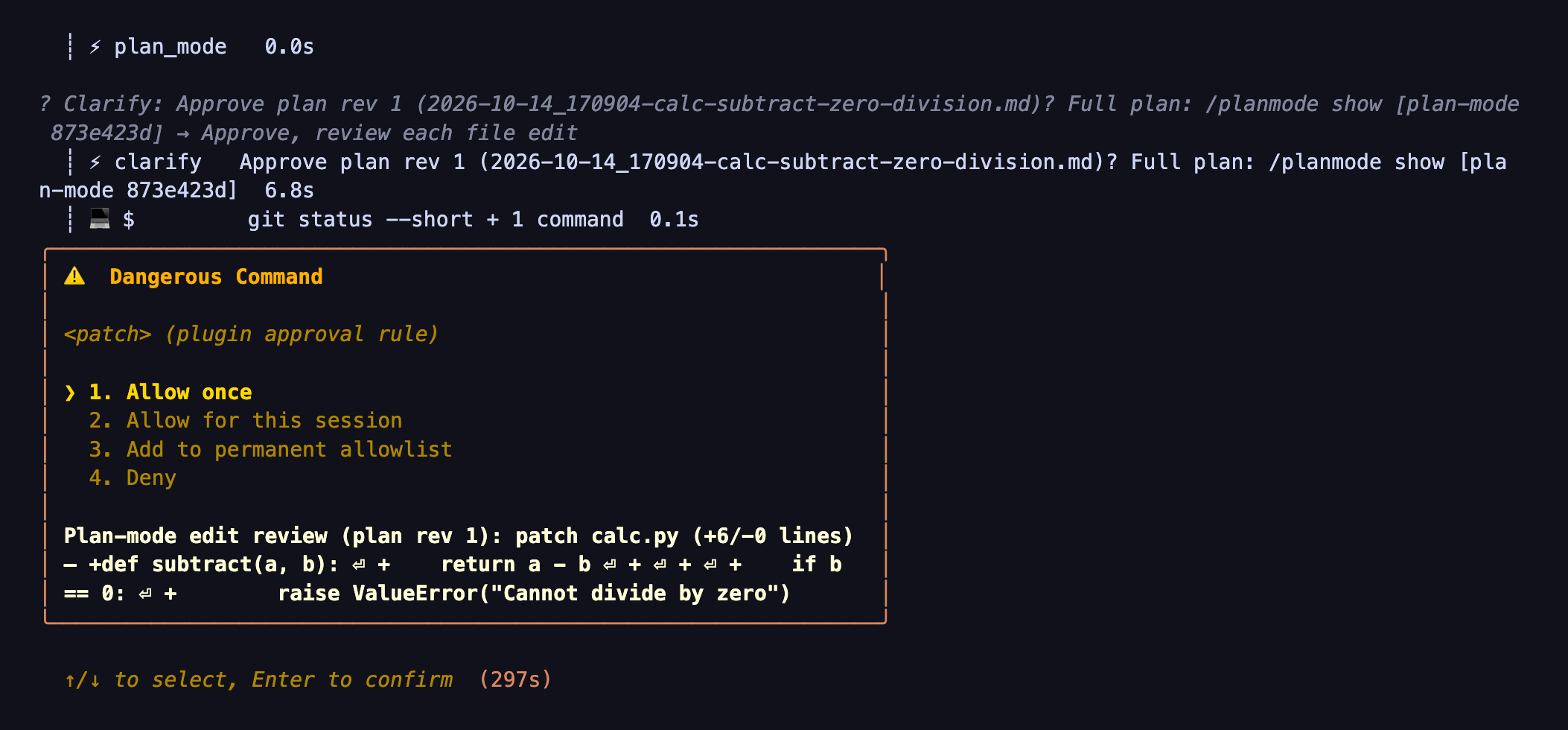
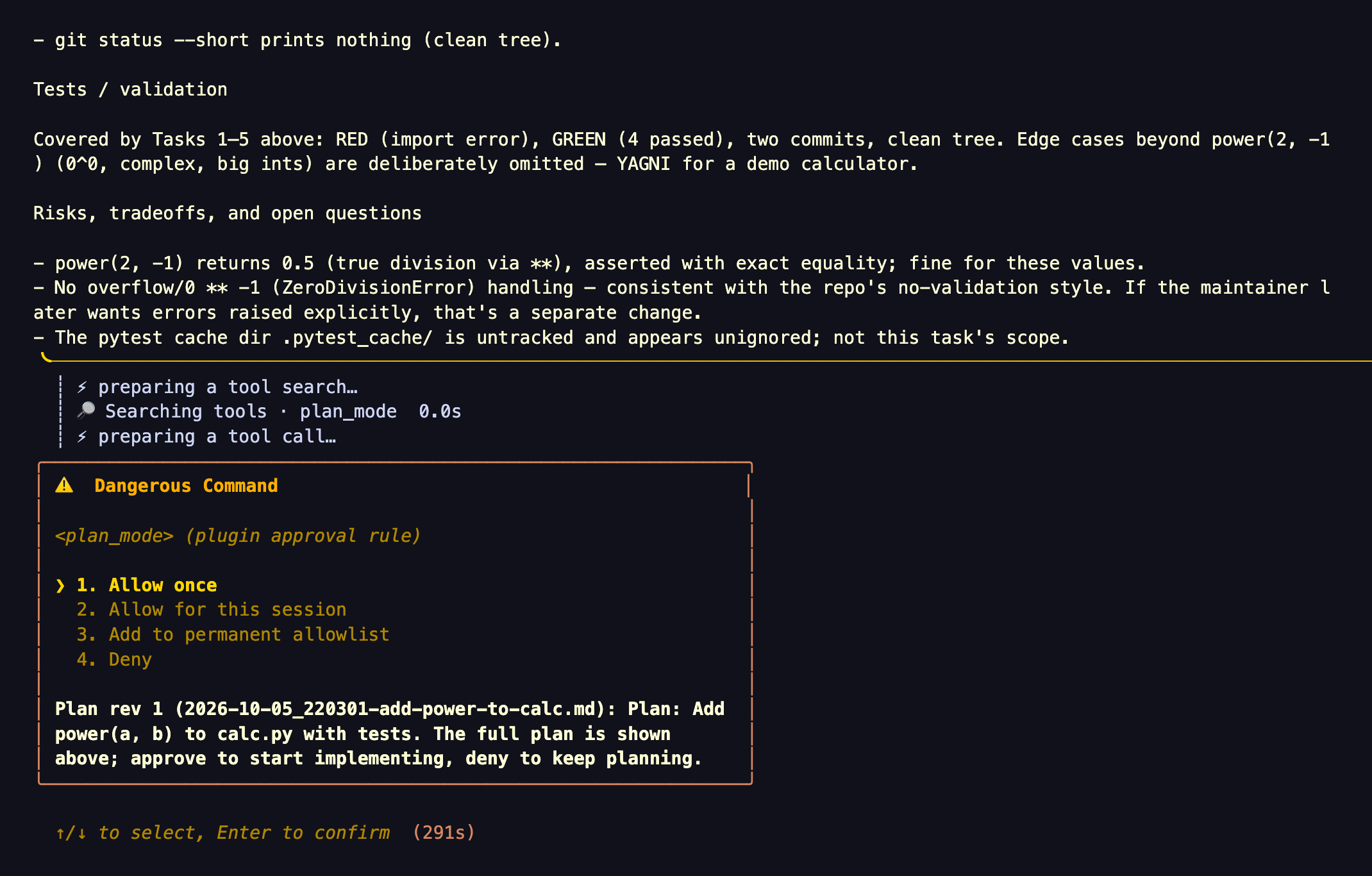
With Approve, review each file edit, each file write shows its path and a preview before it applies:
The implementation then runs in the same turn (excerpt):
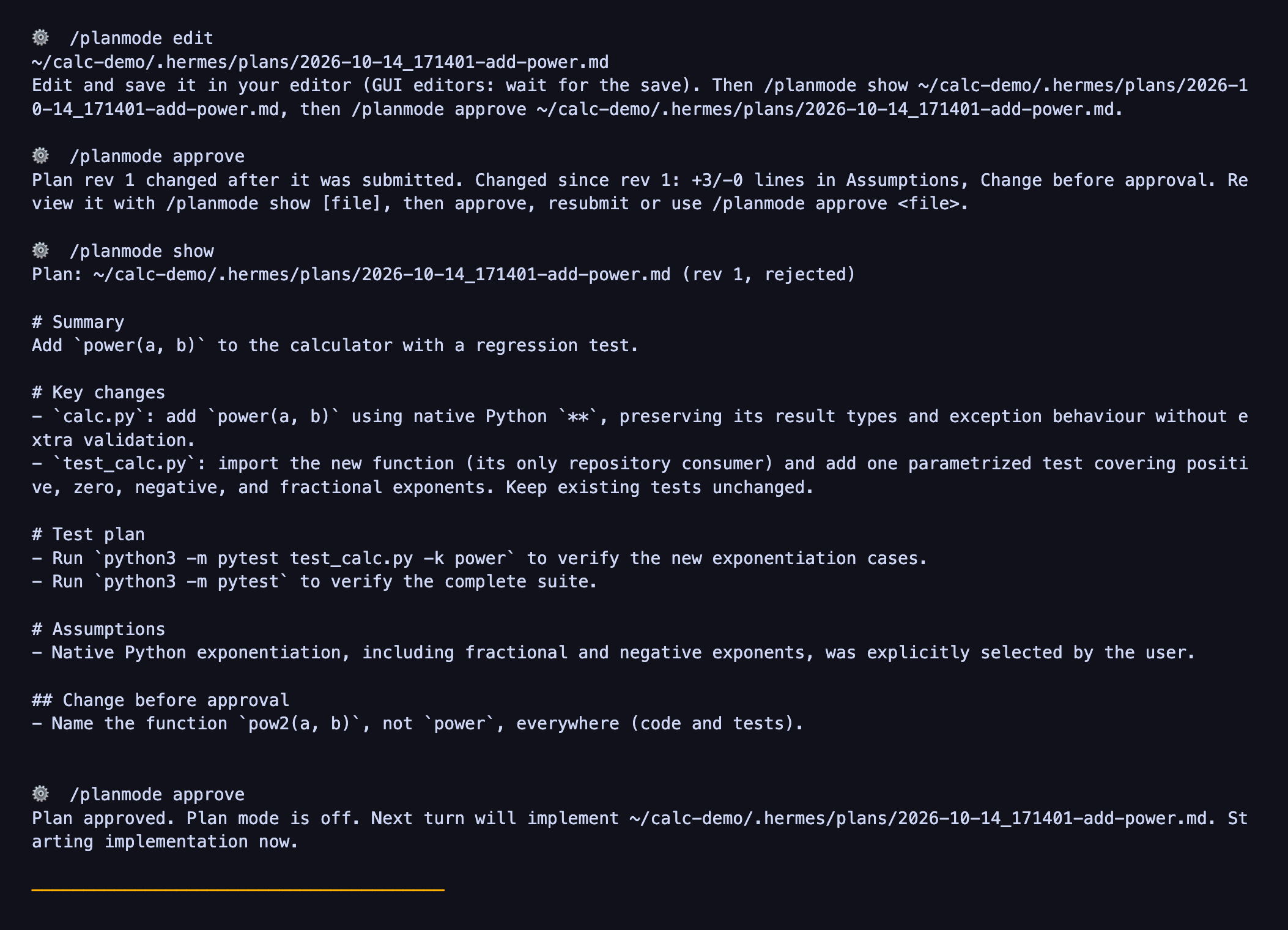
To change the plan yourself, choose Keep planning, run /planmode edit, save your change, then /planmode show
and /planmode approve. Approving a changed file before showing it is refused:
The classic profile (plan_profile: classic) approves through Hermes' own approval panel instead:
What you see on each channel
The plugin uses the approval and clarify UIs each Hermes surface already has; it only sizes the approval text per
platform.
Since 0.6.0 the lean default asks for plan approval with a clarify card, so the "Clarifying questions" column shows
how it renders. The "Approval prompt" column applies to the per-edit review prompts, the classic profile, and
surfaces without a card.
| Surface | Approval prompt | Clarifying questions | Mode footer |
|---|---|---|---|
| CLI | approval panel with a one-line summary; the full plan is printed just above it | interactive picker | no |
| TUI / Desktop | approval card with a one-line summary; the full plan is the reply just above it | the app's question prompt | no |
| Telegram, Slack, Discord | native buttons, short summary (title + up to 6 step titles) | native buttons | yes |
| Feishu, Teams | native buttons, full plan text | numbered list | yes |
| Matrix | reactions to approve or deny, full plan text | numbered list | yes |
| WhatsApp Cloud | native buttons, plan text up to about 1000 chars (the card's limit) | native buttons | yes |
| Mattermost, Google Chat, Signal and other platforms | /approve or /deny <reason> text, full plan text |
buttons where the platform has them, else a numbered list | yes |
- On Telegram, Slack and Discord the approval card has a small text budget (Discord 300 chars, Telegram and Slack 500), so the prompt carries a ≤250-char summary. The full plan is the agent's reply sent just before it.
- Mattermost and several other platforms (for example Signal, WhatsApp Cloud and SMS) do not send the agent's in-progress text before the approval prompt by default. On those, and everywhere without a budget, the approval text carries the full plan, capped at about 3500 chars (about 1000 on WhatsApp Cloud) with a pointer to the file.
/planmode showprints one complete plan up to 64 KiB; larger files show a prefix and do not arm edited-plan approval.- Exercised vs supported. We have run plan mode end to end on the CLI, TUI, Desktop,
hermes serveand Telegram. On Telegram the approval card's buttons were clicked (0.6.7, two runs): Hermes shows each option's text in the message and the buttons as1,2,3and✏️ Other. The other platforms in the table are supported through Hermes' own approval and question UIs, but we have not exercised them.
Install
hermes plugins install 100yenadmin/hermes-plan-mode --enable
hermes gateway restart        # only if you run the messaging gateway
This installs the repository's main branch. To pin a release, add --ref with that release's exact 40-character
commit SHA (see its release notes); --ref does not take a tag. Use the 100yenadmin/hermes-plan-mode form: on a
fresh Hermes 0.23.0, installing by catalog name (plan-mode) gives version 1.0.0 until
NousResearch/hermes-agent#151856 is fixed. Without
--enable, run hermes plugins enable plan-mode. Restart running CLI, TUI and Desktop sessions so they load the
plugin.
Commands
| Command | What it does |
|---|---|
/plan <task> |
Core Hermes plan prompt. With this plugin it also turns on enforced plan mode for the session (CLI, gateway, TUI and Desktop all send core's prompt). |
/planmode on [task] |
Fixes an absolute plans directory for this session and turns enforcement on. |
/planmode status |
Mode, phase (planning, awaiting approval (rev N), executing (rev N: <path>), off), the plans directory, plan files and the last submission. |
/planmode list |
The newest 20 plans in the plans directory, each with its status: being planned, waiting for approval, building (with steps done), approved, done, or draft. Does not create the directory. |
/planmode show [file] |
Displays the submitted plan (else the newest), or a named tracked file, up to 64 KiB. Complete local display records the exact reviewed text for edited-plan approval. |
/planmode edit [file] |
Gives the absolute tracked plan path and instructions to edit, save, show and approve it. Does not launch an editor. |
/planmode approve [file] |
Approves an unchanged submitted revision, or a changed/named new file after a matching complete local show. A reviewed replacement becomes rev N+1 once. |
/planmode reject [feedback] |
Keeps plan mode on and gives the feedback to the agent on its next turn. |
/planmode done |
Ends the executing phase (stops the progress pointer and footer). No approval effect. |
/planmode off |
Turns plan mode off without approving anything. |
Plan files use <cwd>/.hermes/plans/YYYY-MM-DD_HHMMSS-<slug>.md; the planning note hands the model the current
timestamp. Writes must use absolute paths under that directory; relative paths are rejected.
Typed /planmode approve keeps the submitted target; if a newer tracked file was never submitted, name it explicitly
after reviewing it. Explicit approval of an unsubmitted file also needs its own show. On the messaging gateway,
plugin commands run only between turns. After a
typed approval the plugin asks Hermes to start the work at once:
- CLI: works.
- Gateway and TUI/Desktop on Hermes 0.21.6 or newer: only with
allow_gateway_injection: true(see Configuration). - TUI/Desktop on 0.21.5 (
v2026.9.24): not available.
When you type it while the approval prompt is still open, approving that prompt continues the waiting turn with the implementation. Denying the prompt or letting it time out does not cancel your typed approval: the work then starts in the next turn (queued where injection is available, otherwise with your next message). /planmode done before then cancels it.
Otherwise the reply says "Send any message to start", and your next message starts implementation.
Editing a plan before approving
On classic CLI, TUI and Desktop, finish or dismiss any open approval first, then run /planmode edit [file]. Edit the
host file in your editor and wait for the save. On Desktop, open the plan file from the project tree (.hermes/plans/), or from
the markdown link in the agent's reply when it wrote the file itself, and use the preview's Edit and Save controls. Run /planmode show [file], read the complete text, then
/planmode approve [file]. A file changed since submission becomes the approved rev N+1; another save between show
and approve requires showing it again. Implementation receives the captured text and a saved snapshot under
<plans_dir>/approved/<stem>-rev<N>-<digest>.md (a newly created file; a taken name gets a short random tag), so
later edits to the working file do not gain approval.
Files above 64 KiB do not arm approval. Chat platforms also do not arm edited-file approval because complete delivery
is unverified: use Keep planning, Other, or /planmode reject <feedback> for the agent to submit a new revision.
Those revision notes ask the agent to read and preserve any changes already saved to the file. This is external-file
editing with exact approval on local surfaces; it does not provide an editor inside the approval dialog.
Telegram command menu. Telegram's bot menu holds 60 entries by default (core commands first, then plugin
commands, then skills), so /planmode may be hidden on busy profiles. Typing it still works and /commands lists
everything. To pin it:
platforms:
  telegram:
    extra:
      command_menu:
        priority: [planmode]
The agent tool
The plugin registers one tool, plan_mode (toolset plan-mode). The profile must grant that toolset. It is on by default.
It is off on a platform when that platform's known_plugin_toolsets lists plan-mode but platform_toolsets.<platform>
does not, which happens when a tool selection was saved there without it. Add plan-mode to that list to turn it back on:
on: enters plan mode for the current session, with the same checks as/planmode on.status: the same text as/planmode status.off: ends plan mode only when the agent entered it itself and has not submitted a plan yet. Once a plan is submitted, or when you entered plan mode, only/planmode approve,rejectoroffends it.submit(optionalpath,summary): asks you to approve the plan, on the approval card or through Hermes' approval prompt (see How it works). The agent should call it on its own, not batched with other tool calls.inspect: the current state as fields, so the agent can check where it stands (for example after a compaction) without parsing text: phase, plan and revision, approval status, edit policy (auto_acceptorreview_each_edit), todo progress, files changed by the approved plan, whether the plan finishes this turn, and the next steps allowed. Read-only.list: the plans in the plans directory with their status, as/planmode listshows them. Read-only.
The tool cannot approve or reject a plan. Approval is your act, recorded by Hermes' approval hooks or the
plugin-issued clarify question's answer when Hermes approves automatically.
On hosts with Tool Search on (the default from v2026.9.24), plugin tools sit behind tool_search, which plan mode
allows. The plugin adds a short system-prompt hint (≤200 chars) naming plan_mode for multi-step or risky changes,
and the planning turn note tells the model to search for plan_mode if it is not loaded. /plan and
/planmode on stay the reliable way in.
What is allowed in plan mode
- file exploration:
read_file,search_files; - web research:
web_search,web_extract; - skills and history:
skills_list,session_search, andskill_viewwhile Hermes reportsskills.inline_shelloff (the default); - planning and user input:
todo_list,clarify,plan_mode; - Tool Search:
tool_searchandtool_describe(calls made throughtool_callare checked as the inner tool); - media and browser reads:
vision_analyze,video_analyze,browser_snapshot,browser_get_images,browser_vision; - local UI reads:
read_terminal,read_window_below; write_fileandpatchonly when every target is an absolute path whose real path stays inside the plans directory.
Everything else is blocked: terminal, code kernels, delegation, messaging, MCP and connector tools, browser
mutations, cron and kanban mutations, memory (it has no read-only operation), and every unknown tool.
Configuration
In Hermes Desktop, open Settings ▸ Plugins ▸ Plan mode. On Hermes v2026.9.24 the same form sits inline on the plan-mode row under Capabilities ▸ Plugins.
| Setting | Default | What it does |
|---|---|---|
Enforce core /plan (enforce_builtin_plan) |
on | Core /plan turns on enforced plan mode for the session |
Agent hint (agent_hint) |
on | The ≤200-char system-prompt hint naming plan_mode. It applies when Hermes next loads plugins: a new CLI process, or a restart of the gateway or app |
Progress card (progress_card) |
on | While an approved plan is being built, one message lists its steps and updates as they finish. Shown on Desktop, the TUI and chat platforms that edit messages in place (Telegram, Discord, Slack, Matrix, Mattermost, WhatsApp, Feishu, DingTalk, Google Chat); needs Hermes 0.22.7 or newer. The classic CLI shows Hermes' own todo list instead |
Chat footer (footer) |
auto |
auto or off: the one-line plan/progress footer on chat platforms. Off also turns off the approval pointer and the blocked-calls line on every surface |
Extra read-only tools (extra_allowed_tools) |
none | Exact tool names you vouch for as read-only; plan mode lets them run |
Plan profile (plan_profile) |
lean |
lean: faster, leaner compact plans (see below). classic: the 0.3.5 behaviour. Lean applies with Plan style compact and no Plan skill |
Approval card (approval_card) |
on | Ask for plan approval with one card in the lean profile. Off uses Hermes' approval prompt and wins over levers and PLAN_MODE_LEVERS. Change it between plans: it takes effect at once, and turning it off stops per-edit review of a running plan |
Questions (questions) |
normal |
normal: the agent asks only what reading the code cannot settle (in the lean profile it prefers one question; say "grill me" for more). thorough: it interviews you before every plan, one decision per question with a recommended choice, until no open choice is left, and the plan is asked to record each answer as your decision. Applies to every profile |
Plan style (plan_style) |
compact |
compact: a short, decision-complete plan (Goal, Decisions, Changes, Steps, Validation), as in Claude Code and Codex. core: Hermes' own /plan craft (zero-context tasks, full code, a commit per step) |
Allow commits (allow_commits) |
off | Off: the agent is told not to plan or make git commits unless you ask; terminal-tool git commit and git push are blocked while an approved plan executes unless you ask. Aliases, scripts, execute_code, MCP git tools and other commit-creating git commands (merge, revert, cherry-pick, am) are not caught (see Known limitations). On: it may commit as the plan style suggests |
Plan skill (plan_skill) |
none | The name of a skill whose plan format to use instead, such as your own planning contract; it wins over Plan style. When plan mode has to block skill_view (skills.inline_shell is on), Plan style is used |
The lean profile (default since 0.4.0)
Lean keeps everything that makes plan mode safe: the approval gate, the plan file, and asking before guessing. It cuts the rest.
- Planning note. It replaces core
/plan's ceremony with a short note: no 2–5-minute task slicing, no copy-paste code, and no red/green TDD steps unless you ask for TDD. - Plan format. It is Codex-style: Summary; Key changes, grouped by behaviour and naming every touched file and every consumer of a changed interface; Test plan with exact commands; Assumptions.
- Questions. The agent asks only about choices that reading the repo cannot settle. It prefers one question, asks
at most three, and gives each 2–3 choices written as label — consequence, recommended first. If you ask to be
questioned more ("grill me"), it asks one decision per question until none is left. The Questions setting
(
thorough) makes that the default. - Fewer bookkeeping calls.
todo_listis used only for plans with 4 or more steps, and status updates ride along with real work.- Later planning turns get a short reminder instead of the full note.
- Plan once (TUI, Desktop and
hermes serve, since 0.4.1). The agent writes the plan once, in its reply between a<proposed_plan>line and a</proposed_plan>line, and the plugin saves that text as the plan file. This needs Hermes 0.21.5 (v2026.9.24) or later with interim messages shown (and, for Codex models, commentary shown). When those conditions are not met, and always on the CLI and chat platforms, the agent writes the plan file as before. Plan once saves the reply text Hermes hands plugins after each model call. If another plugin holds the stream to withhold commentary (transform_llm_outputwithhold_stream), that text can include commentary it kept off screen; useplan_profile: classicalongside such a plugin, and leaveplan_once(andall) out of any customleversorPLAN_MODE_LEVERSlist. In round 8 (2026-10-11, plugin 0.4.1, gpt-6.1-sol medium, eight tasks with three runs each per arm,plan_oncevs the 0.4.0 default) it was 22% faster (wall time 0.78×, 95% CI 0.73–0.85) with the same test results and judge scores. - Approval card (since 0.6.0). After showing the complete plan, the agent submits and plan mode asks one
clarifycard: "Approve, auto-accept edits", "Approve, review each file edit" (when Hermes approvals are on) or "Keep planning"; Other sends feedback and starts a revision. Review coverswrite_fileandpatch, including file-tool calls insideexecute_code, but not shell commands, subagents or MCP writers: once approves that edit, session / always the rest of this plan. Each approval gets a fresh key, so always leaves one inert config entry that cannot approve another plan. If approvals turn off, review pauses and edits apply without a prompt. WhatsApp Cloud has no Other with 3 choices. To opt out, turn Approval card off (approval_card: false); the other lean settings stay on. It wins overleversandPLAN_MODE_LEVERS; change it between plans, because it takes effect at once (turning it off stops per-edit review of a running plan, like turning Hermes approvals off).plan_profile: classicstill works.- PROOF-060 (2026-10-14, Hermes v0.21.6, gpt-6.1-sol medium; card vs the approval directive on two small tasks,
4 runs each per arm):
- Approval correctness held in both arms: one approval per scripted approve, never before it, and no writes outside the plans directory before approval.
- 8 of 8 verified in both arms. The approved revision addressed the feedback 4/4 with the card vs 3/4 without.
- Reported, not gated (medians): wall time 122 s vs 112 s (+9%), planning 89.7 s vs 82.7 s, request to approval 25.0 s vs 22.4 s.
- Not shown: other models, larger tasks, the TUI, chat-surface buttons, and "review each file edit" (the bench approves with auto-accept).
- What the prompts look like. The per-edit prompt is Hermes' own approval prompt, so the host chooses its frame: the classic CLI shows it in the panel titled "⚠️ Dangerous Command" (once / session / always / deny), and Desktop shows "Approval needed" with Reject, Always allow… (Allow this session) and Run. The text inside is plan-mode's: the plan revision, the file and the changed lines.
- Cancelling the card. On the classic CLI, Ctrl+C cancels the card (Esc does nothing there); on Desktop, Skip.
Either way the plan stays unapproved and non-plan writes through the covered
pre_tool_callhook stay blocked; ask the agent to show the card again when you are ready. - Exercised by real clicks (2026-10-14, gpt-6.1-sol, Hermes v0.21.6): classic CLI and Desktop, every choice
(auto-accept, review each edit with once / deny / session, keep planning, Other feedback with the revision diff,
cancel and re-ask,
/planmode show, and the review choice hidden under/yolo). Not yet exercised: the TUI and chat platforms.
- PROOF-060 (2026-10-14, Hermes v0.21.6, gpt-6.1-sol medium; card vs the approval directive on two small tasks,
4 runs each per arm):
- Other changes.
- The approval result includes the approved plan text.
- Re-entering plan mode points at your previous plan.
- "Just do it" while planning means: plan it and submit.
How 0.4.0 lean was measured against 0.3.5 classic: pre-registered lean-profile rounds with bars written before the runs
and a blind adjudicator, on eight coding tasks with the same model (gpt-6.1-sol, medium effort) and Hermes v0.21.6.
Ratios below use 0.3.5 as the denominator; these historical results do not measure current defaults.
Throughout this README, cost-weighted tokens means 2 × uncached input + 0.1 × cached input + 10 × output,
with token counts in MTok (the campaign's $/MTok weights). This differs from unweighted token counts and wall time.
- Lean finished 42% faster than 0.3.5 (wall time 0.58×, 95% CI 0.55–0.62, faster on all 8 tasks).
- It used 28% fewer cost-weighted tokens (0.72×, CI 0.63–0.80).
- It had equal observed test pass counts on these tasks and no approval leaks.
- On two tasks where the user had an unstated preference, it asked and matched it in 10 of 10 runs, as 0.3.5 did. On the eight tasks without one it asked 15 questions against 0.3.5's 22.
- Two blind judges from different model families scored plan and code quality the same as or better than 0.3.5 (round 3, three runs per task); the question counts above come from round 5, two runs per task.
Set plan_profile: classic to get the 0.3.5 behaviour back.
For a plan without a todo list, the executing reminder ends with the turn that implements it. If that turn stops early, for example on the iteration limit, say "continue": the plan is still in the conversation and on disk.
Experimental levers
Lean is a fixed set of levers: lean_craft, todo_batch, codex_compact, sticky, reentry, approved_text,
light_notes, question_shape, bridge_calls, blocked_tools, skill_policy, test_commands, choice_fidelity,
todo_inline, rename_scope, test_plan_only, approval_card and edit_batch (18 levers), plus plan_once on TUI, Desktop and
hermes serve sessions, and write_once on the classic interactive CLI. plan_skill still opts into a skill's plan format. Seven more are measured but in no
profile. To try one, or to turn plan_once off, set levers to the full list you want. It replaces the profile's
set, including the automatic plan_once and write_once, so include the lean levers you want to keep:
plugins:
  entries:
    plan-mode:
      settings:
        levers: "lean_craft,todo_batch,codex_compact,sticky,reentry,approved_text,light_notes,question_shape,bridge_calls,blocked_tools,skill_policy,test_commands,choice_fidelity,todo_inline,rename_scope,test_plan_only,approval_card,edit_batch,brief_final"
levers is not in the Settings form. The PLAN_MODE_LEVERS environment variable sets it when the key is unset.
exec_skill_guard(opt-in). While an approved plan is executing, it blocksskill_viewof the planning, TDD and code-review process skills, so the agent follows the approved plan instead of a per-edit test loop. A user message that mentions TDD, test-first, red-green or code review while plan mode is on or the plan is executing lifts the block for TDD and code-review skills; planning, brainstorming and executing-plans skills stay blocked. A configuredplan_skillturns the guard off. PROOF-050 (2026-10-13, HP with vs without the guard, two PARITY-4 tasks, 4 runs each per arm) is why it stays opt-in:- The guard blocked the skill in the one lever run that asked for it, and no lever run loaded a process skill.
- Results were unchanged: 8 of 8 verified in both arms.
- The speed effect was not shown, because the control loaded the TDD skill in only 2 of 8 runs.
How the 0.4.4 levers were decided. With all five on (S44), the set cut passing tests on the refactor task (T8) below the pre-declared guard, 33.5 → 26.25 per run, and a fresh replication confirmed it (29.1 → 22.3), so 0.4.4 kept them all opt-in. The 0.4.5 stress (S45, gpt-6.1-sol, 26 runs per arm) then tested the three planning levers without the two execution levers. Every guard held, including T8 tests (24.9 vs 28.4 per run, above the 85% bar), and two levers joined lean. A labelled third arm ran the two execution levers alone: in that arm, mean passing tests per run rose on T7 (14.3 → 18.3) and T8 (28.4 → 32.3). The earlier drop was observed with all five enabled (#26).
rename_scope(lean since 0.4.5) tells the model to keep a rename's behaviour and assertions and to search the whole repo, naming plan files as expected matches. Rename plans that narrowed the leftover search fell from 4 of 4 to 0 in both S44 and S45, and plans adding an unrequested assertion from 3 to 0 in S45.test_plan_only(lean since 0.4.5) tells the model to leave git status, git diff and other repo-hygiene checks out of the test plan unless asked. Plans with them fell from 10 of 26 to 0 in S45 (7 of 22 to 0 in S44).choice_record(opt-in) tells the model to record answered clarify choices in Assumptions as the user's decision. With it, 6 of 6 plans did so in S45. Without it, the probe counted 2 of 6, but read directly 4 of 6 already attributed the choice to the user, so the deficit the lever targets was not shown and it stays opt-in.thorough_questionsis what Questionsthoroughturns on; it is added to any lever set, custom or not, andalldoes not include it. The interview instruction replacesquestion_shape's bound and includeschoice_record, and later planning turns get a one-line reminder. It has not been benchmarked.edit_batch(lean since 0.6.7) tells the model to edit each file in one call where the tool allows, and to send edits to different files, including tests, in the same response. Execution rounds with edits fell from 49 to 27 on the two edit-heavy tasks in S45 (48 to 20 in S44). It joined lean after EB-2 (2026-10-14, pre-registered, decided by a blind adjudicator): 0.6.6 lean with vs without it, on T8 × 8 and on PARITY-4's N1 and L2 × 4 each per arm, same day, same harness, HP only, three tasks, gpt-6.1-sol. Results:- 16 of 16 runs verified in both arms;
- T8 passing tests per run 27.5 vs 26.375 (1.04×, guard ≥ 0.85×);
- execution model calls per run 7.9 vs 11.8 (0.67×, 95% CI 0.56–0.81);
- execution cost-weighted tokens 0.94× (95% CI 0.75–1.18).
EB-2 used medium effort; its ratios use the 0.6.6 lean arm without
edit_batchas the denominator and the cost-weighted definition above.The first run of the same test, EB-1, was not counted for the decision. One run's call count included a Hermes background-review call, which made the call and cost bars undecided; its results and T8 bars held. #26 has both.
brief_final(opt-in) tells the model to finish in 2–4 lines with what changed and the test result. The median final reply fell from 128.5 to 64 output tokens in S45 (117.5 to 62.5 in S44).Speed is labelled, not gated: S45's arm with the three planning levers (
rename_scope,test_plan_only,choice_record) took 1.11× the baseline's wall time (95% CI 0.97–1.25).test_commands(lean) tells the model to write test commands the way the repo runs them, falling back topython3 -m pytestfor an undocumented Python repo. In the 0.4.3 stress, plans naming a barepythonfell from 18 of 18 to 0, and so did runs that spent a round retrying the command (17 of 18 to 0).todo_inline(lean) tells the model never to calltodo_listin a response by itself: create the list with the first edit, update it alongside the next edit or test, and close it with the final test run. Rounds spent only on the todo list fell from 27 to 7.choice_fidelity(lean) tells the model that a recommended clarify choice must keep every stated requirement. On the CSV task, plans that exempted NaN and Infinity from the required round trip fell from 2 of 6 to 0.refactor_scope(opt-in) tells the model to keep a rename's behaviour and assertions, and to search the whole repo for leftovers. S43 first scored it as missing its bar; that was a probe error (the probe matched the plan naming its own file). Re-scored, narrowing went 4→0 of 4 and unrequested asserts 3→0 (#24). It stays opt-in because its "add no new test cases" clause may cut tests on refactors that ask for them;rename_scopeis the rename-only form.bridge_callsnow also gives the agent hint and the agent-entered result thetool_callform, so the agent can enter and leave plan mode without a tool search (#22).plan_budgetasks for compact plans of under about 1,200 characters for small changes. In its pre-registered round it halved plan length and finished 24% faster, but one judge scored plan clarity lower.commit_overrideadds "This overrides any commit step in a loaded skill" to the no-commit rule (#18). In round 8 neither the default nor the lever committed when the task asked for TDD (0 of 12 each), so its effect is unmeasured.approval_asktells the agent to ask the approval question even when you said not to ask questions, where Hermes approves plugin calls automatically (#19). In round 8 the question came unprompted in the first turn in 6 of 8 runs with it and 7 of 8 without; in the other runs it came after one nudge.plan_once(in lean on TUI, Desktop andhermes serve): Hermes readsdisplay.show_commentarywhen it builds the agent, so after changing that setting start a new session before relying onplan_once. The approval card shows the saved plan up to 3,500 characters.write_once(in lean on the interactive classic CLI): the agent writes each plan revision to a new file, Hermes prints it in full as an inline diff, and the agent skips retyping it when the plugin can confirm the diff showed the whole file (see Compatibility). In SPEED-2 (pre-registered, 12 runs on two PARITY-4 tasks, #30) it cut planning output tokens to 0.65× with the same number of model calls and the same plan length, and two blind judges found no worse plans. Planning was not faster: the pre-registered planning-time gate failed (0.94×, bar 0.90×). It joins lean on the owner's metric, plan quality and tokens; wall time is reported, not gated.
Compact plans
Compact plans without commits are the default since 0.3.5. In an end-to-end comparison on eight coding tasks (same
model, blind judge, one run per task), compact plans were about half as long as core's and every task still passed its
checks. The judge scored plan fit plus clarity 10.0 of 10, against 8.9 for core. Median time per task fell from 194 s to
151 s, and token use was about the same. Set plan_style: core and allow_commits: true to get the 0.3.4 behaviour back.
Or set them in the profile's config.yaml (flat keys under settings):
plugins:
  entries:
    plan-mode:
      allow_gateway_injection: false    # true: typed /planmode approve starts work at once on gateway/TUI
      settings:
        enforce_builtin_plan: true
        agent_hint: true
        footer: "off"                   # quote it: a bare off is read as false (also honored)
        extra_allowed_tools: []
        plan_profile: lean              # or classic (0.3.5 behaviour)
        plan_style: compact             # or core
        allow_commits: false
        plan_skill: ""                  # e.g. durable-plan-contract
extra_allowed_toolsis an explicit policy override: the operator vouches that those tools are read-only.allow_gateway_injectionis a core Hermes setting, outsidesettings, so it is not in the form. It lets this plugin queue a message into a gateway or TUI/Desktop session; the plugin uses it only to start implementation after a typed/planmode approve.- The nested
settings.plan_mode.<key>layout from earlier versions is still read when the flat key is unset, but the form shows only flat keys: move old values up one level so the form and the plugin agree.
Compared with other plan modes
| Claude Code | Codex | Hermes /plan |
plan-mode 1.5 | |
|---|---|---|---|---|
| Writes blocked except the plan | yes | prompt only | no | yes, for tools that pass pre_tool_call |
| Approval prompt after the plan | dialog | "Implement this plan?" | no | a clarify card (lean default) or Hermes' approval prompt, every interactive surface |
| Clarifying questions | AskUserQuestion | request_user_input | not prompted | clarify, prompted; an opt-in interview (Questions: thorough) |
| Deny with feedback, revise | yes | yes | no | yes; Other on the card, gateway /deny <reason>, otherwise the agent asks |
| Implement after approval | same turn | one click, as a new turn | no | same turn via the prompt; typed approve may need a message |
| Progress | Tasks / TodoWrite | update_plan | todo_list |
todo_list, a live progress card (chat, Desktop, TUI), a footer on chat platforms and a finish line |
| Agent may enter | yes | no | no | yes |
| Autonomy choice / clear context at approval | yes | partial | no | auto-accept or review each edit; no clear context |
The plan-mode column is version 1.5 (November 2026). The Claude Code and Codex columns describe those products as documented and as run in our October 2026 benchmarks (below); either may have changed since.
Measured against Codex plan mode
Four pre-registered benchmarks, PARITY-1 to PARITY-4, compared plan-mode with Codex's own plan mode.
- Freezing and judging: the bars were written and hashed before any run, and a blind adjudicator applied them, seeing only the bars and the measurements.
- Setup: both products ran the same model (gpt-6.1-sol, medium) with the same scripted user. PARITY-1 to PARITY-3 used a suite of Python coding tasks, two of which hide a preference that only the user knows. PARITY-4 used four larger tasks.
- Reading the metrics: each campaign below names its historical plugin version, not the current release. PARITY
ran the lean defaults for that version. Ratios in this section use Codex plan mode as the denominator: wall time
is elapsed time for the named phase; raw token use counts input and output without price weights; cost-weighted
tokens use
2 × uncached input + 0.1 × cached input + 10 × output, per MTok. PARITY-1 to PARITY-3 had 38 runs per product, with test checks on 35 and hidden-preference checks on 10. Judge percentages use blind plan pairs as the denominator, not finished-code correctness; pair counts not stated below are not given in this summary.
plan-mode 0.4.5 (PARITY-3, 2026-10-13). Against Codex plan mode on the same model, suite and test environment, plan-mode 0.4.5 met every threshold (0 non-plan repository changes before approval in 38 runs; tests passed in 35 of 35 runs for each product; hidden preferences found in 9 of 10 runs, against 10 of 10 for Codex; judge preference 82% Claude, 82% Codex) and took 1.61× as long end to end on the core tasks of this Python suite (95% CI 1.33–1.79): 1.40× in planning and 1.65× in execution.
- 0 commits before approval, and every approval went through the gate.
- One of plan-mode's 9 hidden-preference hits came from a question that named no options. The scripted user's default answer happened to match, so asking quality on that task is unproven.
- The judges compared plans blind, plan text only: 95% CI 71–91% for the Claude judge and 76–86% for the Codex judge.
- Both products ran the same
python3(3.9.6) and pytest (8.4.2), checked for both before and after the campaign. During the runs only Codex's command output was recorded, so for plan-mode the in-run check was not observed. - 0.4.5's two new lean levers held: 0 of 3 rename plans narrowed the leftover check or added an unrequested assertion, and 0 of 38 plans had git status or diff checks (the S44 probes).
- On the rename task, the Codex judge preferred Codex's plan in 3 of 3 pairs: plan-mode's plan names plan files as expected matches of the leftover search, which that judge read as permitting old names (#28). The Claude judge preferred plan-mode's plan in 2 of 3.
Larger tasks (PARITY-4, 2026-10-13). On four larger tasks (a static site generator, a JSON API, a Node.js CLI and a refactor across a ~200-file repo), plan-mode 0.4.5 met every threshold against Codex plan mode on the same model (plan-mode verified 12 of 12 runs, Codex plan mode 12 of 12) and took 1.82× as long end to end (95% CI 1.52–2.18×), 1.73× in planning and 1.96× in execution.
- Before approval: 0 non-plan repository changes and 0 commits in 12 runs, and every approval went through the gate.
- Correctness: both products finished every run, so these tasks do not separate them on correctness.
- Plan quality: in blind plan-only comparisons, the Claude judge preferred plan-mode's plan in 92% of pairs (95% CI 75–100%) and the Codex judge in 83% (67–100%).
- The refactor hides four code paths that use the changed events.
- plan-mode's plans named all four in 3 of 3 runs.
- Codex plan mode's plans named one in one run and none in the other two.
- Both products' finished code handled all four.
- Raw token use: plan-mode made more model calls (a median of 14–34 per run, against 10–13) and used 1.2–5.3× the unweighted tokens across the four tasks (12 runs per product). Its calls were not slower: the median was 7.4 s per call (297 calls), against 12.3 s per Codex request (87 requests; 49 requests with no recorded end were left out).
- Test environment: both products ran the same
node(v26.7.0),python3and pytest, and command output was recorded for both. No run showed a missing node or pytest. - One rule changed after the smoke run and before the counted runs:
- The original node check accepted only a literal
node --testcommand with its own exit status, but both products ran node throughnpm test. - The amended rule also accepts
npm testand a passing node:test summary. It was frozen and re-checked blind before any counted run. - Under the original rule, the campaign would have stopped before it started.
- The original node check accepted only a literal
Revisions (REV-1, 2026-10-15). When the user sent the first plan back with a change, plan-mode 0.6.8 and Codex plan mode had equal observed pass counts on these tasks. Both ran on the same model (gpt-6.1-sol, medium), on the same day, with 6 runs per task and product on two tasks. Plan-mode used its lean defaults. The bars were pre-registered and applied by a blind adjudicator.
- Setup: the scripted user denied the first plan with one change request, then approved the revision.
- T6: give
slugifya docstring with two examples and return""forNone. - T7R: add
import --dry-run, which printswould import N rowsand writes nothing.
- T6: give
- Change applied in the finished code: 12 of 12 for plan-mode, 12 of 12 for Codex plan mode. A column-blind reviewer judged the T6 docstrings.
- Original task still correct: 12 of 12 for each.
- Cost of the revision round (from the feedback to the next plan decision): plan-mode used 1.75× Codex's
cost-weighted tokens (95% CI 1.52–2.02).
- Most of the difference is output. plan-mode writes the complete revised plan and submits it in a second call: a median of 2 calls and about 1,350 output tokens per round, against 1–2 calls and about 460 tokens for Codex.
- Whole runs cost 1.46–1.57× Codex's cost-weighted tokens.
- Median wall time was 94 s against 51 s (T6) and 207 s against 110 s (T7R). Wall time is reported only.
- A first run of the Codex column was not a fair comparison and is not used. It ran without the shared Python user
site that PARITY-3 and PARITY-4 used, so Codex's
python3had no pytest.- Codex then lost 4 of 6 T6 runs to a type annotation that fails on the repository's Python 3.9. It had checked that code only under Python 3.12.
- That run is kept in the evidence (Codex 8 of 12).
- The Codex column was then re-run with the user site, under a declaration written before the re-run. That re-run gives the numbers above.
Following the plan (EXEC-1, 2026-10-17, exploratory). Two blind graders checked whether each finished diff did what its approved plan said, on runs already reported above: PARITY-4 (plan-mode 0.4.5) and REV-1 (plan-mode 0.6.8), 12 runs per product in each. The graders (gpt-6.1-sol and gpt-6-astra, high effort) saw only a rubric, the approved plan and the final diff, without the product's name. No pass bar was set.
- Plan steps found in the diff: a mean of 98–100% for both products, from both graders.
- Unplanned new behaviour: none found in either product's runs.
- Labels out of 24 runs per product, Sol grader / Astra grader:
- plan-mode: followed the plan 18 / 16, minor deviation 3 / 3, major deviation 0 / 2;
- Codex plan mode: followed the plan 20 / 16, minor deviation 0 / 0, major deviation 1 / 5;
- not assessable 3 / 3 for each product: one PARITY-4 task's diffs were longer than the 60 KB the graders saw.
- The graders agreed on 41 of 48 labels (Cohen's κ 0.68). All 7 disagreements were PARITY-4 runs.
- Most major deviations were one explicit plan rule handled only in part, for example a malformed-id route answering 405 where the plan said 404.
- This is diff-level evidence on two task sets. It does not show runtime behaviour or the order of the work.
Asking (ASK-1, 2026-10-17). Pre-registered against Codex plan mode on three tasks where the user holds a preference the task does not state: T5H (a cache), T9H (retries) and T9HO (re
README truncated. Continue reading on GitHub